DoneDone
What is DoneDone?
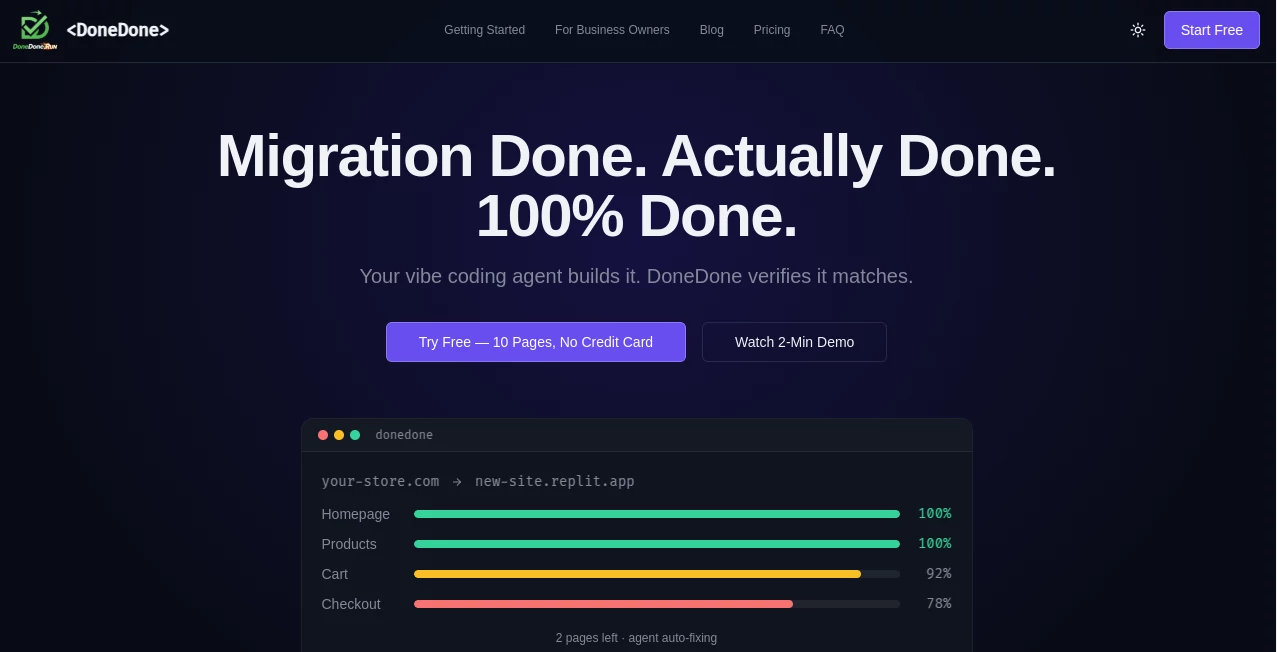
Moving a WordPress site is supposed to be straightforward—until you launch and discover broken layouts, missing images, or pages that simply don’t match the original. This tool takes the stress out of that final step. It intelligently compares your old site with the new one, highlights differences, and gives you clear proof that everything migrated correctly. I’ve seen developers breathe a huge sigh of relief after running their first comparison—suddenly the “did I miss anything?” anxiety disappears. It’s the kind of practical helper that turns a risky migration into a confident launch.
Introduction
WordPress migrations—whether manual, plugin-based, or AI-assisted—are full of hidden gotchas. A button might shift two pixels, an image path breaks, or an entire custom post type vanishes. DoneDone acts as your second pair of eyes, scanning both sites side-by-side and flagging visual and functional differences automatically. Built specifically for the complexity of WordPress, it’s especially powerful when working with AI site builders or large-scale rebuilds. Instead of manually clicking through every page hoping nothing broke, you get an objective report that tells you exactly where to focus. For agencies, freelancers, and serious site owners, it’s quickly becoming an essential part of the migration checklist.
Key Features
User Interface
The dashboard is refreshingly straightforward. You add your source (old) URL and destination (new) URL, optionally adjust a few settings like screenshot resolution or ignored elements, and hit compare. Results appear in a clean split-view interface with side-by-side screenshots and a clear list of detected differences. Everything is visual and intuitive—no cryptic logs or technical jargon unless you want the deeper details. It feels like having a meticulous QA teammate who never gets tired.
Accuracy & Performance
It catches both obvious breaks (missing elements, broken layouts) and subtle ones (color shifts, font changes, tiny positioning differences). The AI understands WordPress structure well enough to ignore dynamic elements like dates or comment counts when they’re supposed to differ. Scans are fast even on larger sites, and the reports are reliable enough that many users now treat them as their final pre-launch checklist. The accuracy stands out especially in AI-generated migrations where unexpected layout quirks are common.
Capabilities
Full-site visual comparison, element-by-element diff detection, support for custom post types and WooCommerce pages, before-and-after screenshots, PDF export of reports, and the ability to ignore specific sections or dynamic content. It works beautifully for standard WordPress sites, headless setups, and AI-rebuilt websites. You can run multiple comparisons, track changes over time, and share reports with clients or team members. It’s purpose-built for the real-world messiness of WordPress migrations rather than generic website comparison.
Security & Privacy
Your site URLs and comparison data stay private. No unnecessary crawling of sensitive areas, and reports are only accessible to you unless you explicitly share them. For agencies handling client sites, that respectful approach to data is a big plus.
Use Cases
An agency migrates a large client site and runs DoneDone as the final verification step before handover—catching several layout issues the client would have otherwise discovered. A solo developer uses AI tools to rebuild an old blog and confirms pixel-perfect accuracy before flipping the DNS. An e-commerce store owner migrates from one host to another and verifies that all product pages, checkout flow, and images survived intact. It gives peace of mind in every scenario where “close enough” simply isn’t acceptable.
Pros and Cons
Pros:
- Specifically tuned for WordPress complexity instead of generic site comparison.
- Fast, clear visual reports that non-technical clients can understand.
- Catches subtle differences most manual checks miss.
- Saves hours of clicking through pages before launch.
- Particularly valuable for AI-assisted or large-scale migrations.
Cons:
- Best results require both sites to be publicly accessible during comparison.
- Dynamic content (like user-generated sections) may need manual review.
Pricing Plans
It offers a generous free tier for smaller sites and occasional use. Paid plans unlock unlimited comparisons, higher resolution scans, team sharing, and priority support. Pricing is reasonable for the time and headaches it saves—most users find it pays for itself after preventing just one embarrassing post-launch issue.
How to Use DoneDone
Enter your old (source) site URL and new (destination) URL. Optionally adjust comparison settings or add elements to ignore. Click compare and wait a short while as it scans and generates the report. Review the side-by-side screenshots and difference list, then fix any highlighted issues. Re-run the comparison after fixes to confirm everything matches. Share the final report with clients or team members for approval. The entire process is fast enough to run multiple times during a migration.
Comparison with Similar Tools
Generic website diff tools often miss WordPress-specific quirks or produce noisy results. This one is purpose-built for the platform, understanding themes, plugins, and dynamic elements better than general-purpose checkers. It strikes a nice balance between automation and clarity—giving you enough detail without overwhelming you with false positives.
Conclusion
Migrations will always carry some risk, but DoneDone removes most of the guesswork. It turns that nervous final check into a confident, data-backed process. Whether you’re moving one site or dozens, it gives you and your clients the reassurance that matters most: everything looks and works as it should. In an era of fast AI rebuilds and frequent hosting switches, having a smart verification layer like this isn’t just convenient—it’s becoming essential.
Frequently Asked Questions (FAQ)
How long does a full comparison take?
Usually just a few minutes, even on larger sites.
Do both sites need to be live?
Yes, the tool needs access to both the source and destination to compare them visually and functionally.
Can I use it with AI-generated sites?
Absolutely—it’s especially useful there because AI rebuilds can introduce unexpected differences.
Is there a limit on free comparisons?
Free tier allows several comparisons—enough for small projects and testing.
Can I share reports with clients?
Yes—paid plans make sharing clean, professional reports simple.
AI Research Tool , AI Developer Tools .
These classifications represent its core capabilities and areas of application. For related tools, explore the linked categories above.

DoneDone Alternatives Product

Standard Com…

RankPeak

EstatePass

Skillselion
Dedoctive

Designmd.fun

AISEOMate

AI Entity

Vibe Coding …