
















What is Designmd.fun?
DESIGNMD.fun is a practical design reverse-engineering tool built for developers, designers, agencies, and teams who want to understand an existing website and turn its visual language into usable documentation for AI coding workflows. Instead of manually inspecting colors, fonts, spacing, shadows, components, and other interface details, users can provide a public website URL and generate structured design files from the rendered page.
The idea is particularly useful when rebuilding an interface, creating a new product inspired by an established visual system, or giving an AI coding assistant enough design context to produce more consistent results. The service extracts design information and prepares it in formats that can be dropped into development projects or supplied directly to modern AI coding assistants.
For someone who has ever watched an AI-generated interface slowly drift away from the intended brand style, this approach can save a surprising amount of manual correction. Rather than repeatedly explaining which colors, typography, spacing, and component styles should be used, developers can provide structured design context from the beginning.
Key Features
- Generate an AI-ready design.md file from a public website URL.
- Extract color tokens using OKLCH and HEX values.
- Identify typography and font information from rendered interfaces.
- Generate spacing, shadows, component, and animation documentation.
- Create Tailwind CSS configuration files for development workflows.
- Export CSS custom variables and structured token files.
- Generate prompts designed for AI coding assistants.
- Provide ZIP exports containing multiple cross-referenced design files.
- Support workflows involving Claude Code, Cursor, Windsurf, Lovable, v0, Bolt, ChatGPT, and GitHub Copilot.
- Offer a library of pre-analyzed design systems for design research and inspiration.
User Interface
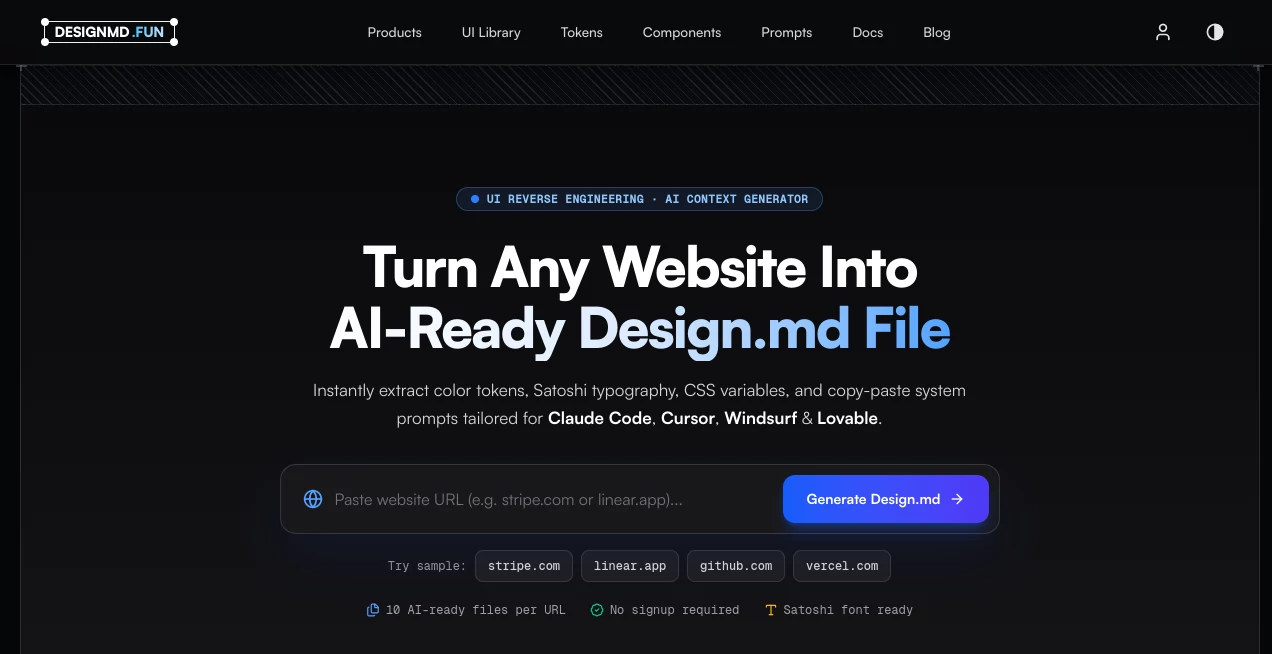
The interface keeps the main workflow remarkably straightforward. Users begin by entering a public website address and starting the analysis. There is no complicated project setup required for the basic workflow, and the service provides sample websites so newcomers can quickly see what the generated result looks like.
The results are presented around practical design information rather than a collection of abstract metrics. Users can inspect extracted colors, typography, design tokens, and AI-oriented documentation before taking the generated files into their own workflow. This makes the product approachable even for developers who are comfortable with code but do not want to manually document every visual decision.
Accuracy & Performance
The extraction process analyzes the rendered page rather than relying only on the visible source markup. According to the service, its extraction engine reads the rendered DOM, calculates styles, and organizes the resulting information into usable token scales. Colors are also analyzed through perceptual OKLCH values, which helps separate roles such as backgrounds, text, and interactive accents.
The result is not simply a screenshot or a list of colors. The generated documentation attempts to describe the broader design system, including layout, typography, spacing, borders, shadows, components, motion, breakpoints, and other interface characteristics. This makes the output more useful when the goal is to reproduce a consistent visual language in a development environment.
Capabilities
One of the strongest parts of the service is the range of formats available from a single analysis. Depending on the export, developers can receive design.md documentation, token files, typography information, component documentation, animation rules, CSS variables, Tailwind configuration, Figma-compatible design tokens, and AI prompts.
The Tailwind support is especially useful for teams already working with modern frontend stacks. The generated configuration is designed around Tailwind CSS v4 and can provide variables such as colors, fonts, and radius values without requiring developers to manually recreate the design system.
The AI integration is another important advantage. Generated context can be used with development assistants such as Claude Code, Cursor, Windsurf, Lovable, v0, Bolt, and GitHub Copilot. Instead of asking an AI assistant to visually guess the intended design, developers can provide explicit rules that describe how the interface should look.
Security & Privacy
The service states that URL extraction is processed using ephemeral browser instances and that private analyses are not indexed or sold. Pro and Team users can also keep their generation history private. This is an important consideration for agencies and product teams that work with design references that should not become publicly searchable.
Users should still exercise normal caution when analyzing websites or design systems containing confidential information. The safest approach is to use publicly accessible pages that the user has permission to analyze and avoid submitting private project URLs unless the service's current terms and privacy policy are suitable for that use.
Use Cases
- AI-assisted web development: Give coding agents structured visual rules before they generate interface code.
- Website redesign: Document an existing visual system before changing or rebuilding an interface.
- Agency projects: Quickly study a client's existing design language and prepare reusable development references.
- Frontend development: Convert visual details into tokens, CSS variables, and Tailwind configuration.
- Design research: Explore established interfaces and understand the systems behind their visual appearance.
- Rapid prototyping: Provide AI builders with more specific design constraints when creating a new product.
- Design system documentation: Create a starting point for documenting typography, colors, spacing, components, and motion.
Pros and Cons
- Pros: Simple URL-based workflow, no signup required for the free experience, multiple export formats, AI coding integrations, Tailwind support, structured design tokens, and a useful library of analyzed interfaces.
- Pros: The ability to generate several related files from one analysis can significantly reduce repetitive design documentation work.
- Pros: Free access makes it easy to test the workflow before committing to a paid plan.
- Cons: The quality of extracted information naturally depends on the complexity and implementation of the website being analyzed.
- Cons: Developers who only need a quick color picker or basic screenshot reference may find the broader documentation workflow unnecessary.
- Cons: Higher-volume users need a paid plan once the free monthly analysis allowance is exceeded.
Pricing Plans
The service currently offers a free plan at $0 per month with five designs per month, design.md export, access to the public design library, and community support. This is a useful starting point for individuals who only need occasional design extraction.
The Pro plan costs $12 per month and increases the allowance to 150 designs per month. It also adds the full collection of export formats, private projects, unlimited downloads, priority processing, and design comparison.
The Team plan costs $39 per month and supports up to 1,000 designs per month. It includes the Pro features along with five team members, a shared workspace, API access, SSO, audit logs, and team billing. For agencies or product teams processing design systems at a larger scale, this tier provides a more appropriate workflow.
How to Use the Tool
- Open the website and locate the URL analysis field.
- Paste the address of a publicly accessible website or page.
- Start the design analysis.
- Allow the extractor to inspect the rendered interface and organize its visual information.
- Review the generated design documentation and extracted tokens.
- Choose the export format that matches your workflow.
- Download the generated files or copy the relevant AI prompts.
- Add the design context to your development repository or AI coding workflow.
Comparison with Similar Tools
Traditional browser inspection tools are excellent for examining individual CSS properties, but they generally require developers to inspect and document those details themselves. Screenshot-based design tools can capture what an interface looks like, yet they do not necessarily provide the structured rules needed by an AI coding assistant.
This service takes a different route by turning the visual characteristics of a rendered website into machine-readable documentation. That makes it particularly appealing for developers who use AI-assisted programming and want their generated interfaces to follow a defined visual system rather than relying on the model's default design choices.
Its built-in collection of analyzed products also adds another dimension. Developers can study recognizable interfaces, inspect their documented design characteristics, and use those observations as inspiration when developing their own products.
Conclusion
For developers working in the growing world of AI-assisted frontend development, having good design context can make a major difference. A coding assistant may be capable of producing an attractive interface in seconds, but attractive is not always the same as consistent. Fonts can change, spacing can drift, colors can be invented, and components can gradually lose the visual character of the original product.
This service addresses that problem by converting a website's rendered design language into structured documentation, tokens, configurations, and prompts. The free tier makes experimentation easy, while the Pro and Team plans provide substantially more capacity for professionals and teams.
It is particularly well suited to frontend developers, design engineers, agencies, and anyone using AI coding assistants to build interfaces faster without giving up control over the visual system. If your development workflow already involves tools such as Cursor, Claude Code, Windsurf, Lovable, or similar AI builders, the generated design context can become a useful bridge between visual references and production code.
Frequently Asked Questions (FAQ)
What does the tool generate from a website?
It can generate design documentation, color and typography information, spacing and shadow data, component documentation, animation information, CSS variables, Tailwind configuration, design tokens, and AI-oriented prompts.
Can I analyze any public website?
The service is designed to analyze publicly accessible website URLs. You simply provide a public page address and let the extraction process inspect the rendered interface.
Which AI coding tools can use the generated files?
The generated design context is intended for workflows involving Claude Code, Cursor, Windsurf, Lovable, v0, Bolt, ChatGPT, and GitHub Copilot, among other AI-assisted development environments.
Is there a free plan?
Yes. The free plan costs $0 per month and currently includes five designs per month along with design.md export, access to the public design library, and community support.
Can the generated design files be used commercially?
The service states that its extracted design tokens, Tailwind configurations, and CSS variables are royalty-free and can be integrated into commercial SaaS applications, agency projects, client work, and production web applications.