

















doodleai
What is doodleai?
Doodle AI is a creative image-generation studio built around a simple idea: start with a photo or a character idea, describe what you want, and turn it into a playful hand-drawn illustration. Instead of making users work through a long list of filters and complicated settings, the platform uses a conversational interface where the creative direction can be given naturally.
The experience is particularly appealing for people who want something more personal than a standard AI portrait. A selfie can become a doodle avatar, a family photo can become an illustrated portrait, and a favorite pet can be transformed into a charming hand-drawn character. There are also options for collages, sticker sheets, emotional expressions, seasonal portraits, gifts, and several other creative formats.
The platform is currently focused on still images rather than animation or video production. That focused approach is one of its strengths: the product feels designed around quick, shareable illustrations rather than trying to become an all-purpose creative suite.
Key Features
- Hand-drawn doodle avatars created from uploaded photos.
- Six-pose close-up doodle collages arranged in a 3x2 grid.
- Full-body action collages with multiple illustrated poses.
- Die-cut sticker sheet generation from doodle characters.
- Emotional mood collections featuring different expressions.
- Seasonal portrait packs based on a single photo.
- Personalized greeting and gift-style illustrations.
- Pet portraits designed around uploaded animal photos.
- Couple and family portrait generation.
- Chibi, crayon, webtoon, childhood, and other playful illustration styles.
- Character saving and organization for continued creative work.
- Boards and account-based organization for keeping generated artwork together.
User Interface
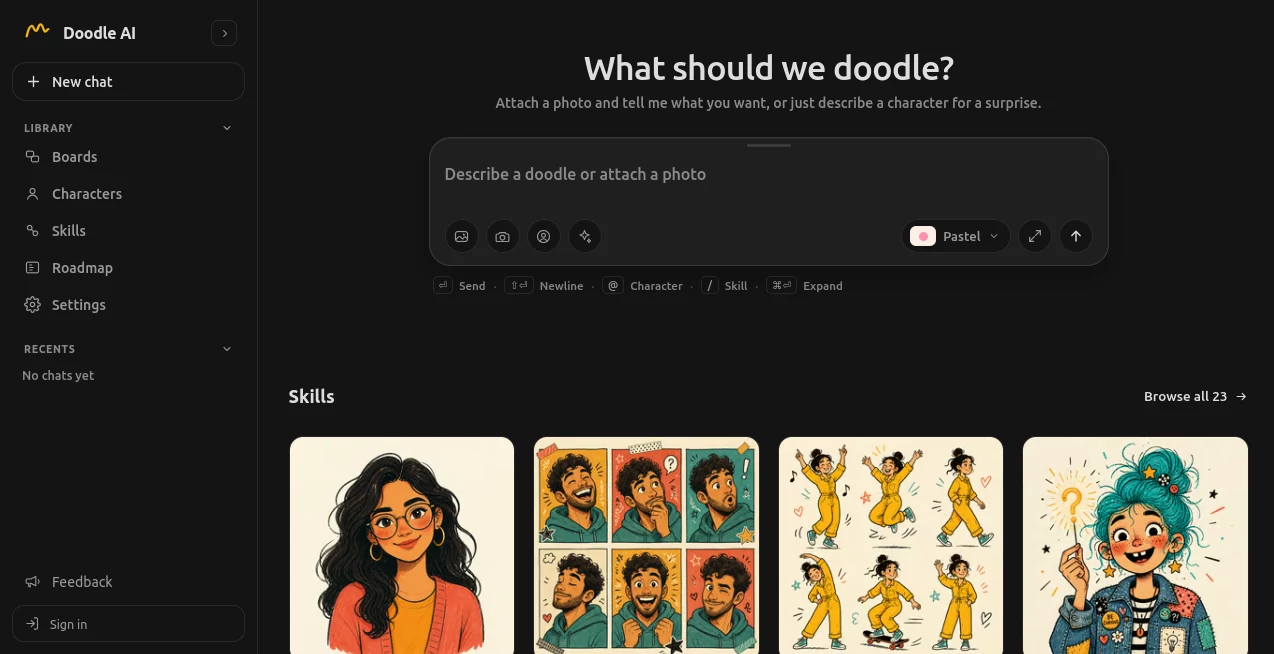
The interface is refreshingly straightforward. The main interaction is a chat-style composer where users can attach an image and describe the result they want. Supported image uploads currently include PNG, JPG, and WEBP files, and the interface also provides a camera option for taking a photo directly from a compatible device.
Users can type a request, attach a picture, choose a skill, or let the system determine an appropriate creative direction. Commands such as mentioning a saved character or selecting a skill from the available library make the workflow feel closer to talking with a creative assistant than operating a traditional image editor.
For someone trying the platform for the first time, this is a major advantage. There is very little to learn before creating the first image.
Accuracy & Performance
Image quality naturally depends on the source photo, the selected skill, and the type of composition requested. Clear, well-lit photos with visible facial features generally provide a stronger starting point, while crowded, blurry, or poorly exposed images can make character details harder to preserve.
The platform offers different generation approaches, including a faster option for quick sketch passes and a higher-detail option for users who want to spend more time on the final result. This gives users some control over the balance between speed and detail without turning the interface into a technical control panel.
One useful aspect of the workflow is that generations consume credits only when the generation is actually processed, while failed generations are refunded. That makes experimentation less frustrating when an image generation does not complete successfully.
Capabilities
The creative library is the heart of the product. Users can create a single doodle avatar, build multi-pose collages, generate expressive reaction sets, create sticker sheets, or turn a photograph into a personalized gift image.
There are also more distinctive options. A childhood-themed pack can reinterpret a person at different ages, while a webtoon-style option can place a character into comic panels with speech bubbles. A faceless portrait can create an identity-focused illustration without relying on facial details, and a family portrait can bring several people into one illustrated composition.
For social media users, the mood and expression-oriented skills are especially practical. Instead of producing one generic avatar, they can create several visually related images that work well for posts, profiles, reactions, or casual sharing.
Security & Privacy
The service uses an account-based workspace for creation and saved work. Users can browse the available skills without signing in, but an account is required for uploading images, generating artwork, saving results, and synchronizing work across devices.
Image generation is handled through a server-side provider connection, so users do not need to enter or manage a separate image-generation API key. Provider credentials are kept away from the browser, which simplifies the experience and reduces the need for users to manage technical configuration themselves.
The platform also uses organization-based access for account workspaces. Conversations, saved characters, moodboards, generation records, and credits are associated with the active organization rather than being presented as a public gallery. Users should still review the current privacy and terms pages before uploading sensitive or third-party photographs.
Use Cases
One of the strongest use cases is creating a personalized profile picture. A regular selfie can be transformed into a hand-drawn avatar that feels more distinctive than a conventional photograph.
Social media creators can also use the platform to produce reaction images, mood collections, expressive characters, and illustrated content from existing photographs. The multi-pose and expression-based skills are particularly useful when one source photo needs to become several pieces of visual content.
Families and couples can use the portrait features for memorable digital artwork. Pet owners can turn photographs of their animals into playful illustrations, while gift-oriented users can create personalized greeting images for birthdays, celebrations, congratulations, or other occasions.
Another interesting application is character exploration. Someone working on a personal project can describe a fictional character without providing a photograph and use the surprise-oriented experience to create an unexpected starting point.
Pros and Cons
- Pros: Very simple conversational workflow with little technical setup.
- Pros: Strong focus on playful hand-drawn artwork rather than generic image generation.
- Pros: A broad collection of specialized doodle skills for portraits, stickers, collages, moods, gifts, pets, and families.
- Pros: Supports PNG, JPG, and WEBP uploads and offers camera capture in the interface.
- Pros: New accounts receive starter credits for trying the generation features.
- Pros: Failed generations return the reserved credit.
- Cons: The current product is focused on still images and does not provide a video or timeline editing workflow.
- Cons: Paid self-service checkout and subscription plans are not currently active.
- Cons: Character consistency across separate generations is not guaranteed.
- Cons: Results can vary when the source photograph is blurry, dark, crowded, or difficult to interpret.
Pricing Plans
The current pricing model is still in a testing phase. New accounts receive five starter credits, and each runnable generation uses one credit. If a generation fails, the reserved credit is refunded.
There is currently no active self-service subscription or public paid credit-pack checkout. The site indicates that additional credits can be added manually during the testing phase. This makes the current experience useful for trying the product without committing to a recurring plan, although users who need large-scale production should check the live credit system before planning a workflow around it.
How to Use It
Start by creating an account and opening a new chat. Upload a clear photo in PNG, JPG, or WEBP format, or use the camera option when available. You can then describe what you want in ordinary language.
For a straightforward portrait, a request for a hand-drawn avatar is enough to get started. For more specific results, choose one of the available skills, such as a collage, sticker pack, emotional set, gift illustration, pet portrait, or webtoon-style design.
Once the image is generated, review the result and decide whether it already works for your purpose. If it needs adjustment, continue the conversation and describe the change you want. You can save useful creations to your workspace or download the finished still for personal use.
A good practical tip is to begin with a clean source photo. A face that is visible, reasonably well lit, and not hidden behind heavy filters gives the image-generation process a much better foundation.
Comparison with Similar Tools
Many AI image platforms are designed around broad prompt-to-image generation, professional photo editing, or large collections of visual styles. This product takes a narrower route. Its identity is centered on hand-drawn doodle artwork and conversational creation.
That distinction matters. Someone looking for cinematic image generation, advanced photo manipulation, or AI video creation may need a more general-purpose platform. On the other hand, someone who wants a playful illustrated avatar, sticker sheet, personalized portrait, or doodle-style social image can benefit from the focused workflow here.
The chat-first approach is another meaningful difference. Instead of choosing dozens of technical parameters before creating an image, users can explain their idea naturally and work from the available skills. For casual creators, that can make the creative process considerably more approachable.
Conclusion
Doodle AI stands out by keeping its purpose clear: turning people, pets, families, and creative ideas into playful hand-drawn artwork without demanding professional illustration skills.
The combination of conversational creation, specialized doodle skills, starter credits, saved characters, and workspace organization makes it an appealing option for profile pictures, social content, digital gifts, reaction images, and personal creative projects.
It is not trying to replace a full video editor or professional design application, and that is worth knowing before signing up. For users who specifically want charming still illustrations with a personal, sketch-like character, however, the focused approach makes the experience easy to understand and genuinely enjoyable to explore.
Frequently Asked Questions (FAQ)
Do I need an account to use the platform?
You can browse the available skills without an account, but you need to sign in to upload photos, generate artwork, save results, and synchronize your work.
How many starter credits are included?
New accounts currently receive five starter credits. Each runnable generation uses one credit.
What happens if a generation fails?
The credit reserved for a failed generation is refunded, allowing users to try again without losing that credit.
Can I upload my own photo?
Yes. The current interface accepts PNG, JPG, and WEBP images, and it also provides a camera capture option on supported devices.
Can I create an avatar from a pet photo?
Yes. There is a dedicated pet portrait skill designed for turning an animal photo into a hand-drawn illustration.
Can I make stickers?
Yes. The sticker skill creates a die-cut sticker sheet as a still image. It should not be confused with direct export to messaging-app sticker formats.
Does it generate videos?
No. The current product focuses on still-image creation and does not provide a video-generation or timeline-editing workflow.
Are paid subscriptions available?
Paid subscriptions and self-service credit checkout are not currently active. The service is operating in a testing phase, with additional credits handled manually.
Can I use the same character in future creations?
Saved characters can help organize and reference creative work, but separate generations are not guaranteed to produce perfectly identical character appearances.
Is it suitable for creating social media profile pictures?
Yes. The hand-drawn avatar and portrait-oriented skills are particularly suitable for creating distinctive profile images and casual social media artwork.
AI Illustration Generator , AI Avatar Generator , AI Selfie & Portrait , Photo & Image Editor .
These classifications represent its core capabilities and areas of application. For related tools, explore the linked categories above.

doodleai Alternatives Product

Image Unblur
PaperYak

insMind

OutfitSwap S…
Resize Image…
MuseCraft.AI

Medical Illu…
ImageChanger

AI Hairstyle
