drifty
What is drifty?
Knowing how time is spent at work is only useful when the data reflects real activity instead of simple app usage. Traditional time trackers often record which applications are open but fail to understand whether someone is deeply focused or simply switching between windows. This modern productivity platform approaches the problem differently by using artificial intelligence to interpret how people interact with software throughout the day.
Rather than measuring productivity through raw screen time, it analyzes work patterns, identifies meaningful focus sessions, and separates intentional work from distractions. The result is a much clearer picture of daily performance, helping professionals improve concentration without relying on manual time logging.
Whether working remotely, in an office, or as a freelancer, users gain valuable insights that make it easier to build healthier work habits, reduce interruptions, and understand where their attention actually goes.
Key Features
- AI-powered activity recognition inside applications.
- Distinguishes focused work from distracting behavior.
- Automatic workday analysis without manual tracking.
- Detailed productivity insights and activity summaries.
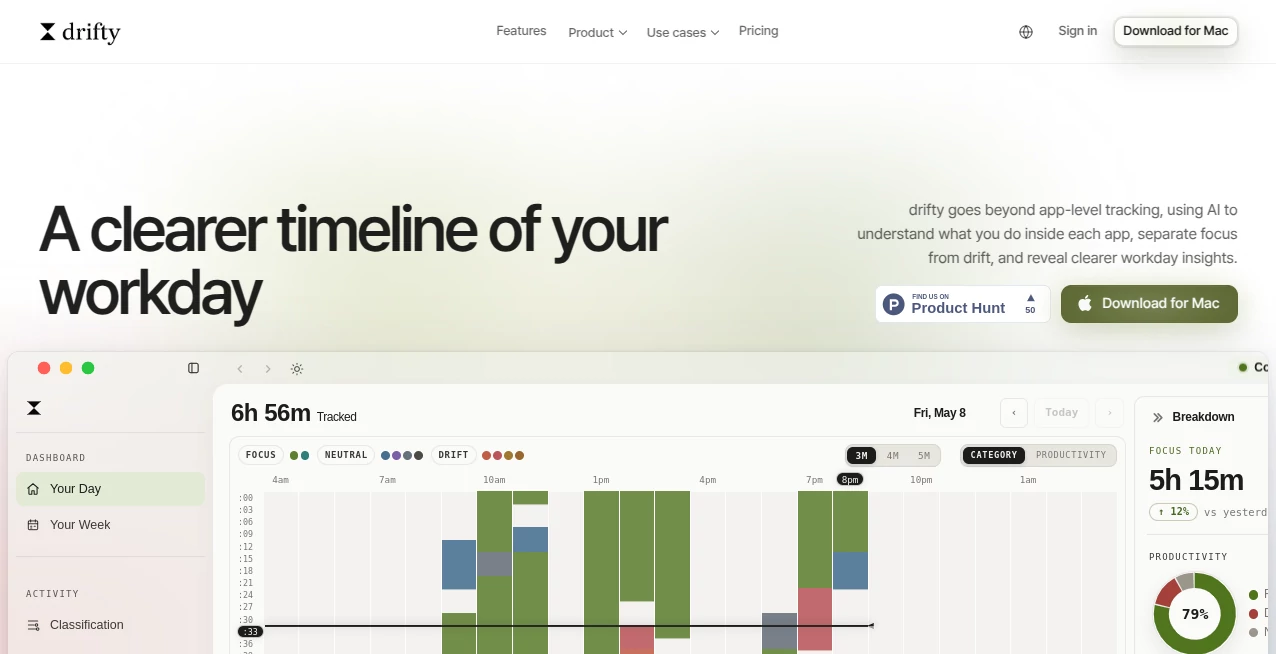
- Timeline of daily work sessions.
- Focus measurement based on actual interactions.
- Helpful reports for improving work habits.
- Designed for knowledge workers and remote teams.
User Interface
The interface is clean, modern, and intentionally minimal. Important metrics are presented through organized dashboards that are easy to understand without requiring technical knowledge. Users can quickly review their day, identify periods of concentration, and recognize patterns that may otherwise go unnoticed.
The navigation is straightforward, making daily reports and productivity insights accessible within a few clicks. Instead of overwhelming users with excessive statistics, the platform emphasizes practical information that can immediately improve work routines.
Accuracy & Performance
One of the strongest aspects of the platform is its ability to understand activities occurring inside applications rather than simply recording which software is open. This provides a far more realistic representation of productive work.
By combining AI analysis with behavioral patterns, the generated insights become more meaningful than traditional time-tracking reports. Users can better distinguish genuine focus sessions from multitasking or passive screen time.
Capabilities
The platform supports professionals who want deeper visibility into their daily workflow. It automatically observes work activity, recognizes productive sessions, highlights distractions, and creates reports that encourage better decision-making.
It can be particularly valuable for remote employees, freelancers, software developers, designers, writers, consultants, and anyone whose work depends on sustained concentration across multiple applications.
Security & Privacy
Privacy is an important consideration for productivity software. The platform is designed to analyze work behavior while helping users understand how their information is used. Individuals and organizations should review the available privacy documentation and settings to ensure the solution aligns with their internal policies and personal preferences.
Use Cases
- Understanding daily productivity habits.
- Improving focus while working remotely.
- Reducing digital distractions.
- Tracking knowledge work automatically.
- Monitoring personal work efficiency.
- Supporting employee productivity analysis.
- Optimizing freelance work schedules.
- Building healthier work routines.
Pros and Cons
Pros
- Goes beyond traditional app-based tracking.
- Uses AI to understand real work behavior.
- Automatically identifies focus sessions.
- Easy-to-read productivity reports.
- Simple and modern interface.
- Useful for individuals and professional teams.
Cons
- Advanced insights may require regular usage to become more valuable.
- Some organizations may need to evaluate privacy policies before deployment.
- Primarily focused on digital knowledge work.
Pricing Plans
The service may offer different pricing options depending on user needs and future updates. Visitors should check the official pricing page for the latest information regarding free access, premium features, and business plans.
How to Use drifty
- Create an account.
- Install the desktop application if required.
- Allow activity monitoring during your workday.
- Continue working normally across your favorite applications.
- Review AI-generated productivity insights.
- Identify distractions and improve focus over time.
- Use reports to build better daily habits.
Comparison with Similar Tools
Many productivity trackers measure application usage or total screen time, but they often struggle to explain how work is actually performed. This solution stands out by interpreting user behavior within applications instead of simply logging which programs are active.
For professionals seeking actionable productivity insights rather than basic time reports, this approach provides a more complete understanding of focus, workflow, and daily performance.
Conclusion
For anyone looking to better understand how their workday unfolds, this AI-powered productivity solution offers a refreshing perspective. Instead of counting hours or tracking applications alone, it provides meaningful insights into attention, focus, and work quality.
Its intelligent analysis, clean experience, and practical reporting make it an appealing choice for professionals who want to work smarter rather than simply work longer. By revealing hidden productivity patterns, it helps transform everyday work into measurable improvement.
Frequently Asked Questions (FAQ)
What makes this productivity tracker different?
It analyzes user activity inside applications instead of only recording which apps are open, providing richer productivity insights.
Is manual time tracking required?
No. The platform is designed to automatically observe work activity and generate productivity reports.
Who can benefit from using this platform?
Remote workers, freelancers, developers, designers, writers, consultants, and other knowledge workers can all benefit from its insights.
Can it help reduce distractions?
Yes. By distinguishing focused work from drifting behavior, users can better understand and improve their daily work habits.
Does it provide productivity reports?
Yes. It generates reports and timelines that help users review their work patterns and identify opportunities for improvement.
AI Team Collaboration , AI Productivity Tools , AI Analytics Assistant , AI Workflow Management .
These classifications represent its core capabilities and areas of application. For related tools, explore the linked categories above.

drifty Alternatives Product
Alloy
Yorph AI

Goodnotes
ClearWork

Your Own AI

Grow Creator
Schedpilot
Carmatec

Nano Banana