
















Grow Creator
What is Grow Creator?
Let’s face it—uploading a video to YouTube feels like shouting into a void sometimes. You put in the work, the editing, the thumbnail, and then... crickets. It’s frustrating because you know your content is good, but the algorithm just isn’t playing ball. That’s exactly why this tool exists. It’s not just another SEO dashboard that tells you what already happened; it’s designed to predict what the algorithm will do next. I remember trying to figure out why one of my videos tanked while a similar one blew up. This platform gave me a predictive report that explained the difference in under a minute. It felt like I finally had a cheat sheet for the YouTube game.
Key Features
This tool stands out because it treats YouTube’s recommendation system as what it is: a set of complex, constantly shifting levers. Instead of generic advice, it gives you data-driven insights that are specific and actionable.
User Interface
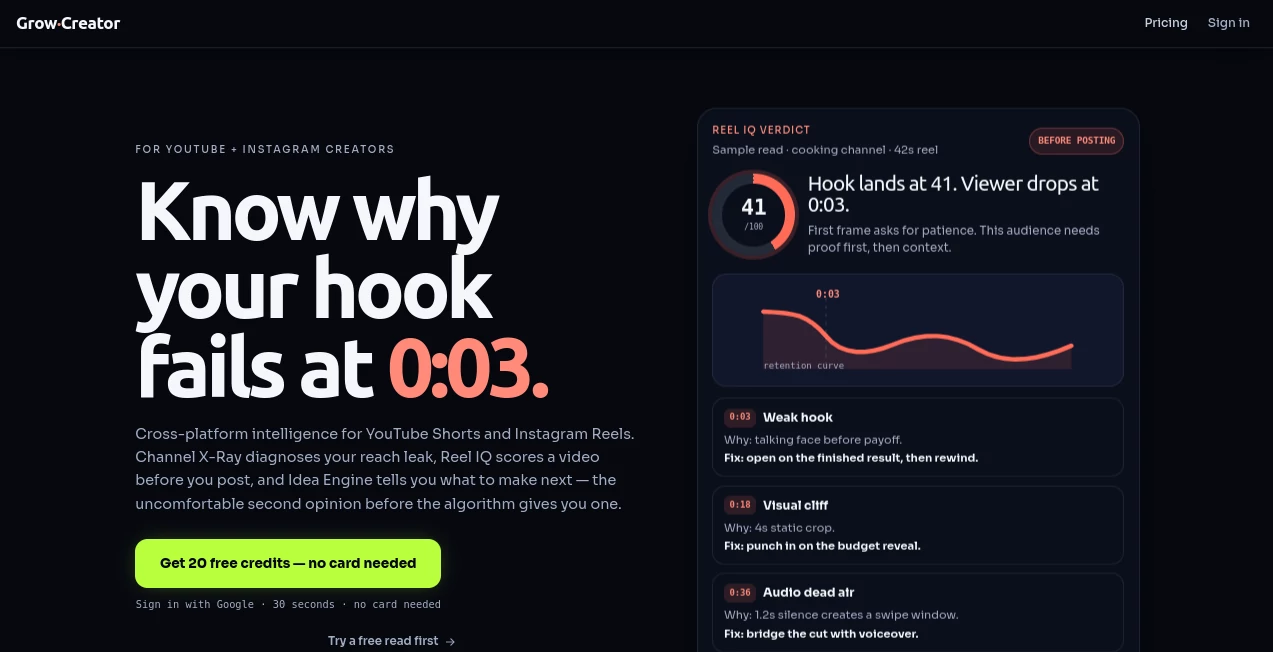
You don’t need to be a data scientist to navigate this. The interface is clean and uncluttered, focusing on what matters most: your channel’s performance. You simply paste your channel URL, and within about sixty seconds, you get a comprehensive predictive report . There’s no confusing dashboard with irrelevant metrics. The information is presented in a way that makes sense for creators at any level.
Accuracy & Performance
What makes this tool accurate is its approach. It doesn’t lump all of YouTube into one bucket. It separates the "Browse" and "Suggested" algorithms because they work differently and require different strategies . The title formula isn’t guesswork either; it’s trained on over 10,000 trending videos to help you craft headlines that actually capture attention. When you’re trying to make a living on YouTube, this kind of precision is invaluable.
Capabilities
The main capability here is predictive analytics. It gives you a roadmap for your content strategy. One of the smartest features is the retention-slope analyzer, which helps you identify exactly where viewers drop off in your back catalog, so you can recut and repurpose older videos for new growth . It’s like having an editor who knows exactly how to keep eyes on the screen.
Security & Privacy
When you’re analyzing your channel’s data, security is a legitimate concern. The platform ensures your data isn’t misused or exposed. By offering a free engine without requiring a credit card for the initial report, it also removes the friction and risk of committing to a tool you haven’t tested yet .
Use Cases
This is perfect for any serious YouTuber. Whether you're a gaming channel trying to break into the trending page, an educational creator looking to improve watch time, or a business trying to build a brand, the insights here are universal. I’ve seen creators use the retention analyzer to find a two-second dip in their intro, fix it, and watch their average view duration climb. It’s practical, not theoretical.
Pros and Cons
Pros:
- Provides predictive insights that go beyond basic analytics.
- Offers a free engine to test the tool's value without any commitment.
- The "Browse" vs. "Suggested" split is a game-changer for strategy.
Cons:
- As a predictive tool, it can’t guarantee overnight success; it still needs you to create good content.
- The deep-dive analytics might require a pro subscription after the initial report, though founding-member pricing is available for early sign-ups .
Pricing Plans
One of the best things about this platform is its generosity. You can access a free engine to get your first predictive report and see what the tool can do for you . For those who want to go deeper, there’s a founding-member pricing model that locks in a lifetime rate for early adopters. It’s a smart way to invest in your channel’s future without blowing your budget.
How to Use Grow Creator
Getting started couldn’t be simpler. First, head to the site and locate the main dashboard. Next, copy your channel’s URL and paste it into the provided field. The platform will then process your data and generate a predictive report—this usually takes about a minute . From there, you can analyze the recommendations for your titles, check your retention curves for each video, and start planning your next upload based on what the algorithm is likely to favor. It’s a workflow that cuts through the noise and gets straight to the data that matters.
Comparison with Similar Tools
Most YouTube tools are reactive. They tell you what your audience did last week. This one is proactive, telling you what the algorithm is gearing up to promote next. While other services might give you keyword suggestions, this one provides a structured formula for your titles, which is a huge advantage . It’s less about "optimization" and more about "prediction," which puts it in a league of its own for creators who want to stay ahead of the curve.
Conclusion
Creating great videos is only half the battle; getting them seen is the other. This tool bridges that gap by giving you the exact data you need to improve your titles, thumbnails, and retention rates. It doesn’t take away the hard work of content creation, but it ensures that work pays off. If you’re ready to stop gambling on the algorithm and start playing it strategically, this is the partner you’ve been looking for.
Frequently Asked Questions (FAQ)
What makes this different from YouTube Analytics?
YouTube Analytics tells you what happened; this tool predicts what’s likely to happen next based on algorithm behavior .
Is it free to try?
Yes, there is a free engine that allows you to get a predictive report by pasting your channel URL .
How long does it take to get a report?
Most reports are generated within about 60 seconds of pasting your URL .
What does “Browse vs. Suggested” mean?
It means the tool evaluates your content for two different algorithms on YouTube, which have different criteria for promoting videos .
Can I get a deal on the pricing?
Yes, they offer lifetime founding-member pricing for users who sign up during the initial launch period .