


















EaseMate AI
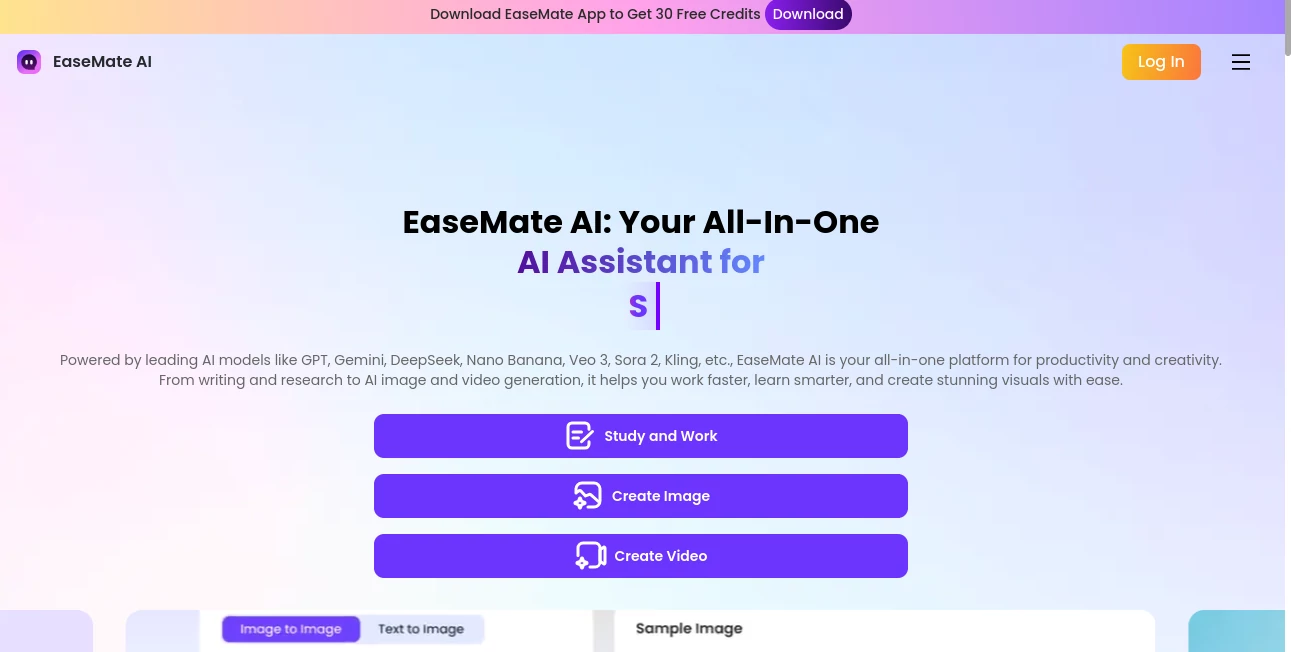
What is EaseMate AI?
EaseMate AI brings a broad collection of AI-powered tools into one practical workspace for studying, working, writing, researching, and creating visual content. Instead of jumping between separate services for chatting, document analysis, image generation, video creation, translation, and writing assistance, users can handle many of these tasks from a single platform.
The platform is designed for a wide audience, from students and researchers to content creators, marketers, and everyday users who simply want to get more done with AI. Its selection of models includes well-known options such as GPT, Gemini, DeepSeek, Claude, and Grok, while its creative side supports models and technologies used for modern image and video generation.
What makes the experience particularly useful is the combination of creative and productivity features. Someone researching a topic can work with PDFs and summaries, then move into writing or presentation-related tasks without starting over in another application. A content creator can generate an image, turn an image into video, and continue refining the idea from the same environment.
Key Features
- AI chat with access to multiple leading language models
- ChatPDF for asking questions about uploaded PDF documents
- PDF summarization and OCR-powered text extraction
- AI writing, paraphrasing, grammar checking, and story generation
- Math and physics problem solving with step-by-step explanations
- AI translation and document-related assistance
- AI image generation and creative image transformation
- Image-to-video and text-to-video generation
- Video-to-video transformation and enhancement features
- AI quizzes and flashcard generation for learning
- YouTube video summarization
- AI-generated content detection
- Browser extension support for convenient access
User Interface
The interface is organized around clear areas for chat, study and research, photos, videos, and additional AI utilities. This structure makes the platform approachable even for users who are not experienced with AI software. Rather than presenting every capability at once, the main workspace separates creative and productivity functions into recognizable sections.
The workflow is also straightforward. A user can select a tool, provide a prompt or upload a file, and start working without dealing with complicated technical settings. The browser extension adds another layer of convenience for people who want AI assistance while browsing or working online.
Accuracy & Performance
Performance depends on the selected model and the type of task, but the platform's multi-model approach gives users flexibility when a particular response, writing style, or creative result does not meet expectations. Switching between different AI models can be useful when comparing answers or approaching the same problem from different angles.
For academic and productivity tasks, features such as step-by-step math and physics solutions, document summarization, OCR, and PDF conversations can reduce the amount of manual work involved. For creative projects, the platform supports modern image and video generation models, giving users several ways to experiment with visual ideas.
Capabilities
The range of capabilities is one of the strongest aspects of the service. The AI chat environment can be used for general questions, writing, translation, summarization, and research. Its document features allow users to upload PDFs, ask questions about their contents, summarize lengthy material, and extract text from image-based documents.
Creative users have a different set of options. Images can be generated or transformed into different visual styles, while video tools can create clips from text or images. There are also specialized features for tasks such as background removal, watermark removal, photo transformations, talking avatars, face swapping, and other creative experiments.
For students, the combination of math and physics solvers, flashcards, quizzes, video summaries, and research-oriented tools creates a useful study environment. For marketers and creators, writing assistance, image generation, video generation, advertising content, social posts, scripts, and visual assets can all become part of the same workflow.
Security & Privacy
When working with documents, research material, or personal files, privacy should always be considered before uploading sensitive information to any online AI service. Users should review the platform's current privacy policy and terms before submitting confidential business documents, private records, or other sensitive material.
For ordinary research, writing, study, and creative projects, the centralized workflow can be convenient. However, users handling confidential information should choose their files carefully and follow their organization's data-handling requirements.
Use Cases
- Students: Solve academic problems, summarize PDFs, create flashcards, generate quizzes, and review difficult subjects.
- Researchers: Extract information from documents, summarize lengthy material, compare ideas, and use AI chat for research assistance.
- Content creators: Develop stories, scripts, images, short videos, captions, and other creative material.
- Marketers: Prepare advertising copy, social media content, posters, and visual concepts for campaigns.
- Professionals: Draft documents, summarize information, translate text, and handle everyday writing tasks.
- Video creators: Turn text or images into videos and experiment with video transformations and effects.
- Everyday users: Ask questions, improve writing, transform photos, summarize online content, and explore creative AI features.
Pros and Cons
Pros
- Large collection of AI tools in one platform
- Access to multiple AI models
- Useful combination of productivity, study, and creative features
- ChatPDF and OCR support for document workflows
- Image and video generation tools are included
- Free options are available for users who want to try the service
- Useful for both professional and personal projects
Cons
- Some advanced features consume credits
- Results can vary depending on the selected AI model
- The large number of tools may take some time for new users to explore
- Users working with confidential documents should carefully review privacy terms before uploading files
Pricing Plans
A free Basic option is available with limited access to the platform's capabilities. Paid subscriptions provide larger shared credit pools and increased allowances for image, video, and AI usage.
The Lite plan is listed at $8.90 for the first month and then $9.90 per month, while the Pro plan starts at $19.90 for the first month and then $24.90 per month. Annual billing offers additional savings. The platform also provides one-time credit packages, starting from $4.90 for 500 credits, with larger packages available for users who prefer credits that do not expire.
Because usage limits and supported models can change, users should check the current pricing page before choosing a plan.
How to Use the Platform
- Create an account or start with an available free feature.
- Choose the area that matches your task, such as AI Chat, Study, Photo, Video, or a specialized AI tool.
- Enter a prompt, question, or piece of text, or upload the relevant document or image.
- For document tasks, use features such as PDF chat, summarization, or OCR to extract useful information.
- For creative work, select an image or video tool and describe the result you want to create.
- Review the generated result and refine your prompt when necessary.
- If you need higher usage limits or access to more advanced models, consider one of the paid credit or subscription options.
Comparison with Similar Tools
Many AI services specialize in one area. Some focus almost entirely on chat, others concentrate on image generation, while separate products may be built specifically for PDF analysis or video creation. The main advantage here is breadth. Instead of choosing a different service for every stage of a project, users can combine conversational AI, document work, learning utilities, image generation, and video creation in one place.
This makes the platform especially appealing to users who regularly switch between different types of work. A student may start by analyzing a PDF, move to a study question, generate flashcards, and then summarize a lecture video. A creator might brainstorm a script, generate supporting visuals, and turn images into short video content. For these mixed workflows, having several capabilities under one account can be more convenient than maintaining a collection of specialized subscriptions.
Conclusion
EaseMate AI is a strong choice for users who want more than a conventional chatbot. Its real value comes from bringing research, study assistance, writing, document analysis, image generation, and video creation into a single AI environment.
The free access makes it easy to explore the platform before committing to a subscription, while the paid plans provide additional credits for users with heavier creative or productivity needs. Whether the goal is understanding a difficult PDF, preparing study materials, improving written content, or creating visual media, the wide selection of tools gives users plenty of room to experiment and build a workflow that fits their needs.
Frequently Asked Questions (FAQ)
What is EaseMate AI used for?
It is an all-in-one AI platform for tasks including chatting, writing, research, PDF analysis, studying, image generation, video creation, translation, and content transformation.
Can I use EaseMate AI for free?
Yes. A free Basic option is available with limited credits and access to selected capabilities. Users can upgrade when they need higher limits or more advanced features.
Can it analyze PDF files?
Yes. Its PDF tools can let users chat with documents, ask questions, summarize content, work with multiple PDFs, and extract text from image-based PDF pages through OCR.
Can it generate AI images and videos?
Yes. The creative section includes text-to-image, image transformation, text-to-video, image-to-video, and video-to-video capabilities, with support for several modern AI models.
Is it useful for students?
Yes. Students can use features such as math and physics solving, PDF summarization, flashcard generation, quiz creation, video summarization, writing assistance, and research support.
Does it support multiple AI models?
Yes. The platform brings together models from several providers, allowing users to work with different models depending on the type of task and desired result.
What type of users can benefit from it?
Students, researchers, marketers, content creators, professionals, and everyday users can all find practical applications for its collection of productivity and creative tools.
AI Photo & Image Generator , AI PDF , AI Video Generator , AI Productivity Tools .
These classifications represent its core capabilities and areas of application. For related tools, explore the linked categories above.
EaseMate AI details
Website unavailable — View Alternatives
Pricing
- Free
Apps
- Web App
- iOS App
- Android App
- Chrome Extensions
Categories

EaseMate AI Alternatives Product

GPT Image 2

Freepik

whisk ai

Mediagen

AllInOneTools

GetVivix

Weekly Brief

LTX 2.3
Seedance 2 A…
