

















GPT Image 2
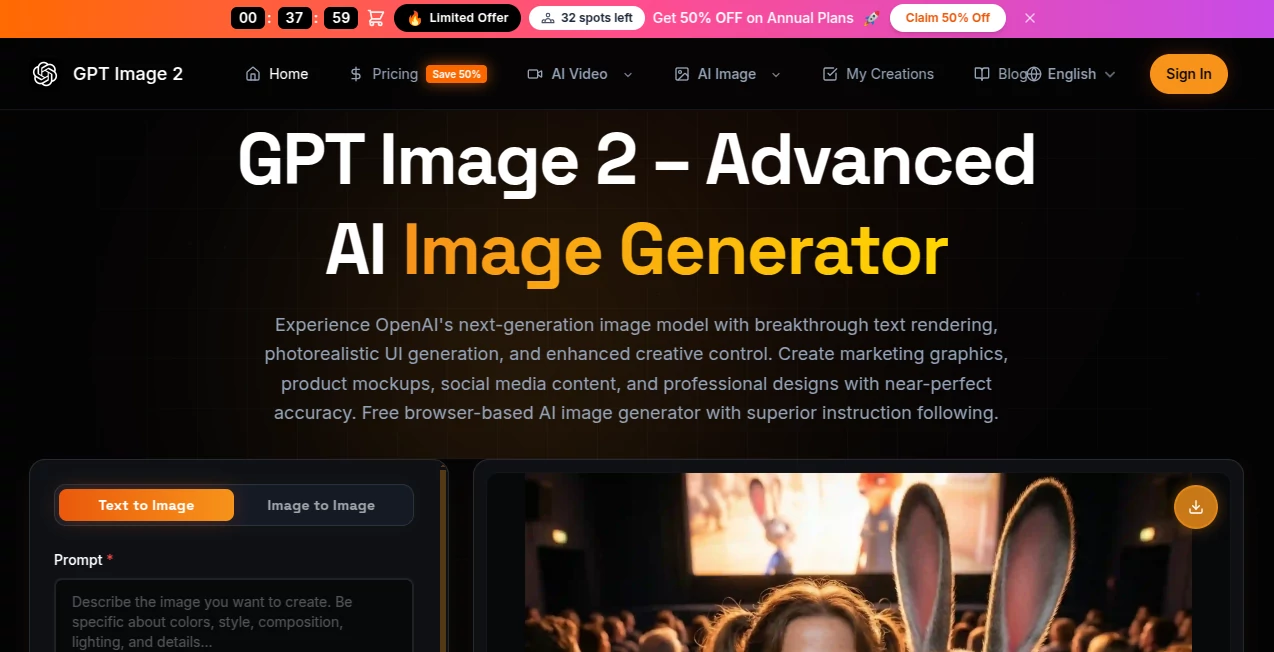
What is GPT Image 2?
Let's be honest for a second. For the longest time, asking an AI to generate an image with specific text felt like trying to teach a cat to fetch. Sure, the pictures looked pretty. Sometimes even breathtaking. But the moment you needed a sign, a menu, a UI screenshot, or anything with actual readable words, everything fell apart. You'd get squiggly lines, random symbols, or text that looked like it was written in a dream by someone who had never seen a real alphabet before. Frustrating, right?
Well, that era just ended. Not gradually. Not with a "coming soon" promise. It ended the moment this tool hit the scene. What makes this different from every other image generator you have tried before? Simple. It actually understands what letters and numbers are. It knows that a "T" is not just a random vertical line with a dash. It gets that a dollar sign has a very specific shape. And most importantly, it places those characters exactly where they belong — on signs, on product packaging, on phone screens, on tiny grains of rice if you really want to push it.
I have spent countless hours testing every major image generator on the market. I have watched them struggle, fail, and sometimes just give up when asked to render a simple "OPEN" sign on a shop window. This time, I felt something different. I felt relief. Finally, someone built an image model that treats text as a first-class citizen, not as an annoying afterthought. Whether you are a marketer rushing to launch a campaign, a developer needing realistic UI mockups, or just someone who wants to create a birthday card that actually spells the name right — this changes everything for you.
Key Features
Before we dive into the nitty-gritty, let me tell you what actually matters. This is not one of those tools with a hundred useless gimmicks. Every feature here serves a real purpose. You will find yourself using all of them, probably every single day.
The most jaw-dropping capability has to be the text rendering. We are talking about accuracy that hovers around ninety-nine percent. That is not a typo. The previous generation of models hovered between ninety and ninety-five, which sounds good until you realize that five percent failure rate meant every twentieth word was gibberish. Try explaining that to a paying client. Now, the mistakes are so rare that you might actually forget you are using AI at all. I have generated posters, flyers, social media graphics, even complex infographics. The words come out clean, crisp, and correctly spelled in the right places.
Then there is the photorealism. Not the kind where everything looks like a glossy render from a video game. Real photorealism. The lighting makes sense. The textures feel right. Shadows fall in the correct directions. When you generate a photo of a coffee cup on a wooden table, you can almost smell the roast. When you create a product shot for an e-commerce site, it looks like something a professional photographer spent hours lighting and staging. This matters because your audience has seen it all. They can spot fake AI images from a mile away. Give them something that looks genuine, and they will trust you more. Simple as that.
The interface deserves a shoutout too. No complicated sliders. No confusing terminology. You type what you want, and the tool figures out the rest. But here is the secret sauce — the Thinking mode. Yes, there is a free Instant mode that works beautifully for quick drafts. But when you toggle on Thinking, the model actually pauses. It plans. It might even search the web to understand your reference. It breaks down your request into parts, considers the composition, checks for potential issues, and only then starts generating. The difference is night and day. For complex scenes, for multi-element compositions, for anything that requires consistency across several images — Thinking mode is your best friend.
Security and privacy are baked in, not bolted on as an afterthought. The platform uses C2PA metadata watermarks. Fancy term, simple idea. Every image you generate carries an invisible mark that tells the world this came from AI. You do not have to worry about accidentally misleading someone. The information is there if someone looks for it. Plus, the system keeps your data protected. Your prompts stay your own. Your uploads are not used to train public models. In a world where every company seems hungry for your creative work, that respect for privacy feels refreshing.
User Interface
Using this tool feels less like wrestling with software and more like having a conversation with a really talented designer who just gets it. The main screen is clean. Almost too clean. You might find yourself searching for hidden menus or advanced settings that simply are not there. And that is the point. Everything happens through natural language. Want to generate an image? Type a description. Want to edit something? Type what you want to change. Want to combine two ideas? Just say so.
The learning curve is practically flat. I handed this to a friend who has never used an AI image tool before. Within five minutes, she was generating professional-looking social media graphics. Within ten, she had created a multi-panel comic strip with consistent characters. The tool did not ask her to learn any special syntax. It did not demand that she memorize keywords. It just listened and delivered.
For power users, the Thinking mode interface adds a bit more depth without becoming overwhelming. You can see the model working through your request. You can watch it plan the composition. Sometimes it will ask for clarification. Sometimes it will surprise you by adding details you never mentioned but that make perfect sense. It feels collaborative, not like you are giving orders to a machine.
Accuracy & Performance
Let me share a specific test that blew my mind. I asked the tool to generate a PhotoShop workspace showing a person masking out hair from a complex background. The result came back with realistic tools selected, the right panels open, even the little marching ants around the selection edge. This was not a generic "Photoshop-like" image. It was specific. It was accurate. It showed genuine understanding of how design software actually works.
Another test involved generating a YouTube homepage screenshot. The model did not just slap a red play button on a random layout. It created the correct sidebar, the right thumbnail grid, the accurate button placements, even plausible channel names and video titles. I had to do a double-take. It looked real enough that I almost tried to click on a video.
Performance speed holds up too. Instant mode delivers images in seconds. Thinking mode takes a bit longer but still feels snappy. You are not waiting around watching loading spinners. The tool respects your time. Generate, evaluate, tweak, regenerate. The whole loop moves fast enough that you can iterate through dozens of ideas in a single sitting.
Capabilities
Beyond basic generation, this tool handles complex edits with surprising grace. Upload a reference image and ask for changes. Want to re-light a product shot? Done. Need to remove a background? Handled. Looking to add text to an existing design? Easy. The model understands what you want to preserve and what you want to change. It does not randomly alter unrelated elements just because it feels like being creative.
Batch generation works smoothly too. You can ask for up to eight images at once and the model maintains consistency across all of them. Characters look the same from one image to the next. Objects keep their shapes and colors. Styles stay coherent. This matters for storytelling, for branding, for any project where your visuals need to feel like they belong together.
Resolution goes up to 4K for those who need it. Most of the time, standard resolution works fine. But when you need to print something large or crop in tight on details, the higher quality option delivers. Just be aware that higher resolution means higher token usage. The tool is transparent about this. No hidden fees or surprise charges.
Security & Privacy
Every image generated carries C2PA metadata. Think of it as a digital fingerprint. Anyone with the right tools can check where the image came from. This protects you from accusations of deception and protects everyone else from misinformation. It is not a perfect solution — metadata can be stripped — but it shows responsible thinking from the developers.
Your prompts and uploads stay private. The company does not claim ownership of your creations. You are not feeding their training data just by using the tool. For professionals who worry about intellectual property, these details matter. Read the terms yourself to be sure, but everything I have seen suggests a respectful approach to user data.
Use Cases
The practical applications here go way beyond just making pretty pictures. Let me walk you through some scenarios where this tool genuinely changes the game.
Marketing and advertising professionals will find themselves reaching for this constantly. Need a Facebook ad with your sale prices clearly visible? Done in thirty seconds. Want an Instagram story with stylish typography? Typed and generated. Creating a billboard mockup to show a client before the expensive printing happens? Easy. The text rendering means your copy actually appears correctly, so clients can read it and give real feedback instead of squinting at squiggles.
UI and product designers finally have a fast way to generate realistic app screenshots. No more painstakingly recreating interfaces in design software just for a quick mockup. Describe the screen you need, and the tool builds it. The details — the button states, the icon placements, the text field borders — all look authentic enough to include in investor decks or user testing sessions.
Content creators and YouTubers can generate custom thumbnails in seconds. The perfect text rendering means your title shows up clearly even at small sizes. No more hiring freelance designers for every video. No more settling for stock photos that do not quite fit your brand. Create exactly what you envision, whenever you need it.
E-commerce store owners can generate product images, lifestyle photos, and promotional graphics without expensive photoshoots. Describe your product, describe the setting, and let the tool handle the rest. The photorealism holds up under scrutiny. Customers will not feel cheated because the images look genuine, not like obvious CGI.
Educators and trainers can create visual aids, diagrams, and illustrated handouts without learning complex illustration software. Need a diagram showing how a particular process works? Describe it. Want a visual timeline for a history lesson? Generates instantly. The text rendering ensures all your labels and captions are actually readable.
Even casual users will find endless uses. Birthday cards. Party invitations. Social media posts. Memes that actually say the right words. Interior design mood boards. Vacation photo enhancements. The barrier to creating custom visuals has never been lower.
Pros and Cons
Let me be straight with you. No tool is perfect. This one comes incredibly close in some areas but has limitations you should know about before committing.
What works brilliantly: The text rendering genuinely sets a new standard. You can stop worrying about whether your words will appear correctly. The photorealism impresses consistently. The interface feels intuitive and welcoming. Thinking mode adds real value for complex projects. Speed in Instant mode keeps you moving. Privacy protections show responsible development.
What could be better: The API access is rolling out gradually. If you are a developer waiting to integrate this into your own apps, you might face some delays depending on your region and account status. The free tier exists but comes with message caps. Occasional users will be fine. Daily power users will probably need a subscription. The highest quality settings cost more tokens, so your bill can vary month to month depending on how demanding your projects are. Asian facial features sometimes render less consistently than other ethnicities — a known limitation that the team is reportedly working to improve.
The Thinking mode, while powerful, can occasionally overthink simple requests. Sometimes you just want a quick image. Instant mode handles those cases better. Learning when to use each mode takes a little practice but becomes second nature quickly.
Pricing Plans
The pricing structure is refreshingly straightforward once you understand the two main paths to access.
For casual users and individuals: The free tier gives you access to Instant mode with rate limits. You can generate images, test the waters, and handle basic creative needs without spending a dime. The limits are generous enough for occasional use but will feel restrictive if you are creating daily.
ChatGPT Plus at twenty dollars per month unlocks Thinking mode, higher rate limits, and full access to the model picker. For most solo creators, freelancers, and small business owners, this hits the sweet spot. You get the real power of the tool without breaking the bank. Pro at two hundred dollars per month exists for heavy users who need the highest limits and priority access. Most people will never need this tier.
For developers and businesses using the API: The billing is token-based rather than per-image. Input tokens for images cost eight dollars per million. Output tokens run thirty dollars per million. Text input adds five dollars per million. These numbers sound abstract until you convert them into actual image costs.
A standard square image at medium quality runs about five cents. Low quality drops below one cent. High quality jumps to roughly twenty-one cents. Larger sizes and edit-heavy workflows increase the cost because reference images add input tokens. Batch processing through the API cuts prices in half if you can wait up to twenty-four hours for results.
The best advice I can give? Start with ChatGPT Plus if you are creating fewer than a couple hundred images per month. Switch to the API only when your volume justifies the complexity. And always run a small test before committing to a large budget. Your specific workflow will determine your actual costs more than any pricing table can predict.
How to Use It
Getting started takes less time than making coffee. Open your browser. Navigate to the website. No downloads. No installations. No command line weirdness. Just a clean interface waiting for your ideas.
Type your prompt in plain English. Be as specific or as vague as you want, though specificity gets better results. "A coffee shop logo with the name Brew Haven in elegant gold lettering" will work better than "make a coffee logo." The model understands natural language, so write like you are talking to a human designer.
Click generate. Watch the image appear in seconds. Evaluate the result. If something feels off, tweak your prompt and try again. The fast iteration cycle means you can explore multiple directions quickly.
For more control, upload reference images. Up to five at once. The model studies your examples and uses them to guide generation. Want to keep a specific character consistent across multiple scenes? Upload their picture from different angles. Need to match a particular style? Share examples of that style. The reference images act like showing a human designer what you mean.
Toggle Thinking mode for complex requests. The difference is noticeable. Thinking mode takes slightly longer but delivers better composition, more accurate details, and fewer weird artifacts. Use Instant for drafts and quick concepts. Use Thinking for final assets and anything with dense text or complex layouts.
Save your favorites. Regenerate the ones that almost worked with small tweaks. Build a library of assets that actually look like you hired a professional. The whole workflow feels natural, not technical. You focus on what you want to create. The tool focuses on how to make it happen.
Comparison with Similar Tools
You have probably tried other image generators. I have tried all of them. The differences here are not subtle.
Midjourney creates stunning artistic images. Everyone knows this. But ask Midjourney to generate a simple sign that says "OPEN" and watch what happens. The letters become decorations, not readable text. This tool renders that sign perfectly. Every time. If your work needs words, Midjourney stops being competitive.
DALL-E made huge strides in text rendering compared to earlier models. But the ninety to ninety-five percent accuracy meant you still had to fix things manually about five percent of the time. Multiply that across a campaign with dozens of images and you have hours of cleanup work. The ninety-nine percent accuracy here eliminates almost all of that cleanup.
Stable Diffusion offers incredible customization and control for technical users. You can fine-tune models, adjust every parameter, and squeeze out exactly what you want. But that power comes at the cost of complexity. You need to understand what you are doing. This tool gives you similar quality without the learning curve. For most professionals, the trade-off favors simplicity.
Google's Imagen and Nano Banana models show real promise. The visual quality impresses. But community testing consistently shows better text rendering from this tool, especially for non-Latin scripts like Chinese, Arabic, and Cyrillic. If international typography matters to you, the choice becomes clear.
Where this tool falls slightly behind is in pure artistic interpretation. Some competitors produce more dreamlike, stylized, or abstract results when you push them in creative directions. This tool prioritizes accuracy and realism. It wants to give you exactly what you asked for, not a beautiful interpretation of what you meant. Choose based on your needs. Need precise text and realistic visuals? This wins. Want wild artistic exploration? Other tools might suit you better.
Conclusion
Sitting here after weeks of testing, I feel something I rarely feel about AI tools anymore. Genuine excitement. Not because this tool does something completely new, but because it finally does something we have been waiting for properly. Text rendering that actually works. Photorealism that fools the eye. An interface that stays out of your way. Privacy protections that show real respect for users.
Is it perfect? No. The Asian facial consistency needs work. The Thinking mode sometimes overthinks. The free tier has limits that heavy users will bump against. But these are quibbles. The core experience works so well that you will forgive the rough edges.
The bottom line is simple. If you create images for work — marketing materials, product mockups, social content, UI designs, educational resources — you need to try this. The time you save on manual text fixes alone will pay for the subscription. The improved quality will make your work look more professional. The speed will let you iterate faster than ever before.
Stop fighting with AI that cannot spell. Stop settling for "good enough" images with gibberish where the words should be. The technology finally caught up to our expectations. Go see for yourself.
Frequently Asked Questions (FAQ)
Is there a free version available?
Yes. The free tier gives you access to Instant mode with rate limits. You can generate images and test the capabilities without paying anything. The limits work fine for occasional use but may feel restrictive for daily creative work.
How accurate is the text rendering really?
Approximately ninety-nine percent accurate based on community testing and independent benchmarks. This represents a significant jump from previous generations which hovered between ninety and ninety-five percent. The remaining one percent usually involves extremely dense text, unusual fonts, or very small characters.
What resolution can I generate?
Up to 4K for high-quality outputs. Standard images typically generate at lower resolutions to save processing time and token usage. You can choose your quality settings based on your needs. Low quality works for drafts and quick concepts. Medium works for most social media and web use. High quality handles print and professional work.
Does it work with languages other than English?
Yes. The model handles multiple languages well, including Chinese, Arabic, Cyrillic scripts, and other non-Latin writing systems. Testing shows particularly strong results with Chinese characters, which have historically been very difficult for AI image generators.
How does Thinking mode differ from Instant mode?
Instant mode generates quickly without additional processing. Thinking mode takes extra time to plan the composition, research your prompt, verify outputs, and potentially search the web for reference information. Thinking mode produces better results for complex requests, multi-image batches, and anything requiring precise layouts.
Are my images private?
Reasonably so. The platform includes privacy protections and does not automatically use your prompts or uploads for training. Images include C2PA metadata watermarks by default. For complete details, review the official privacy policy.
Can I use generated images commercially?
Generally yes, but check the specific terms for your region and use case. The default position grants you ownership of your generations. Some restrictions may apply for extremely high-volume commercial use or for generating specific trademarked content.
What happens to DALL-E?
DALL-E 2 and DALL-E 3 are being retired in May 2026. Existing integrations need to migrate to this model or other alternatives before that date.
Is there an API for developers?
Yes, though availability is rolling out gradually. The API uses token-based billing with pricing detailed above. Check your OpenAI account dashboard to see if API access is available in your region and at your tier level.
What are the main limitations?
Asian facial features can sometimes render less consistently than other ethnicities. Very dense text in extremely small sizes may still have occasional errors. The Thinking mode occasionally overcomplicates simple requests. Free tier users face rate limits that heavy users will exceed quickly.