Color Palette Generator
What is Color Palette Generator?
Finding the right combination of colors can be one of the hardest parts of any creative project. Whether you're building a brand identity, designing a website, creating social media graphics, or developing a mobile app, the right palette influences how people feel about your work. This intelligent design tool removes the guesswork by turning ideas, images, and color theory into beautiful, practical palettes within seconds.
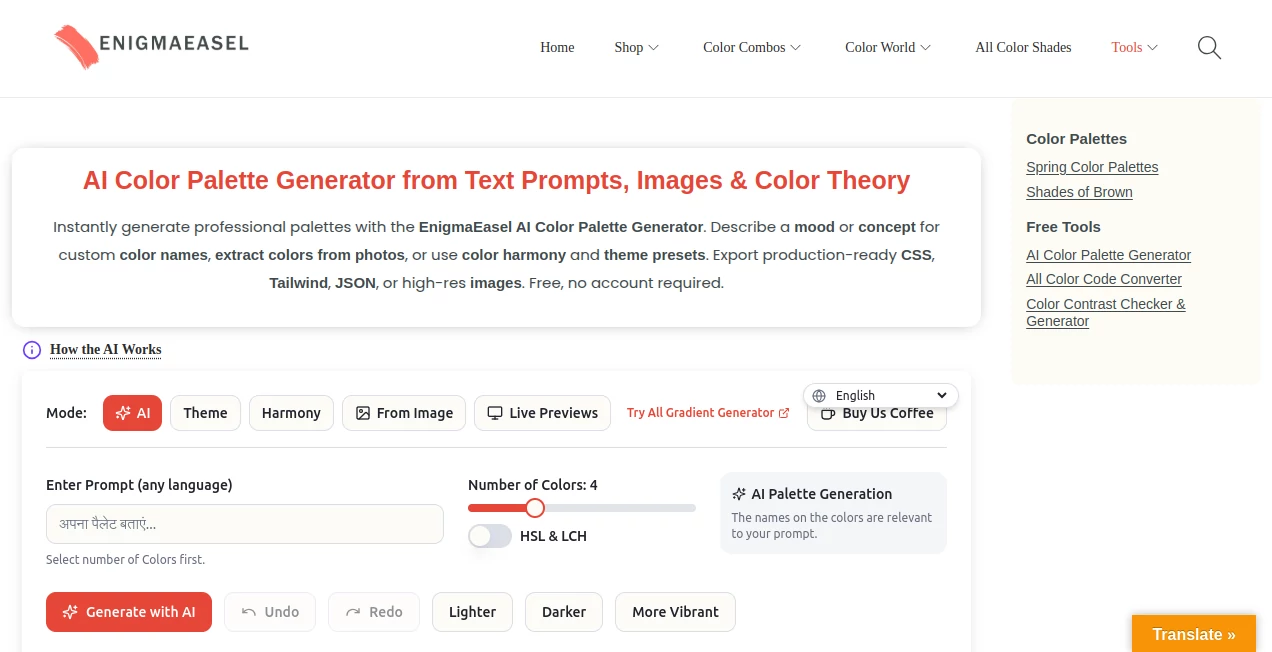
Instead of limiting creativity to random color suggestions, the platform gives users multiple ways to discover combinations that truly fit their vision. You can describe a mood using natural language, upload an image for instant extraction, generate palettes based on proven harmony principles, or start with professionally designed themes. The experience feels fast, intuitive, and surprisingly enjoyable, making it suitable for beginners as well as experienced designers.
One feature that immediately stands out is the ability to preview color combinations in realistic website layouts before exporting them. Combined with accessibility testing, developer-friendly exports, and advanced editing controls, it becomes much more than a simple palette generator. It serves as a complete workspace for anyone who works with digital colors on a daily basis.
Key Features
- Generate palettes from natural language prompts.
- Extract dominant colors from uploaded images.
- Create palettes using professional color harmony rules.
- Choose from multiple predefined visual themes.
- Preview colors inside realistic website layouts.
- Lock favorite colors while regenerating others.
- Undo and redo editing history.
- Accessibility testing with WCAG contrast checking.
- Color blindness simulation for inclusive design.
- Export palettes in CSS, Tailwind, JSON, SVG, PNG, PDF and many additional formats.
- Local saving without creating an account.
User Interface
The interface is clean and welcoming. Every generation mode is clearly organized, allowing users to switch between AI prompts, image extraction, harmony tools, and theme presets without confusion. Interactive controls make editing individual colors effortless, while drag-and-drop functionality keeps the creative process smooth and enjoyable.
Accuracy & Performance
The generated palettes feel thoughtful instead of random. Image extraction accurately identifies dominant colors, while harmony generation produces combinations that remain visually balanced. Live previews update quickly, helping users evaluate design decisions without interrupting their workflow.
Capabilities
The platform supports between two and twelve colors per palette, giving creators far more flexibility than many traditional generators. It also includes advanced color editing, multiple extraction moods, customizable exports, website previews, accessibility verification, and developer-ready code generation for modern design workflows.
Security & Privacy
The service can be used without creating an account, making it easy to experiment without sharing personal information. Palettes can be stored locally in the browser, giving users greater control over their work while keeping the overall experience simple and privacy-friendly.
Use Cases
- Building brand identities and style guides.
- Creating modern website color systems.
- Designing mobile application interfaces.
- Generating palettes from product photography.
- Preparing social media graphics.
- Developing marketing materials.
- Creating accessible user interfaces.
- Exporting production-ready colors for development projects.
Pros and Cons
- Pros
- Completely free to use.
- No registration required.
- Multiple palette generation methods.
- Excellent accessibility features.
- Wide variety of export formats.
- Realistic website preview mode.
- Suitable for both designers and developers.
- Cons
- Focused specifically on color workflows rather than complete graphic design.
- Advanced options may take a few minutes for first-time users to explore.
Pricing Plans
The platform is available free of charge. Users can generate palettes, preview designs, perform accessibility checks, and export their work without creating an account or paying subscription fees.
How to Use Color Palette Generator
Start by selecting the generation method that best matches your project. Describe a concept using plain language, upload an image, choose a color harmony, or begin with one of the built-in themes. Review the generated palette, adjust individual colors if needed, lock your favorites, and regenerate the remaining colors until the result perfectly matches your vision. Finally, preview the palette in a realistic website layout, verify accessibility, and export it in the format required for your workflow.
Comparison with Similar Tools
Many palette generators offer only one approach, such as random generation or image extraction. This platform combines several creative methods in a single environment, including AI-generated palettes, harmony-based creation, theme presets, image analysis, accessibility testing, and live website previews. The ability to export directly into developer-friendly formats also makes it particularly valuable for teams working across both design and development.
Conclusion
Choosing colors should inspire creativity instead of slowing projects down. By combining artificial intelligence with practical design tools and accessibility features, this solution helps transform rough ideas into polished visual identities in only a few clicks. Whether you're an independent designer, developer, marketer, or creative agency, it offers an impressive collection of features without adding unnecessary complexity or cost. Its thoughtful workflow, generous export options, and attention to usability make it a valuable addition to any modern design toolkit.
Frequently Asked Questions (FAQ)
Is this tool free to use?
Yes. All major features are available without registration or subscription.
Can I generate palettes from images?
Yes. Upload an image to extract dominant colors and build a custom palette.
Does it support accessibility testing?
Yes. It includes WCAG contrast checking together with color blindness simulation.
Can developers export code?
Yes. Palettes can be exported in formats including CSS, Tailwind, JSON, SCSS, and several others.
Who is this tool best suited for?
It is ideal for UI/UX designers, graphic designers, web developers, branding professionals, marketers, and anyone who regularly works with digital colors.
AI Design Assistant , AI Website Designer , AI Colorize , AI Graphic Design .
These classifications represent its core capabilities and areas of application. For related tools, explore the linked categories above.
Color Palette Generator details
Website unavailable — View Alternatives
Pricing
- Free
Apps
- Web App
Categories

Color Palette Generator Alternatives Product

LPM AI:

HTMLSlides

Luma AI

Huebert

Pixelied

SparkIconAI

Nano Banana …

LogoAI

Invitation M…