


















Everest
What is Everest?
Everest is an AI scheduling assistant built for people whose lives do not fit neatly into a single calendar. Instead of forcing you to compare personal, work, and client calendars manually, it brings them together and helps manage meetings from one place.
The idea is refreshingly practical: connect your Google and Outlook calendars, then let the assistant deal with the tedious parts of scheduling. It can suggest suitable times, handle the back-and-forth with other people, book meetings on the appropriate calendar, and follow up when a conversation goes quiet.
This is particularly useful for consultants, freelancers, founders, agency owners, and anyone working across several organizations. If you have ever opened three or four calendars just to answer “When are you free?”, the approach here makes a lot of sense.
Key Features
- Unified view of personal, work, and client calendars
- AI-assisted meeting scheduling through email
- Automatic availability checking across connected calendars
- Meeting proposals and follow-ups
- Automatic booking on the selected calendar
- Rescheduling and cancellation support
- Support for meetings involving multiple participants
- Google Calendar and Microsoft Outlook integration
- Private busy blocks across connected calendars
- Contact and time-zone context for recurring scheduling
- Natural-language scheduling through chat
- Day, week, month, year, and schedule-list calendar views
User Interface
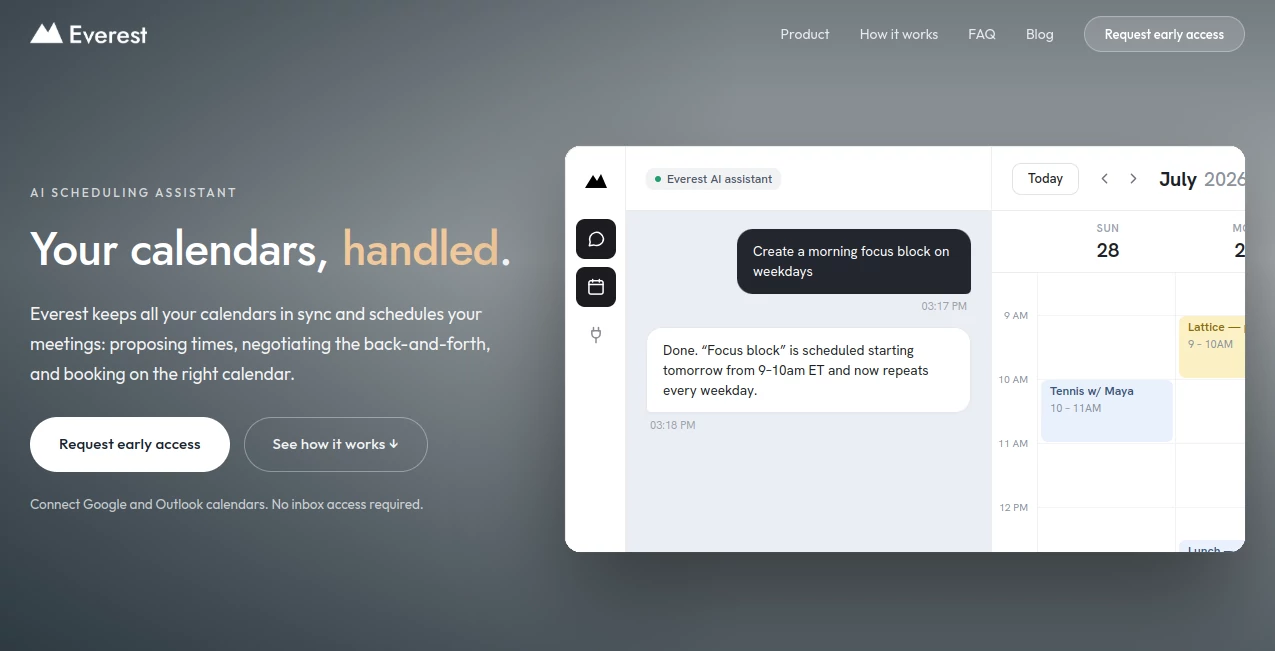
The interface is designed around the idea of one calendar view instead of several disconnected ones. Users can switch individual calendars on or off and move between day, week, month, year, and agenda-style views.
Creating an event is also straightforward because the user can choose exactly which connected calendar should receive it. This is a small detail, but it matters when someone works with several companies or wants to keep personal and professional commitments separate.
The scheduling conversation itself can happen through email or chat. For email-based scheduling, the assistant can be added to an existing thread, which means the other participant does not need to create an account or learn a new scheduling system.
Accuracy & Performance
Scheduling across multiple calendars is largely a problem of having complete availability information. The assistant addresses this by checking connected calendars together rather than treating each one as an isolated schedule.
When a meeting is booked on one calendar, the corresponding time can be reflected as busy on the others without exposing event titles or private details. It also checks availability again before booking, helping reduce the risk of selecting a time that has become unavailable during an email conversation.
Like any AI-based system, its suggestions should still be reviewed when a decision has important consequences. The product itself acknowledges that AI outputs can occasionally be incorrect, so human oversight remains sensible for significant scheduling decisions.
Capabilities
The strongest part of the platform is its ability to handle scheduling as an ongoing conversation rather than simply generating a static booking link. A user can add the assistant to an email thread and let it propose times, negotiate alternatives, send the invitation, and follow up if necessary.
It can also work with several participants. Instead of asking everyone to visit a separate scheduling page, it can find a suitable common time and book the earliest slot that everyone confirms.
Another useful capability is its understanding of recurring contacts. Names, email addresses, and time zones can be remembered within the appropriate workspace, making future scheduling conversations less repetitive.
The chat experience adds another practical option. A user can make requests in everyday language, such as asking to block a lunch period, arrange a meeting, or send an invitation after a time has been confirmed.
Security & Privacy
Privacy is an important part of the product's positioning. The service does not require access to the user's general inbox. Instead, it works with connected calendars and only interacts with email threads where the assistant has explicitly been included.
Calendar commitments can be synchronized using private busy blocks, allowing one calendar to account for another without revealing meeting names or descriptions. This is useful for people who manage calendars belonging to different clients or organizations.
The company states that Google user data is not sold, used for targeted advertising, or used to train generalized AI models. For AI processing, relevant information may be sent to language-model providers such as Anthropic, OpenAI, and Google under the service's stated data-processing arrangements.
Users should still review the privacy policy and connected-account permissions before granting access, particularly when multiple professional calendars are involved.
Use Cases
- Consultants: Keep client calendars together while scheduling meetings without constantly switching between accounts.
- Freelancers: Coordinate personal commitments and several client schedules from one place.
- Agency Owners: Reduce the amount of email back-and-forth involved in client meetings.
- Founders: Manage investor, partner, team, and personal meetings without losing track of calendar conflicts.
- Remote Professionals: Work across different time zones while keeping availability organized.
- Multi-company Workers: See several workplace calendars together while keeping each event on the correct account.
- Busy Teams: Coordinate meetings with several participants without requiring every person to use the same scheduling platform.
- Personal and Work Scheduling: Prevent professional commitments from accidentally colliding with important personal events.
Pros and Cons
Pros
- Designed specifically for people managing multiple calendars
- Combines Google and Outlook calendars in one view
- Can handle scheduling conversations through email
- Other participants do not need an account
- Supports rescheduling and follow-ups
- Uses private busy blocks to coordinate availability
- Natural-language chat makes scheduling feel more conversational
- Strong focus on limiting unnecessary inbox access
Cons
- The service is still in its Early Access Program
- Public pricing has not been finalized
- The current calendar integrations are focused on Google and Microsoft Outlook
- Users managing only one simple calendar may not need such an advanced multi-calendar workflow
- AI-generated scheduling decisions should still be reviewed when the meeting is particularly important
Pricing Plans
The service is currently free during its Early Access Program, and no credit card is required to request access. The company says early users will have an opportunity to receive exclusive founder pricing when the product launches publicly.
Because public pricing has not yet been finalized, users should check the latest information before making a long-term decision. For someone who regularly manages several calendars, the current early-access period provides a chance to explore the workflow before committing to a paid plan.
How to Use It
- Connect your Google and Outlook calendars.
- Review the unified calendar view and choose which calendars should be visible.
- Create meetings directly from the calendar when you want to handle scheduling yourself.
- For email scheduling, add the personal scheduling assistant to a relevant email thread.
- Let it check availability across the connected calendars.
- Review the proposed times and allow the conversation to continue with the other participant.
- Once a time is confirmed, the meeting is booked on the appropriate calendar.
- If plans change, continue the conversation to request a reschedule or cancellation.
Comparison with Similar Tools
Traditional scheduling services are often built around one primary calendar and a booking page. That approach works well when someone's schedule is relatively simple, but it becomes less convenient when availability is distributed across several accounts.
This platform takes a different route. Instead of asking every participant to choose a time through a separate interface, it can participate directly in an email conversation. It also treats multiple calendars as part of the same availability picture.
That distinction makes it particularly interesting for consultants, agency owners, freelancers, and professionals who work with several organizations. Someone with a single work calendar and a straightforward meeting schedule may find a conventional booking tool perfectly adequate. Someone constantly switching between calendars may appreciate the broader approach much more.
Conclusion
Managing meetings sounds simple until several calendars, clients, time zones, and changing plans enter the picture. That is where this scheduling assistant makes its strongest case.
Its combination of unified calendar management, email-based scheduling, automatic availability checks, and conversational assistance removes a surprisingly large amount of repetitive work. The privacy approach is another positive, particularly for professionals who need to coordinate calendars belonging to different organizations without exposing unnecessary information.
The product is still in early access, so its long-term pricing, integrations, and feature set may evolve. For people already spending too much time comparing calendars and negotiating meeting times, however, the current concept is compelling. It aims to make scheduling something that happens in the background rather than another task competing for attention.
Frequently Asked Questions (FAQ)
Does it read my entire email inbox?
No. The service states that it does not connect to the user's general inbox. It only acts on email threads where the scheduling assistant has been explicitly included.
Which calendars are supported?
Google Calendar and Microsoft Outlook are supported at launch. The service is designed to bring multiple connected calendars into a unified availability view.
Does the other person need an account?
No. People participating in a scheduling conversation can simply reply to the email normally. They do not need to create an account to participate.
Can it schedule meetings with multiple people?
Yes. It can consider the availability of multiple participants, propose suitable times, and book the earliest slot that everyone confirms.
Can it reschedule a meeting?
Yes. Users can ask for a meeting to be rescheduled or canceled within the same scheduling conversation, and the service can update the participants accordingly.
Is it free?
It is currently free during the Early Access Program. No credit card is required, while public pricing will be introduced when the service launches more broadly.
Who is it best suited for?
It is especially well suited to consultants, freelancers, founders, agency owners, and other professionals who regularly manage multiple calendars, clients, or work relationships.
Does it expose private calendar details between accounts?
The service states that it can synchronize availability using private busy blocks without exposing event titles or details between connected calendars.
AI Productivity Tools , AI Scheduling .
These classifications represent its core capabilities and areas of application. For related tools, explore the linked categories above.

Everest Alternatives Product

SlideStorm AI

Arobis AI Vi…

KoloQR

wigoo

EntreDash

CoolVerdict

Free Email V…

UPDF AI

Weblo AI
