
EzEditor
What is EzEditor?
Editing a photo no longer has to mean opening a complicated editor, searching through menus, and spending several minutes making selections by hand. EzEditor takes a much simpler approach: upload an image, describe what you want to change, and let AI handle the editing.
The browser-based editor is designed for creators, marketers, ecommerce sellers, designers, photographers, and everyday users who want quick visual improvements without installing software or creating an account. It can be used for tasks such as changing backgrounds, removing unwanted objects, restyling photos, improving images, and making creative visual adjustments from natural-language prompts.
One particularly useful detail is the low barrier to entry. The service does not require registration, and users can start editing directly from their browser. For someone who only needs to fix a product photo before publishing it, prepare a social media image, or experiment with a new visual style, that simplicity can make a noticeable difference.
Key Features
- AI-powered image editing through natural-language prompts
- Image-to-image editing for transforming existing photos
- Text-to-image generation for creating new visuals
- Multiple AI models for different creative requirements
- Object removal and background replacement
- Photo restyling and visual blending
- Clothes-changing capabilities for supported creative edits
- Image upscaling and enhancement
- High-resolution image output
- Watermark-free downloads
- Support for JPG, JPEG, PNG, and WEBP files
- Batch processing for repetitive image-editing tasks
- Adjustable output aspect ratios
- No account required to begin editing
User Interface
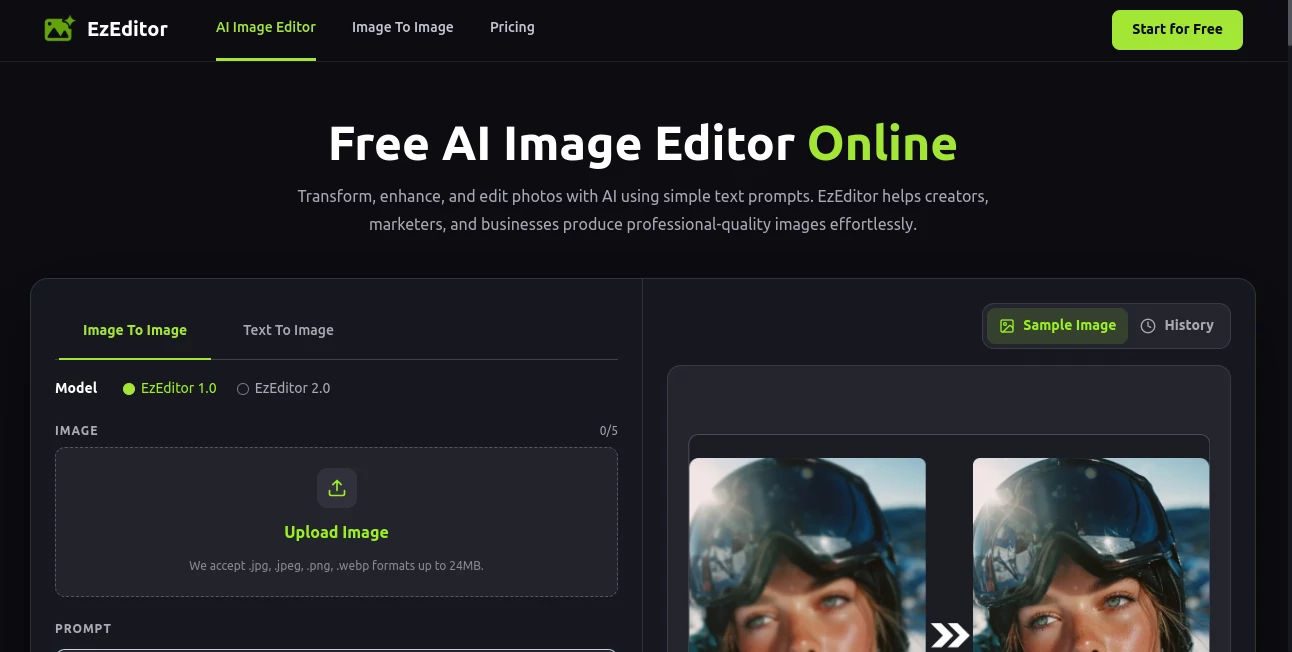
The interface keeps the editing process focused on the image rather than on a long list of technical controls. Users can upload an image, write a prompt describing the desired change, select an aspect ratio, and generate a result.
There are also ready-made editing actions for common jobs, including restyling, object removal, background replacement, clothes changes, and upscaling. These shortcuts are useful when the goal is straightforward and the user does not want to spend time figuring out how to phrase a complex instruction.
The workflow feels particularly suitable for people who are comfortable explaining an idea in words but may not have advanced photo-editing skills. A request such as changing a plain background to a clean studio setting is much easier than manually cutting out a product and rebuilding the scene from scratch.
Accuracy & Performance
Results naturally depend on the source image, the requested transformation, and the prompt itself, but the platform is built around fast AI generation and aims to produce edits within seconds. The availability of multiple AI models also gives users more flexibility when one approach is better suited to a particular visual style or task.
High-resolution output is another practical advantage. Instead of treating AI editing as something intended only for experimentation, the service positions the generated images for real-world uses such as ecommerce listings, marketing materials, social media posts, and other creative projects.
For best results, specific prompts tend to be more useful than vague instructions. Describing the desired background, lighting, mood, composition, or visual style gives the system more information to work with and makes the editing process easier to refine.
Capabilities
The platform covers a broad range of image-editing scenarios. Users can work with an existing photograph and ask for targeted modifications, or start from a text description when creating a new visual.
Background replacement is useful for product photography and marketing content, while object removal can help clean up distracting elements in an otherwise good photograph. Style transfer opens another creative direction, allowing an ordinary image to be reimagined with a different artistic appearance.
There are also practical enhancement features. Upscaling can help when a source image needs more resolution, while image-to-image editing makes it possible to preserve the basic concept of an existing picture while changing its appearance. Batch processing is particularly valuable for repetitive work where several images need a similar treatment.
Security & Privacy
Privacy is addressed directly on the platform. Uploaded images are described as being processed securely and not shared with third parties. This is an important consideration for anyone working with photographs that are not intended for public distribution.
As with any online image-processing service, users should still consider the sensitivity of the material they upload and review the provider's current privacy terms before processing confidential or highly sensitive content.
Use Cases
Ecommerce Product Photography: Store owners can create cleaner product visuals by replacing backgrounds, removing unwanted elements, or adjusting the overall presentation. This can be especially useful when a product needs a consistent look across multiple listings.
Social Media Content: Creators can transform ordinary photographs into more eye-catching visuals without rebuilding every image manually. Background changes, style transformations, and image enhancements can help prepare content for different platforms.
Marketing Materials: Marketers can quickly experiment with different visual concepts for advertisements, promotional graphics, posters, and campaigns. The ability to make changes through prompts makes testing ideas considerably faster.
Creative Projects: Illustrators and designers can use image transformation and style-transfer capabilities to explore visual directions before committing to a final concept.
Photography: Photographers can use AI-assisted editing for image enhancement, object removal, restoration-style improvements, and creative reinterpretations.
Quick Personal Edits: Someone who simply wants to improve a portrait, remove an unwanted object, or change a photo's background can complete the task without learning a full professional editing application.
Pros and Cons
Pros
- Free access with five credits refreshed each day
- No signup is required to start editing
- Works directly in a web browser
- Natural-language prompts make editing accessible
- Supports several common image formats
- Offers multiple AI models
- Provides high-resolution output
- Downloads are available without watermarks
- Useful for both creative and commercial image workflows
- Batch processing can reduce repetitive work
Cons
- The daily free allowance limits the number of edits available without additional access
- Results can vary depending on the quality of the source image and prompt
- Advanced professional editing controls may still be preferable for highly precise manual work
- Complex transformations may require several prompt-based iterations
Pricing Plans
The service currently provides a free way to use its AI image-editing features without requiring an account. Users receive five free credits each day, with the allowance automatically refreshed on the following day.
This daily-credit approach makes it practical for occasional editing, experimentation, and smaller creative projects. There is also no credit card requirement for getting started, so users can test the workflow before deciding whether it fits their needs.
How to Use It
Start by uploading a JPG, JPEG, PNG, or WEBP image. The supported upload size is up to 24MB, making it suitable for many everyday photographs and creative assets.
Next, describe the change you want using a text prompt. You can request a specific transformation, such as replacing a background, removing an object, changing the visual style, or improving the image. For common tasks, predefined editing actions can make this step even quicker.
Choose the desired output ratio and generate the edit. If the first result is close but not quite right, refine the instruction and generate another version. Once the image meets your expectations, download the high-resolution result without a watermark.
Comparison with Similar Tools
Traditional photo editors remain the stronger choice when a designer needs detailed control over individual layers, masks, curves, selections, and other manual adjustments. Their flexibility is excellent, but that flexibility can also mean a steeper learning curve and a slower workflow for simple changes.
Prompt-based AI editors take the opposite approach. Instead of manually describing every operation through editing controls, users explain the intended result in ordinary language. This makes them particularly attractive for quick background changes, object removal, style experiments, and creative variations.
Compared with AI image generators that focus primarily on producing new images from text, this service places a strong emphasis on editing existing photographs as well. That distinction makes it more relevant when the starting point is an image the user already owns and wants to improve or transform.
Conclusion
For users who want to make meaningful changes to photographs without dealing with a traditional editing workflow, this AI-powered approach is refreshingly straightforward. Upload an image, describe the change, review the result, and refine it when necessary.
The combination of prompt-based editing, multiple AI models, background replacement, object removal, restyling, upscaling, high-resolution output, and watermark-free downloads gives it a useful range of applications. The five daily free credits and no-signup workflow also make it easy to try without committing to a subscription.
It is especially well suited to creators, ecommerce sellers, marketers, designers, and casual users who value speed and simplicity. For more demanding professional work that requires pixel-level control, a traditional editor may still have the advantage. But for fast AI-assisted transformations, it offers a convenient alternative worth exploring.
Frequently Asked Questions (FAQ)
Is this AI image editor free?
Yes. The service provides five free credits every day, and the credits automatically refresh the following day. No credit card is required to get started.
Do I need to create an account?
No. Users can upload an image and begin editing without signing up or installing software.
Which image formats are supported?
The editor supports JPG, JPEG, PNG, and WEBP images. Uploaded files can be up to 24MB.
Can I remove objects or change backgrounds?
Yes. Object removal and background replacement are among the available AI editing actions. Users can also describe more specific changes through natural-language prompts.
Are the downloaded images watermarked?
No. The service states that generated images can be downloaded without watermarks and in high resolution, making them suitable for social media, ecommerce, marketing, and other creative applications.
Can I edit several images?
Yes. Batch processing is available for applying the same editing settings to multiple images, which can be useful for repetitive image-editing workflows.
AI Photo Enhancer , Photo & Image Editor , AI Background Generator , AI Image to Image .
These classifications represent its core capabilities and areas of application. For related tools, explore the linked categories above.

EzEditor Alternatives Product

Imagens App
Z image AI

Remove Handw…

img2img.net

AI Image Enh…
AI Signature…

Picture to L…
Banana AI

Free HD Phot…