

















EzImgEditor
What is EzImgEditor?
Image editing has evolved far beyond basic cropping and filters. Today, creators, marketers, and everyday users need tools that can understand context, automate complex edits, and deliver professional-quality results in seconds. This platform brings a refreshing approach to visual editing by combining artificial intelligence with a clean, intuitive experience that feels natural even for beginners.
Instead of spending hours learning complicated software, users can make precise edits, enhance visuals, and transform images with minimal effort. Whether you’re preparing content for social media, designing marketing assets, or simply improving personal photos, the experience is smooth, fast, and surprisingly powerful.
Key Features
User Interface
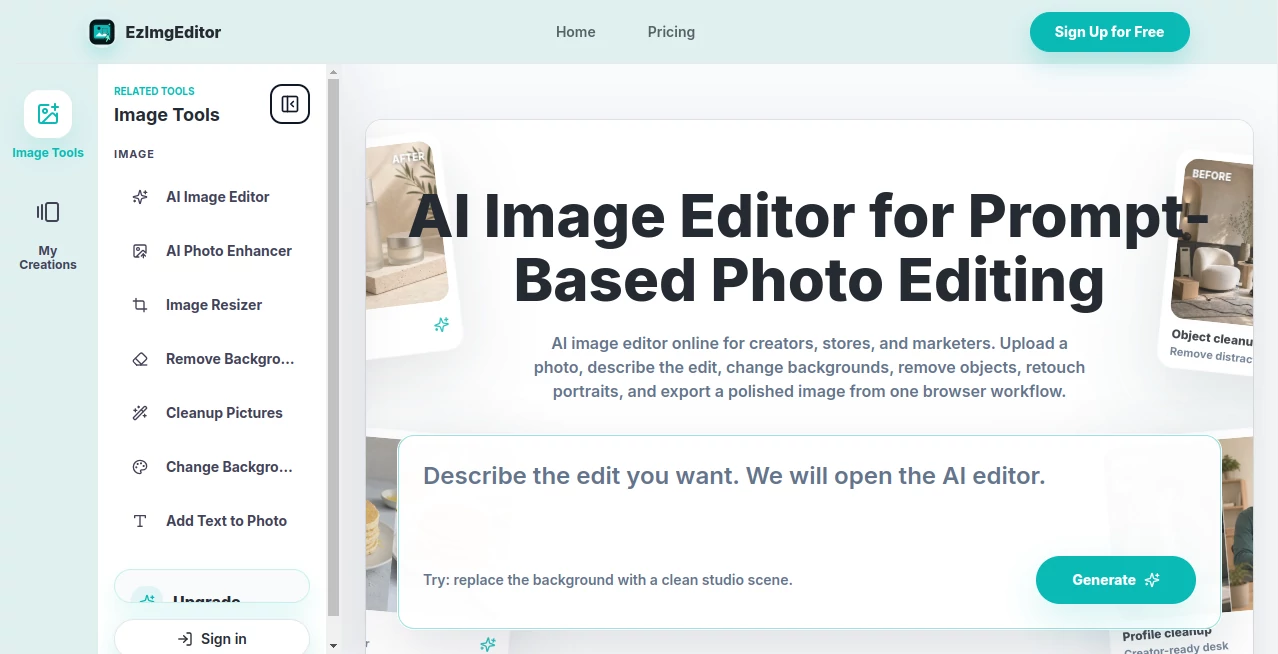
The interface is designed with simplicity in mind. Everything is accessible without overwhelming menus or technical barriers. Users can upload an image and immediately start editing with clear, guided controls. The layout feels modern, lightweight, and focused on productivity rather than complexity.
Accuracy & Performance
The editing engine performs impressively well when it comes to understanding image context. Edits such as object removal, background adjustments, and visual enhancements are processed with strong accuracy. Even high-resolution images are handled efficiently without noticeable lag, making it suitable for both casual and professional use.
Capabilities
- Smart background removal and replacement
- AI-based object editing and cleanup
- Image enhancement and quality improvement
- Style adjustments for creative visuals
- Fast batch processing for multiple images
Security & Privacy
User privacy is taken seriously, with uploaded content processed securely. Images are handled in a controlled environment, ensuring that personal or commercial assets are not exposed or misused. This makes it a reliable choice for sensitive projects.
Use Cases
This tool is versatile and fits into many creative and professional workflows:
- Social media content creation and visual branding
- E-commerce product photo enhancement
- Marketing campaigns and digital advertising assets
- Personal photo retouching and cleanup
- Rapid prototyping for designers and creators
Pros and Cons
Pros
- Very easy to use, even for beginners
- Fast processing speed
- High-quality AI-powered edits
- No steep learning curve
Cons
- Advanced professional controls may be limited
- Requires stable internet connection
Pricing Plans
The platform typically follows a flexible pricing model that may include free access with limited features and premium tiers for advanced capabilities. Users can start without commitment and upgrade based on their creative or business needs.
How to Use This Tool
Getting started is straightforward and requires no technical background. Users simply upload an image, choose the type of edit they want, and let the system handle the rest. The AI processes the request in seconds and presents a refined result that can be downloaded or further adjusted.
For more precise results, users can experiment with different prompts or editing options. The iterative workflow allows gradual refinement until the output matches expectations perfectly.
Comparison with Similar Tools
Compared to traditional photo editing software, this solution removes the need for manual editing skills. While advanced design tools offer deeper control, they often require time and expertise. This platform focuses on speed and accessibility, making it ideal for users who want professional results without complexity.
Against other AI-based editors, it stands out for its balance between simplicity and output quality, making it suitable for both casual users and content creators who need quick turnaround times.
Conclusion
In a world where visual content is essential, having a reliable and intelligent editing solution can make a significant difference. This platform delivers a practical blend of automation, quality, and ease of use. It empowers users to create polished visuals without technical barriers, making it a strong choice for modern digital workflows.
Frequently Asked Questions (FAQ)
Is this tool suitable for beginners?
Yes, it is designed specifically to be intuitive and easy to use, even for people with no editing experience.
Can it handle professional projects?
Yes, many users rely on it for marketing materials, product images, and creative content.
Does it require installation?
No, it runs directly in the browser without the need for installation.
Is my data safe?
Yes, uploaded images are processed securely with privacy-focused handling.
AI Image Recognition , Photo & Image Editor , AI Graphic Design , AI Image to Image .
These classifications represent its core capabilities and areas of application. For related tools, explore the linked categories above.

EzImgEditor Alternatives Product

AI Signature…

Kirkify

SAM 3D

Lymio

OutfitSwap S…

VividManga

IMAGE 2

Text Remover…

poseup
