
















IMAGE 2
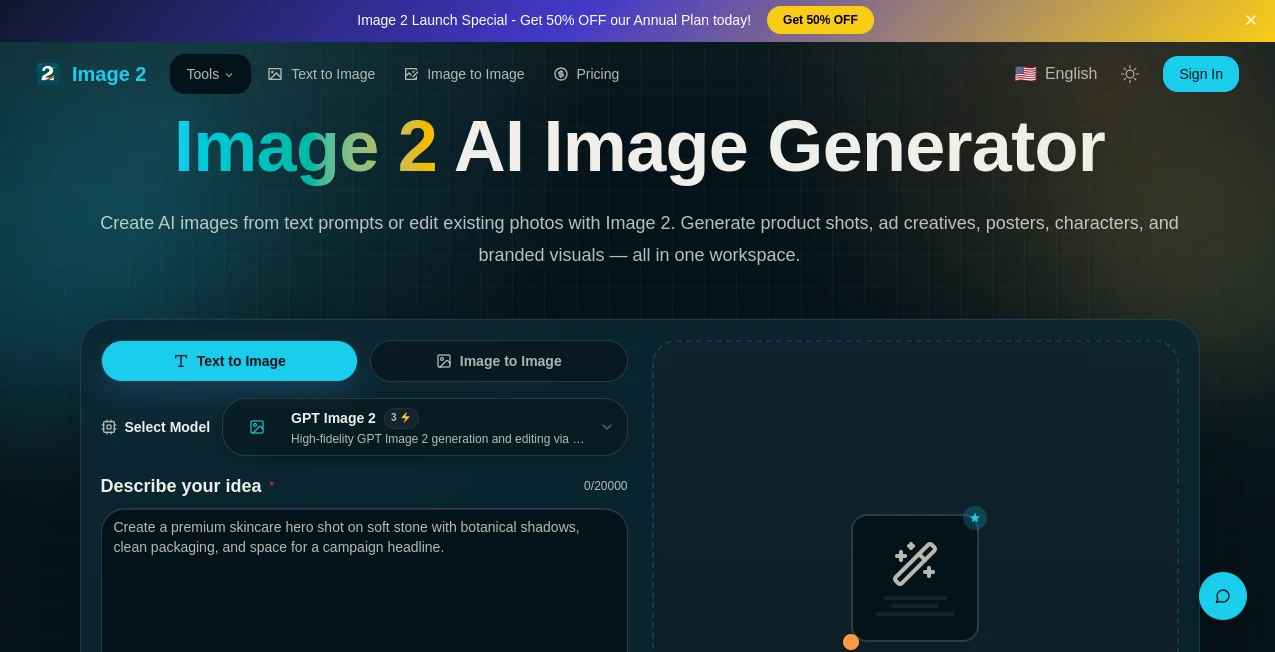
What is IMAGE 2?
Let's be honest for a second. Most AI image generators out there are great at creating dreamy landscapes or abstract art. But the moment you ask them to put actual readable words on a poster, or design a realistic e-commerce product shot, they completely fall apart. It’s frustrating, right?
That’s exactly why this platform feels like such a breath of fresh air. I stumbled upon it while looking for a tool that could handle practical, everyday design work—not just pretty pictures. This isn't another art toy; it is a full-on workhorse for businesses, marketers, and content creators.
Whether you need a sleek UI mockup for a client presentation, a multi-lingual infographic for social media, or a consistent brand kit for your product line, this tool handles it with surprising ease. It bridges the gap between complex software like Photoshop and the unpredictable nature of standard AI art generators.
Key Features
What makes this platform stand out in a sea of sameness? It’s the little things that actually save you hours of editing pain.
User Interface
The dashboard is refreshingly clean. You aren’t bombarded with confusing sliders or technical jargon. It feels like a calm workspace. You have your prompt box, your aspect ratio options, and a clear button to upscale to 4K. I really appreciate how they separated the "Text to Image" and "Image to Image" workflows. It eliminates the guesswork. Even if you’ve never used AI before, you can jump in, select a case study from their gallery, copy the style, and be on your way in under two minutes.
Accuracy & Performance
Here is the magic trick. Unlike other models that turn text into garbled alien symbols, this one actually reads. I tested it by asking for a "Chocolate Shop Menu" and a "Tech Conference Schedule." The words were crisp, spelled correctly, and placed logically. The performance speed is snappy too. We are talking about generating high-res images in seconds, not minutes. It handles complexity well. When I threw a chaotic prompt about a "cyberpunk city with neon signs in Japanese and English," it didn't break a sweat. It kept the architectural lines straight and the lighting realistic.
Capabilities
This isn't just a generator; it’s a full editing suite. You can upload a rough photo you took on your phone and turn it into a professional poster. The "Edit Elements" feature is a lifesaver. It can actually separate an image into layers—background, foreground, subject, and text. You can export these as PSD files. For a small business owner, that means you aren't locked into the "AI look." You can take that file to a designer later or tweak it yourself. It also supports consistent character generation, meaning your brand mascot looks the same in every single ad, not like a distant cousin.
Security & Privacy
Nobody wants their campaign visuals leaked before launch day. While many free tools claim ownership of your uploads, this platform respects your intellectual property. They process your images and then they are yours. There is no hidden clause about them using your product photos to train their internal models. For professional teams working on NDAs or unreleased product launches, this level of respect for privacy is non-negotiable.
Use Cases
I’ve seen a lot of tools, but this one fits into workflows like a missing puzzle piece. Here is where it shines brightest.
- E-commerce & Product Shots: You don't need a white background studio anymore. Generate lifestyle images for your products instantly. Want your coffee mug on a snowy mountain peak? Done.
- Marketing & Social Media: Create "How-To" infographics, quote cards, and Instagram carousels without hiring a graphic designer. The multi-lingual support means you can run the same campaign in English, Japanese, or Spanish effortlessly.
- UI/UX Design: Designers can mock up app interfaces, dashboards, and websites without coding or dragging assets. Generate a "Fitness App Dashboard" with realistic dummy data and charts.
- Internal Presentations: Forget boring white slides. Turn your quarterly report into a visual journey. Generate timelines, mind maps, and complex data charts that actually look attractive.
Pros and Cons
No tool is perfect, but the good here heavily outweighs the bad for most users.
What Works Well:
The text rendering is industry-leading right now. You get 4K resolution which looks crisp on billboards or phones. The "Brand Kit" feature saves your fonts and colors, so you can batch-produce 50 images that all look like they came from the same team.
Room for Improvement:
The free tier is quite limited (usually around 6-10 credits), so you will likely need a subscription for serious work. Also, while it excels at realism and graphic design, it sometimes feels a bit too "perfect" if you are looking for grungy, random artistic chaos. It prefers order.
Pricing Plans
You don't need to empty your wallet to test the waters. New users typically get a handful of free credits just for signing up. This is enough to generate a few posters or logos to test the quality yourself.
If you like it, the pay-as-you-go model is incredibly affordable. Compared to hiring a freelancer for $50 an hour, generating images here costs pennies. Reports estimate costs as low as $0.008 to $0.01 per standard image. If you are a power user, the Pro membership often unlocks unlimited low-resolution generations or a massive monthly credit allowance for 4K renders. It’s built to scale from the solo blogger to the marketing agency.
How to Use the Platform
Getting started takes less time than making a cup of coffee. First, head to the website and create a free account. Once you confirm your email, you will see your free credits in the top corner.
Start with a simple prompt, but be specific. Instead of "dog," try "Golden Retriever wearing a bee costume, product photography, white background." Hit generate. If the result is 90% there, use the "Edit" feature. You can erase a weird paw or change the background color with a text command. Once you are happy, download it as a PNG or JPG. For advanced users, try uploading a reference image to lock in a specific color palette or character face. The workflow is linear and logical, which I deeply appreciate.
Comparison with Similar Tools
Let’s put it on the table. You have Midjourney, which is great for artistic vibes but terrible at text. You have DALL-E, which is getting better but is locked inside a chat interface. Then you have this tool.
While Midjourney focuses on "art," this tool focuses on "work." It is significantly better than most competitors at generating readable text, which is the holy grail for graphic design. It is also much faster than running local models like Stable Diffusion, and you don't need a $2,000 graphics card. Compared to Canva’s AI, this gives you more granular control over the composition and editing layers. It sits right in the sweet spot between "beginner friendly" and "professional grade."
Conclusion
If you are tired of fighting with AI that can't spell or editing out weird artifacts for hours, this is the solution you have been waiting for. It isn't trying to replace human creativity; it is trying to remove the technical friction so you can get your ideas out faster.
Whether you are a solopreneur making TikTok content, a marketer launching a campaign, or a designer tired of doing tedious mockups, this tool will save you a massive chunk of time. The text accuracy alone is worth the price of admission. Go try it with the free credits. I suspect you will be as impressed as I was when you see that first perfectly formatted poster come out looking print-ready.
Frequently Asked Questions (FAQ)
Does it really generate readable text?
Yes, this is its superpower. It handles English, Chinese, Japanese, Korean, and several other languages with very few typos, which is rare in the AI world.
Can I use this for my commercial products?
Absolutely. You own the rights to the images you create. You can use them for book covers, t-shirts, ads, or product packaging.
Do I need to download software?
No. It runs entirely in your web browser. It works on Mac, Windows, and even your iPad.
What if I don't know how to write prompts?
The site has a gallery of examples. You can literally copy a prompt for "E-commerce Headphones" and change the word to "Sunglasses." It is very forgiving.