

















EzTranscript
What is EzTranscript?
EasyTranscript is an AI-powered transcription platform designed to transform audio and video content into accurate, editable text within minutes. It helps creators, researchers, students, businesses, and media professionals save time by converting spoken content into organized transcripts, subtitles, summaries, and translated files.
Instead of manually listening to long recordings and typing every sentence, users can upload media files or provide supported online links and receive a ready-to-edit transcript. The platform creates a smoother workflow for anyone working with podcasts, interviews, meetings, online videos, and educational content.
With support for more than 100 languages and multiple export options, this solution makes managing spoken content faster and more practical. Whether you need captions for a video, notes from a meeting, or searchable text from a recording, it provides a simple way to move from audio to usable content.
Key Features
User Interface
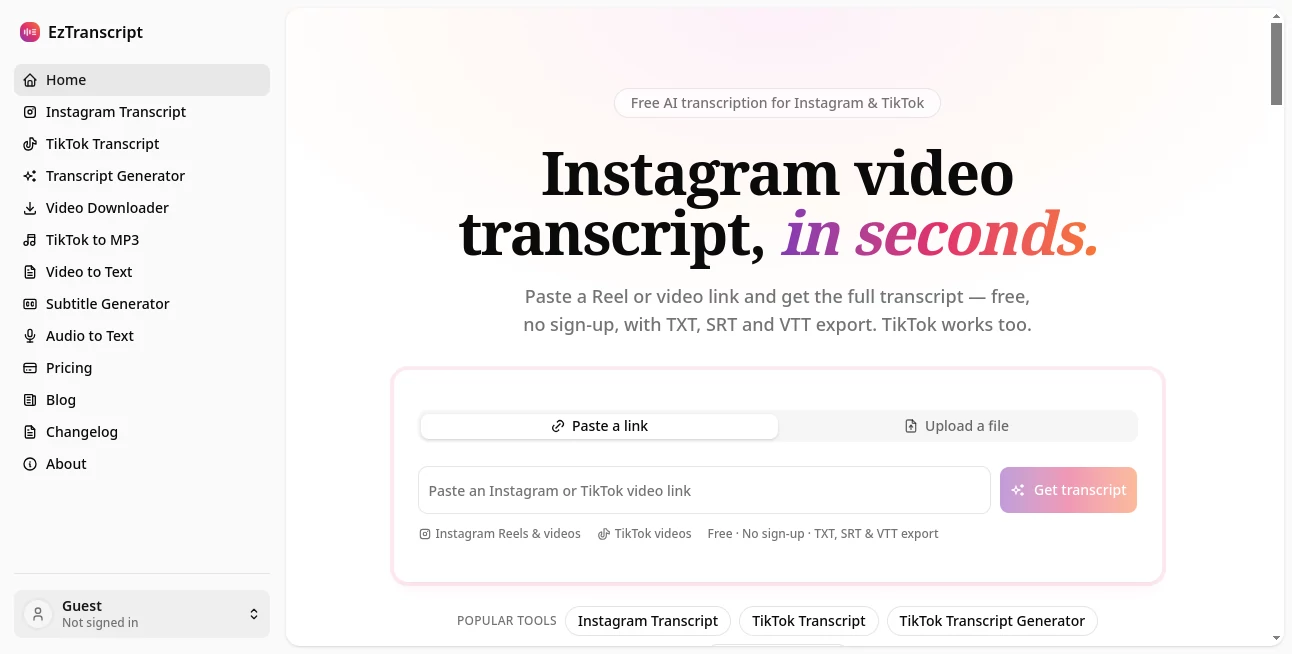
The platform offers a clean and straightforward workspace where users can upload files, paste media links, review transcripts, and edit text without dealing with complicated settings. The transcript appears alongside the original media, making it easier to compare spoken words with generated text.
The editing experience is designed for everyday users, allowing quick corrections, searching through transcripts, and managing different parts of recorded content from one place.
Accuracy & Performance
Using advanced AI speech recognition technology, the platform delivers fast transcription results while maintaining strong accuracy across different types of recordings. It can handle various audio and video formats, making it suitable for professional and personal workflows.
Speaker identification helps separate different voices in conversations, which is especially useful for interviews, meetings, podcasts, and discussions with multiple participants.
Capabilities
The platform goes beyond simple audio-to-text conversion. Users can create subtitles, generate summaries, translate transcripts, and export content in formats such as TXT, Markdown, SRT, and VTT.
- Audio and video transcription
- Support for online media links
- Live speech-to-text conversion
- Speaker identification
- Subtitle generation
- AI-powered summaries
- Translation and export options
- Editable timestamped transcripts
Security & Privacy
Protecting user content is an important part of any transcription workflow. The platform is designed to provide a private environment where users can process their recordings and manage their transcripts without unnecessary complexity.
This makes it a suitable choice for professionals handling interviews, internal meetings, educational materials, and other recorded information.
Use Cases
AI transcription technology can improve workflows across many industries. Content creators can quickly generate captions and written versions of videos, while podcast producers can create searchable transcripts and show notes.
Businesses can use it to document meetings, record discussions, and organize important conversations. Students and researchers can turn lectures, interviews, and recorded studies into easy-to-review text.
- Podcast transcription
- YouTube video transcripts
- Social media caption creation
- Meeting documentation
- Online course transcription
- Interview analysis
- Research and content organization
Pros and Cons
Pros:
- Supports audio and video transcription
- Works with many popular media sources
- Provides subtitle generation tools
- Includes speaker identification
- Offers multiple export formats
- Supports more than 100 languages
Cons:
- Accuracy can vary depending on audio quality
- Advanced usage may require a paid plan
- Highly specialized terminology may need manual review
Pricing Plans
The platform provides flexible access options based on transcription needs. Users can explore the service and choose a suitable plan depending on their required transcription volume and features.
Pricing may vary based on usage limits, processing requirements, and available features. Users who regularly work with large amounts of audio or video content can benefit from selecting a plan designed for frequent transcription workflows.
How to Use EasyTranscript
Getting started is simple and requires only a few steps:
- Create an account and access the transcription workspace
- Upload an audio or video file or provide a supported link
- Wait for the AI transcription process to complete
- Review and edit the generated transcript
- Create subtitles, summaries, or translations if needed
- Export the final content in your preferred format
Comparison with Similar Tools
Many transcription platforms focus only on converting speech into text. This solution stands out by combining transcription, subtitle creation, summaries, translation, and editing features in a single workflow.
For users who need more than a basic transcript, having multiple tools available in one place can reduce the time spent moving between different applications. Its support for various media sources and export formats makes it a practical option for creators and professionals.
Conclusion
EasyTranscript provides a convenient way to transform spoken content into valuable written information. By combining AI transcription, subtitle generation, speaker recognition, and content organization features, it helps users handle audio and video projects more efficiently.
Whether you are a content creator, educator, researcher, or business professional, this platform offers a reliable workflow for turning recordings into searchable, editable, and shareable content.
Frequently Asked Questions (FAQ)
What types of files can be transcribed?
The platform supports common audio and video formats, allowing users to convert different types of recordings into text.
Can it create subtitles?
Yes, users can generate subtitles and export caption files such as SRT and VTT.
Does it support multiple languages?
Yes, the platform supports transcription in more than 100 languages.
Can it identify different speakers?
Yes, speaker identification helps separate voices in conversations and recordings.
Can transcripts be exported?
Yes, transcripts can be exported in different formats including TXT, Markdown, SRT, and VTT.
AI Voice & Audio Editing , AI Transcription , AI Speech to Text , AI Captions or Subtitle .
These classifications represent its core capabilities and areas of application. For related tools, explore the linked categories above.
EzTranscript details
Website unavailable — View Alternatives
Pricing
- Freemium
Apps
- Web App
Categories

EzTranscript Alternatives Product

WhispriNote

Lyria 3

mp3tourl

Omni Voice

Seedance 2.5

AudioScribe
TranscribeYT

Klyra AI

Mp3ToMidi
