Fabricate
What is Fabricate?
Turning an idea into a working web application often requires weeks of planning, coding, testing, and deployment. Modern AI development platforms are changing that process by allowing creators to describe what they need in plain language and receive a functional application in return. This approach removes repetitive work while giving developers and non-technical founders a much faster path from concept to launch.
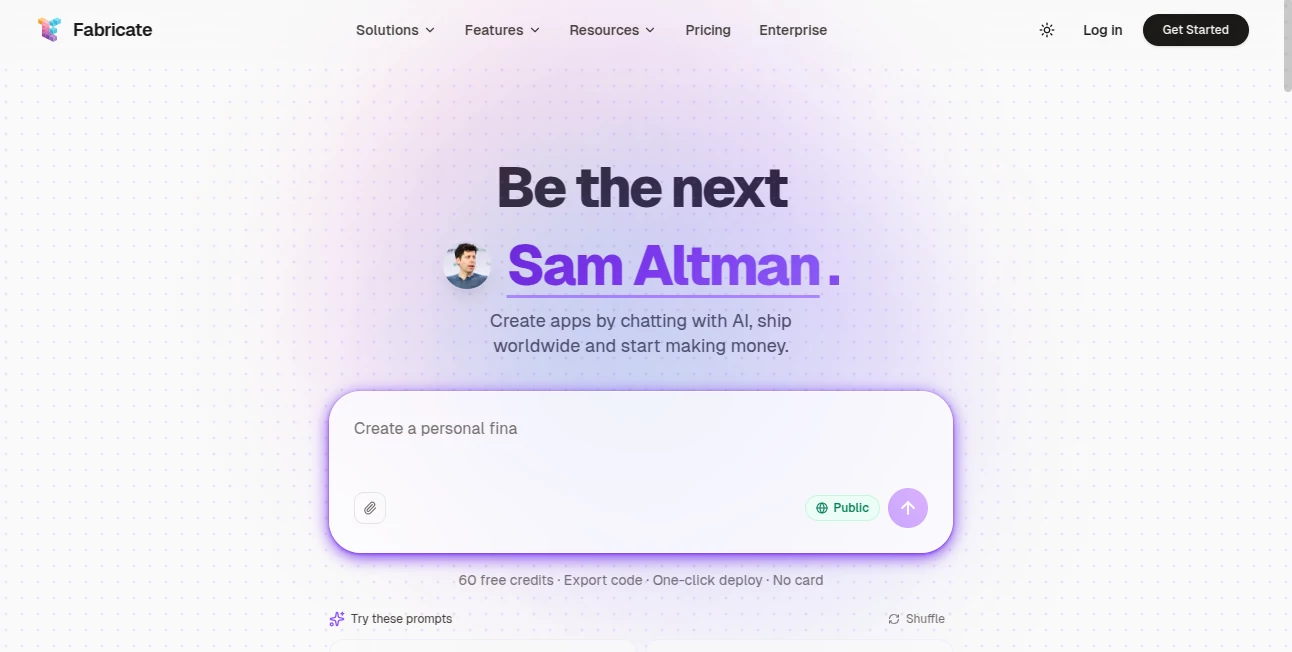
Designed for startups, entrepreneurs, agencies, and product teams, this platform generates complete web applications instead of isolated code snippets. It produces front-end interfaces, backend logic, authentication systems, databases, and deployment-ready projects that can be published with minimal effort. Whether the goal is launching an MVP, building an internal dashboard, creating a booking platform, or testing a new SaaS concept, the workflow remains remarkably simple while still providing flexibility for future customization.
Key Features
User Interface
The interface focuses on conversation instead of configuration. Users simply describe the application they want to build, review the generated project, refine it through additional prompts, and deploy it when satisfied. The clean workspace reduces unnecessary complexity, making it approachable for beginners while remaining productive for experienced developers.
Accuracy & Performance
Projects are generated with production-ready architecture rather than basic prototypes. Applications include modern components, organized project structures, database integration, authentication, and responsive layouts. One-click deployment, automatic SSL certificates, global content delivery, and edge infrastructure contribute to fast loading times and reliable performance for published applications.
Capabilities
- Generate complete full-stack web applications from natural language.
- Create landing pages, SaaS products, dashboards, marketplaces, CRM systems, and internal tools.
- Build responsive user interfaces with modern development practices.
- Automatically generate backend services and database connectivity.
- Include authentication without manual implementation.
- Deploy projects instantly with minimal configuration.
- Connect custom domains for production websites.
- Export source code for independent hosting and long-term ownership.
- Support GitHub synchronization for development workflows.
- Allow continuous refinement through conversational prompts.
Security & Privacy
Applications benefit from secure HTTPS deployment through automatic SSL provisioning. Infrastructure includes built-in protection against common online threats while edge deployment improves availability worldwide. Since projects can be exported, teams maintain ownership of their source code and are not permanently locked into a single hosting environment.
Use Cases
- Launching startup MVPs in a fraction of the traditional development time.
- Creating marketing websites and landing pages for new products.
- Building customer portals and internal business tools.
- Developing booking systems and business management applications.
- Generating SaaS dashboards for rapid product validation.
- Producing portfolio websites for freelancers and agencies.
- Testing product ideas before investing in full-scale development.
- Helping non-technical founders transform concepts into working software.
Pros and Cons
Pros
- Transforms plain English into complete web applications.
- Suitable for both technical and non-technical users.
- Fast deployment with global edge infrastructure.
- Provides ownership of generated source code.
- Supports custom domains and GitHub integration.
- Reduces repetitive development tasks significantly.
Cons
- Highly customized enterprise applications may still require manual development.
- Advanced developers may wish to fine-tune generated code for specialized requirements.
- Some premium capabilities are reserved for paid plans.
Pricing Plans
A free plan allows users to begin building and experimenting without upfront cost. Paid subscriptions provide additional credits, private projects, source code export, GitHub synchronization, custom domains, increased project flexibility, and enhanced support for professional development teams.
How to Use Fabricate
Start by describing the application you want to create using natural language. Review the generated interface and functionality, then continue refining the project through additional prompts until it matches your vision. Once satisfied, deploy the application with a single click, connect a custom domain if needed, and continue expanding the project using the exported source code or integrated development workflow.
Comparison with Similar Tools
Unlike many AI coding assistants that generate isolated snippets or help complete individual functions, this platform delivers complete production-oriented applications with frontend, backend, authentication, database integration, and deployment included. Compared with traditional no-code builders, it provides greater flexibility by producing editable source code while maintaining a conversational building experience that dramatically shortens development cycles.
Conclusion
For founders, creators, agencies, and businesses that want to launch software faster, this platform offers an impressive balance between simplicity and capability. The ability to transform plain language into fully functional applications, combined with instant deployment and code ownership, makes it an excellent choice for rapid product development. Instead of spending weeks assembling infrastructure before writing business logic, users can focus on validating ideas, improving user experience, and growing their products.
Frequently Asked Questions (FAQ)
Can beginners build applications without coding?
Yes. The conversational workflow makes it accessible for users with little or no programming experience.
Can generated projects be customized later?
Yes. Exportable source code allows developers to modify and expand applications independently.
Is deployment included?
Yes. Applications can be deployed quickly with built-in hosting features, SSL certificates, and global content delivery.
What types of applications can be created?
Users can build SaaS products, dashboards, landing pages, marketplaces, booking platforms, internal business tools, CRM systems, and many other web applications.
Is there a free plan?
Yes. Users can begin with a free plan before upgrading to paid subscriptions for additional features and higher usage limits.
AI Website Builder , AI No-Code & Low-Code , AI Developer Tools , AI App Builder .
These classifications represent its core capabilities and areas of application. For related tools, explore the linked categories above.

Fabricate Alternatives Product

ace.me

Emergent
JustCopy.ai

Lovable APP

Jujutsu Zero…

Screenshot t…

NetlifyAPP

ModelsLab

Bolt AI