
face2social
What is face2social?
Finding a social media profile from a photograph can be surprisingly difficult. A username may be unknown, a profile may use a nickname, and the same person can appear in completely different photos across several platforms. Face2Social takes a more direct approach by using facial recognition to search for possible social media accounts from an uploaded image.
The service is designed around a simple idea: upload a clear photo containing a face and let the system compare it with images available across supported social networks. Instead of manually searching through usernames, hashtags, or old posts, users can start with the one thing they already have—the picture.
This can be particularly useful when checking whether your own profile picture has been reused, investigating a suspicious online profile, or trying to understand whether the same face appears across different social platforms. The service currently focuses on Instagram, Facebook, TikTok, and X, giving users a convenient way to search several networks from one place.
Key Features
- Face-based social media search from an uploaded photo
- Search across Instagram, Facebook, TikTok, and X
- Reverse social media image lookup
- Possible profile matching based on facial characteristics
- Free preview before paying to reveal available account details
- Support for screenshots, cropped images, and lightly edited photos in suitable cases
- Useful for checking possible fake or impersonating profiles
- Results can include confidence indicators to help evaluate possible matches
- Email notifications when new matches are found for previously searched photos
- No software installation or dedicated application required
User Interface
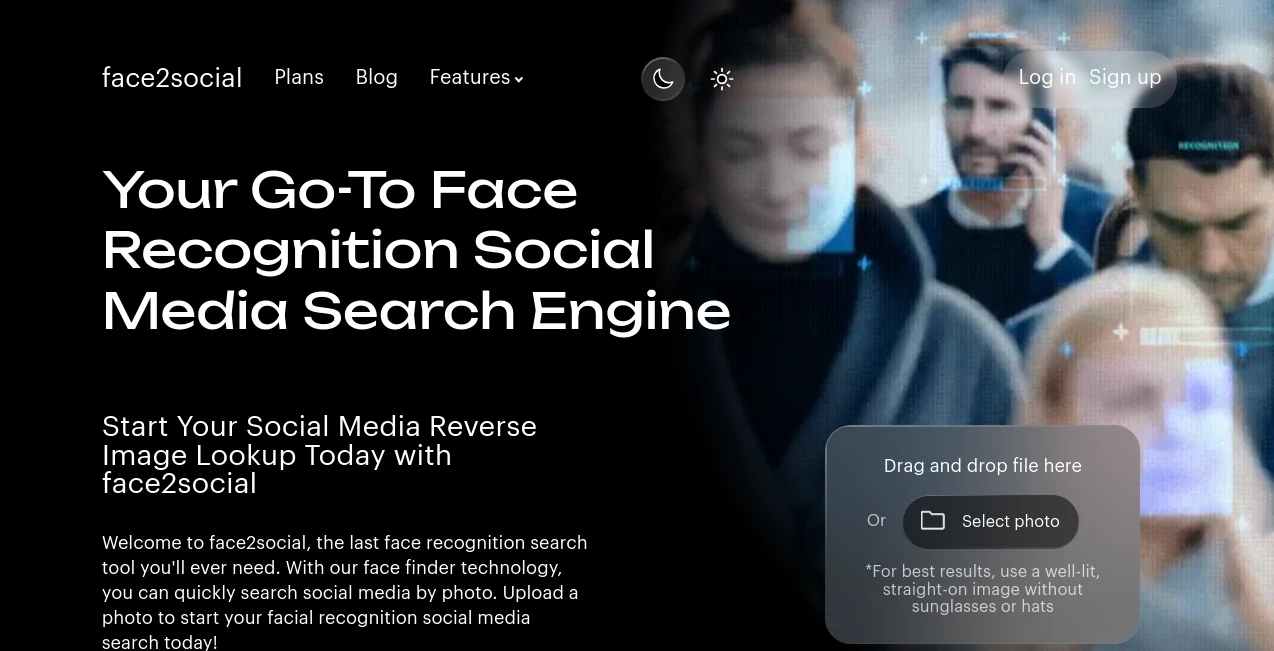
The interface keeps the main task remarkably straightforward. Users can drag and drop an image or select a photo from their device, which removes much of the friction normally associated with reverse-image tools. There is no complicated dashboard to learn before starting a search.
For the strongest results, the service recommends a well-lit, straight-on photograph where the face is clearly visible. This is sensible advice for any facial recognition system, since sunglasses, hats, poor lighting, extreme angles, and heavy image editing can make matching considerably harder.
Accuracy & Performance
The search process is built to return an initial result in roughly 30 seconds. That makes it practical for quick checks rather than long investigative sessions. Once processing is complete, users can review a preview of potential matches before deciding whether they want to reveal additional account information.
It is important to treat facial matches as leads rather than absolute proof of identity. The quality and visibility of the face, the source images available to the system, and changes between photographs can all affect the outcome. A clear portrait will generally give the system a better starting point than a distant or heavily edited image.
Capabilities
The strongest part of the service is its social-media focus. Rather than presenting itself as a general-purpose image search engine, it concentrates on finding possible profiles connected to a face across several major social networks.
For example, someone who discovers that their profile photograph has been copied can upload the original picture and check for possible accounts using the same face. Likewise, someone reviewing a suspicious profile can use an available photograph as another source of information before deciding whether the account appears trustworthy.
The system can also work with images that are not exact duplicates. Its facial matching approach is intended to compare facial characteristics, meaning that a different photograph of the same person may still produce a possible match.
Security & Privacy
Facial search involves sensitive information, so privacy deserves particular attention. The service provides a Privacy Policy and a dedicated option for users who want to request removal of eligible information from its systems.
Users should still make responsible decisions about which photographs they upload. Facial recognition results should be treated as potentially useful evidence for verification, not as definitive identification. When dealing with another person's image, users should also consider applicable privacy laws and the circumstances in which the photograph was obtained.
Use Cases
- Checking for impersonation: Upload your own profile photo to look for possible accounts using the same face.
- Verifying suspicious profiles: A photograph from an unfamiliar social account can provide another clue when assessing whether the profile appears genuine.
- Social media discovery: Search for possible accounts when you have a photograph but do not know the person's username.
- Finding reused photos: Creators and individuals can investigate whether their recognizable photographs appear across supported networks.
- Dating profile checks: A public profile photograph can be used as one part of a broader effort to verify an online identity.
- Cross-platform research: Searching multiple supported networks can be more convenient than checking each platform individually.
Pros and Cons
- Pros: Simple upload-based workflow, support for several major social networks, quick preliminary results, free result previews, and a practical focus on social media face searches.
- Pros: Users can see whether possible matches exist before paying to reveal available account information.
- Pros: The service can be useful for checking profile-picture reuse and possible impersonation.
- Cons: Results are not guaranteed and facial recognition can produce false or incomplete matches.
- Cons: Search quality depends heavily on image clarity, face visibility, and the photographs available for comparison.
- Cons: The free experience is primarily a preview; revealing available account details requires a paid plan.
Pricing Plans
The service uses a preview-first pricing model. Users can register, upload an image, and see whether potential matches are available before paying to reveal account information and profile links.
- Free Preview: View whether possible matches were found, along with preview information and confidence indicators.
- Family: $19.99 per month with 10 search reports per month.
- Professional: $199.99 per month with 200 search reports per month.
There is also a no-match, no-charge approach: when a search does not return results that are available to reveal, payment is not required. Pricing and billing terms should be reviewed before completing a purchase, as the service displays the applicable terms during checkout.
How to Use the Tool
- Choose a photograph containing a clearly visible face.
- Upload the image using the drag-and-drop area or the photo selection option.
- Allow the search process to analyze the image and compare it with available social media images.
- Review the free preview to see whether possible matches were detected.
- Check the confidence information and available result details carefully.
- If useful matches are available, choose the appropriate paid option to reveal the available account information.
A straightforward portrait usually makes the best starting point. If a first attempt produces weak results, using a clearer crop or another photograph where the face is more visible may provide a better basis for comparison.
Comparison with Similar Tools
Traditional reverse image search engines are excellent when the goal is to locate an identical or visually similar image on the web. Facial recognition services take a different approach by concentrating on the characteristics of a face, which can be useful when the same person appears in several different photographs.
The main advantage here is specialization. The service is designed specifically around social media discovery and supports Instagram, Facebook, TikTok, and X from the same search workflow. This makes it particularly appealing to users whose main question is not simply “Where does this image appear?” but rather “Could this face be connected to other social media profiles?”
Compared with broader people-search platforms, the workflow is also refreshingly focused. There is no need to begin with a name, email address, or phone number. The photograph itself becomes the starting point.
Conclusion
For anyone who regularly needs to investigate social media photographs, check possible impersonation, or search for profiles using an image rather than a username, this tool offers a focused and approachable solution. Its support for several major social networks and its preview-before-payment model make the process easier to test without immediately committing to a paid search.
The most important thing to remember is that a facial match is a starting point for verification, not a final verdict. Results should always be reviewed in context, especially when the outcome could affect another person's reputation, privacy, or identity.
Used responsibly, the combination of facial recognition, multi-platform searching, and a simple upload workflow can turn an otherwise time-consuming social media investigation into a much quicker process.
Frequently Asked Questions (FAQ)
Can I search social media using only a photo?
Yes. The service is designed to let users upload a photograph containing a face and search for possible matching profiles across supported social networks.
Which social media platforms are supported?
The current service supports searches across Instagram, Facebook, TikTok, and X.
Is the search completely free?
You can access a free preview after signing up and check whether possible matches were found. Payment is required when you choose to reveal available account details and profile links.
How long does a search take?
A typical search takes around 30 seconds, although actual processing time can vary depending on the search and available data.
Does the exact same photo need to be online?
No. The system is designed to compare facial characteristics, so a different photograph of the same person may still produce a possible match. However, results depend on image quality and the photographs available for comparison.
Can I use a screenshot or cropped photo?
Yes, screenshots, cropped images, and lightly edited photographs can work when the face remains clear enough for analysis. Heavy filters, low resolution, or obstructions can reduce the quality of results.
Are the results guaranteed to be accurate?
No. Facial recognition results should be treated as possible matches rather than definitive proof of identity. Users should review the available information and verify important findings independently.
Can I check whether someone is using my profile picture?
Yes. One of the intended uses is checking whether a personal profile photograph may have been reused on other social media accounts.
Will I know if new matches are found later?
For eligible searches, the service states that it can send an email notification when new matches are found for a photograph previously uploaded to an account.
Can I request removal of my information?
The website provides a dedicated information-removal request option and directs users to its Privacy Policy for eligibility and the applicable process.
AI Image Recognition , AI Social Media Assistant , AI Image Scanning .
These classifications represent its core capabilities and areas of application. For related tools, explore the linked categories above.

face2social Alternatives Product

TikoTranscri…

TextSharp | …

Apify

Simplified

AI for Social

Zush

Reddit Campa…
AI Face Anal…

SocialRails