
















FastQRMenu

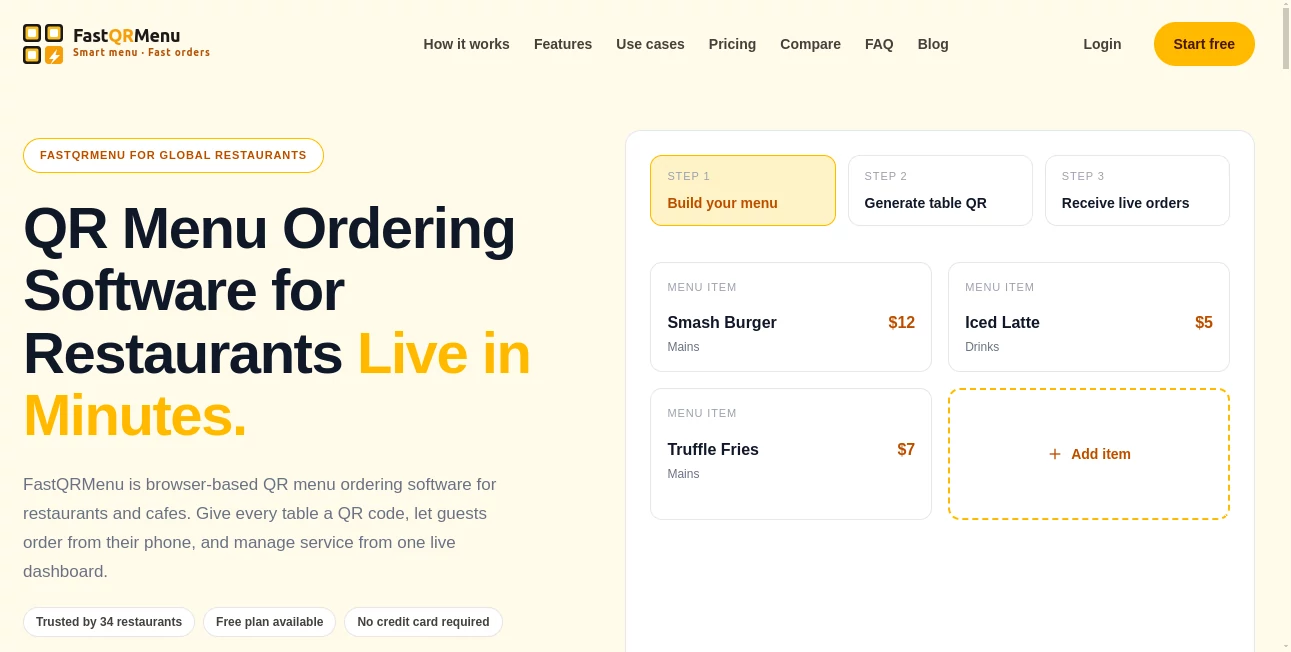
What is FastQRMenu?
Instead of asking customers to install another mobile application, every table receives a unique QR code that instantly opens a digital menu. Guests can browse dishes, customize their orders, and submit requests from their own smartphones while staff monitor everything through a live management dashboard. The result is a faster ordering process, fewer misunderstandings, and a more organized workflow during busy hours.
This browser-based approach makes digital ordering accessible for businesses of every size, from small neighborhood cafés to busy restaurants serving hundreds of guests every day. Setup requires very little technical knowledge, making it an attractive option for owners who want to improve service without investing in expensive hardware or complicated software.
Key Features
User Interface
The platform focuses on simplicity for both customers and restaurant staff. Diners simply scan a QR code and immediately access an organized digital menu that is easy to navigate on any smartphone. Categories, food images, prices, and descriptions are displayed clearly, allowing guests to place orders without confusion.
Restaurant employees benefit from a centralized dashboard where incoming orders appear in real time. The clean layout helps staff monitor active tables, manage requests, and coordinate kitchen operations without switching between multiple systems.
Accuracy & Performance
Digital ordering significantly reduces common mistakes caused by handwritten notes or verbal communication. Since customers submit their own selections, kitchens receive more accurate order details and optional customizations.
Real-time synchronization keeps staff informed as new orders arrive, helping restaurants maintain faster response times during peak business hours. Browser-based technology also allows the system to operate without requiring customers to download additional software.
Capabilities
- Create digital QR menus for every table.
- Allow guests to order directly from their smartphones.
- Manage all orders from one live dashboard.
- Update menu items instantly.
- Edit prices without reprinting menus.
- Display food descriptions and images.
- Reduce ordering errors.
- Improve table turnover.
- Support restaurants, cafés, and similar hospitality businesses.
- Operate entirely through a web browser.
Security & Privacy
Because the ordering experience runs inside a web browser, customers do not need to install applications or share unnecessary personal information before browsing the menu. Restaurant owners maintain control over menu management and order processing through a centralized administrative dashboard, making day-to-day operations easier to supervise.
Use Cases
- Restaurants looking to replace printed menus.
- Cafés that want faster table ordering.
- Food courts with multiple dining areas.
- Busy restaurants seeking to reduce waiting times.
- Hospitality businesses that frequently update menu prices.
- Businesses wanting contactless ordering.
- New restaurants launching digital-first operations.
- Small cafés that need an affordable ordering solution.
Pros and Cons
Pros
- Quick setup with minimal technical knowledge.
- No mobile app required for customers.
- Works directly in a web browser.
- Live dashboard for managing orders.
- Improves service efficiency.
- Reduces ordering mistakes.
- Easy menu updates.
- Suitable for restaurants of different sizes.
Cons
- Requires customers to have internet access.
- Businesses unfamiliar with digital ordering may need a short onboarding period.
- Some restaurants may still prefer printed menus alongside digital versions.
Pricing Plans
The service offers multiple pricing options designed for different business sizes, including a free plan that allows restaurants to explore the platform before upgrading. Paid plans provide additional capabilities intended for growing restaurants that require more advanced operational features.
How to Use FastQRMenu
Begin by creating a restaurant account and building a digital menu with categories, dishes, prices, descriptions, and images. Generate QR codes for individual tables and place them where guests can easily scan them. Customers simply use their smartphone camera to access the menu, select their meals, and submit orders directly from the browser. Incoming requests immediately appear in the management dashboard, allowing staff to process orders efficiently while monitoring dining activity in real time.
Comparison with Similar Tools
Compared with many digital restaurant ordering platforms, this solution emphasizes accessibility and simplicity. Many alternatives require dedicated mobile applications or more complex installations, while the browser-based approach removes barriers for both customers and restaurant owners. The live dashboard, instant menu updates, and QR-based ordering combine to create a streamlined experience that focuses on speed and convenience rather than unnecessary complexity.
For restaurants that want to modernize service without investing in specialized hardware, this lightweight approach provides an excellent balance between functionality and ease of use.
Conclusion
Digital dining experiences are becoming an important part of modern restaurant operations, and browser-based QR ordering offers a practical way to improve both customer satisfaction and staff efficiency. The combination of contactless ordering, real-time order management, instant menu updates, and a simple interface makes this platform an appealing choice for restaurants seeking a smarter workflow.
Whether managing a small café or a busy restaurant, businesses can reduce manual work, minimize ordering mistakes, and create a smoother dining experience while keeping operations organized through a single live dashboard.
Frequently Asked Questions (FAQ)
Does customers need to install an app?
No. Guests simply scan a QR code and place their orders directly from their mobile browser.
Can menu items be updated anytime?
Yes. Restaurant owners can modify menu items, prices, and availability instantly through the dashboard.
Is it suitable for small restaurants?
Yes. The platform is designed for cafés, small restaurants, and larger hospitality businesses alike.
Can staff monitor orders in real time?
Yes. New customer orders appear instantly in the live dashboard for efficient service management.
Is there a free plan available?
Yes. A free plan is available for businesses that want to try the platform before selecting a paid subscription.