
figviz
What is figviz?
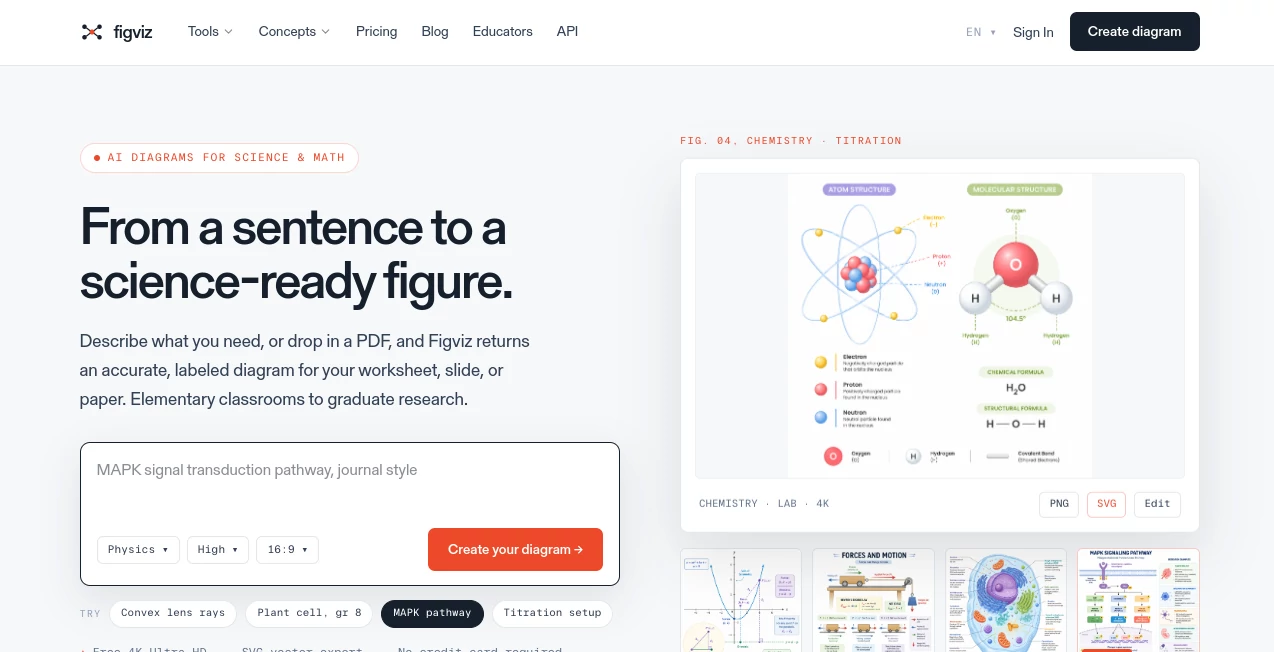
FigViz is an AI-powered visualization platform designed to help users transform ideas, concepts, and information into clear and engaging visual experiences. It focuses on simplifying the process of creating diagrams and visual content, making it easier for teams, designers, educators, and professionals to communicate complex ideas.
Visual communication has become essential in modern workflows. Whether you are planning a product, explaining a process, presenting research, or organizing information, having the right visual structure can save time and improve understanding. This platform provides an intuitive environment where users can quickly turn thoughts into organized visual formats without requiring advanced design skills.
Instead of spending hours manually arranging elements, users can focus on their ideas while the AI-assisted workflow helps create professional-looking results. It is especially useful for people who need fast, structured, and attractive visual outputs for work, learning, and creative projects.
Key Features
User Interface
The platform offers a clean and straightforward interface that makes visual creation accessible for beginners and experienced users alike. The design focuses on reducing unnecessary complexity, allowing users to concentrate on building and refining their ideas.
The workflow feels natural, with tools organized in a way that supports quick exploration. Users can move from concept development to finished visuals without dealing with complicated design processes.
Accuracy & Performance
The AI-driven approach helps users generate structured visual outputs with speed and consistency. It is built to understand user input and assist in creating meaningful representations of information.
For professionals who regularly create diagrams, planning documents, or visual explanations, faster generation means more time can be spent improving ideas rather than formatting layouts manually.
Capabilities
- AI-assisted visual creation from ideas and descriptions
- Support for creating structured diagrams and visual explanations
- Faster organization of complex information
- Useful workflows for brainstorming and planning
- Helps users communicate concepts more effectively
- Suitable for professional, educational, and creative projects
Security & Privacy
Privacy and responsible handling of user information are important considerations for modern AI applications. The platform is designed to provide users with a reliable environment for working on their visual projects while maintaining a professional workflow.
Use Cases
This tool can be valuable across different industries and workflows. Product managers can use it to map ideas and explain product structures. Designers can use it during brainstorming sessions to quickly explore concepts. Educators can create clearer learning materials, while businesses can improve presentations and internal communication.
A marketing team preparing a campaign roadmap, for example, can turn scattered ideas into a structured visual plan. Similarly, a developer explaining a technical process can create easier-to-understand diagrams for teammates and stakeholders.
- Business planning and strategy visualization
- Product development workflows
- Educational materials and lessons
- Team brainstorming sessions
- Process documentation
- Creative project organization
Pros and Cons
Pros:
- Simple workflow suitable for different experience levels
- Helps save time when creating visual content
- Makes complex ideas easier to communicate
- Useful for teams, individuals, and educators
- Reduces the need for manual diagram creation
Cons:
- Advanced professional designers may require additional customization options
- AI-generated visuals may still need human refinement for specific projects
- Availability of certain features may depend on the selected plan
Pricing Plans
Pricing details may vary depending on available features and subscription options. Users should check the official platform for the latest information about free access, premium features, and possible business plans.
For individuals exploring AI-powered visualization, starting with available trial or free options can be a practical way to understand the workflow before choosing a paid plan.
How to Use FigViz
Getting started is simple. Users can begin by describing their idea, project, or information structure. The AI-assisted system then helps transform the input into a more organized visual format.
- Create an account or access the platform
- Enter your idea, concept, or information
- Allow the AI system to generate a visual structure
- Review and refine the output
- Use the final visualization for presentations, planning, or communication
Comparison with Similar Tools
Compared with traditional diagram and visualization software, this solution focuses on reducing manual work through AI assistance. Traditional tools often require users to build every element individually, while AI-powered platforms help accelerate the creative process.
Compared with general design applications, it is more focused on turning concepts into structured visuals. This makes it a practical option for users who need clarity and speed rather than spending significant time learning complex design features.
Conclusion
FigViz provides a modern approach to visual creation by combining artificial intelligence with an easy-to-use workflow. It helps individuals and teams transform ideas into understandable visual formats without requiring advanced technical or design skills.
For anyone looking to improve brainstorming, planning, documentation, or communication, this platform offers a practical way to create better visuals with less effort. Its focus on simplicity and AI-assisted generation makes it a useful addition to modern productivity and design workflows.
Frequently Asked Questions (FAQ)
What is this AI visualization platform used for?
It helps users create structured visual content from ideas, concepts, and information, making communication and planning easier.
Who can benefit from using this tool?
Professionals, educators, designers, marketers, product teams, and anyone who needs to organize ideas visually can benefit from it.
Do I need design experience to use it?
No. The platform is designed to make visual creation easier for users with different levels of experience.
Can it replace traditional diagram tools?
It can reduce manual work and speed up visual creation, but users may still combine it with other tools depending on their specific needs.
Is there a free plan available?
Pricing and available plans can change over time, so users should check the official website for the latest subscription details.
AI Diagram Generator , AI Design Assistant , AI Productivity Tools , AI Graphic Design .
These classifications represent its core capabilities and areas of application. For related tools, explore the linked categories above.

figviz Alternatives Product

Where Is Thi…

Period Calcu…

Free Email V…

EaseMaker

Eleven AI

RoomDecorFin…

GPT Image 2 …

ModelsLab

Classroom Sc…