

















Fix Overexposed Photos
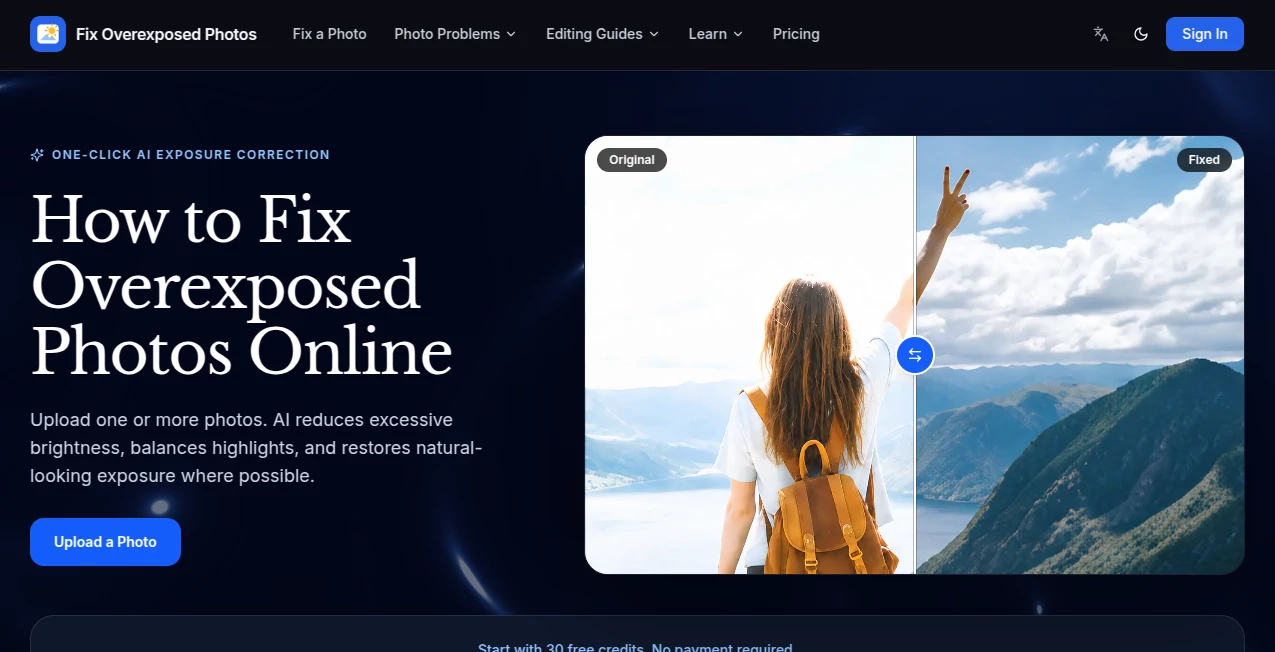
What is Fix Overexposed Photos?
Fix Overexposed Photos is an AI-powered photo correction tool designed to bring balance back to images that are too bright, washed out, or affected by harsh lighting. Instead of spending time adjusting curves, masks, highlights, and color channels manually, users can upload an image and let the system handle the exposure correction automatically.
The tool is particularly useful for photos affected by strong sunlight, direct flash, backlighting, bright snow, sand, or water. It works with JPG, JPEG, PNG, and WebP files and supports uploading one or multiple photos. New users also receive 30 free starter credits, making it easy to test the correction quality before paying.
Key Features
- AI-powered exposure correction
- Automatic reduction of excessive brightness
- Highlight and midtone balancing
- Before-and-after image comparison
- Support for JPG, JPEG, PNG, and WebP
- Multiple photo uploads
- Watermark-free downloads
- High-resolution downloads on paid plans
- Private photo processing
- Separate corrected files that preserve the original image
User Interface
The interface keeps the process refreshingly simple. Users can drag and drop their photos into the upload area or browse for files directly from their device. After processing, a before-and-after comparison makes it easy to judge whether the exposure has improved before downloading the result.
There is no need to understand professional photography controls or spend time searching through complicated editing panels. For someone who simply wants a photo to look less washed out, the straightforward workflow is a real advantage.
Accuracy & Performance
The AI analyzes the complete image and adjusts excessive brightness, highlights, and midtones while aiming to maintain natural-looking colors. This is especially helpful when the subject is darker than a very bright background, such as a person standing in front of a sunny window.
Results depend on how much information remains in the original photograph. If bright areas still contain texture or color, there is a better chance of recovering a convincing appearance. Completely clipped white areas cannot be restored with their exact original detail because that information was never recorded by the camera.
Capabilities
The system handles several common exposure problems. It can help with blown-out landscapes, backlit portraits, harsh flash, and bright reflective environments such as snowy fields, beaches, and scenes containing a lot of water.
It also processes each photograph as an independent task, which makes the workflow suitable for correcting several images without manually repeating a long sequence of editing adjustments.
Security & Privacy
Privacy is addressed as part of the service's paid offerings, which include private photo processing. Professional and Business plans also provide private task history. The original image is not replaced by the correction; instead, a separate fixed result is produced so users can retain and compare both versions.
Use Cases
This tool can be useful in many everyday photography situations. A travel photo may have a beautiful landscape but an almost white sky. A portrait taken with direct flash may have overly bright skin. A beach or snow photograph can lose contrast because of reflected light. In each case, automatic exposure correction can provide a quicker starting point than editing everything manually.
- Correcting portraits taken in harsh sunlight
- Balancing backlit photographs
- Improving photos affected by strong camera flash
- Restoring contrast in snow, beach, and water scenes
- Reducing excessive brightness in landscape photography
- Preparing personal photographs for sharing or printing
- Fixing batches of photographs without professional editing software
Pros and Cons
Pros
- Very simple one-click workflow
- 30 free starter credits for new users
- Supports common image formats
- Allows multiple photos to be uploaded
- Before-and-after comparison helps users review the result
- Watermark-free downloads
- Useful for several common overexposure scenarios
Cons
- Completely blown-out areas cannot regain detail that was never captured
- Severely blurred or damaged photographs remain difficult to recover
- Each correction consumes 10 credits
- Heavy users need a paid plan for continued processing
Pricing Plans
The service uses a credit-based system, with each exposure correction costing 10 credits. New users start with 30 free credits, which provides enough processing capacity to test the results without making an immediate purchase.
The Starter annual plan costs $99 per year and includes 500 credits per month, equivalent to up to 50 photo fixes monthly. The Professional plan costs $199 per year and provides 1,500 credits each month, or up to 150 fixes. For higher-volume work, the Business plan costs $499 per year and includes 4,000 monthly credits, allowing up to 400 photo fixes.
The paid plans also add features such as high-resolution downloads, private processing or task history, and priority support depending on the selected tier.
How to Use Fix Overexposed Photos
Using the tool requires only a few steps.
- Upload one or more JPG, JPEG, PNG, or WebP photos.
- Start the AI exposure correction.
- Allow the system to analyze and process the image.
- Compare the corrected version with the original.
- Download the result when you are satisfied with the correction.
For the best possible result, it is worth uploading the highest-quality original available. A larger source file generally gives the AI more useful visual information to work with.
Comparison with Similar Tools
Traditional photo editors offer far more manual control, but that flexibility can also make a simple correction unnecessarily time-consuming. Adjusting exposure, highlights, curves, masks, and individual color channels by hand is useful for experienced photographers, but it is not always practical when the goal is simply to rescue a photo that came out too bright.
This approach focuses on one specific problem rather than trying to replace a complete image-editing application. That specialization is its main appeal. Someone who has never used professional editing software can upload a photograph, inspect the correction, and download a cleaner-looking version without learning a complicated interface.
Conclusion
For anyone dealing with photographs that are simply too bright, this AI-powered approach offers a convenient alternative to manual exposure editing. Its strongest point is the focused workflow: upload the image, let the AI balance the exposure, compare the result, and save the corrected version.
It is not a magic solution for photographs where important highlights were completely clipped, but when useful image information remains, it can make a noticeable difference. With free starter credits, support for common image formats, and straightforward before-and-after comparisons, it is a practical option for photographers, travelers, creators, and everyday users who want to rescue an overexposed photo without opening a professional editor.
Frequently Asked Questions (FAQ)
Can an overexposed photo really be fixed?
Yes, in many cases. The amount of improvement depends on how much detail was captured in the bright areas. Photos with some remaining texture and color generally offer better recovery potential than images containing large areas of pure white.
Can it fix an overexposed face?
Yes. Photos affected by strong flash or sunlight can often benefit from reduced brightness and improved contrast when facial details are still present in the original image.
Which image formats are supported?
The service supports JPG, JPEG, PNG, and WebP images.
Does the original photo get replaced?
No. The corrected image is produced as a separate result, allowing users to keep the original and compare both versions.
How many credits does one photo correction use?
Each exposure correction uses 10 credits. New users receive 30 starter credits, while paid plans provide larger monthly credit allowances.
Can completely white highlights be restored?
Not with their exact original detail. If pixels contain no recorded texture or color information, an AI system cannot truly recover what the camera never captured. It can, however, improve surrounding tones and make the overall photograph look more balanced.
Do I need professional photo-editing experience?
No. The workflow is designed around automatic correction, so users can upload a photo, process it, review the result, and download it without manually adjusting advanced editing controls.
Can multiple photos be uploaded?
Yes. The upload interface supports one or multiple photos, making it more convenient when several images need exposure correction.