Fleck AI
What is Fleck AI?
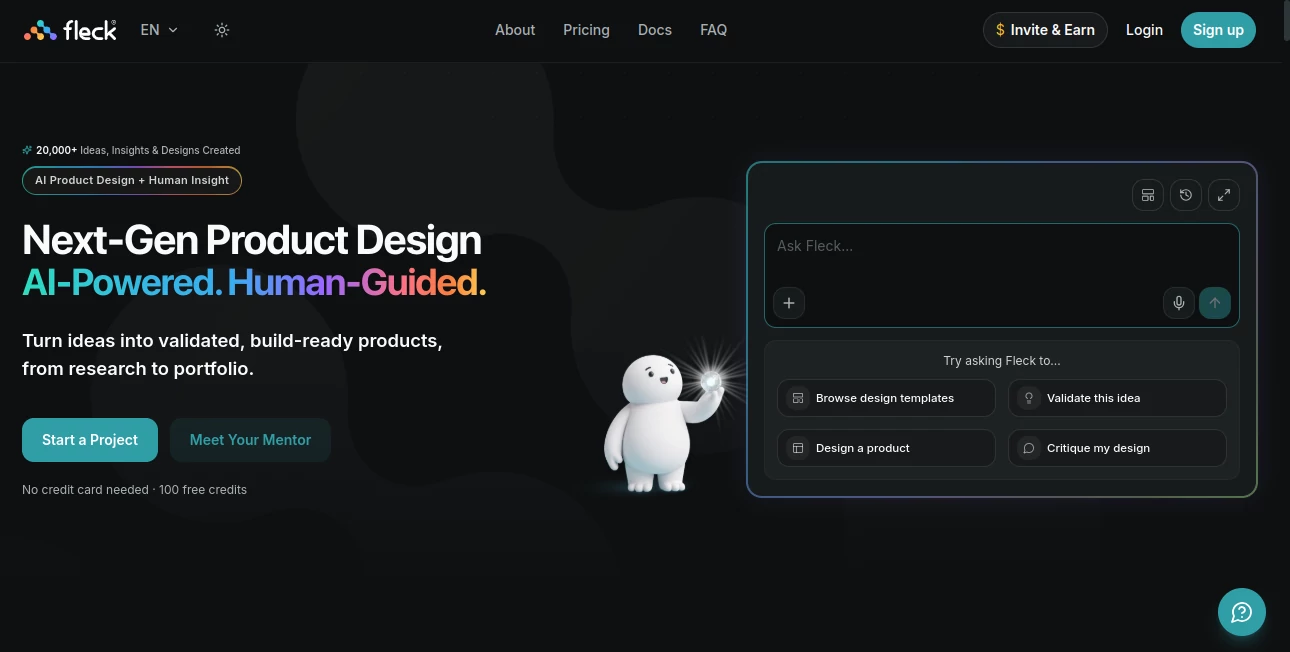
Fleck is a full-stack design agent built for product designers who want to move from an early idea to a validated, build-ready product without jumping between a dozen different tools. Instead of focusing only on generating attractive screens, it puts product thinking, UX, validation, design, auditing, and developer handoff into one connected workflow.
The approach is particularly useful when the hardest question is not “What should this screen look like?” but “Should we build this at all, who is it for, and how should the experience work?” A product concept can be submitted in natural language and evaluated for market viability, differentiation, technical feasibility, monetization potential, risks, opportunities, and MVP scope before serious design work begins.
From there, designers can map information architecture, generate user flows and personas, create multi-screen interfaces, review UX quality, produce developer-ready code, and publish a working project. It feels less like another image generator and more like a design partner that stays involved throughout the product process.
Key Features
- AI-powered product idea validation with scoring, risks, opportunities, and MVP recommendations.
- Automatic sitemap and information architecture generation.
- Persona modeling with user goals, pain points, and demographic context.
- Multi-screen design generation on a connected canvas.
- Design tokens, style presets, annotations, sticky notes, and flow connections.
- UX audits covering accessibility, usability, visual hierarchy, and cognitive load.
- Screenshot, sketch, and wireframe conversion into editable high-fidelity interfaces.
- Component-based React and Tailwind CSS code generation.
- PRD generation and product-thinking support.
- AI design mentoring and design critique.
- Case study generation for product design portfolios.
- GitHub synchronization, Figma export, ZIP downloads, and live project publishing.
User Interface
The interface is centered around a visual canvas rather than a simple prompt-and-result workflow. Designers can arrange multiple screens, connect flows, add notes and annotations, inspect layouts, and refine individual pages without losing the context of the larger product.
Design tokens provide another useful layer. Colors, typography, components, and other visual decisions can be kept consistent across a project, while version history makes it easier to understand how a design has changed. For someone working on a SaaS dashboard, mobile app, marketplace, or another multi-screen product, this connected approach can save considerable time.
Accuracy & Performance
The strongest part of the experience is that design generation does not happen in isolation. Product context, personas, brand rules, technical constraints, accessibility requirements, and approved decisions can influence later work. That makes the results more coherent than repeatedly starting from a blank prompt.
Its UX auditing tools add another practical layer. A screenshot can be analyzed for accessibility compliance, hierarchy, usability heuristics, cognitive load, and other UX considerations, followed by suggestions for improvement. These results should still be reviewed by an experienced designer, but they provide a useful second opinion during iteration.
Capabilities
The workflow covers much more than interface generation. Designers can begin with an idea, investigate its viability, define users and flows, create a sitemap and PRD, generate screens, audit the experience, and prepare a handoff package.
The design converter is especially useful for teams that already have visual references. Sketches, screenshots, and wireframes can be transformed into editable interfaces and production-oriented React and Tailwind CSS output. Developers can then receive specifications, design tokens, notes, assets, and runnable code rather than a collection of disconnected screenshots.
There is also a portfolio-focused side to the platform. Project information can be turned into structured case studies, while Portfolio Studio can help designers present finished work in a more professional format.
Security & Privacy
Ideas, canvases, and generated code are private by default according to the product's published information. This is important for designers working with early product concepts, client projects, or internal product discussions.
As with any AI-powered design service, users should still avoid uploading confidential information unless they are comfortable with the service's current terms and privacy practices. Generated code and design output should also be reviewed before being used in a production environment.
Use Cases
Product discovery: Founders can test an early product idea, identify potential risks, define an MVP, and establish an initial product direction before investing heavily in development.
UX and product design: Designers can create personas, information architecture, user flows, multi-screen concepts, and high-fidelity interfaces while keeping project context in one place.
Rapid prototyping: A designer preparing a client presentation can move from a rough concept to several connected screens and a shareable prototype without building everything manually.
UX reviews: Existing interfaces can be evaluated for usability, accessibility, hierarchy, and clarity. This is handy before a design review or stakeholder presentation.
Developer handoff: Teams can export code, specifications, tokens, assets, and development notes, reducing the usual back-and-forth between design and engineering.
Design portfolios: Students and working designers can turn project information into case studies and create a portfolio presentation around completed work.
Pros and Cons
- Pros: Covers product reasoning and UI design in one workflow.
- Pros: Strong UX audit and design-review capabilities.
- Pros: Supports multi-screen product flows rather than isolated screens.
- Pros: Useful developer handoff with React, Tailwind CSS, Figma, and GitHub options.
- Pros: Includes free access with welcome credits and no credit card requirement.
- Cons: AI-generated product decisions still require human validation and domain knowledge.
- Cons: Credit limits can become important for users generating large numbers of screens or running frequent AI operations.
- Cons: Designers who only need basic visual generation may find the broader product workflow unnecessary.
Pricing Plans
The platform uses a credit-based model with Free, Standard, and Pro plans. The Free plan costs $0 and includes 100 welcome credits, limited idea analysis, mentor usage, and access to a selection of core design features.
The Standard plan is priced at $9 per month and includes 500 credits each month, support for up to 10 projects, UX audits and reviews, screen flows, and PDF and code exports. It is positioned for designers who regularly work on product concepts and prototypes.
The Pro plan costs $19 per month and includes 1,500 monthly credits, unlimited projects, advanced analysis, version history, GitHub export, Figma capabilities, and the broader set of professional features.
Additional credit packs are also available for users who need more usage without changing their subscription. The published credit packs range from 100 credits for $5 to 5,000 credits for $125.
How to Use It
Start by describing the product you want to create. Adding useful context such as the target audience, business goal, existing references, brand direction, sketches, or technical requirements can give the design process a stronger foundation.
Next, review the generated product reasoning, personas, sitemap, flows, and recommendations. This stage is worth taking seriously because it can reveal problems before they become expensive design or development decisions.
Once the direction looks right, move into the design canvas and generate the required screens. Refine individual sections, adjust the visual system, and use the UX audit tools to identify usability or accessibility issues.
When the product is ready for review, generate a live shareable version or prepare a handoff package. Depending on the plan and workflow, the finished work can be exported to Figma, pushed to GitHub, downloaded as a ZIP, or published as a shareable project.
Comparison with Similar Tools
Many AI design products concentrate primarily on generating interfaces from prompts. That approach is excellent when the goal is to get a visual starting point quickly, but it can leave product strategy, user flows, validation, and UX evaluation to separate tools or manual work.
This platform takes a broader position. It tries to handle the thinking that comes before the pixels, including product validation, personas, information architecture, PRDs, UX audits, and design rationale. It can also work alongside established design workflows through Figma export and developer handoff rather than requiring designers to abandon everything they already use.
For someone who only wants quick UI concepts, a simpler generator may be sufficient. For a product designer or founder who wants to connect research, product decisions, design, testing, and handoff, the broader workflow is considerably more compelling.
Conclusion
For product designers, one of the biggest advantages of an AI design assistant is not simply producing screens faster. The real value comes from reducing the distance between an idea, a sensible product structure, a usable interface, and something a development team can actually work with.
This platform does a convincing job of bringing those stages together. Its combination of idea validation, product reasoning, multi-screen design, UX auditing, code generation, handoff, and portfolio tools makes it a strong option for designers who want more than attractive first drafts.
The free plan also makes it easy to explore the workflow before committing to a paid subscription. For independent designers, founders, design students, and small product teams, it can serve as a practical bridge between early product thinking and a tangible prototype.
Frequently Asked Questions (FAQ)
What is this AI design platform used for?
It is designed to help product and UX designers validate ideas, plan product experiences, create interfaces, audit UX, generate developer-ready output, and publish design work.
Can it generate complete product interfaces?
Yes. Its multi-screen generation workflow can create connected product screens while using project context, personas, brand information, and design decisions to maintain consistency.
Can generated designs be exported to Figma?
Yes. The platform supports Figma-related export capabilities, including editable SVG-based screen transfer and additional design data for advanced workflows.
Can developers use the generated code?
Yes. The design converter can produce component-based React and Tailwind CSS code, while handoff packages can include code, specifications, tokens, assets, and developer notes.
Does it have a free plan?
Yes. The Free plan is available at no monthly cost and includes 100 welcome credits along with limited access to several features.
Who can benefit most from it?
Product designers, UX designers, designer-founders, students, and small product teams are among the audiences most likely to benefit from its end-to-end workflow.
Is human review still necessary?
Absolutely. AI-generated product strategies, UX recommendations, designs, and code should be reviewed and tested by people before important business or production decisions are made.
AI App Builder , AI Design Assistant , AI Website Designer , AI Design Generator .
These classifications represent its core capabilities and areas of application. For related tools, explore the linked categories above.

Fleck AI Alternatives Product

Seedream 5.0
Z-Image Gene…

String Art

Banana Pro

Medical Illu…

Project Genie

Seedream 5.0

Trending AI …

Logo Animati…