
Flitx AI
What is Flitx AI?
Sometimes you just need a second brain that actually understands what you're trying to do. Whether you're debugging tricky code at midnight, drafting an important email, or trying to wrap your head around a complex concept, this AI assistant steps in like a sharp, patient colleague who’s always available. Powered by strong models like Gemini, it handles coding help, creative writing, logical reasoning, and everyday questions with a natural flow that doesn't feel robotic. I've watched developers solve stubborn bugs faster than they expected, and writers polish drafts that suddenly sound clearer and more confident. It’s the kind of tool that quietly becomes part of your workflow because it delivers useful results without the usual AI awkwardness.
Introduction
In a world full of AI chat tools that promise everything but deliver generic answers, this one stands out by focusing on being genuinely helpful across different tasks. It combines solid reasoning with practical knowledge, making it suitable for both quick questions and deeper problem-solving sessions. Students use it to understand difficult topics, professionals lean on it for productivity boosts, and hobbyists explore ideas without judgment. The interface stays out of the way so you can focus on the conversation, and the responses often hit that sweet spot between concise and thorough. For anyone who works with ideas, code, or words on a regular basis, it feels like having a reliable thinking partner who's ready whenever you are.
Key Features
User Interface
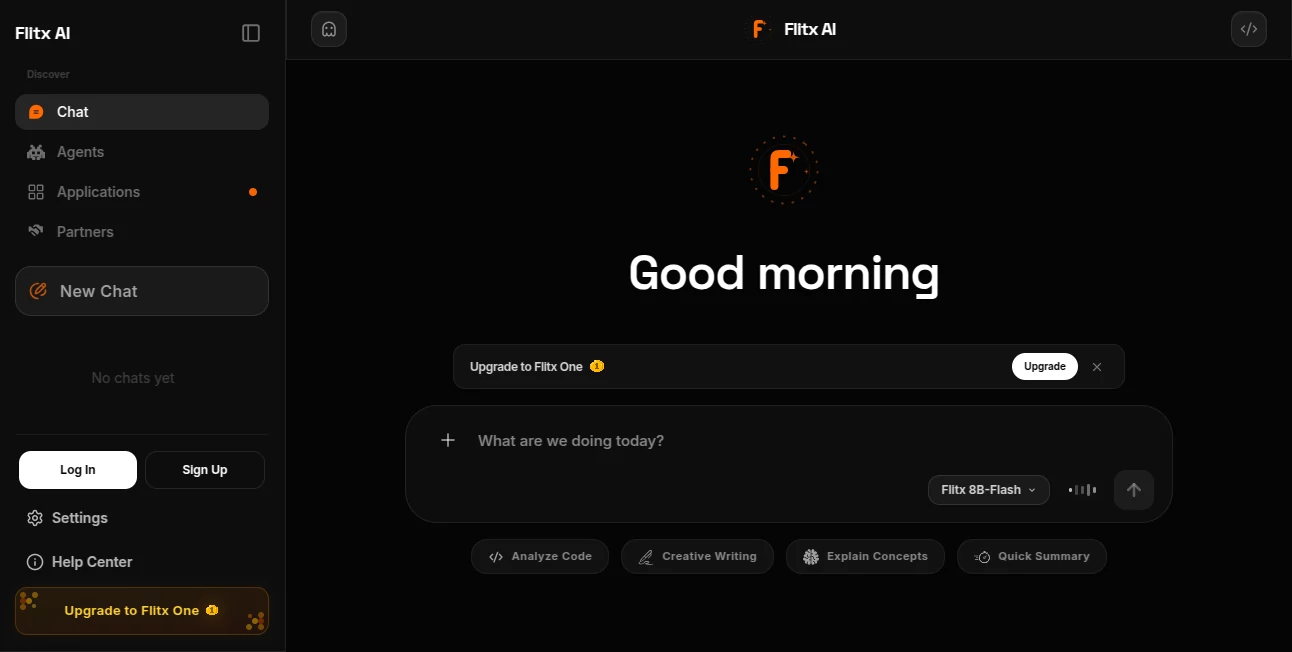
The chat experience is clean and distraction-free. A simple input box at the bottom, clear conversation history on the side, and the ability to start fresh threads whenever needed. It supports file uploads for context (code files, documents, images), making interactions more grounded and useful. Responses come with good formatting—code blocks, lists, and headings when appropriate—so you can actually use the output right away. It never feels overwhelming, even during longer sessions.
Accuracy & Performance
It shines when it comes to following instructions precisely and maintaining context across longer conversations. Coding help is particularly strong— it explains logic clearly and suggests practical solutions rather than just spitting out snippets. Reasoning tasks feel thoughtful, and creative requests (writing, brainstorming) carry a nice touch of originality. Response times are snappy, keeping the conversation feeling natural rather than delayed.
Capabilities
Beyond basic chatting, it handles code explanation and debugging, creative writing in different styles, logical problem-solving, research-style questions with structured answers, and general productivity tasks like summarizing or planning. File uploads let you provide context (PDFs, code files, images), and it can analyze them meaningfully. The balance between depth and speed makes it versatile for both quick lookups and more involved projects.
Security & Privacy
Your conversations stay private by default, with no unnecessary data sharing or long-term storage of sensitive inputs. It’s designed to be a helpful companion without turning your queries into training data. For users working on personal projects, client work, or private ideas, that respectful approach builds real trust.
Use Cases
A developer pastes buggy code and gets clear explanations plus fixed versions that actually work. A student struggling with a concept asks for different explanations until one clicks. A marketer brainstorms campaign ideas and gets structured outlines with tone variations. A writer stuck on dialogue uses it to generate natural conversation samples. Teams use it for meeting summaries or quick research checks. It adapts comfortably to different needs without forcing one style of interaction.
Pros and Cons
Pros:
- Strong reasoning and context retention across longer conversations.
- Practical help with coding, writing, and analysis tasks.
- Clean, focused interface that stays out of your way.
- Good balance of speed and thoughtful responses.
- Support for file uploads adds real usefulness.
Cons:
- Like most AI assistants, very niche or cutting-edge topics may need clearer prompting.
- Free usage limits exist; heavier daily needs benefit from upgrades.
Pricing Plans
It offers a generous free tier that lets you explore its capabilities without commitment—perfect for daily use or testing on real tasks. Paid plans unlock higher usage limits, faster responses during peak times, and priority access to newer features. The structure feels fair, rewarding regular users while keeping the entry point open for everyone.
How to Use Flitx AI
Start a new chat and type your request naturally—be as specific or casual as you like. For coding, paste the relevant snippet and describe the issue. For writing, give context about tone, length, and audience. Upload files when you want the AI to reference them directly. Read the response, ask follow-ups to refine, or start fresh if you want a different direction. The more context you provide, the better the results usually become. It’s designed to feel like a conversation rather than a command line.
Comparison with Similar Tools
While many AI assistants exist, this one combines solid reasoning power with a clean, practical interface and strong file-handling capabilities. Some competitors feel either too basic or overly complex; this strikes a nice middle ground that works well for both quick questions and deeper work sessions. The focus on being genuinely useful across coding, writing, and general tasks makes it a strong daily driver for many users.
Conclusion
In our busy days filled with questions, drafts, and problems to solve, having a capable AI assistant that feels reliable and easy to talk to is a real advantage. This tool delivers that experience without unnecessary complications. It helps you move faster, think clearer, and create better—whether you're building something, learning something, or just trying to get through your to-do list. For anyone who works with ideas or code, it’s the kind of companion that quietly makes things better, one helpful response at a time.
Frequently Asked Questions (FAQ)
Do I need to sign up to start using it?
No, you can jump right in and start chatting without creating an account.
Can it help with coding problems?
Yes, it handles code explanation, debugging, and suggestions across many languages.
Does it support file uploads?
Yes, you can upload documents, code files, or images for better context in responses.
How does the free tier compare to paid?
Free gives solid daily access; paid removes limits and adds priority during busy periods.
Is my conversation data private?
Conversations are handled privately and not used for training without explicit consent.
AI Chatbot , AI Productivity Tools , AI Developer Tools , AI Writing Assistants .
These classifications represent its core capabilities and areas of application. For related tools, explore the linked categories above.

Flitx AI Alternatives Product

Blackbox AI

FLINT AI

BootstrapKing

Arobis AI Vi…

UPDF AI

Tate-A-Tate

Airtable AI …

Mentor

Dewy Chat