
Flowstep
What is Flowstep?
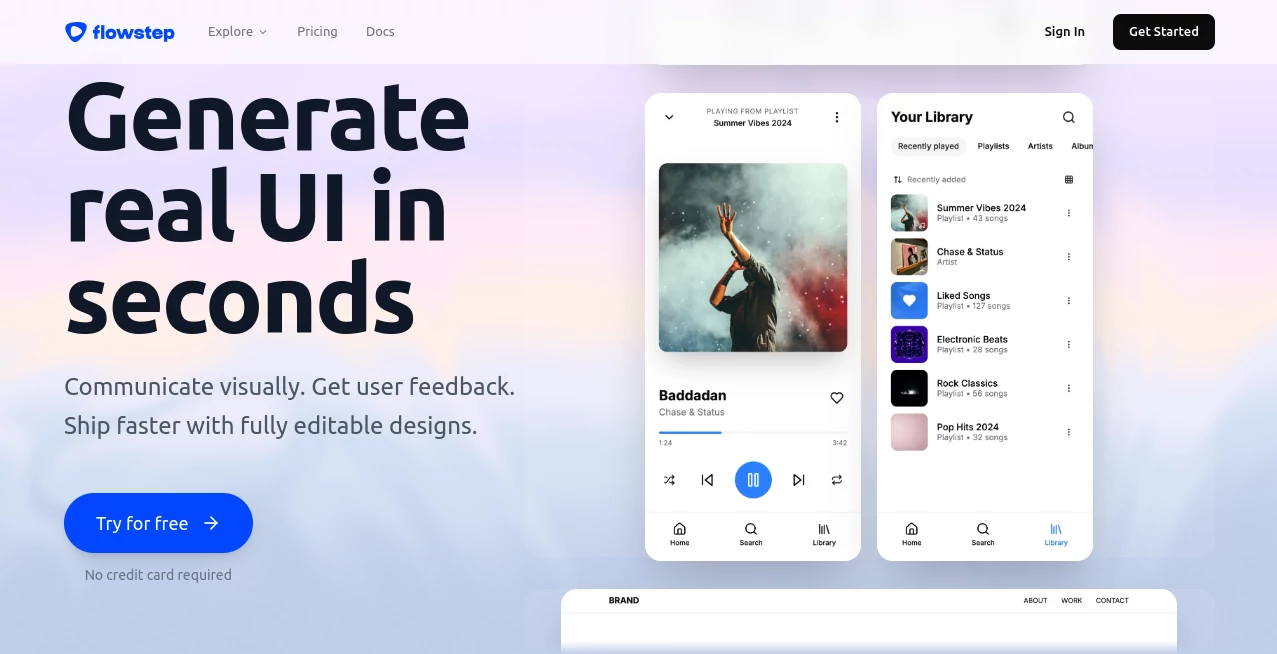
There’s a special kind of frustration that hits when you have a clear vision for a screen but the tools slow you down—blank canvases, endless tweaking, or waiting for a designer. This platform cuts through that friction beautifully. You describe what you want in plain words, and it builds actual, high-fidelity UI right on an infinite canvas. The best part? Everything stays fully editable, exportable to Figma, and even ready for clean code. I’ve watched product folks go from vague concept to shareable prototype in minutes instead of days. It feels less like a tool and more like having a ridiculously fast design partner who actually gets your vision.
Introduction
Most AI design tools spit out pretty pictures that you can’t really use. Flowstep is different. It generates real, structured UI components you can drag, drop, refine, and ship. Whether you’re a solo founder sketching an MVP, a product manager mapping flows, or a designer exploring concepts, it keeps you in creative flow instead of fighting software. The infinite canvas feels natural, collaboration is seamless, and the output is production-minded from the start. People who try it often say the same thing: “This is how I always wished design tools would work.”
Key Features
User Interface
The workspace is calm and focused—an infinite canvas where ideas appear as you type. No cluttered side panels or hidden menus. You chat naturally (“a clean dashboard for analytics with dark mode”), watch elements appear, then drag, resize, or tweak with familiar controls. It strikes a lovely balance between AI magic and hands-on control, so you never feel like you’re fighting the tool or waiting on it.
Accuracy & Performance
It understands context remarkably well—layout logic, component hierarchy, and modern design patterns. Prompts turn into coherent screens that respect spacing, typography, and user flow. Generations are fast enough to keep momentum, and revisions happen instantly. The consistency across multiple screens in one project is impressive, which is where many other tools fall apart.
Capabilities
From single screens to full multi-step user flows, it handles complex prompts with ease. You can generate, iterate with follow-up instructions, edit manually, collaborate in real time, and export cleanly to Figma or production code (React + Tailwind). Reference images, PRDs, or existing designs can guide output. It’s powerful for rapid prototyping, stakeholder presentations, and handoff—basically the full journey from spark to shippable design.
Security & Privacy
Your designs stay private by default. No training on user data, strong access controls for team workspaces, and thoughtful data handling. For companies and independent creators working on sensitive products, that respect for privacy builds real confidence.
Use Cases
A founder sketches a new SaaS dashboard idea during lunch and has a clickable prototype ready for investor calls the same afternoon. A product team maps an entire onboarding flow, gets feedback from stakeholders directly on the canvas, and refines it together in real time. A designer explores three different directions for a mobile app feature and exports the winner to Figma in seconds. It shines whenever speed and iteration matter more than pixel-perfect perfection from the start.
Pros and Cons
Pros:
- Turns natural language into real, editable UI faster than most designers can sketch.
- Infinite canvas + collaboration feels like working with a full team.
- Clean Figma and code export shortens the handoff dramatically.
- Strong understanding of modern design systems and user flows.
Cons:
- Extremely complex or highly custom enterprise designs may still need manual polish.
- Still evolving—some advanced interactions require a final human touch.
Pricing Plans
It’s free to start with generous limits so you can feel the difference immediately. Paid plans unlock unlimited generations, team collaboration features, higher export quality, and priority support. The pricing feels fair—many teams say it pays for itself by compressing weeks of design cycles into days.
How to Use Flowstep
Open a new project, start typing what you want (“SaaS analytics dashboard with sidebar navigation and dark theme”), and watch components appear on the canvas. Refine with follow-up prompts (“add a metrics overview card here” or “make this mobile responsive”). Drag and adjust anything manually, invite teammates for live feedback, then export to Figma or copy clean code when you’re happy. The loop is fast, intuitive, and addictive once you get going.
Comparison with Similar Tools
Many AI design tools generate static images or require heavy post-editing. This one produces structured, editable designs from the start and focuses on real shipping workflows with strong Figma and code integration. It sits in a sweet spot—more capable than simple generators, more approachable than heavy professional suites—making it ideal for fast-moving teams.
Conclusion
Good design should accelerate ideas, not slow them down. This tool brings that philosophy to life by removing the blank-canvas barrier and giving creators a fast, collaborative way to see and refine their vision. Whether you’re validating an idea, presenting to stakeholders, or building the real thing, it keeps the focus where it belongs—on the product, not the process. If you’ve ever wished design could move at the speed of thought, this is as close as it gets right now.
Frequently Asked Questions (FAQ)
Do I need design experience to use it?
Not at all. Clear prompts and iterative chatting work beautifully even for non-designers.
Can I export to Figma?
Yes—one-click copy-paste with excellent fidelity.
Is the generated code production-ready?
It’s clean React + Tailwind that developers can use directly or as a strong starting point.
How does collaboration work?
Real-time cursors, comments, and simultaneous editing—just like modern design tools should feel.
Is there a free plan?
Yes, generous enough to explore and build real prototypes before upgrading.
AI Design Assistant , AI No-Code & Low-Code , AI Website Designer , AI Design Generator .
These classifications represent its core capabilities and areas of application. For related tools, explore the linked categories above.

Flowstep Alternatives Product
Z-Image Gene…

AppScreens

Luma AI

ModelsLab

Seedream 5.0

deck cleaner

CatDoes

Image To Ima…

ChatGPT Imag…