
Flurink
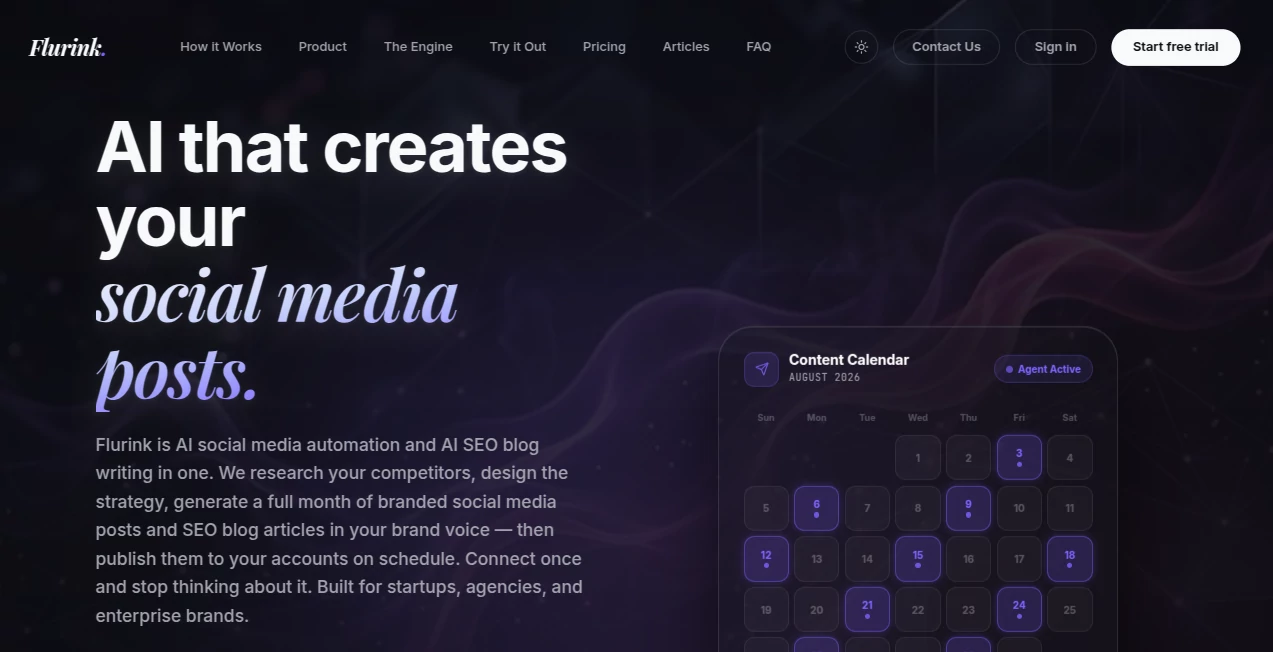
What is Flurink?
Flurink is an AI-powered content engine designed for businesses that want to keep their social channels active while building a steady stream of search-focused content. Instead of treating social media posts, blog writing, competitor research, images, hashtags, and publishing as separate jobs, it brings them into one workflow.
The platform researches competitors, studies questions people are asking in communities such as Reddit and niche forums, develops a content strategy, and creates a monthly batch of branded social posts and SEO articles. The content is designed around the brand's voice rather than a generic template, making it particularly useful for startups, agencies, and marketing teams that need consistent output without constantly managing every small task.
Its approach is especially interesting for businesses trying to combine social visibility with organic search. The platform states that its content is also designed with AEO and GEO in mind, helping brands become more discoverable in traditional search as well as AI-generated answers.
Key Features
- AI-generated social media posts with captions, images, and hashtags.
- Long-form SEO blog article generation based on keyword research and real search demand.
- Competitor research covering content, hashtags, advertising activity, and ranking keywords.
- Community question mining using Reddit and niche forums to identify topics customers actually discuss.
- AI-generated visuals tailored to the brand and content strategy.
- Brand voice and business profile creation based on the company's website, product, and competitors.
- Automated publishing for connected Instagram, Facebook, and LinkedIn accounts.
- Content calendar for reviewing and managing generated material before publication.
- Hashtag research based on competitor and trend analysis.
- Strategic scheduling designed around audience engagement patterns.
User Interface
The workflow is built around a content calendar rather than a traditional text-generation interface. After providing information about a brand, users can review the generated posts and articles, make adjustments, regenerate individual posts when necessary, and decide which social accounts should receive automated publishing.
This approach makes the experience feel closer to managing a small content operation than simply chatting with an AI writer. For an agency handling several brands, that distinction can be particularly useful because each brand can have its own voice, competitors, strategy, and publishing schedule.
Accuracy & Performance
Content quality depends heavily on the information supplied during setup and the quality of the research available for a particular market. The platform attempts to improve relevance by combining competitor intelligence, community discussions, and keyword research instead of relying solely on generic prompts.
Its SEO workflow is another strong point. Articles are planned around keywords with reported search-volume data, while topics can be based on questions found in real online communities. This gives the resulting content a clearer purpose than simply producing articles around broad keywords.
The service also reports more than 200 SEO articles and more than 400 social media posts created, alongside a workflow capable of preparing 30 days of content in one batch.
Capabilities
The platform covers much more than basic caption generation. It can research competitors, identify content gaps, create social media concepts, produce accompanying visuals, write captions, research hashtags, and generate long-form articles.
For SEO teams, its AEO and GEO-oriented approach is worth noting. The goal is not only to create pages that can rank in conventional search results, but also to structure content around questions and information that may be useful in AI-powered search experiences.
On the social side, users can connect Instagram, Facebook, or LinkedIn and have scheduled posts published automatically. Content that users prefer to publish themselves remains available in the calendar for manual use.
Security & Privacy
The platform's public website focuses primarily on content automation and publishing rather than providing extensive technical details about its security architecture. Businesses should therefore review the current privacy policy and terms before uploading confidential brand documents, sensitive customer information, or proprietary material.
For ordinary marketing workflows, the most important consideration is controlling what information is supplied to the system and which social accounts are connected for automated publishing.
Use Cases
Startups can use the platform to establish a consistent publishing rhythm without immediately hiring separate social media, SEO, design, and research specialists. A founder can provide the business information once and receive a month of planned content rather than starting from an empty content calendar every week.
Marketing agencies can benefit from the multi-brand workflow. Each client can have a distinct content strategy, brand voice, competitor set, and calendar, making it easier to manage several accounts without treating every project as a completely manual operation.
SEO-focused businesses can use the article generation workflow to turn keyword research and customer questions into a recurring editorial pipeline. Meanwhile, social teams can use the same system to produce platform-ready images, captions, and hashtags.
It can also be useful for businesses that already know what they sell but struggle with consistency. Instead of asking, “What should we post today?”, the team starts with an organized monthly batch and spends more time reviewing and improving the best ideas.
Pros and Cons
- Pros: Combines social media automation and SEO content generation in one platform.
- Pros: Uses competitor research and community questions to inform content ideas.
- Pros: Generates images, captions, hashtags, and long-form articles.
- Pros: Supports automated publishing to Instagram, Facebook, and LinkedIn.
- Pros: Designed for startups, agencies, and larger marketing teams.
- Pros: Offers a 7-day free trial with no charge during the trial period.
- Cons: Businesses wanting complete editorial control may still need to review and edit generated content.
- Cons: The value of automated publishing depends on the quality of the initial brand information and strategy.
- Cons: Users requiring highly specialized or deeply technical content may need additional human editing.
Pricing Plans
The service uses subscription-based pricing with different plans based on content volume. Public pricing starts at $49 per month, with higher tiers available for businesses that need more output. The listed plans include Starter at $49 per month, Growth at $89 per month, Scale at $139 per month, and Enterprise at $189 per month.
The Growth plan is presented as the most popular option and includes 30 social posts and 16 blog articles per month. The plans also include competitor research, content strategy, AI-generated images, SEO-focused captions, hashtag research, strategic scheduling, and automated publishing.
A 7-day trial is available for the first brand. The website states that the trial does not charge the customer during those seven days, and the trial includes three preview posts and two article generations so businesses can evaluate the output before continuing.
How to Use Flurink
- Provide your website and basic information about your business, product, or brand.
- Allow the platform to build a brand profile and identify relevant competitors.
- Review the resulting content strategy and monthly content ideas.
- Check generated social posts, images, captions, hashtags, and SEO articles.
- Regenerate a post when the first version does not match your expectations.
- Connect Instagram, Facebook, or LinkedIn if you want automated publishing.
- Review the content calendar and let scheduled posts publish automatically, or publish selected content manually.
Comparison with Similar Tools
Many social media platforms focus primarily on scheduling content that a user has already created. This platform takes a different approach by placing content research and generation before scheduling. It attempts to handle the research, strategy, writing, visual creation, hashtag selection, and publishing as one connected process.
It also goes beyond a typical social media generator by including long-form SEO articles. That combination can be useful for businesses that want their social media and organic search efforts to work from the same overall content strategy.
Compared with using a general-purpose AI assistant, the main advantage is workflow continuity. Instead of repeatedly explaining a brand, generating individual prompts, finding an image tool, researching hashtags, and arranging a publishing schedule, the platform is built around producing and managing a recurring content operation.
Conclusion
For businesses that view content as an ongoing operation rather than a collection of isolated posts, this platform offers a practical combination of research, creation, SEO writing, visual generation, scheduling, and social publishing. Its strongest differentiator is the attempt to connect these tasks into a monthly content engine.
The addition of competitor intelligence and real community questions makes the workflow more purposeful than simply asking an AI to generate generic marketing posts. Add automated publishing and recurring SEO articles, and the result is a useful option for startups, agencies, and marketing teams looking to produce more content without expanding their entire content department.
It is still wise to review important articles and branded posts before publication, particularly when accuracy, industry expertise, or a distinctive brand voice matters. Used as a structured content partner rather than a replacement for human judgment, it can significantly reduce the repetitive work involved in maintaining a modern marketing pipeline.
Frequently Asked Questions (FAQ)
Who is this platform designed for?
It is designed for startups, agencies, enterprise brands, founders, and marketing teams that need regular social media and SEO content without managing every stage manually.
Can it create SEO blog articles?
Yes. Each subscription plan includes long-form SEO articles. Topics can be developed using community questions, competitor research, and keyword data with real search volume.
Which social platforms can it publish to?
Users can connect Instagram, Facebook, and LinkedIn for automated scheduled publishing. Content can also be kept in the calendar for manual publication.
Does it generate images?
Yes. The platform creates AI-generated visuals based on the brand and the content strategy rather than simply relying on stock images.
Can I try it before paying?
Yes. A 7-day free trial is offered for the first brand. The website states that customers are not charged during the trial and receive three preview posts and two article generations.
Can generated content be edited?
Yes. Generated content can be reviewed before publishing, and each post includes one free regeneration when the initial version does not meet expectations.
Is it a replacement for tools such as Buffer or Hootsuite?
It approaches the problem differently. Traditional social scheduling tools are generally centered on organizing and publishing content that has already been created, while this platform aims to research, generate, schedule, and publish the content as part of one workflow.
Marketing , AI SEO Assistant , AI Content Generator , AI Social Media Assistant .
These classifications represent its core capabilities and areas of application. For related tools, explore the linked categories above.

Flurink Alternatives Product

Domain Rank …

Resize Image…

Socialync

Klyra AI

PromptZerk

promptcat

KarmaGuy

Groniz

Inkfox AI