
Flux 3 AI Video Generator
What is Flux 3 AI Video Generator?
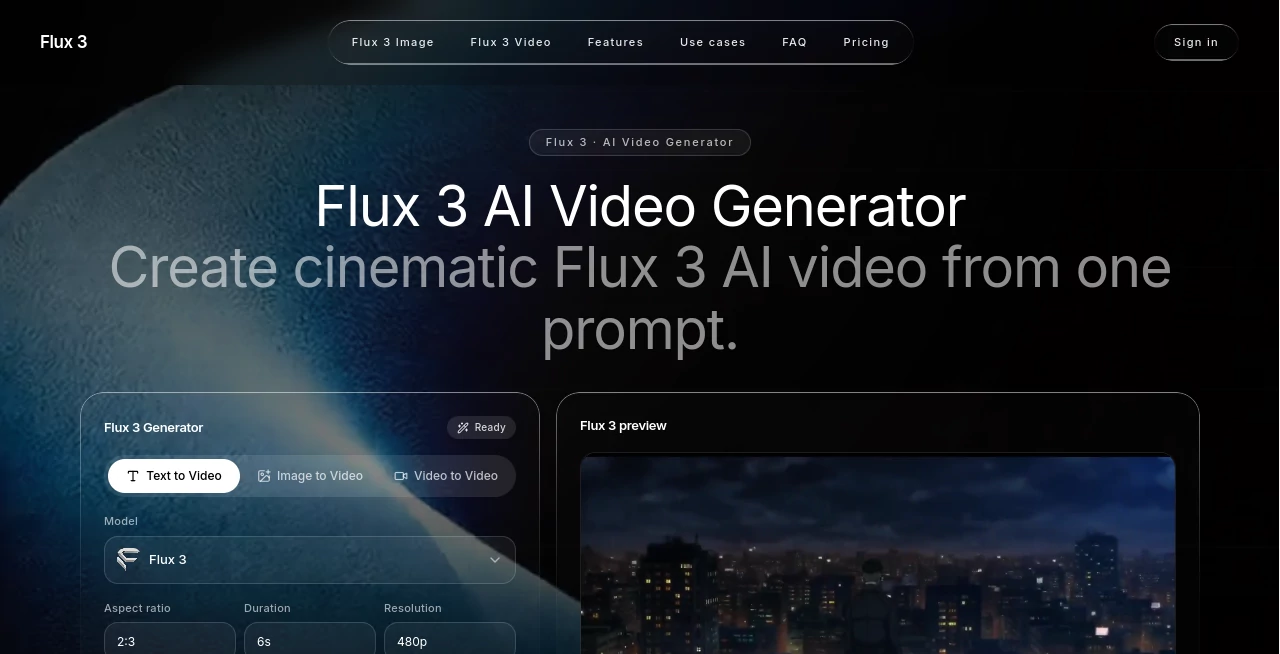
Flux 3 is an AI video generation platform designed to turn creative ideas into short, polished video clips using text prompts, images, or video references. Instead of starting with a timeline, stock footage, and a collection of editing tools, creators can begin with a simple description of the scene they want to see.
The platform focuses on prompt-driven video creation while giving users additional control through reference images and video clips. This makes it useful for marketers, content creators, product teams, filmmakers, and anyone who wants to test a visual idea before investing time in traditional production.
A particularly interesting part of the experience is its multimodal approach. Generated clips can include native audio, while prompts can describe elements such as camera movement, lighting, mood, subject behavior, and timing. For someone developing a product advertisement or testing a storyboard, being able to see an idea in motion can make the creative process considerably faster.
Key Features
- Text-to-video generation from detailed natural-language prompts
- Image-to-video generation for animating still visuals
- Video-to-video generation using reference footage
- Native audio generation matched to visual events
- Expressive human movement and facial expressions
- Multilingual dialogue generation
- Control over aspect ratio, duration, and resolution
- Reference-based guidance for products, characters, composition, and motion
- Preview-oriented workflow for testing creative ideas
- Generation history for saving and downloading successful results
User Interface
The interface is built around a relatively straightforward creation workflow. Users can choose the type of generation they need, provide a prompt or reference material, select output settings, and start generating. The absence of an unnecessarily complicated model-selection process can be helpful for people who simply want to create a video rather than spend time deciding which technical configuration to use.
The example gallery is also useful for understanding what is possible before writing a prompt. Looking at camera movement, product shots, cinematic scenes, and different visual styles can give creators a practical starting point for their own ideas.
Accuracy & Performance
Video generation quality naturally depends on the prompt, reference material, and selected output settings. Detailed prompts tend to give the system more information about the intended scene, particularly when they explain the subject, movement, camera path, lighting, atmosphere, and timing.
The reference workflow adds another layer of control. For example, a product image can provide information about shape and appearance, while a reference video can help communicate movement, rhythm, framing, or timing. This can be especially valuable when a creator needs the generated result to follow an existing visual direction.
Native audio is another notable capability. Instead of treating sound as something that must always be added during post-production, the platform can generate audio alongside the video, including environmental sounds and audio events associated with what happens on screen.
Capabilities
The platform covers several common AI video workflows in one place. A creator can start from a written scene description, animate an existing image, or provide video footage as a reference. This flexibility makes it suitable for both completely new concepts and projects that already have visual material.
Its capabilities are particularly well suited to short-form creative work. A marketer might describe a dramatic product reveal, a YouTube creator might experiment with an opening sequence, and a designer could turn a static concept into a moving presentation. The same workflow can also be used to explore storyboard ideas before committing to a larger production.
Security & Privacy
Users should review the platform's privacy policy and terms before uploading confidential material, proprietary product designs, unreleased campaign assets, or other sensitive content. As with any online generative AI service, creators should understand how uploaded references and generated content are handled before using the service for commercially sensitive projects.
Use Cases
- Marketing campaigns: Create advertising concepts, campaign variations, launch teasers, and social media visuals.
- Product marketing: Animate product images into demonstrations, close-ups, lifestyle scenes, and promotional clips.
- Social media: Produce short vertical or widescreen videos for TikTok, Instagram Reels, YouTube Shorts, and similar channels.
- Storyboarding: Turn written scene ideas into moving concept shots before producing a complete project.
- Creative testing: Experiment with different camera movements, visual directions, moods, and hooks quickly.
- E-commerce: Transform static product photography into more engaging motion-based promotional content.
- Concept trailers: Explore characters, environments, atmosphere, and action sequences during early development.
Pros and Cons
Pros
- Supports text, image, and video inputs
- Native audio generation adds another dimension to generated clips
- Reference-based creation provides more creative control
- Useful for advertising, product content, social media, and story development
- Simple workflow makes experimentation accessible to non-filmmakers
- Multiple aspect ratios and output settings support different publishing needs
- Generation history makes it easier to keep successful results
Cons
- High-volume generation can become expensive because the service uses credits
- Results can vary depending on prompt quality and scene complexity
- Creators seeking precise frame-by-frame editing may still need a traditional video editor
- AI-generated video may require multiple attempts before reaching the desired result
Pricing Plans
The platform uses a credit-based pricing system with both subscriptions and one-time credit packages. Monthly plans currently start with the Starter option at $39.90 per month for 2,000 credits. The Plus plan provides 3,600 credits for $59.90 per month, while the Pro plan offers 7,500 credits for $119.90 per month.
Yearly subscriptions are also available. The Starter yearly plan includes 20,000 credits for $279 per year, the Plus plan includes 30,000 credits for $399 per year, and the Pro plan includes 65,000 credits for $799 per year.
For creators who do not want a recurring subscription, one-time credit packages are available as well. The Standard Pack provides 2,500 credits for $50, the Pro Pack provides 5,500 credits for $99, and the Max Pack provides 12,000 credits for $199. Credit requirements can vary depending on the generation, so frequent users should consider their expected video output when choosing a plan.
How to Use the Tool
- Start with a clear idea for the video you want to create.
- Write a detailed prompt describing the subject, action, camera movement, environment, lighting, mood, and timing.
- Choose text-to-video, image-to-video, or video-to-video depending on your starting material.
- Upload an image or video reference when you need additional control over appearance, composition, or motion.
- Select the desired aspect ratio, duration, and resolution.
- Generate a preview and review the result carefully.
- Refine the prompt or reference if the movement or visual direction is not what you expected.
- Use additional credits when you are ready to create more versions.
- Save your strongest results and download them from your generation history.
Comparison with Similar Tools
Compared with traditional video editing software, this platform takes a very different approach. Instead of manually assembling footage and keyframes, users describe what they want and let generative AI produce the initial motion. This makes it particularly attractive for ideation and rapid creative testing.
It also differs from simpler text-to-video services by accepting both image and video references. That distinction matters when a creator already has a product photograph, character design, visual composition, or motion reference that needs to influence the final result.
For short advertising concepts, social clips, product visuals, and story experiments, this prompt-and-reference workflow can reduce the distance between an idea and something the team can actually watch and evaluate.
Conclusion
For creators who want to move from a written concept to a visual sequence without building everything manually, this platform offers a compelling workflow. Text prompts provide the creative starting point, while image and video references offer additional direction when consistency and visual control matter.
The combination of video generation, reference-guided creation, native audio, and flexible output settings makes it useful across marketing, social media, product promotion, and early-stage filmmaking. It is not a replacement for every part of professional video production, but it can be an effective way to explore ideas, produce short-form content, and turn static assets into motion.
Frequently Asked Questions (FAQ)
What can I create with this AI video generator?
You can create short videos for advertising, social media, product promotion, storyboards, concept trailers, and other creative projects using text prompts, images, or video references.
Can I create a video from an image?
Yes. Image-to-video generation allows you to provide a still image and use it as visual guidance for the generated video. This can be useful for product photography, characters, artwork, and other static assets.
Can generated videos include audio?
Yes. The platform supports native audio generation, allowing sound to be produced alongside the video and matched to events and actions within the scene.
Can I use a video as a reference?
Yes. Video references can help guide movement, rhythm, framing, timing, and other aspects of the generated sequence.
Do I need professional filmmaking experience?
No. The workflow is designed around natural-language prompts and references, so beginners can experiment with video creation without first learning a complete professional editing workflow.
How does the pricing work?
The service uses credits. Users can choose monthly or yearly subscriptions with recurring credit allowances, or purchase one-time credit packages when they prefer not to maintain a subscription.
AI Video to Video , AI Image to Video , AI Video Generator , AI Text to Video .
These classifications represent its core capabilities and areas of application. For related tools, explore the linked categories above.
Flux 3 AI Video Generator details
Website unavailable — View Alternatives
Pricing
- Free
Apps
- Web App
Categories

Flux 3 AI Video Generator Alternatives Product

Seedance 2.0

Kling-4 Vide…

Quso AI

Wan AI

Seedance Art

vei4 ai

PropertyPhot…

Vidtool AI

Ltx 2.3