Formind
What is Formind?
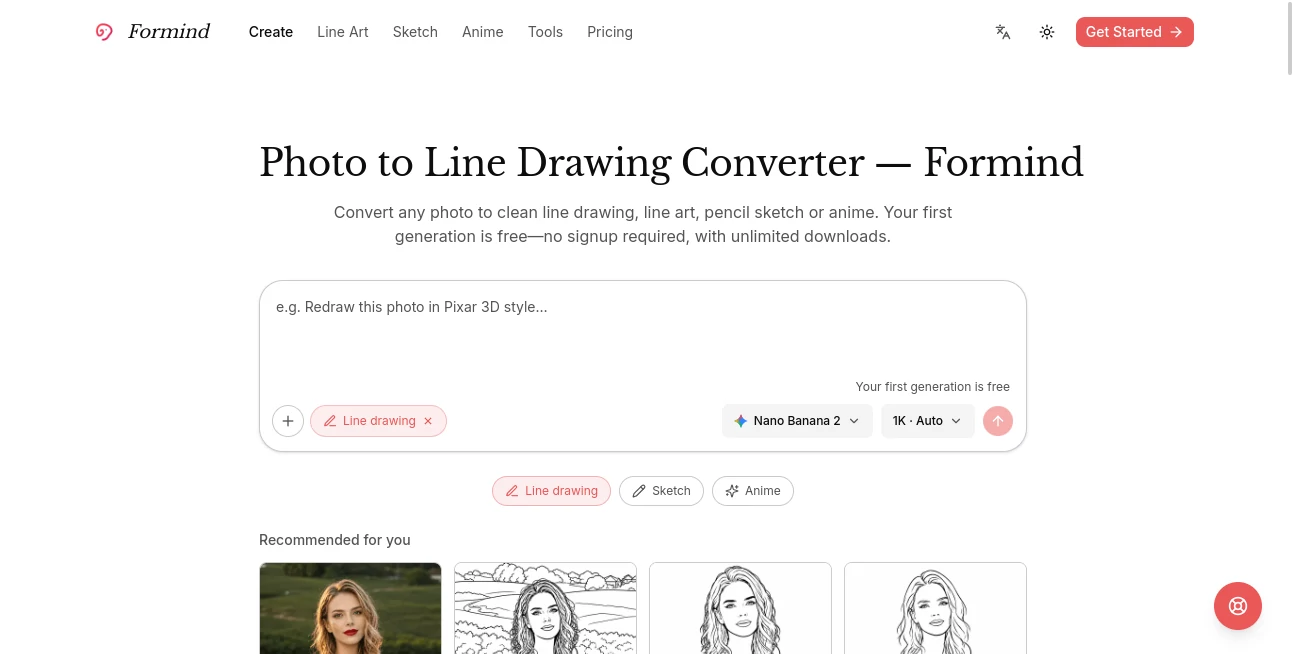
Turning an ordinary photo into something visually distinctive usually takes more than one editing step. Formind makes that process much simpler by letting users upload an image, describe the result they want, and let an AI image agent handle the transformation. It can turn portraits, products, pets, and everyday scenes into clean line drawings, pencil sketches, anime artwork, and other creative styles.
One of the most appealing parts is how easy it is to experiment. The first image generation is available for free without requiring an account, and users can download their results without a complicated workflow. Instead of starting from scratch every time something needs changing, users can continue the conversation and ask for cleaner lines, more detail, a simpler background, or a different visual direction.
Key Features
- Convert photos into clean line drawings and line art.
- Create pencil sketch and contour-style artwork from existing images.
- Transform portraits and scenes into anime-inspired artwork.
- Use conversational instructions to refine generated images.
- Remove unwanted backgrounds or objects from photos.
- Enhance image quality, sharpness, lighting, and clarity.
- Create professional profile pictures and passport-style photos.
- Expand images beyond their original borders with outpainting.
- Download generated results without an artificial download limit.
- Work with several specialized photo-editing tools from one workspace.
User Interface
The interface is built around a straightforward upload-and-describe workflow. Users do not need to understand complicated image-editing controls before getting started. A photo can be uploaded, a desired visual style can be explained in plain language, and the image agent generates an initial result.
The conversational editing approach is particularly useful when the first result is close but not quite right. For example, a user might ask for thinner outlines, fewer background details, stronger contrast, or a more recognizable face instead of returning to the beginning and uploading the image again.
Accuracy & Performance
Image transformation quality naturally depends on the source photo, requested style, and selected generation model, but the workflow is designed to preserve the important characteristics of the original image. The platform specifically supports transformations where the subject remains recognizable while its visual treatment changes.
For line-art work, the available styles include full line art, minimalist line art, no-background line art, blueprint sketches, cartoon sketches, and contour sketches. This variety makes it easier to choose an output that matches the intended use instead of relying on a single generic filter.
A practical advantage is the iterative workflow. If a first result needs improvement, users can continue refining it through conversation rather than repeatedly rebuilding the same image from the beginning.
Capabilities
The platform goes beyond a single photo-to-sketch feature. Its collection includes tools for passport photos, 2x2 picture formatting, profile pictures, background removal, image expansion, object removal, watermark removal, picture enhancement, and converting pictures into PDF documents.
Creative users can also explore photo-to-line-drawing, photo-to-line-art, photo-to-sketch, and photo-to-anime workflows. The style collection includes options ranging from minimalist and contour artwork to cartoon, classic 2D animation, 3D animation, and pop-art treatments.
Security & Privacy
When working with personal photographs, privacy is an important consideration. The service provides dedicated privacy and terms pages, while its FAQ also addresses questions around privacy, usage limits, and commercial use. Users should review the current privacy policy and terms before uploading sensitive or confidential images, particularly when working with client material or identifiable people.
For everyday creative work, the simple account system also makes it possible to start experimenting before committing to a longer workflow. The service supports account creation and sign-in through common authentication options, including Google and GitHub.
Use Cases
- Social media creators: Turn ordinary portraits into illustrations, anime images, sketches, or distinctive profile artwork.
- Designers: Produce quick line-art variations for concepts, presentations, layouts, and visual experiments.
- E-commerce sellers: Clean up product imagery, remove backgrounds, enhance photos, and prepare more polished visual assets.
- Photographers: Create alternative artistic versions of portraits, landscapes, and other photographs.
- Marketing teams: Generate visual variations for campaigns and promotional material without manually rebuilding every image.
- Pet owners: Turn pet photographs into sketches, cartoons, or anime-inspired artwork.
- Personal projects: Transform memorable photographs into creative artwork suitable for sharing or printing.
- Professional profiles: Create cleaner profile pictures and polished portrait variations.
Pros and Cons
- Pros: Easy photo-to-art workflow, conversational refinement, multiple artistic styles, free first generation, no signup required for initial use, unlimited downloads, and a broad collection of additional photo tools.
- Pros: Useful for both creative experimentation and practical image preparation such as background removal, enhancement, and ID-style photography.
- Cons: More advanced usage consumes credits, so frequent creators need to pay attention to their available credit balance.
- Cons: Results can vary depending on the quality and composition of the uploaded photograph and the style requested.
- Cons: Users looking for traditional pixel-level photo editing may still prefer a conventional professional image editor for highly manual adjustments.
Pricing Plans
The service uses a credit-based pricing model. New users can test the experience with a free generation, while paid usage provides additional credits for image generation and editing. The current pricing information lists three monthly options: Lite at $1.90 per month with 2,000 credits, Pro at $9.90 per month with 4,800 credits, and Ultra at $39.90 per month with 10,000 credits.
All three paid plans include access to image generation and editing with custom prompts, access to the available image models, unlimited downloads, and a commercial license. This makes the lower-cost plan particularly interesting for occasional creators, while the larger plans are better suited to users producing images regularly.
How to Use Formind
Getting started is straightforward. Choose the photo you want to transform and upload it to the relevant image tool. A clear portrait, product photograph, pet image, or scene generally gives the system a better starting point.
Next, describe the result you want in natural language. You might ask for a minimalist line drawing, a detailed pencil sketch, a clean background, or an anime-inspired treatment. The image agent selects an appropriate image model and produces the first result.
The real benefit comes during refinement. If the result is almost right, continue the conversation and explain what should change. Requests such as simplifying the background, preserving facial features, increasing line detail, or changing the artistic style can be used to guide subsequent versions. Once the result looks right, it can be downloaded and reused for the intended project.
Comparison with Similar Tools
Many AI image services focus primarily on generating a new image from a text prompt. This platform takes a more practical photo-editing direction by starting with an existing image and allowing the user to progressively transform it.
That distinction is useful for people who already have a photograph they like but want to explore different visual treatments. Instead of replacing the original concept entirely, the workflow can preserve the subject while changing its presentation. The combination of line-art, sketch, anime, enhancement, background removal, object removal, and other utilities also makes it more versatile than a tool built around one single transformation.
For someone who wants complete manual control over every pixel, a traditional image editor will still offer more detailed controls. For quick AI-assisted transformations, however, the conversational approach can save considerable time and reduce the number of repetitive editing steps.
Conclusion
Formind is a practical choice for anyone who wants to transform existing photographs without learning a complicated editing workflow. Its strongest point is the combination of AI image generation and conversational refinement: users can start with a real photograph, describe the desired direction, inspect the result, and continue refining it until the image feels right.
The free first generation makes experimentation easy, while the credit-based plans provide an affordable path for people who need more frequent image creation. With tools covering line art, sketches, anime transformations, background removal, enhancement, profile photos, and several other everyday tasks, it can serve both casual creators and professionals who need quick visual variations.
Frequently Asked Questions (FAQ)
Can I use the service for free?
Yes. The current website offers a first free generation, and the initial photo-to-line-drawing workflow does not require an account. Paid usage is available when additional credits are needed.
Do I need to create an account before trying it?
No. The first generation can be tested without signing up. An account becomes useful when you want to continue your work and use the broader platform features.
What types of images can I transform?
You can work with portraits, product photographs, pet images, and general scenes. Different tools are available for line drawings, sketches, anime transformations, enhancement, background removal, and other image-editing tasks.
Can I refine an image after it has been generated?
Yes. The image agent supports conversational refinement, allowing you to request changes such as cleaner lines, additional detail, different styling, or background adjustments instead of starting over.
Are downloads limited?
The current service states that generated results can be downloaded without an artificial download limit.
Is commercial use available?
The current paid plans list a commercial license as part of their included features. Users should still review the latest terms of service for specific commercial-use conditions.
How much does image generation cost?
Image operations consume credits, with the exact amount depending on the tool and operation. For example, some current photo-editing tools display a cost of 4 credits per generation, while the photo-to-line-drawing workflow currently shows a higher credit requirement.
What makes the conversational workflow useful?
It allows users to explain what they want changed in ordinary language. Instead of adjusting dozens of manual settings, you can describe the problem and request another version while keeping the creative direction consistent.
AI Illustration Generator , Photo & Image Editor , AI Photography , AI Anime & Cartoon Generator .
These classifications represent its core capabilities and areas of application. For related tools, explore the linked categories above.

Formind Alternatives Product

img2img.net
PostPlus AI

Image Descri…

AI Image Edi…

Image to STL
Ghibli Image…

GPT Imagine

Klyra AI

Krea 2 Turbo