
















GPT Imagine
What is GPT Imagine?
Have you ever spent hours trying to describe a perfect image to a bot, only to get back something that looks like a melted clock? Frustrating, right. That’s where this platform completely flips the script. It takes the headache out of AI art by pairing a seriously powerful engine with an interface that doesn’t require a computer science degree.
This isn't just another run-of-the-mill generator. It’s built for speed freaks and quality junkies. Whether you need a gritty cyberpunk alleyway or a fluffy corporate mascot, the results feel less like "algorithm output" and more like something a human actually wanted. It bridges the gap between professional design studios and solo creators who just need a fantastic thumbnail, fast .
Key Features
While other tools bog you down with sliders and confusing CFG scales, this platform focuses on what actually matters: getting the shot. Here is a breakdown of the core mechanics that make it stand out.
User Interface
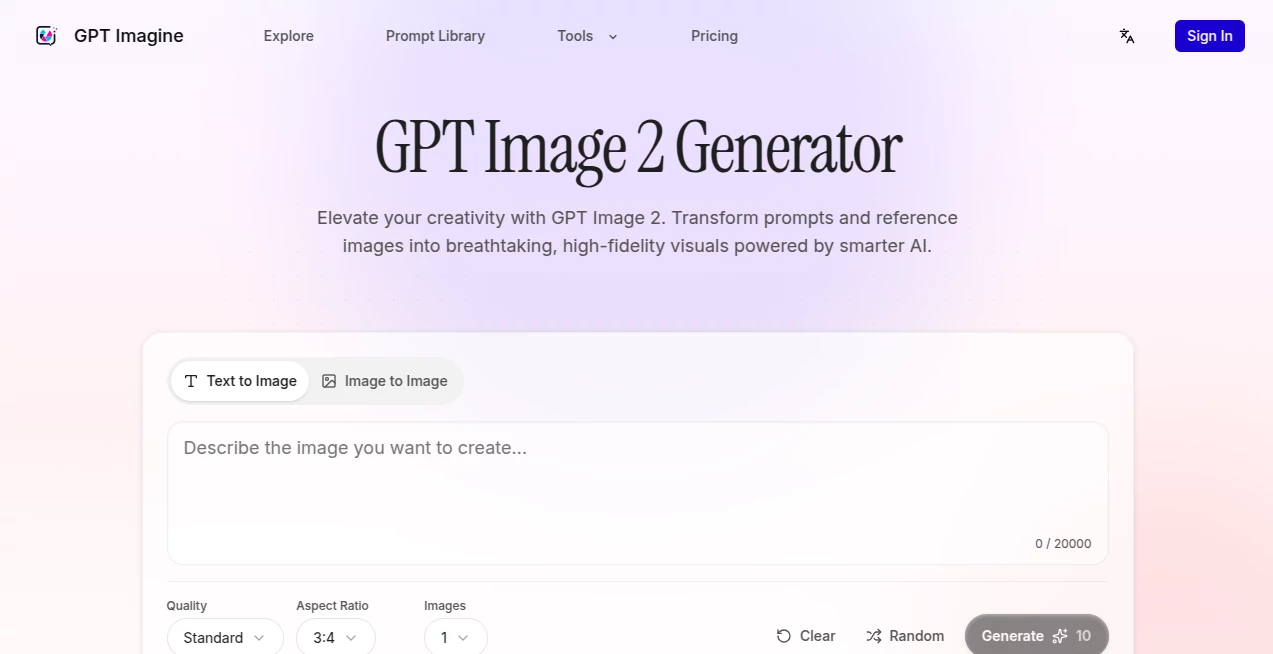
You know that feeling when you open a new software and immediately want to close it because there are 500 buttons? You won't get that here. The layout is refreshingly clean. Drag and drop your reference image, type what you want, and hit generate. It’s built to remove friction, allowing you to iterate through dozens of ideas in minutes rather than hours. The visual controls for aspect ratios (perfect for TikTok vs. LinkedIn) are right there on the main screen, not buried three menus deep.
Accuracy & Performance
This is where the magic happens. Powered by the advanced GPT Image 2 model, the platform actually listens. If you ask for a "red fox wearing a spacesuit eating pizza on Mars," you’ll get exactly that, not a weird fox-dog hybrid floating in beige nothingness. The speed is impressive too. We are talking seconds, not coffee-break minutes. It handles complex lighting and textures like fur, glass, and metal without turning them into a blurry mess .
Capabilities
Versatility is the name of the game. You aren't stuck with just typing text. The Image-to-Image feature is a lifesaver for brand consistency. Have a sketch or a photo of a product? Upload it. You can change the background from a messy office to a tropical beach while keeping the product looking identical. The batch generation mode is perfect for A/B testing ad creatives—generate four or eight variations of a single prompt at once to see which one pops .
Security & Privacy
Nobody wants their unreleased album art or book cover floating around on a public server. The platform treats your creations with respect. While there is a public library for inspiration (which is opt-in for sharing), your private workspace stays private. You retain full rights to the images you generate, which is crucial for commercial projects .
Use Cases
So, who actually gets the most bang for their buck here? Pretty much anyone who needs visuals, but let's look at three specific winners:
- E-commerce Owners: Stop paying for expensive photoshoots for every single product variant. Generate lifestyle images showing your mug on a ski slope or your t-shirt on a mannequin in Paris.
- Social Media Managers: Need a themed post for "International Cat Day" tomorrow at 9 AM? Generate quirky, on-brand mascots and backgrounds in bulk to keep your calendar full without stock photo watermarks .
- Stuck Creatives: Staring at a blank page is terrifying. Using the built-in Prompt Library, you can grab a prompt for a "cyberpunk samurai," click "Import," and tweak it. It's like having a brainstorming partner who never gets tired .
Pros and Cons
Let’s keep it real. No tool is perfect for every single job, but this one comes pretty close for most creators.
Why you’ll love it: The learning curve is basically flat. You get professional-grade "Ultra" quality outputs without needing to be a prompt engineer. The pay-as-you-go credit system means you aren't trapped in a monthly subscription you forget to cancel. Plus, the drag-and-drop image editing is seamless.
The catch: Because it relies on a credit system, heavy users (agencies generating thousands of images a day) will need to keep an eye on their balance. Also, while the library is great, sometimes you just want to browse without importing, and the UI pushes you toward creating rather than just lurking.
Pricing Plans
They operate on a transparent credit system. You buy a pack of credits, and generating an image uses a certain amount based on the quality you select (Standard, HD, or Ultra). "Standard" is great for drafts and social media, while "Ultra" is perfect for print and high-res thumbnails. This model is great because you aren't punished for taking a week off; your credits just sit there waiting for you .
How to Use GPT Imagine
Getting started takes less time than making coffee. First, head to the website. You don't even need to sign up to browse the prompt library, but to generate, you'll need an account. Pick your mode: Text-to-Image if you have a clear vision, or Image-to-Image if you want to modify an existing shot. Type your prompt in natural language. Seriously, talk like a human: "A cinematic shot of a wizard drinking tea in a library." Select your aspect ratio (16:9 for YouTube, 1:1 for Instagram). Hit generate. If you love it, download it. If you don't, tweak the prompt and go again. It’s that simple .
Comparison with Similar Tools
Look, we all know the big players like Midjourney and DALL-E exist. But where they are complex (Discord bots, anyone?) this tool is accessible. Midjourney requires learning specific parameters like `--ar` and `--style raw`. This tool uses buttons and sliders. You don't have to memorize a dictionary. Compared to stable diffusion interfaces, which often look like airplane cockpits, this one is a bicycle. It gets you where you need to go without the risk of crashing due to a bad setting. It trades infinite customization for speed and reliability, which frankly, 90% of users want .
Conclusion
If you have been burned by AI tools that produce plastic-looking nightmares, give this one a shot. It respects your time and your creativity. The combination of the high-fidelity GPT Image 2 engine with the dead-simple user interface makes it a no-brainer for anyone from YouTubers to interior designers. It handles the heavy lifting of rendering, leaving you free to focus on the fun part: the ideas.
Frequently Asked Questions (FAQ)
Do I need to be a designer to use this? Absolutely not. If you can type a sentence on Twitter, you can generate an image here.
What is the "Prompt Library" I keep hearing about? It’s a curated gallery of images made by other users. If you see a style you like, you hit a button, and it copies the exact prompt and settings to your generator. It is the best cure for creative block.
Can I sell the images I make? Yes. For almost all commercial uses, the rights belong to you. Always check the specific terms, but generally, go ahead and sell those t-shirt designs.
What’s the difference between the quality modes? Standard is fast and great for social media. HD is sharper. Ultra is maximum resolution, perfect for printing posters or full-screen website heroes .