
FreeGPT
What is FreeGPT?
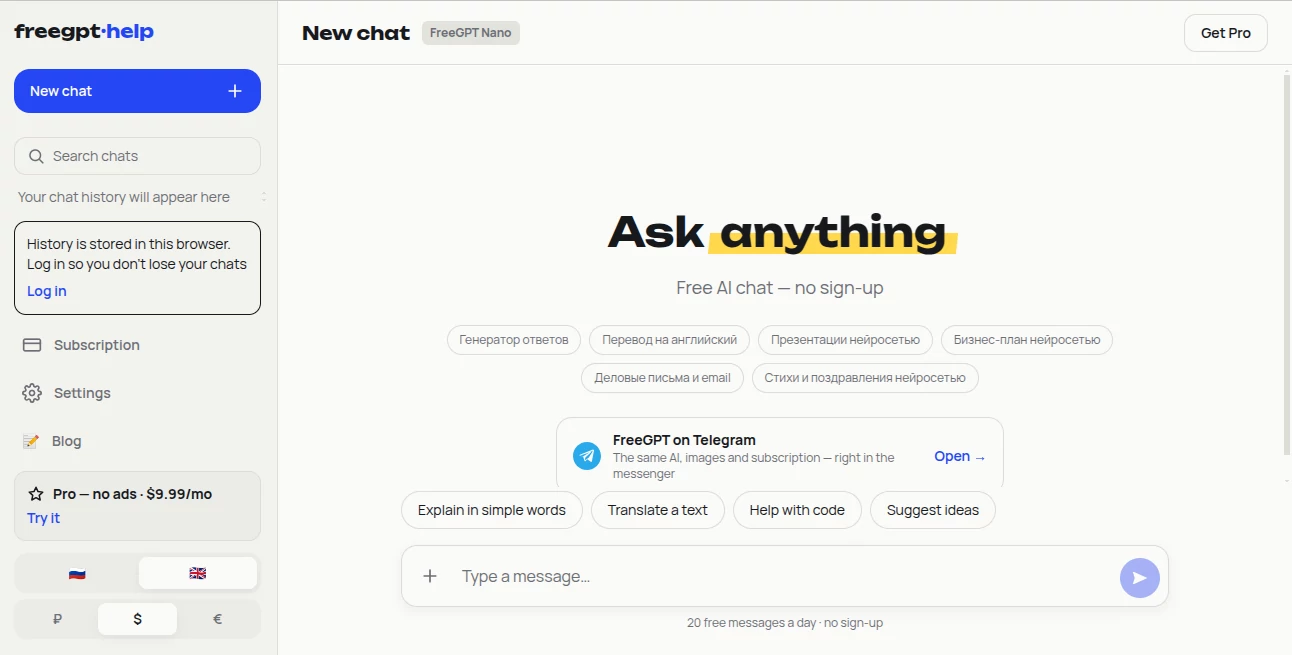
FreeGPT is a browser-based AI chat service designed for people who want quick access to AI without going through a complicated registration process. The homepage keeps things simple: open a new chat, ask a question, and start working. It supports everyday requests such as explaining a topic, translating text, helping with code, generating ideas, and working with text and images.
One of its strongest advantages is accessibility. The free experience is available without signing up, making it useful when you need an answer quickly or simply want to test an AI assistant before committing to a subscription. The service also provides an English interface alongside Russian, with currency options for different users.
Key Features
- AI chat without registration for everyday questions and tasks.
- Text generation and assistance for writing-related requests.
- Text translation for multilingual communication.
- AI-powered coding assistance and explanations.
- Text-to-image generation on supported plans.
- Different AI model levels depending on the subscription.
- Conversation history for paid users.
- File and image support on higher-tier plans.
- Multiple response styles, including Short, Normal, and Detailed.
- Light, Dark, and System appearance options.
User Interface
The interface is intentionally uncluttered. A new conversation is placed at the center of the experience, while previous chats can be searched from the sidebar when chat history is available. Quick actions such as explaining something simply, translating text, getting help with code, or generating ideas make it easier to start without having to formulate a detailed prompt from scratch.
There are also useful personalization settings. Users can choose their preferred interface language, change the visual theme, select how detailed answers should be, and decide whether pressing Enter sends a message. These small controls make the service feel practical rather than overloaded with options.
Accuracy & Performance
Performance depends on the model included with the selected plan. The service separates everyday fast responses from more capable models intended for demanding tasks. Higher plans add priority speed and access to models designed for deeper answers, analysis, coding, and longer pieces of text.
For quick questions, brainstorming, translations, and routine writing, the fast model is positioned as the everyday option. Users handling more complicated research, programming, or lengthy documents can move to higher tiers when additional capability is needed.
Capabilities
The platform covers several common AI workflows in one place. A user can ask it to explain a difficult concept, translate a passage, assist with programming, develop ideas, generate written content, or create images when the selected plan supports image generation.
Paid tiers extend these capabilities further with file and image support, larger daily allowances, longer conversation context, and access to more advanced models. This makes the service suitable not only for casual experimentation but also for users who want a lightweight AI workspace for recurring tasks.
Security & Privacy
The service provides privacy-related controls through its settings and account area. One notable detail is that chat history for the no-sign-up experience is stored only in the user's browser. Users can also download their data or clear their chat history from the settings interface.
For subscriptions, an account is required so access can work across devices. Users should still review the platform's privacy and terms pages before submitting confidential business information, personal data, or sensitive documents.
Use Cases
This service fits particularly well into quick, everyday AI workflows. A student can use it to simplify a difficult subject, summarize information, translate a passage, or brainstorm ideas for an assignment. A developer can use the coding assistant to discuss an error, understand unfamiliar code, or explore an implementation approach.
It can also be useful for content creators and marketers who need help drafting text, developing ideas, translating material, or producing supporting images. For professionals, the higher subscription levels become more interesting when file handling, extended context, stronger models, or higher usage limits are important.
For example, someone preparing an article could first ask for a simple outline, refine individual sections, translate selected material, and then use image generation where available. The ability to move between different types of tasks inside the same chat makes that workflow convenient.
Pros and Cons
- Pros: No-sign-up access for the free experience, straightforward interface, useful quick-start prompts, text and coding assistance, translation, image generation on paid plans, multiple model tiers, and flexible settings.
- Cons: The free experience has usage limits and includes advertising. Image generation, file support, advanced models, higher limits, and priority speed require paid plans. An account is also required for subscriptions.
Pricing Plans
The service uses a tiered subscription structure. The Free plan costs $0 and includes 30 messages per day with a fast model and advertising.
The Go plan costs $2.99 per month and removes ads while providing up to 500 fast messages and 15 images per day, along with chat history. Plus costs $6.99 per month and adds a smart-lite model, file and image support, and up to 40 images per day.
The Pro plan costs $9.99 per month and adds access to a top model, up to 100 images per day, and priority speed. The Ultimate plan costs $19.99 per month and offers the highest model tier, up to 300 images per day, maximum conversation context, priority speed, and early access to new features.
Paid subscriptions can be cancelled at any time, with access remaining active until the end of the paid period. The service processes card payments through Stripe.
How to Use FreeGPT
- Open the AI chat interface in your browser.
- Start a new conversation.
- Enter a question, instruction, or task into the chat box.
- Use one of the suggested actions if you need inspiration for your first request.
- Continue the conversation with follow-up questions to refine the response.
- Adjust the answer style, language, theme, or other preferences from Settings when needed.
- Upgrade to a paid plan if you need higher limits, image generation, file support, advanced models, or priority performance.
Comparison with Similar Tools
Compared with general-purpose AI chat platforms, this service focuses heavily on straightforward access and a low barrier to entry. The ability to start chatting without creating an account is particularly convenient for occasional users who do not want another registration process.
Its subscription structure also gives users several steps between a completely free experience and access to stronger models. Instead of requiring every user to pay for advanced capabilities, the platform allows casual users to stay on the free tier while heavier users can select a plan based on message volume, image generation, file support, model capability, and speed.
Another practical difference is the emphasis on a clean, focused chat environment. Rather than making users navigate a large collection of separate tools, common actions such as translation, coding help, explanations, and idea generation are available directly from the conversation interface.
Conclusion
For anyone looking for a simple way to access AI chat from a browser, this service offers a compelling combination of accessibility and useful everyday features. The no-sign-up starting point makes it especially convenient for quick questions, while the paid tiers provide a clear upgrade path for people who need more messages, image generation, files, stronger models, or faster service.
Its biggest strength is simplicity. You can open the chat, describe what you need, and get started without learning a complicated workflow. For casual users it can remain a free AI assistant, while students, developers, creators, and professionals with heavier requirements have several paid options to choose from.
Frequently Asked Questions (FAQ)
Can I use the AI chat without creating an account?
Yes. The free chat experience is available without sign-up. An account is required when purchasing a subscription.
How many free messages are available each day?
The current Free plan provides 30 messages per day and uses the fast model.
Does it support image generation?
Yes. Image generation is available on paid plans, with daily image limits increasing from Go through Ultimate.
Can I upload files?
File support is available with the Plus, Pro, and Ultimate plans.
Can it help with programming?
Yes. Coding assistance is one of the supported everyday use cases, and higher-tier models are designed for more demanding coding and analysis tasks.
Is chat history available?
Chat history is available on paid plans. For the no-sign-up experience, chat history is stored only in the user's browser.
Can I change the response style?
Yes. Settings provide Short, Normal, and Detailed answer styles, allowing users to control how much information they receive.
Can a subscription be cancelled?
Yes. Subscriptions can be cancelled at any time, and access remains available until the end of the paid billing period.
Which plan is suitable for advanced AI work?
Pro and Ultimate are aimed at users who need stronger models, higher usage limits, image generation, and priority speed. Ultimate is the highest tier and adds the maximum model level and early access to new features.
These classifications represent its core capabilities and areas of application. For related tools, explore the linked categories above.

FreeGPT Alternatives Product

FortuneTelle…

Vapi

FLINT AI

VoiceFlow Te…

ZynfoAI

Play Queens …

Ryne AI

Blushly Chat
Sauci.ai