FreeOCR.AI
What is FreeOCR.AI?
Converting scanned documents, screenshots, handwritten notes, and images into editable text no longer needs to be a slow or frustrating process. This AI-powered OCR platform brings together modern vision language models and intelligent document recognition to deliver highly accurate text extraction directly from a web browser. There is nothing to install, no complicated setup, and even first-time users can start processing files within seconds.
Unlike many traditional OCR solutions that struggle with tables, mathematical formulas, mixed languages, or handwritten content, this platform is designed to understand document structure instead of simply recognizing characters. It supports more than 100 languages and automatically detects text without requiring manual language selection. Whether you are digitizing books, extracting invoice data, converting PDFs into editable documents, or copying text from screenshots, the experience remains fast, reliable, and remarkably accurate.
Its browser-based workflow makes it equally attractive for students, researchers, office professionals, developers, and businesses that need dependable document processing without investing in expensive desktop software. The combination of speed, intelligent formatting preservation, and privacy-focused processing makes it a practical solution for everyday OCR tasks.
Key Features
User Interface
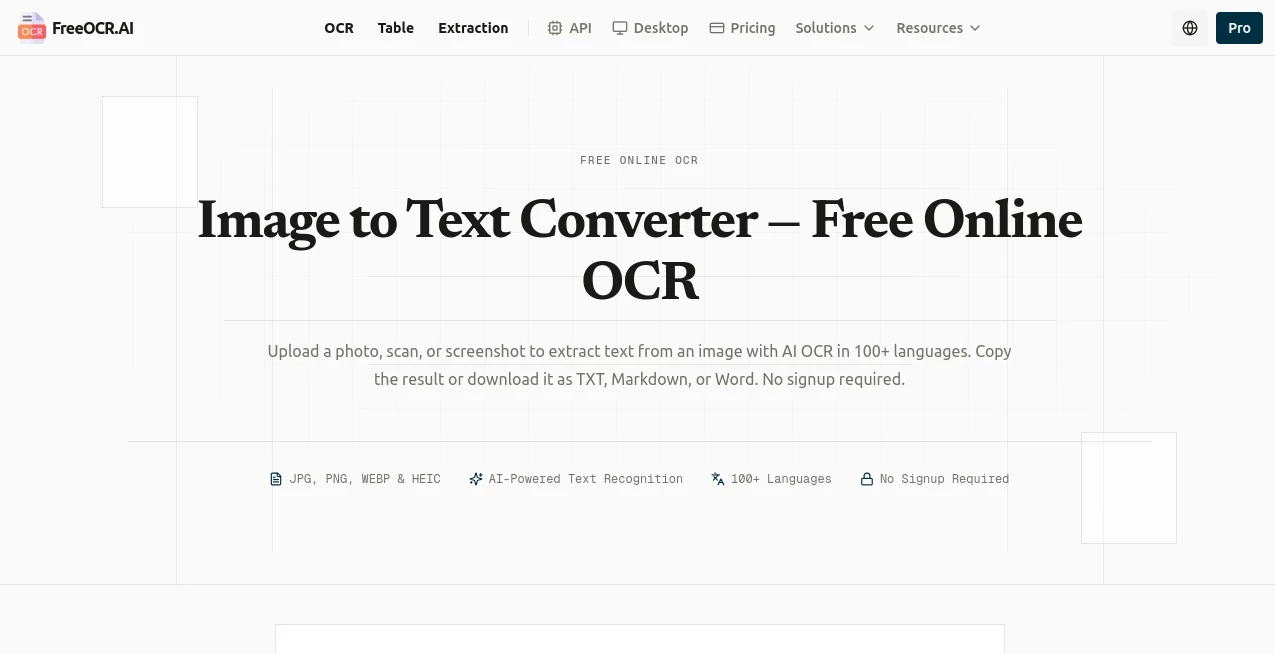
The interface is intentionally simple. Users can drag and drop images, upload files, or paste screenshots directly into the browser. Processing begins immediately, eliminating unnecessary registration for basic usage. Navigation is clean, making advanced OCR technology accessible even for people with little technical experience.
Accuracy & Performance
Powered by modern Vision Large Language Models, the platform delivers impressive recognition accuracy across printed documents, handwritten notes, complex layouts, and multilingual content. It preserves paragraphs, tables, columns, and document structure far better than many conventional OCR engines. Mathematical expressions can even be converted into LaTeX or Markdown formats for academic workflows. Support for over 100 languages further improves its versatility across international projects. :contentReference[oaicite:0]{index=0}
Capabilities
- Extract text from images and scanned documents.
- Convert PDF files into editable text or Word documents.
- Recognize handwritten content with high precision.
- Extract structured table data into CSV or Excel-ready formats.
- Capture custom fields from invoices, receipts, and forms.
- Export results as plain text, Word, Markdown, or structured datasets.
- Support multilingual documents without manual language selection.
- Provide OCR API access for developers building automated workflows.
- Handle books, research papers, business documents, and screenshots.
- Process documents directly from any modern web browser.
Security & Privacy
Privacy is treated as a priority. Uploaded files used through the free service are processed temporarily and are not permanently stored after OCR is completed. The platform also states that user documents are not used for AI model training, while secure encrypted transfers protect uploaded data during processing. These practices make it suitable for users handling sensitive documents. :contentReference[oaicite:1]{index=1}
Use Cases
- Digitizing printed books and research papers.
- Converting scanned contracts into editable documents.
- Extracting invoice and receipt information for accounting.
- Transforming screenshots into searchable text.
- Recognizing handwritten lecture notes.
- Converting tables into Excel-ready spreadsheets.
- Preparing multilingual documents for translation.
- Automating OCR workflows through API integration.
- Creating editable versions of archived PDFs.
- Processing business forms and structured documents.
Pros and Cons
Pros
- Excellent recognition accuracy for complex layouts.
- Supports over 100 languages.
- No installation required.
- Free usage available without registration.
- Recognizes handwritten text and mathematical formulas.
- Table extraction preserves document structure.
- Developer-friendly API.
- Strong privacy-focused approach.
Cons
- Advanced batch processing requires a paid subscription.
- Internet connection is required.
- Heavy enterprise workloads may require API credits or Pro plans.
Pricing Plans
The service offers a generous free tier for individual users with no signup required for basic OCR tasks. Professional users can subscribe to monthly or yearly Pro plans that include batch processing, priority performance, bulk exports, and additional productivity features. Permanent pay-as-you-go credits and enterprise solutions are also available for organizations requiring large-scale document processing. :contentReference[oaicite:2]{index=2}
How to Use FreeOCR.AI
- Open the website using any modern browser.
- Upload an image, scanned document, or PDF.
- Wait a few seconds while the AI analyzes the content.
- Review the extracted text and formatting.
- Export the results as text, Word, Markdown, CSV, or another supported format.
- Use the API for automated OCR workflows if needed.
Comparison with Similar Tools
Compared with conventional OCR software, this solution focuses on understanding the complete structure of a document rather than simply recognizing characters. It performs particularly well when processing handwritten notes, complex tables, mathematical formulas, and multilingual documents. The browser-based workflow removes installation barriers, while API access allows developers to integrate intelligent OCR into their own applications. Its combination of accessibility, accuracy, privacy, and modern AI technology gives it a noticeable advantage over many traditional OCR utilities. :contentReference[oaicite:3]{index=3}
Conclusion
For anyone looking to transform images or scanned documents into editable, searchable content, this platform delivers an impressive balance of simplicity and advanced AI capabilities. From everyday document conversion to enterprise automation, it provides reliable OCR performance while preserving formatting that many traditional solutions struggle to maintain. Its commitment to multilingual support, secure processing, and accessible browser-based workflows makes it a valuable productivity tool for students, professionals, researchers, and businesses alike.
Frequently Asked Questions (FAQ)
Does it support handwritten text?
Yes. The platform is designed to recognize handwritten notes with significantly better accuracy than many traditional OCR systems.
Can it process multiple languages?
Yes. It automatically detects and recognizes text in more than 100 languages.
Is installation required?
No. Everything runs directly in the browser without downloading software.
Can it extract tables from scanned documents?
Yes. Table extraction preserves rows and columns and allows exporting structured data into spreadsheet-friendly formats.
Is there an API for developers?
Yes. Developers can integrate OCR, table extraction, and structured document processing into their own applications through the available REST API.
AI Document Extraction , AI PDF , AI Productivity Tools , AI Files Assistant .
These classifications represent its core capabilities and areas of application. For related tools, explore the linked categories above.

FreeOCR.AI Alternatives Product

Tooladda

PDFgear

ClawBridge

Unix Timesta…

Sourcetable

Ryne AI

gemini omni …

AllInOneTools
AI Wire