


















GA4.so
What is GA4.so?
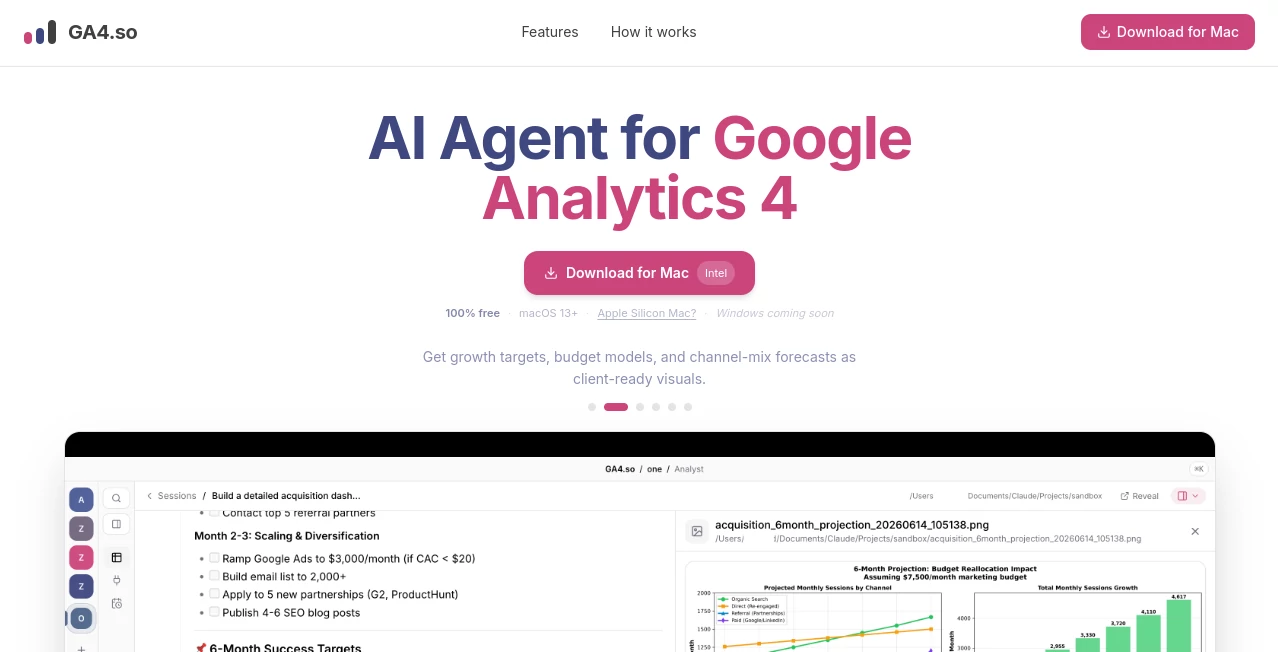
I used to dread opening Google Analytics. Endless dashboards, confusing reports, and that nagging feeling I was missing the important insights hidden in the data. Then I started using this AI agent and everything changed. It feels like having a sharp, patient analyst who actually understands your business sitting next to you. You ask questions in plain English, and it goes off, pulls the right data, writes the queries, and comes back with clear answers, charts, and actionable recommendations. No more wrestling with GA4’s interface or second-guessing what you’re looking at. It just works.
Introduction
Google Analytics 4 is powerful but notoriously complex for most people. Between custom reports, event tracking, and trying to connect everything to business goals, many teams only scratch the surface of what their data can tell them. This platform changes that by turning GA4 (and Google Search Console) into something conversational and useful. It acts as your dedicated AI agent — fetching data, writing code behind the scenes, creating scheduled reports, and delivering insights with beautiful charts. Whether you’re a marketer, founder, or analyst who wants deeper understanding without the technical headache, it makes GA4 finally feel approachable and valuable.
Key Features
User Interface
The chat interface is clean and natural. You type questions like “What were our top converting pages last month?” or “Show me traffic trends compared to last year,” and it responds with clear explanations and visuals. You can schedule recurring insights, build custom dashboards, and even ask follow-up questions that reference previous answers. It never feels intimidating — just like having a smart colleague who’s always available and never gets tired of explaining things.
Accuracy & Performance
It pulls real data directly from your GA4 and Search Console properties, so the numbers are accurate and up-to-date. The agent writes the actual queries needed, which means it can handle complex analysis that would take humans much longer. Responses come back quickly, and the charts are clear and professional. Users often mention how it catches insights they would have missed manually — seasonal patterns, unexpected drops, or emerging opportunities.
Capabilities
Beyond basic questions, it can create automated weekly or monthly reports, build growth forecasts, model budgets, compare campaigns, analyze user behavior flows, and connect data across sources. You can ask for plain-English summaries, deep dives, or specific visualizations. It’s particularly strong at turning raw analytics data into business-relevant insights instead of just showing you graphs.
Security & Privacy
It connects securely to your Google properties using proper authentication. Your data never leaves your control unnecessarily, and the platform focuses on delivering insights without storing sensitive information longer than needed. For businesses handling real customer data through GA4, this careful approach builds important trust.
Use Cases
A marketing manager asks for a weekly performance summary and gets a clear email with key wins, problem areas, and recommendations. An e-commerce founder tracks which traffic sources actually drive profitable sales instead of just vanity metrics. A content team discovers which blog posts bring the best leads and doubles down on similar topics. Agencies use it to deliver better reporting to clients without spending hours building custom dashboards. It fits naturally into any workflow where understanding website and search performance matters.
Pros and Cons
Pros:
- Turns complex GA4 data into clear, actionable insights in plain English.
- Saves enormous time compared to manual reporting and analysis.
- Scheduled reports and visualizations keep everyone informed without extra work.
- Handles both GA4 and Search Console together for a fuller picture.
- Feels like working with a skilled analyst rather than fighting an interface.
Cons:
- Best results come from well-set-up GA4 properties (clean events and conversions).
- Very advanced or highly custom analysis may still need manual verification.
Pricing Plans
It offers a free tier generous enough to test with your own data and see real value quickly. Paid plans unlock more frequent reports, higher usage limits, team access, and advanced modeling features. The pricing feels fair for the time and insight it returns — many users say it pays for itself within the first month through better decisions and saved hours.
How to Use GA4.so
Connect your GA4 and Search Console properties (secure and straightforward), then start chatting with the agent. Ask questions in normal language, request specific reports, or set up scheduled insights. Review the generated charts and explanations, ask follow-ups for deeper analysis, and use the insights to guide your next moves. You can also export reports or share them with your team. The more specific and contextual your questions, the better the results become over time.
Comparison with Similar Tools
While Google’s own AI features in GA4 are helpful, they’re limited in scope and depth. Other analytics tools can be expensive or overly complex. This agent stands out by combining deep technical access with natural conversation, making advanced analysis accessible without requiring a data science degree. It’s less about replacing GA4 and more about making it finally usable and valuable for real business decisions.
Conclusion
GA4 contains incredible insights, but most people only see a fraction of them. This AI agent unlocks the rest in a way that’s practical, fast, and actually enjoyable to use. It turns data overwhelm into clear direction, helping teams and individuals make smarter marketing and product decisions. If you’ve ever felt lost in your own analytics, this could be the tool that finally makes GA4 work for you instead of the other way around.
Frequently Asked Questions (FAQ)
Do I need technical knowledge to use it?
No — you ask questions in plain English and get clear answers.
How does it connect to my GA4?
Secure OAuth connection — quick and safe, with no risky permissions.
Can it send scheduled reports?
Yes — set up daily, weekly, or monthly insights delivered by email.
Does it work with Search Console too?
Absolutely — combining GA4 and GSC data gives much richer insights.
Is there a free way to try it?
Yes, the free tier lets you connect your properties and start asking questions immediately.
AI SEO Assistant , AI Marketing Plan Generator , AI Research Tool , AI Analytics Assistant .
These classifications represent its core capabilities and areas of application. For related tools, explore the linked categories above.

GA4.so Alternatives Product

Sorank

Analyse

Odysseus AI

Elicit

PortBackLinks

BlogBuster

DemoDash

AI Entity

TrueSource AI
