
Gemini Omni
What is Gemini Omni?
Gemini Omni is a video-first AI creation platform designed for people who want to turn ideas, images, prompts, and existing media into polished video content without building a complicated production workflow. Instead of treating video generation as a one-shot process, it lets creators generate a scene and then refine it through natural-language instructions.
The platform is particularly interesting for marketers, creators, ecommerce teams, and brands that need a steady flow of product videos, advertisements, social media clips, and visual concepts. You can begin with a text description, upload an image, or use reference media to give the generation process more direction.
One of its strongest advantages is the ability to keep working on an idea instead of starting over every time. A creator can ask for changes to the subject, environment, lighting, movement, or overall visual style and gradually move toward the desired result.
Key Features
- Text-to-video generation for creating scenes from written prompts.
- Image-to-video generation for animating existing images and product visuals.
- Support for reference images, video, and audio to provide additional creative context.
- Conversational editing using natural-language instructions.
- Multi-reference creation for combining different creative assets.
- Video style transfer and scene reconstruction.
- Scene-aware generation with an understanding of physical movement and spatial relationships.
- Multi-turn editing that helps maintain consistency between successive changes.
- Support for 16:9 and 9:16 video formats.
- Video generation options including 720p, 1080p, and 4K.
User Interface
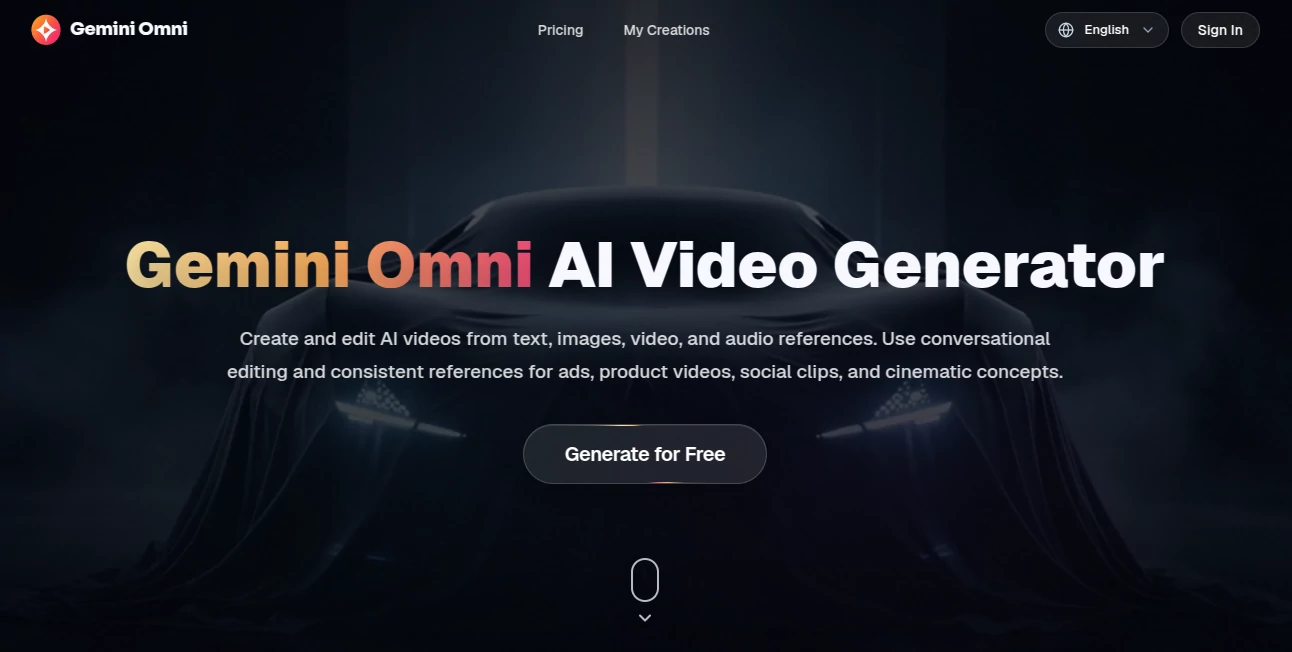
The interface follows a straightforward creative workflow. Users can select the video model, add an optional image, describe what they want in the prompt, choose the duration, aspect ratio, and resolution, and then generate the result.
This approach makes the platform approachable even for someone who has never worked with professional video-generation software. The controls are focused on the decisions that matter most: what should appear in the scene, what references should guide it, and how the final video should look.
The reference-based workflow is especially useful when consistency matters. Instead of explaining every visual detail from scratch, creators can provide an existing asset and let the model use it as part of the creative direction.
Accuracy & Performance
The platform is built around a multimodal generation approach, so the model can work with more than written instructions. Combining text with visual or audio references gives the system additional context about the intended subject, movement, atmosphere, or style.
Its real-world understanding is another notable strength. The underlying technology is designed to reason about physical relationships, movement, lighting, and scene logic, which can make generated actions feel more coherent.
For creators producing several variations of an idea, multi-turn editing can also reduce unnecessary repetition. Rather than recreating a complete prompt after every change, users can progressively refine the same creative direction.
Capabilities
The platform covers several practical video-generation workflows. Text-to-video is useful when starting with a completely new concept, while image-to-video works well when a creator already has a product photo, character image, artwork, or other visual asset.
Reference-driven creation adds another layer of control. Images can guide appearance and composition, videos can provide motion references, and audio can contribute additional context to the creative direction.
It is also suited to commercial content. Product demonstrations, ecommerce clips, launch concepts, advertising creatives, social media videos, and cinematic experiments can all be produced within the same workflow.
Security & Privacy
Privacy is an important consideration when working with commercial assets, especially product images and unpublished campaign material. The platform advertises a private creation workspace and commercial use rights on its paid plans.
Users should still review the current privacy policy and terms before uploading confidential material or sensitive business assets. As with any cloud-based creative service, the exact handling, storage, and retention of uploaded content should be checked before using it for confidential production work.
Use Cases
Product Marketing: Turn product images and descriptions into engaging promotional videos without organizing a traditional video shoot.
Social Media Content: Create vertical clips and creative variations suitable for social platforms, allowing teams to test different concepts more quickly.
Ecommerce: Generate product demonstrations, promotional clips, launch content, and visual variations for online stores.
Advertising: Marketers can experiment with different hooks, scenes, product angles, and visual directions before committing to expensive production.
Creative Prototyping: Filmmakers, designers, and creative teams can use generated scenes to explore an idea before producing the final version.
Image Animation: Existing product photography, character artwork, and concept images can be transformed into moving scenes.
Pros and Cons
- Pros: Multimodal video creation, conversational editing, reference-based generation, multiple resolutions, support for vertical and landscape formats, commercial-use options, and a workflow suitable for marketing content.
- Pros: The ability to refine a video through successive instructions makes experimentation much more practical than repeatedly generating completely new clips.
- Cons: Video generation consumes credits, and actual usage can vary depending on the selected model, resolution, duration, and audio settings.
- Cons: The most advanced generation options are better suited to users who need regular video production and may not be necessary for occasional experimentation.
Pricing Plans
The platform offers monthly, annual, and one-time credit options. The Basic plan costs $20.99 per month and includes 800 AI credits, watermark-free exports, a private creation workspace, commercial use rights, and standard generation speed.
The Pro plan costs $34.99 per month and provides 2,000 AI credits. It adds a priority generation queue, HD exports, more creation models, watermark-free exports, commercial use rights, and priority customer support.
The Premium plan costs $69.99 per month and includes 5,000 AI credits. It is designed for teams, businesses, and users with high-frequency production needs, with faster generation, high-spec exports, the full creative toolset, commercial use rights, and dedicated customer support.
Annual billing provides a stated 30% saving compared with the corresponding monthly pricing. Since credit consumption depends on the model, resolution, duration, and audio settings, users with frequent production requirements should consider their expected monthly workload before choosing a plan.
How to Use Gemini Omni
Start by deciding what you want to create. A simple text description is enough for a new scene, while an existing image can provide a stronger visual starting point for an image-to-video project.
Next, write a clear prompt describing the subject, action, environment, camera movement, mood, and important visual details. If you already have supporting media, add the appropriate reference to give the generation process more context.
Choose the desired aspect ratio and resolution, then generate the video. Once the first result is ready, evaluate the details rather than rewriting everything. Ask for a specific change, such as modifying the background, adjusting movement, changing the atmosphere, or refining a visual element.
This iterative approach is one of the most useful parts of the workflow. A practical creator might start with a basic product scene, then progressively request a different camera angle, a more suitable environment, improved lighting, and a final social-media-friendly composition.
Comparison with Similar Tools
Traditional AI video generators often focus primarily on converting a text prompt into a short clip. This platform takes a broader approach by combining text with images, video, and audio references and allowing the user to continue editing the result through conversation.
Compared with conventional video editors, the workflow is also less dependent on manually manipulating timelines, layers, effects, and individual assets. Instead, many creative changes can be expressed as instructions in natural language.
For professional productions that require frame-level editing, advanced color grading, detailed sound design, or a traditional timeline workflow, conventional editing software may still be the better choice. For rapid concept development, AI-generated advertising material, ecommerce videos, and social content, however, a conversational workflow can be considerably faster.
Conclusion
For creators who want to move from an idea to a usable video without a lengthy production process, Gemini Omni offers a compelling workflow. Its combination of text and reference-based generation gives users more control than a simple prompt-to-video experience, while conversational editing makes it easier to refine the result.
The strongest use cases are likely to be marketing, ecommerce, social media, product promotion, and creative experimentation. The ability to work with different forms of reference media also makes it useful when visual consistency matters.
It is not intended to replace every part of a professional video-production pipeline. Instead, its real value comes from making the early and middle stages of video creation dramatically more accessible: describe an idea, provide useful references, generate a scene, and keep refining it until the concept is ready to use.
Frequently Asked Questions (FAQ)
What is Gemini Omni?
Gemini Omni is a video-focused AI creation workflow that can generate and edit videos using prompts and reference media such as images, video, and audio.
Can it create videos from text?
Yes. Text-to-video generation allows users to describe a scene and generate a video based on the written prompt.
Can I turn an image into a video?
Yes. Image-to-video generation allows an existing image, such as a product photo or concept artwork, to become the starting point for a moving scene.
Can I edit an AI-generated video?
Yes. The conversational editing workflow allows users to describe changes in natural language and progressively refine the generated video.
What video resolutions are available?
The available generation options include 720p, 1080p, and 4K, depending on the selected workflow and settings.
Does it support vertical videos?
Yes. Both 16:9 and 9:16 aspect ratios are available, making the workflow suitable for landscape content as well as vertical social media videos.
Is there a free option?
The platform provides a free generation entry point, while paid plans offer larger monthly credit allowances and additional benefits. The exact availability and limits can change over time.
Can businesses use the generated videos commercially?
Paid plans advertise commercial use rights. Businesses should review the current terms before using generated content in commercial campaigns or client work.
Who can benefit most from this tool?
It is particularly useful for marketers, ecommerce businesses, social media creators, advertising teams, designers, and anyone who needs to produce or test video concepts quickly.
AI Image to Video , AI Video Generator , AI Video Editor , AI Advertising Assistant .
These classifications represent its core capabilities and areas of application. For related tools, explore the linked categories above.
Gemini Omni details
Website unavailable — View Alternatives
Pricing
- Freemium
Apps
- Web App
Categories

Gemini Omni Alternatives Product
See dance 2.…

Seedance 2.0…

Read
Video to GIF…

WonderShare …
Veo 4

RunwayAI

AI Pixel Ani…

Seedance 2 P…