
Genfaceless
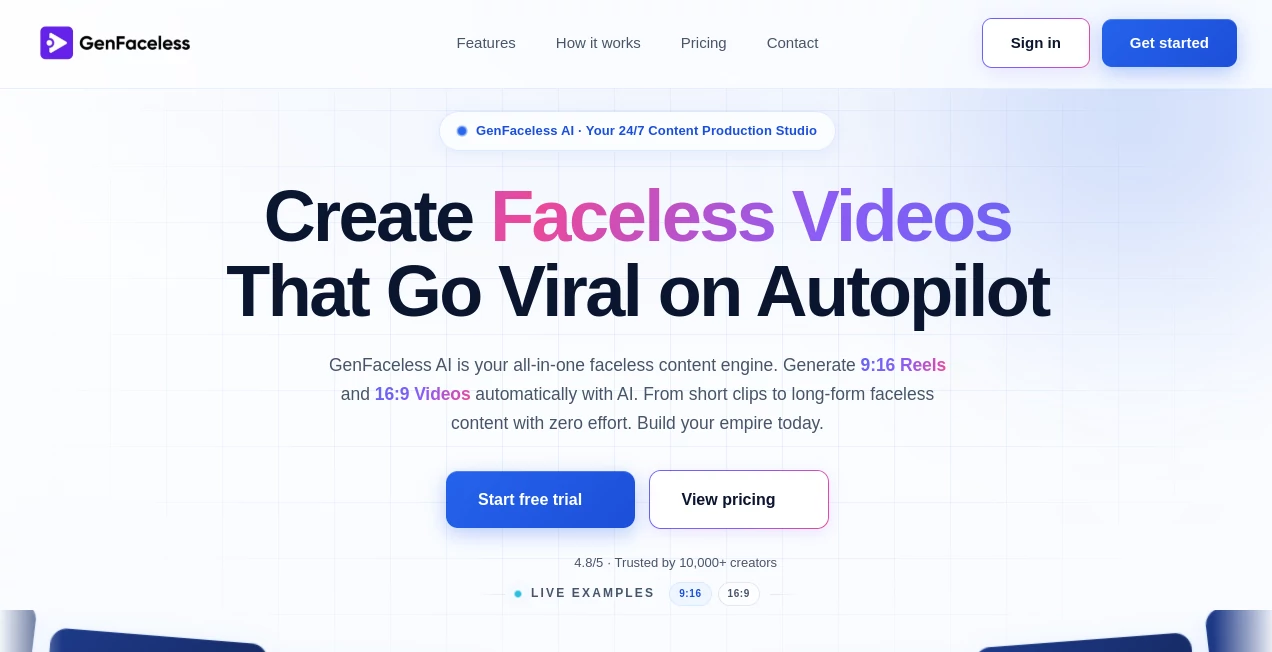
What is Genfaceless?
There’s a special kind of freedom that comes with creating videos without ever stepping in front of the camera. You can focus purely on the story, the message, and the quality instead of worrying about lighting, appearance, or awkward delivery. This tool makes that freedom feel effortless and scalable. It takes your topic or script and handles everything else—writing, visuals, voiceover, editing, and even publishing—so you end up with polished, ready-to-post faceless videos for YouTube, TikTok, Instagram Reels, and more. I’ve seen creators go from struggling to post once a week to maintaining consistent daily content without burning out, and the growth that follows is often remarkable.
Introduction
Faceless content has exploded in popularity because it lets creators stay private while still building strong audiences. The challenge has always been production time and cost. GenFaceless solves both by turning the entire process into an automated workflow. You choose your niche and preferences once, and the AI generates full videos from idea to final file. It’s particularly strong for educational content, storytelling, facts and trivia, motivational videos, and niche explainers. The results look professional enough to compete with channels that have full editing teams, yet it requires almost no manual work from you. For anyone who wants to grow a content business without showing their face, it feels like having a silent production partner that never sleeps.
Key Features
User Interface
The dashboard is straightforward and focused. You set your content preferences—niche, voice style, video format, and schedule—then the system takes over. There’s a clean preview area so you can review videos before publishing, and simple controls to tweak styles or regenerate specific parts. It avoids overwhelming you with too many options while still giving enough customization to make the output feel like your own. The whole experience is designed so even beginners can start creating high-quality faceless content within minutes.
Accuracy & Performance
The AI consistently produces coherent scripts, natural-sounding voiceovers, and well-paced edits that match the chosen niche. Visuals and B-roll are relevant, transitions feel smooth, and the final videos hold viewer attention. Generation speed is practical for regular content calendars, and the quality remains high even when scaling to multiple videos per week. It’s reliable enough that many creators trust it to run on autopilot after the initial setup.
Capabilities
It handles the full pipeline: AI script writing, voiceover generation with multiple voice options, relevant stock footage and visuals, automatic editing with captions, and direct publishing to connected platforms. You can create both short-form Reels/Shorts and longer YouTube videos. The system supports multiple niches and lets you run several channels or client projects simultaneously. It’s built for scale—turning one good setup into dozens of professional videos without proportional effort.
Security & Privacy
Your content ideas and generated videos stay under your control. The platform focuses on delivering results without unnecessary data retention or sharing. For creators working on original or sensitive topics, this clean approach provides confidence to experiment and produce freely.
Use Cases
Aspiring YouTubers launch faceless channels in competitive niches and maintain consistent uploads that lead to monetization faster. Social media agencies deliver high-volume Reels to clients without expanding their editing team. Side-hustle creators build multiple income streams by running automated channels in different topics. Educators and coaches produce evergreen training content that works 24/7. Anyone who wants to grow an audience through video without appearing on camera finds a practical, scalable solution here.
Pros and Cons
Pros:
- Complete automation from script to published video saves dozens of hours per month.
- Professional quality that competes with manually edited content.
- Strong focus on virality and engagement for short-form platforms.
- Scalable for running multiple channels or serving clients.
- Simple setup that lets you start creating quickly.
Cons:
- Best results come after fine-tuning your initial preferences and style settings.
- Free tier has usage limits suitable for testing rather than full-scale production.
- Highly custom or very specific creative directions may still need some manual guidance.
Pricing Plans
It offers a free tier to test the quality and workflow. Paid plans unlock higher video limits, faster generation, priority features, and the ability to scale production significantly. Pricing is positioned as an investment that pays for itself through time saved and content output gained. Many users report that moving to a paid plan quickly becomes worthwhile once they see consistent results.
How to Use GenFaceless
Sign up and complete the quick setup by choosing your niche, preferred voice style, and video formats. Connect your social channels if you want automated publishing. Write a topic or let the AI suggest ideas, then generate your first video. Review the output, make any small adjustments if needed, and publish or schedule. Once your preferences are dialed in, you can set recurring schedules and let the system run on autopilot while you focus on strategy and growth.
Comparison with Similar Tools
Many faceless video tools require significant manual editing or produce generic-looking content. This one stands out by handling the full pipeline with better coherence, relevance, and polish. It balances automation with enough customization to make videos feel unique to your brand, rather than mass-produced. For creators who want quality output without spending hours in editing software, it often becomes the preferred choice.
Conclusion
Creating consistent, high-quality faceless content used to be time-intensive and expensive. This tool changes the equation by making professional video production accessible and scalable for solo creators and small teams. It lets you focus on what matters most—growing your audience and refining your message—while the heavy production work happens in the background. If you’ve been wanting to build a content presence without showing your face, this platform gives you a practical, effective way to do it at scale. The results speak for themselves once you start publishing regularly.
Frequently Asked Questions (FAQ)
How long does it take to generate a video?
Most videos are ready in a few minutes, depending on length and current demand.
Can I customize the style and voice?
Yes—you have good control over voice selection, pacing, visuals, and overall tone.
Which platforms does it support?
It works beautifully for YouTube, TikTok, Instagram Reels, and Shorts.
Do I need video editing experience?
No—the AI handles scripting, visuals, voiceover, and editing automatically.
Is there a free way to try it?
Yes, the free tier lets you test the quality before committing to a paid plan.
AI Animated Video , AI Content Generator , AI Video Generator , AI Text to Video .
These classifications represent its core capabilities and areas of application. For related tools, explore the linked categories above.

Genfaceless Alternatives Product

Logo Animati…

Seedance 2

Seedance 2 P…

Sora 2 Video
SkyReels-V4

AI Baby Dance

Quso AI

seedream vid…

AI Entity