
GeniLoop
What is GeniLoop?
There’s something addictive about opening a tool and instantly turning an idea into moving pictures or striking visuals without leaving your browser. GeniLoop delivers that feeling consistently. Whether you type a scene description or upload a photo, it generates polished video clips and images that feel far more intentional than most AI outputs. I’ve watched creators start with a vague concept and end up with share-ready content in minutes—sometimes even surprising themselves with how good the result looks. It’s the kind of platform that makes you want to keep experimenting because the loop from idea to output is so smooth.
Introduction
In a sea of AI tools that promise the moon but deliver jittery clips or generic images, this one stands out by focusing on quality, speed, and creative control. It combines strong text-to-video, image-to-video, and image generation capabilities into one clean studio. You can iterate quickly—tweak a prompt, change style, or add references—and get results that maintain consistency and cinematic feel. It’s particularly loved by social creators, marketers, and indie storytellers who need good-looking content fast without learning complex software. The platform keeps evolving, regularly adding new models and effects, which keeps the experience fresh and exciting.
Key Features
User Interface
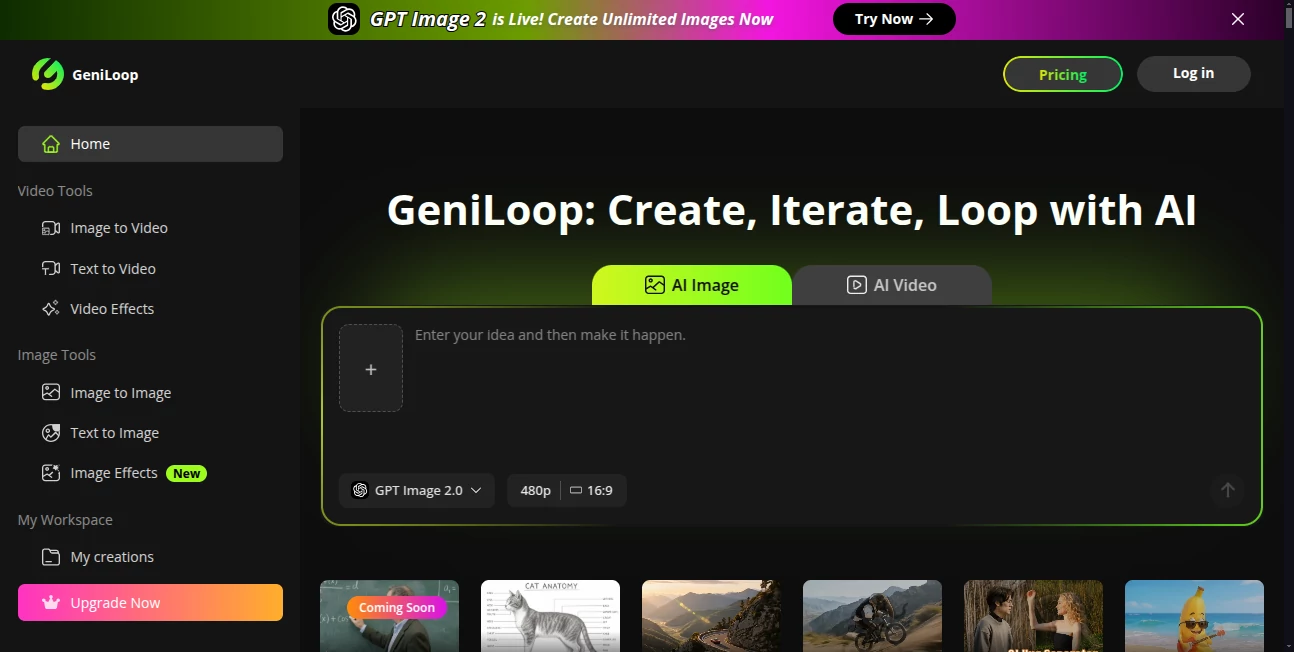
The workspace is thoughtfully designed—clean, focused, and fast. A prominent prompt box sits front and center, with easy options to upload reference images or videos. Style selectors, aspect ratio choices, and duration settings are right where you expect them. Previews load quickly so you stay in flow rather than waiting. It never feels overwhelming, even when you’re exploring advanced options. Both beginners and experienced users comment on how intuitive it feels from the first click.
Accuracy & Performance
Motion stays coherent, characters keep their identity across frames, and lighting behaves naturally. Text-to-video and image-to-video outputs show strong prompt adherence without the usual random artifacts. Generation speed is impressive for the quality level—most clips appear in under a minute. The platform handles complex scenes better than many competitors, especially when you give it good references or detailed descriptions. The results consistently feel more “directed” than purely algorithmic.
Capabilities
It excels at both video and image creation: text-to-video, image-to-video, image-to-image transformations, and multiple artistic styles. You can create short cinematic clips, looping animations, product visuals, character animations, and more. Reference guidance is particularly strong—upload a face or object and it stays consistent throughout. The combination of video and image tools in one place makes it a true creative studio rather than a single-purpose generator.
Security & Privacy
Your prompts and uploaded references are handled responsibly. The platform doesn’t store content longer than necessary for generation, and you maintain control over what you create. For creators working on client projects or personal ideas, that respect for privacy adds real peace of mind while using powerful AI features.
Use Cases
A content creator turns a product photo into a smooth lifestyle video for Instagram Reels in minutes. A marketer writes a script and generates multiple video variations to test which performs best. An indie filmmaker prototypes story beats quickly before investing in full production. A designer creates consistent character animations for social media series. The common thread is speed with quality—getting professional-looking results without days of editing or shooting.
Pros and Cons
Pros:
- Strong consistency in characters and style across video frames.
- Fast iteration cycle that keeps creativity flowing.
- Good balance between ease of use and creative control.
- Versatile enough for both video and static image needs.
- Regular updates with new models and features.
Cons:
- Clip length is still best for short-form content (Reels, ads, prototypes).
- Very complex or abstract scenes may need prompt refinement.
- Higher quality and unlimited usage require a paid plan.
Pricing Plans
The platform offers a generous free tier so you can test the quality and workflow without commitment. Paid plans unlock higher resolutions, longer clips, faster generation, priority access during peak times, and more credits. Pricing is competitive for the output quality, and many users find the upgrade pays for itself after creating just a few client or marketing pieces.
How to Use GeniLoop
Start by typing a clear description of the scene or story you want. Upload a reference image if you want specific characters, style, or composition. Choose your aspect ratio (vertical for social, horizontal for wider shots) and desired length. Hit generate and review the result. Tweak the prompt or references and try again if needed. Download the best version or generate variations until you’re happy. The whole process is quick enough that you can experiment with several ideas in one sitting.
Comparison with Similar Tools
Many AI video tools still struggle with motion artifacts or character drift. This one prioritizes coherence and cinematic feel while remaining accessible. The combination of strong video and image tools in a single studio gives it an edge over single-purpose generators. It’s not the longest clips available, but for quality and usability in the short-to-medium format, it consistently delivers results that feel more polished and usable right out of the box.
Conclusion
GeniLoop makes high-quality AI video and image creation feel approachable and fun again. It removes the usual technical headaches and lets you focus on the story and style you actually want. For creators who need to move fast without sacrificing too much quality, it’s become a trusted part of the workflow. The gap between imagination and shareable content has never been smaller—and that opens up exciting possibilities for everyone from solo creators to growing teams.
Frequently Asked Questions (FAQ)
How long are the generated videos?
Best suited for short-to-medium clips (typically 5–10+ seconds depending on plan), perfect for social media and prototypes.
Do I need reference images?
Not required—text-only works well—but references significantly improve character and style consistency.
Is it good for commercial use?
Yes—paid plans include commercial rights for the content you generate.
Can I generate both videos and images here?
Absolutely—it’s a full creative studio covering both motion and static visuals.
What if the first result isn’t perfect?
Iteration is fast—just refine your prompt or add better references and generate again. Most users get great results within 2–3 tries.
AI Image to Video , AI Art Generator , AI Video Generator , AI Text to Video .
These classifications represent its core capabilities and areas of application. For related tools, explore the linked categories above.

GeniLoop Alternatives Product

Seedance AI

AI Raphael

You.bot

Freepik
Sora 2 Video

WonderShare …

Seedance 2

seedance2

DaVinci AI