

















AI Happy Horses
What is AI Happy Horses?
You know that feeling when you have a brilliant video idea, but the thought of renting cameras, hiring actors, or learning complex editing software just kills your vibe? We have all been there. That is exactly why this platform feels like such a breath of fresh air. Imagine describing a scene just by typing a few sentences, or uploading a simple image, and then watching it transform into a full-blown cinematic clip with realistic movement and sound.
This tool is not just another tech demo. It is built for creators, small business owners, and marketers who need professional-grade content without the Hollywood budget. Whether you are trying to make a quick ad for social media, a short animation, or a narrative scene, the experience feels surprisingly smooth. I recently tried turning a static photo of a rainy street into a 5-second clip, and the way the water rippled and the lights reflected was genuinely impressive. It feels like having a film director sitting right inside your browser, ready to bring your imagination to life.
Key Features
What makes this platform stand out is how it handles the technical stuff so you can focus on the creative part. It is built on a robust architecture that supports everything from text descriptions to image references, making sure what you see in your head ends up on the screen.
User Interface
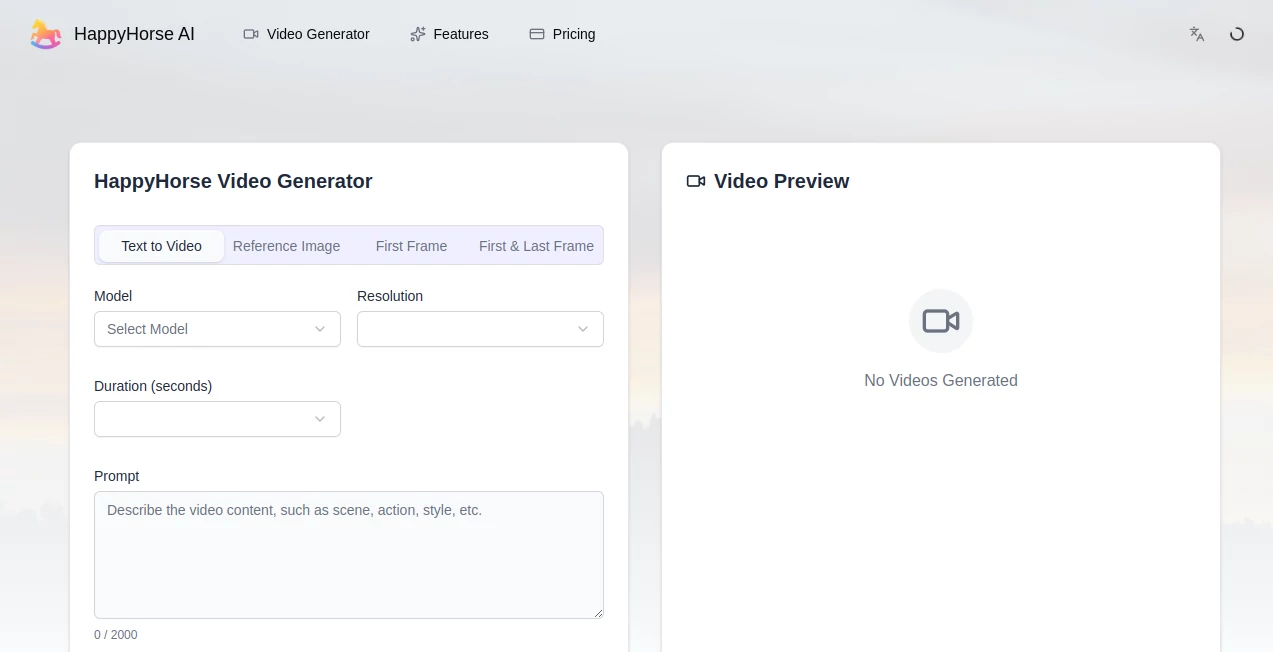
Nobody wants to wrestle with a complicated dashboard when they are trying to be creative. The layout here is clean and minimal. You are greeted with two main options: "Generate Video" or "Edit Video." If you are just starting, you will find a simple box on the left side for your prompt, a space to upload an image if you have one, and a big purple button to start the magic. On the right side, your creation plays instantly. It is so straightforward that you can jump right in without watching a single tutorial. The whole process feels less like operating software and more like sending a wish to a helpful assistant.
Accuracy & Performance
Let's talk about how well it actually works. The model is exceptionally good at understanding specific camera jargon. If you ask for a "shallow depth of field" or a "200mm telephoto lens", it actually knows what you mean. It compresses the background and blurs the surroundings just like a real camera would. For short clips (around 5 seconds), the physics hold up brilliantly—hair moves naturally, water flows correctly, and lighting remains consistent. However, like most tools at this stage, it can stumble a bit on longer sequences. If you try to push it to 15 seconds with complex sword fights or rapid movements, you might occasionally see a hand morphing into a second sword or a lip-sync that gets slightly off. But for standard social media clips, product shots, or atmospheric B-roll, the accuracy is top-tier.
Capabilities
This platform is not just about generating from scratch. You have three powerful ways to create. First, Text-to-Video works perfectly for abstract concepts or scenes you don't have an image for. Second, Image-to-Video lets you upload a reference photo and animate it—perfect for bringing still product shots or character designs to life. Third, it supports multi-image reference, which helps keep a character looking consistent across different shots. It also handles video editing and supports up to 1080p output. The built-in audio generation is a lifesaver too; it syncs dialogue and ambient sounds like rain or footsteps directly into the clip, saving you hours of editing in Premiere Pro.
Security & Privacy
When you are working on unreleased ad campaigns or personal projects, the last thing you want is to worry about where your data is going. The platform is backed by a major cloud infrastructure, ensuring that your prompts and uploads are processed securely. They utilize standard API security protocols, and if you are using the paid plans, your content generates without watermarks. It is also fully compliant with current AI content regulations, meaning you get the necessary labels for transparency if you need to publish widely, keeping you on the right side of platform policies.
Use Cases
There are so many ways to fit this into a daily workflow. If you run an e-commerce store, you can turn static product photos into lifestyle videos showing the item in use. Social media managers can generate eye-catching hooks for TikTok or Instagram Reels in minutes rather than hours. Short film creators and animators are using it to storyboard concepts or even generate whole sequences for indie projects. I have also seen real estate agents use it to add weather effects or ambiance to property walkthroughs, making a sunny day look like a cozy rainy evening to match the mood of the listing. It is essentially a creativity engine for anyone who needs moving visuals.
Pros and Cons
Pros:
The cinematic quality is the biggest win here. The lighting, lens choices, and textures look like real film. It is also highly affordable, especially for short clips, often cheaper than the competition. The process is incredibly fast; you usually get your 5-second clip in about 90 seconds. Plus, the built-in audio sync saves a huge step in post-production.
Cons:
It is not perfect for long stories yet. Anything over 10 seconds risks logical errors or distorted physics. The free version leaves a watermark on your video, so you will need a subscription for professional use. Occasionally, specific text rendering or complex action choreography might come out a little wonky.
Pricing Plans
Getting started is risk-free. When you sign up, you receive free daily credits to test the waters. If you love it, the Standard plan starts around $10 per month, providing extra credits and removing the watermark. For power users, the Pro plan offers the lowest per-second cost (approximately $0.44/second for 720p and $0.78/second for 1080p) plus priority generation queues. There are also API options for developers who want to integrate the engine directly into their own apps or websites.
How to Use HappyHorse
Using it is as easy as making a sandwich. First, go to the website and log in with your Google account. Once inside, click "Generate Video". You have two boxes: one to drag an image (if you want to animate a specific photo) and one to type your prompt. Be as descriptive as possible—mention the lighting, the camera angle, the mood, and the action. For example, say "cinematic shot of a samurai standing in a neon-lit alley, rain falling, slow motion," rather than just "samurai." Select your duration (5 or 10 seconds is usually best) and resolution. Hit the purple button, wait about a minute or two, and download your masterpiece.
Comparison with Similar Tools
Compared to other big names like Seedance or Kling, this one tends to win on pure visual beauty and lens accuracy. It often ranks number one in "visual fidelity" tests because the frames just look prettier straight out of the gate. Other tools might be better at keeping a character totally rigid for a 20-second monologue, or have more complex editing timelines. However, if your priority is getting a beautiful, atmospheric, "film-like" shot quickly and cheaply, this is currently the best horse in the race, so to speak. It treads the line between quality and speed better than most.
Conclusion
We are standing at a point where AI video is finally becoming a reliable partner rather than a gimmick. This platform excels at providing high-end visual quality for short-form content, giving small creators the power of a studio. While it has typical growing pains with long-form logic, the value for marketing, social media, and creative exploration is undeniable. It feels like the beginning of a new era where your budget no longer dictates your imagination. If you have been waiting for the right moment to jump into AI video, this is your sign to just go for it.
Frequently Asked Questions (FAQ)
Do I need a powerful computer to run this?
No, not at all. Everything happens on the cloud. As long as you have a web browser and an internet connection, you are good to go.
Can I use the videos for commercial ads?
Absolutely. Paid subscribers can use the generated content for commercial purposes. Just make sure to review the specific terms on the site to be safe.
Why does my video sometimes have weird hands or glitches?
That is called "hallucination," and it happens to every AI model occasionally, especially with complex movements. Keeping your prompts simple and sticking to 5-second clips usually solves the problem.
Does it really generate sound?
Yes. Unlike many tools that give you a silent video, this one creates ambient sounds, footsteps, and even lip-synced dialogue based on your prompt.
Can I extend a video longer than 15 seconds?
You can generate multiple clips and edit them together. The model currently caps single generations at 15 seconds to maintain quality.