


















Backdrop
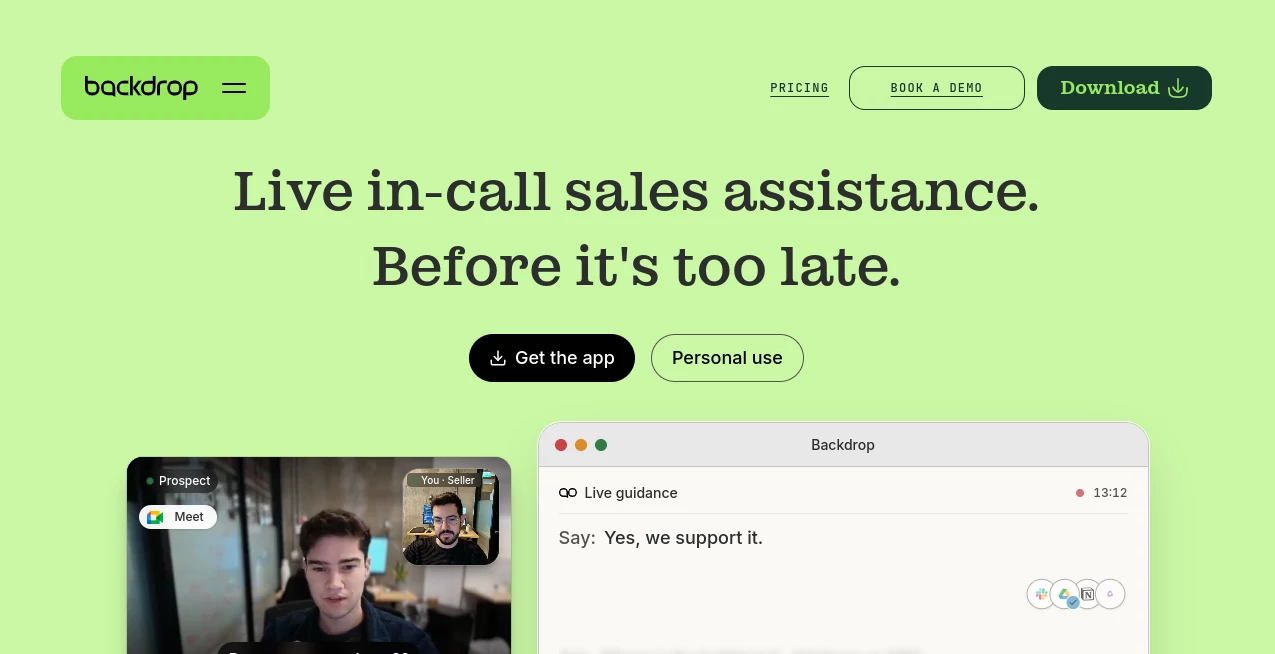
What is Backdrop?
Backdrop is an AI-powered sales copilot designed to help sales representatives make better decisions while a customer conversation is still happening. Instead of waiting until a meeting ends to review a recording or analyze notes, it provides guidance during the call itself, giving reps useful context, suggested questions, relevant answers, and supporting information when they need it.
The idea is refreshingly practical: salespeople do not always need another dashboard after the meeting. They often need help at the exact moment a prospect raises a difficult question, describes a technical problem, or asks for proof. This platform is built around that moment.
It can listen directly to computer audio without joining the meeting as a visible bot or sending notifications to other participants. It can then use information from conversations, buyer context, battlecards, product documentation, and connected business resources to surface useful guidance.
For sales teams dealing with complex products, technical buyers, or rapidly changing product information, this approach can make calls feel more prepared without forcing representatives to memorize every detail.
Key Features
- Real-time AI assistance during sales calls
- Discovery question suggestions
- Real-time objection handling guidance
- Access to relevant case studies and proof points
- Automatic follow-up email drafts
- Deal summaries and post-call recaps
- Support for sales battlecards and product documentation
- Context-aware guidance based on the conversation and buyer
- Integration with popular sales and productivity platforms
- Sales coaching and performance features on higher-tier plans
User Interface
The experience is designed around keeping the sales representative focused on the conversation rather than switching between multiple applications. Guidance appears alongside the call, allowing a representative to see a suggested question or response without interrupting the discussion to search through documents.
The overall concept is particularly useful for situations where speed matters. Imagine a prospect asking whether a product supports a particular technical workflow. Instead of opening a knowledge base, searching through a presentation, and hoping the right document appears, the representative can receive relevant information while the conversation continues.
Accuracy & Performance
Real-time sales assistance is only useful when the information is relevant to the conversation. The platform is designed to interpret what is being discussed and connect that context with sales materials, product information, and other approved sources.
This makes it more than a simple transcription or note-taking application. The focus is on turning the live conversation into actionable guidance. For teams with extensive product documentation or complicated sales processes, having the right information surfaced at the right moment can reduce the amount of time representatives spend searching for answers.
The company also highlights customer-reported outcomes including faster ramp-up and improvements in sales-engineering efficiency. These figures should be viewed as reported customer results rather than a guarantee for every organization.
Capabilities
The platform covers several stages of the sales workflow. Before and during calls, it can help representatives prepare for discovery and technical conversations. During the discussion, it can suggest questions, help with objections, and surface relevant case studies or proof points.
After the call, it can assist with summaries, follow-up messages, and next steps. Higher plans add capabilities such as CRM synchronization, shared team playbooks, knowledge bases, manager coaching dashboards, representative benchmarking, and advanced CRM integration.
Another useful aspect is its broad compatibility. The system is designed to work with the audio from the meeting environment rather than depending on a single conferencing application, making it suitable for teams that use a mixture of communication platforms.
Security & Privacy
Security matters when an AI system is exposed to sales conversations, customer information, and internal business knowledge. The company states that it uses enterprise AI infrastructure including Google Cloud Vertex AI and Amazon Bedrock, with contractual requirements for zero data retention by those AI platforms.
The company also states that customer data is not used to train or fine-tune its own AI models or third-party AI models. Its security program includes SOC 2 Type 2 certification, which is an important consideration for organizations evaluating AI software for professional sales environments.
Teams should still review the current privacy policy, security documentation, data-processing terms, and internal compliance requirements before using any AI assistant with sensitive customer information.
Use Cases
- Discovery calls: Representatives can receive suggestions for better discovery questions instead of relying entirely on memorized sales frameworks.
- Technical sales: Teams selling technical products can get help when prospects raise detailed questions that would normally require assistance from a sales engineer.
- Objection handling: Relevant guidance can appear while a prospect is raising an objection, helping representatives respond without leaving the conversation.
- Sales onboarding: New representatives can receive contextual guidance while learning products, positioning, and sales processes.
- Competitive conversations: Sales teams can keep approved battlecards and proof points available during competitive discussions.
- Product launches: Teams introducing new products can give representatives access to updated product information without expecting everyone to memorize every change.
- Follow-up work: Summaries and follow-up email drafts can reduce the administrative work that comes after a sales call.
- Sales coaching: Managers can use higher-tier coaching and benchmarking capabilities to help representatives improve over time.
Pros and Cons
- Pros: Real-time assistance instead of only post-call analysis
- Pros: Useful for discovery and objection handling
- Pros: Can surface case studies and approved sales information during conversations
- Pros: Works across different meeting environments
- Pros: Integrates with several sales, communication, and knowledge platforms
- Pros: Free plan available for testing the core experience
- Cons: Higher-tier plans require multiple seats
- Cons: Usage is measured in minutes on paid plans
- Cons: Advanced CRM and management features are reserved for higher plans
- Cons: Teams handling sensitive customer conversations should review privacy and compliance requirements before deployment
Pricing Plans
A free plan is available with no credit card required. It includes the real-time AI copilot, discovery question suggestions, objection handling guidance, case study retrieval, automatic follow-up email drafts, deal summaries, and approximately 180 minutes of usage per month.
The Solo plan costs $50 per month for one seat and includes up to 1,000 minutes per month, with additional usage charged at $0.30 per minute.
The Starter plan costs $99 per seat per month when billed annually, with a minimum of three seats. It provides 1,200 minutes per seat each month, CRM synchronization, shared team playbooks and knowledge bases, SSO/SAML, and lower overage pricing.
The Growth plan costs $149 per seat per month when billed annually, with a minimum of five seats. It adds manager coaching dashboards, representative benchmarking, playbook enforcement and tracking, and advanced CRM synchronization.
For an individual sales professional, the free or Solo option may be the simplest starting point. Larger teams that need centralized knowledge, coaching, CRM connectivity, and performance management will get more value from the team-oriented plans.
How to Use Backdrop
Getting started is straightforward. First, install the desktop application for the operating system you use. The application is available for both macOS and Windows.
Once configured, use it alongside your normal sales meeting. The assistant listens to the computer’s audio directly, allowing it to understand the ongoing conversation without appearing as a separate meeting participant.
During the call, pay attention to the contextual suggestions that appear. These can include discovery questions, responses to objections, relevant case studies, and other sales guidance. The more useful internal knowledge and sales material your team provides, the more valuable the contextual assistance can become.
After the meeting, use the generated summary and follow-up assistance to close the loop. Teams on plans with CRM functionality can also connect the workflow more closely with their existing sales systems.
Comparison with Similar Tools
Traditional conversation-intelligence platforms are often strongest after a call has finished. They can record meetings, produce transcripts, identify patterns, and provide analytics for managers. This approach takes a different position by concentrating heavily on what the representative needs while the conversation is still happening.
That distinction can matter. If the main goal is reviewing historical calls and measuring team performance, a traditional conversation-analysis platform may be a better fit. If the bigger problem is helping representatives answer questions, navigate discovery, handle objections, and find the right sales material in real time, an in-call copilot can be considerably more useful.
It is also not intended to replace every sales role. Complex technical deals may still benefit from experienced sales engineers, product specialists, and managers. Instead, the software can help representatives handle more situations independently and make better use of the expertise already available inside the organization.
Conclusion
For sales teams, timing is everything. A perfect answer that arrives two hours after a customer meeting is far less valuable than the same answer appearing while the customer is asking the question.
This AI sales assistant is built around that simple idea. It combines live conversation awareness with sales knowledge, discovery guidance, objection support, proof points, and post-call assistance. The result is a workflow aimed at making representatives better prepared without turning every sales call into a complicated technical exercise.
Its strongest appeal is likely to be among B2B sales organizations where conversations involve technical products, detailed discovery, competitive positioning, and large amounts of internal knowledge. With a free tier available, smaller teams can also test the experience before committing to a broader deployment.
Frequently Asked Questions (FAQ)
What is Backdrop?
It is an AI-powered sales copilot that provides real-time assistance during sales calls, including discovery suggestions, objection handling, relevant information, and post-call support.
Does Backdrop join sales meetings as a bot?
No. The platform is designed to listen directly to computer audio rather than joining the meeting as a visible bot or sending meeting notifications.
Does Backdrop work with different meeting platforms?
Yes. The service is designed to work with meeting audio regardless of which supported conferencing platform the sales representative is using.
Is there a free plan?
Yes. The free plan costs $0 per month and includes the core real-time copilot experience along with several sales-assistance features and approximately 180 minutes of usage per month.
Does it offer CRM integration?
Yes. CRM synchronization is included with the Starter plan, while the Growth plan provides advanced CRM synchronization.
Is customer data used to train AI models?
The company states that customer data is not used to train or fine-tune its own AI models or third-party AI models. It also states that its enterprise AI sub-processors operate under zero-data-retention requirements.
Who can benefit most from this tool?
It is particularly suited to sales representatives, sales leaders, technical sales teams, and sales enablement professionals who want real-time support during customer conversations.
AI Knowledge Management , AI Sales Assistant , AI Meeting Assistant , AI Customer Service Assistant .
These classifications represent its core capabilities and areas of application. For related tools, explore the linked categories above.

Backdrop Alternatives Product
Anti Noise F…

LocalRAG!

FeatureShark

LorePanic

Jotform AI A…
TuCanChat

David One

Meet Submind

EasyVC
