
Voibe
What is Voibe?
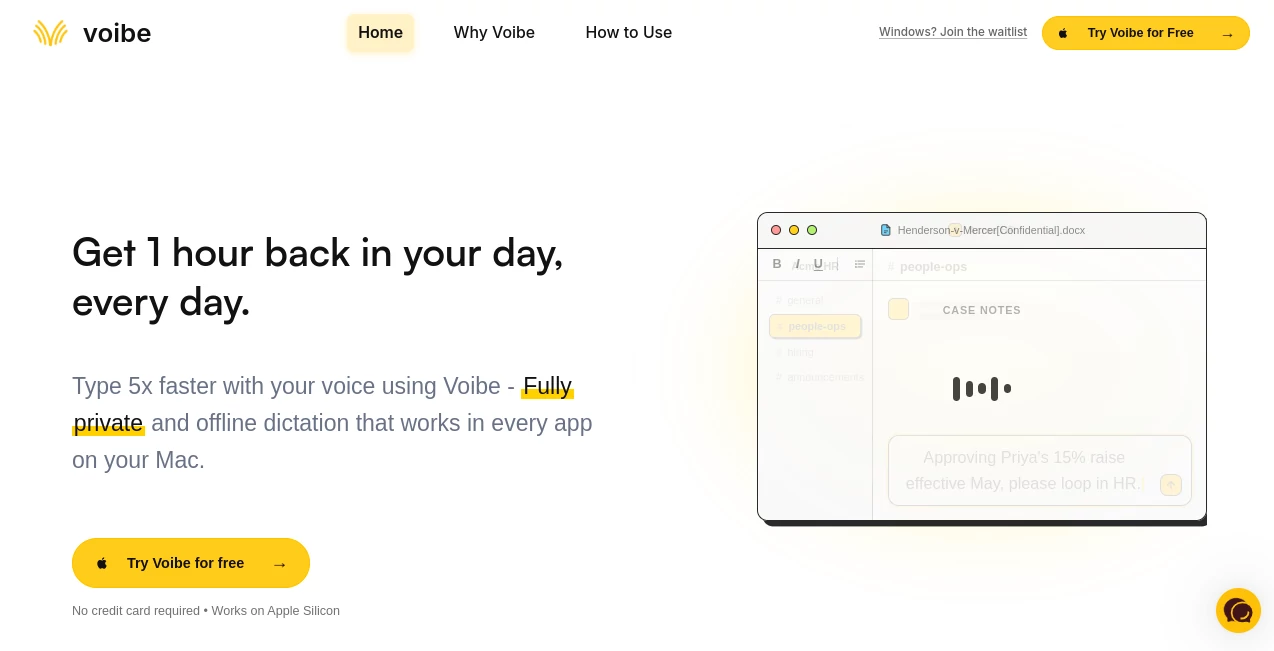
I’ve always been faster at thinking than typing. Ideas would flow quickly in my head, but my fingers could never keep up, especially during long writing sessions or when replying to important messages. Then I started using this app and everything shifted. Hold a key, speak naturally, release — and the words appear instantly wherever my cursor is. No cloud delays, no worrying about privacy, and it works in every single app on my Mac. After a week, I realized I was getting an hour or more of my day back, and my wrists thanked me too.
Introduction
Most dictation tools force you to trade speed for privacy or accuracy for convenience. This one refuses to make that compromise. It runs completely on your Mac using optimized local models, delivering fast, accurate transcription without ever sending your voice to the cloud. Whether you’re drafting emails, writing code comments, brainstorming in Notion, or chatting in Slack, it feels like a natural extension of how you think. Professionals who live in text-heavy workflows — writers, developers, lawyers, executives — are quietly switching because it finally delivers on the promise of voice as a serious input method.
Key Features
User Interface
The experience is beautifully minimal. Hold the Fn key (or any custom hotkey), speak at normal speed, and release — your words appear instantly with smart punctuation. There’s no separate window you have to switch to. It just works everywhere your cursor is. The settings are straightforward, letting you adjust hotkeys, custom vocabulary for technical terms, and sensitivity without ever feeling complicated. It stays out of your way until you need it, which is exactly how dictation should feel.
Accuracy & Performance
The transcription is impressively clean and fast. It handles natural speech, different accents, and technical jargon remarkably well, with punctuation that actually makes sense. Because everything runs locally on Apple Silicon, there’s zero network latency — you speak and the text appears almost immediately. I’ve dictated long emails and code explanations without having to stop and correct every other sentence. The consistency is what surprised me most.
Capabilities
It works system-wide in any app with a text cursor — Mail, Notes, Slack, Notion, VS Code, ChatGPT, you name it. You can add custom vocabulary for industry terms, enable developer mode for better code handling, and get smart punctuation automatically. It excels at both short commands and long-form dictation. The offline nature means it works perfectly on planes, in tunnels, or anywhere without internet. For power users, the speed and reliability make voice a genuine alternative to typing.
Security & Privacy
Your voice never leaves your Mac. Everything is processed locally, and audio is discarded right after transcription. No cloud uploads, no data training, no logs of what you said. It’s especially valuable for anyone working with confidential information, client work, or NDAs. That level of privacy combined with high performance is rare and genuinely appreciated.
Use Cases
Writers draft full articles or scripts by speaking their thoughts instead of staring at a blinking cursor. Developers document code or write commit messages while keeping their flow. Busy professionals clear their inbox three times faster with natural, detailed replies. Students take better notes during lectures or dictate essays. Anyone with repetitive strain issues or who simply thinks faster than they type finds real relief. The common thread is people who want to communicate faster without sacrificing privacy or accuracy.
Pros and Cons
Pros:
- Completely private and offline — your words stay on your device.
- Lightning-fast dictation with excellent punctuation and accuracy.
- Works system-wide in every Mac app.
- Simple, reliable hotkey workflow that feels natural.
- Strong performance on Apple Silicon with minimal battery impact.
Cons:
- Currently available only for Mac (Windows version is in development).
- Best results with clear, natural speech (like any dictation tool).
Pricing Plans
It offers a generous free trial so you can test it with your own workflow. Paid plans are straightforward and affordable, with monthly and annual options plus a lifetime license for those who want to pay once. The pricing feels fair for the daily time savings and peace of mind it provides. Many users say they recoup the cost quickly through increased productivity alone.
How to Use Voibe
Download and install the app (works on Apple Silicon Macs). Open any text field — email, document, chat, code editor — place your cursor, hold your chosen hotkey (default is Fn), speak naturally, and release. The text appears instantly. Add custom words for better accuracy with technical terms or names. That’s it. After a day or two, it becomes muscle memory, and typing starts feeling slow by comparison.
Comparison with Similar Tools
Cloud-based dictation tools often feel laggy and raise privacy concerns. Built-in Mac dictation can be inconsistent with punctuation and requires internet. This app stands out by combining local processing, high accuracy, system-wide availability, and excellent speed. It’s less about flashy features and more about being a reliable daily tool that respects your privacy and time.
Conclusion
Voice should feel like a natural way to create, not a gimmick. This tool makes that possible by being fast, private, and genuinely useful across all your apps. Once you experience writing at the speed of thought without compromising privacy, it’s hard to go back to typing everything. For professionals who live in text, it’s one of those rare tools that quietly adds real hours back to your day.
Frequently Asked Questions (FAQ)
Is my voice data really private?
Yes — everything runs locally on your Mac. No audio is ever uploaded or stored.
Does it work without internet?
Completely. Once installed, it works offline indefinitely.
Which apps does it support?
Any app on your Mac where you can place a cursor — from Notes to Slack to code editors.
How accurate is it with technical terms?
Very good, and you can add custom vocabulary for even better results with specific jargon.
Is there a Windows version?
Not yet, but it’s on the roadmap — you can join the waitlist.
AI Speech to Text , AI Voice & Audio Editing , AI Speech Recognition , AI Voice Assistants .
These classifications represent its core capabilities and areas of application. For related tools, explore the linked categories above.

Voibe Alternatives Product

PureMIDI

Qwen3 TTS

SAM Audio

AssiPilot

Adobe Podcast

Peanut AI

YTVidHub-you…

Goose Pod
Sonicker