
















What is PureMIDI?
Turning audio recordings into editable MIDI data has traditionally been a time-consuming process that required advanced software and plenty of manual correction. This platform simplifies that workflow by using AI-powered transcription technology to analyze pitch, timing, and musical structure, then generate MIDI files that can be opened in virtually any modern DAW.
Whether you are a music producer sketching new arrangements, a student studying musical compositions, or a performer trying to preserve spontaneous ideas, the service provides a practical way to transform recordings into editable musical data. With support for multiple audio formats and browser-based processing, it removes many of the technical barriers that often slow down creative work.
Key Features
User Interface
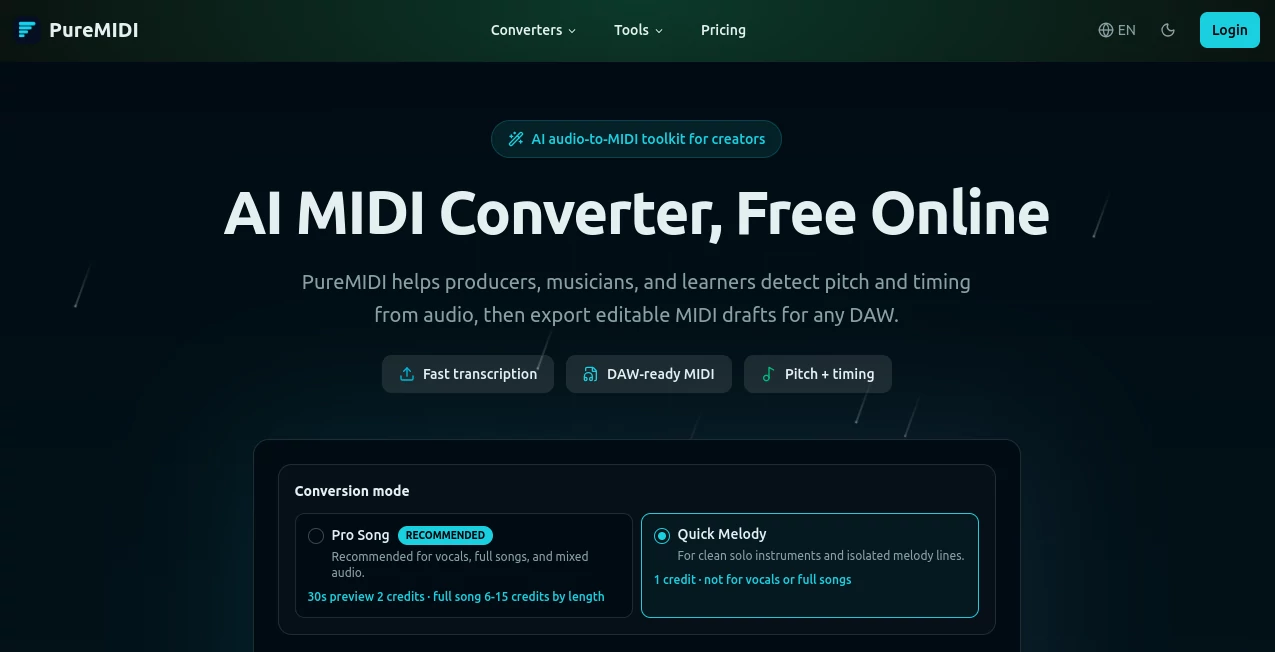
The interface is refreshingly straightforward. Users can upload supported audio files directly from a browser and begin the conversion process without installing plugins or desktop software. Clear navigation and dedicated conversion workflows help both beginners and experienced musicians get started quickly.
The dashboard also allows users to monitor conversion progress and access completed MIDI files in a centralized workspace, making project management simple and efficient.
Accuracy & Performance
The platform performs particularly well with clean recordings, solo instruments, vocal melodies, piano performances, and isolated musical parts. Its AI transcription engine focuses on detecting note pitch and timing with impressive precision, producing MIDI drafts that are immediately useful for editing and arrangement.
While complex full-song recordings may still require some refinement, the generated output often provides a strong foundation that can significantly reduce manual transcription work.
Capabilities
- Convert audio recordings into editable MIDI files.
- Support popular audio formats including MP3, WAV, FLAC, M4A, AAC, OGG, and more.
- Process video audio tracks and convert them into MIDI data.
- Transform sheet music PDFs and MusicXML files into MIDI.
- Generate DAW-ready MIDI files compatible with major music production software.
- Provide browser-based MIDI editing tools for further refinement.
- Support music education, transcription, remixing, and arrangement workflows.
Security & Privacy
Privacy is treated as an important part of the workflow. Uploaded files are processed only for conversion purposes and are not used to train AI models. Temporary storage policies help ensure that user content is removed after processing, offering peace of mind to musicians working with original compositions and unreleased material.
Use Cases
Music creators can apply the platform in many practical scenarios:
- Convert vocal recordings into MIDI melodies for production projects.
- Capture piano improvisations and transform them into editable compositions.
- Create MIDI arrangements from existing recordings for remixing.
- Study musical performances through transcription and analysis.
- Generate notation drafts by importing converted MIDI files into notation software.
- Preserve creative ideas recorded on mobile devices.
- Build practice tracks for students and educators.
Pros and Cons
Pros
- Simple browser-based workflow.
- No software installation required.
- Supports a wide range of audio formats.
- Works with major DAWs and notation applications.
- Useful for producers, students, composers, and educators.
- Offers free trial credits for new users.
- Strong performance on clean recordings and solo instruments.
Cons
- Complex full mixes may require manual cleanup.
- Very dense arrangements can reduce transcription accuracy.
- Advanced editing may still be necessary for professional projects.
- Some specialized conversion tools remain in beta development.
Pricing Plans
The service follows a credit-based pricing model that allows users to pay only for the conversions they need.
- Free trial credits available for new accounts.
- Starter credit packs suitable for occasional users.
- Larger credit bundles designed for producers with frequent conversion needs.
- Credits do not expire, making the system flexible for long-term use.
This approach is particularly attractive for musicians who want predictable costs without committing to recurring subscriptions.
How to Use PureMIDI
- Upload an audio recording, video file, or supported music document.
- Select the appropriate conversion workflow.
- Allow the AI engine to analyze pitch and timing information.
- Wait for the conversion process to complete.
- Download the generated MIDI file.
- Import the file into a DAW or notation application for editing.
- Refine instrumentation, timing, and arrangement as needed.
The process is designed to be accessible even for users with limited technical experience.
Comparison with Similar Tools
Many MIDI conversion solutions focus on a single workflow or require dedicated software installations. In contrast, this platform combines multiple conversion paths within a single browser-based environment. Audio-to-MIDI, video-to-MIDI, sheet-music conversion, and MIDI editing tools are available under one ecosystem.
Another notable advantage is its emphasis on practical production workflows. Instead of generating isolated experimental results, the service creates standard MIDI files that integrate seamlessly into popular DAWs such as Logic Pro, Ableton Live, FL Studio, Cubase, Reaper, GarageBand, and many others.
The combination of accessibility, broad format support, and AI-assisted transcription makes it a compelling choice for creators seeking efficient music production tools.
Conclusion
For musicians, producers, educators, and hobbyists, converting audio into editable MIDI can unlock entirely new creative possibilities. This platform delivers a streamlined solution that transforms recordings into flexible musical data without requiring complex software or technical expertise.
Its balance of usability, transcription quality, privacy protections, and cross-platform compatibility makes it a valuable addition to modern music production workflows. Whether you are preserving an inspired performance, studying a composition, or building the foundation of a new track, the service offers a fast and practical way to move from sound to MIDI.
Frequently Asked Questions (FAQ)
Can I convert MP3 files into MIDI?
Yes. Multiple audio formats are supported, including MP3, WAV, FLAC, M4A, AAC, OGG, and others.
Will the MIDI files work with my DAW?
Yes. Standard MIDI files can be imported into most major DAWs and notation software.
Does the platform offer a free trial?
New users receive trial credits that can be used to test the conversion features before purchasing additional credits.
How accurate is the conversion process?
Accuracy is generally highest with clean recordings, isolated instruments, and clear vocal performances. More complex mixes may require some editing afterward.
Are uploaded files used to train AI models?
No. User uploads are processed for conversion purposes and are not used for AI training.