
















YTVidHub-youtube subtitle download
What is YTVidHub-youtube subtitle download?
Let’s be honest for a second. If you’ve ever tried to pull transcripts from more than a handful of YouTube videos, you know the drill. Copy, paste, wait, download, rename, repeat. It’s mind-numbing. And when you’re staring down a list of 50 or 100 videos for a project, that little workflow becomes a massive time sink.
That’s exactly the headache this platform was built to eliminate. Think of it as your new best friend for data collection. Instead of fighting with clunky interfaces or spending hours on manual grunt work, you get a clean, efficient pipeline. Paste your links, hit a button, and walk away. It’s built for people who actually need to get work done—researchers, developers, content analysts, or anyone building AI models. No fluff, just results.
I remember the first time I tried to gather transcripts for a sentiment analysis project. I spent an entire afternoon clicking around, and honestly, I wanted to throw my laptop out the window. This tool would have saved me that whole day. It feels like someone finally listened to all the complaining on developer forums and said, "Alright, let's fix this properly."
Key Features
User Interface
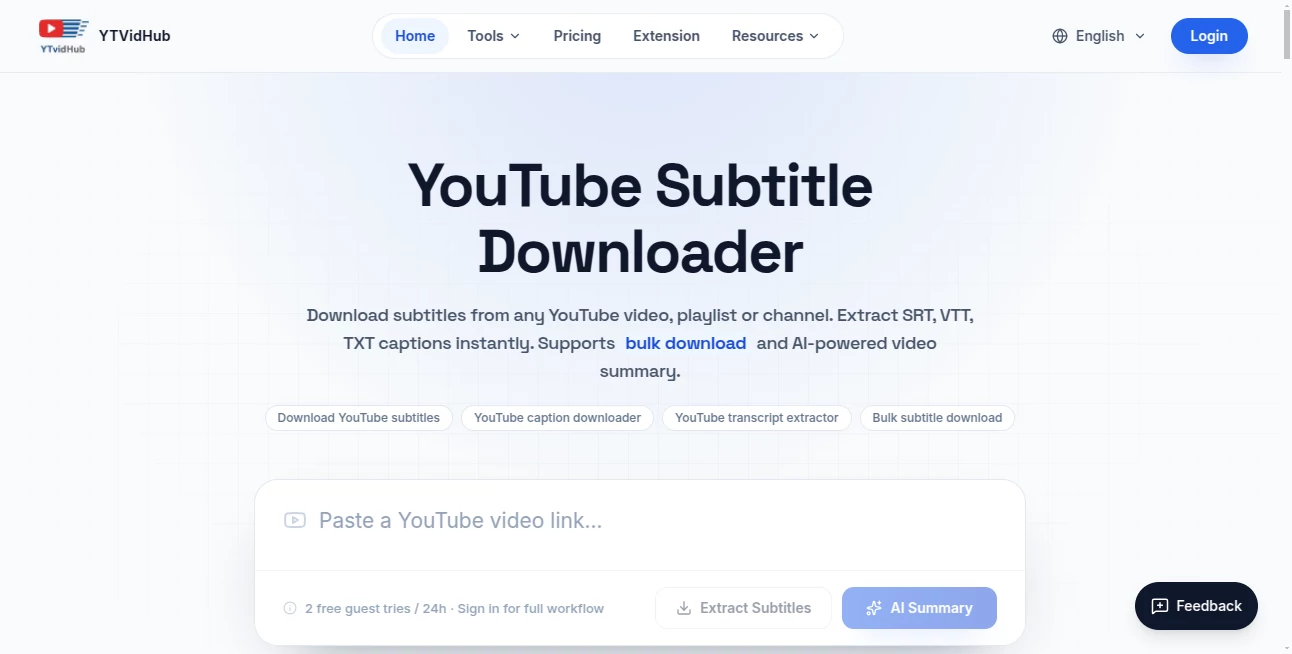
You won’t find any confusing dashboards here. The interface is stripped down to the essentials because that’s all you really need. A text area to drop your links, a button to start the process, and a download link when it’s done. It works exactly how you hope it would on the first try.
There’s no software to install, no browser extension to manage, and definitely no random ads popping up in your face. You just open the website, paste whatever you need—whether that’s individual video URLs, an entire playlist link, or even a channel URL—and the system handles the rest. For anyone who isn't comfortable with command-line tools like yt-dlp, this is a lifesaver. It puts enterprise-grade extraction power behind a button that anyone can click.
Accuracy & Performance
Speed matters when you’re processing bulk data. The engine behind the scenes is built for efficiency. It grabs the existing subtitles directly from YouTube’s servers, which means you get exactly what YouTube has—whether that’s the manual captions uploaded by creators or the auto-generated ASR (Automatic Speech Recognition) tracks.
Because it’s pulling existing data rather than trying to transcribe audio on the fly, the turnaround time is surprisingly fast. You can feed it a playlist with dozens of videos and have a neatly packaged ZIP file ready in moments. It respects the original timing and formatting of the subtitles while giving you the option to strip all that away if you just need the raw text.
Capabilities
The core magic here is "true bulk processing." Drop in 10 links, or 50, or a whole channel. It doesn't get confused. It goes through the list methodically, grabs every available subtitle track, and organizes everything for you.
You get three output formats: SRT (standard for video players), VTT (great for web use), and TXT. But the TXT output deserves a special mention. The tool automatically strips out all the timestamps, numbering, and formatting noise. What you’re left with is clean, plain text that’s ready to be fed straight into a Large Language Model, a RAG pipeline, or a text analysis script. You don't have to write a parser to clean up the mess afterward.
Multilingual support is also on the table. If a video has subtitles in English, Spanish, Japanese, or any other language, you can grab them. And for those member-only videos or private playlist items? That’s covered too, thanks to smart session handling on the backend.
Security & Privacy
Nobody wants their research lists or playlists floating around on public servers. The tool processes your requests without storing your extracted data indefinitely on some vulnerable database. You run the job, download your ZIP file, and that’s the end of the transaction.
For videos that require authentication, the system uses secure methods to verify access without compromising your personal account credentials. It’s designed to get you the data you’re authorized to see, nothing more, nothing less. You can feel comfortable using this for proprietary research or sensitive content analysis without losing sleep over data leaks.
Use Cases
Academic Research: Imagine you're studying linguistic trends across a specific genre of YouTube content. Instead of manually transcribing hours of footage, you pull clean text from hundreds of videos in minutes. That shifts your workload from "gathering data" to "actually analyzing it."
Training AI Models: LLMs and RAG systems need massive amounts of high-quality text. The clean TXT output is perfect here. You can build a knowledge base from YouTube tutorials, lectures, or reviews without spending weeks cleaning up dirty data.
Content Repurposing: YouTubers and podcasters can grab their own transcripts to turn videos into blog posts, social media threads, or newsletters. It’s a huge time-saver for anyone trying to stretch one piece of content across multiple platforms.
SEO and Competitive Analysis: Want to know what keywords your competitors are using in their video descriptions and spoken content? Grab the transcripts, run them through an analyzer, and spot patterns you’d never catch by just watching the videos.
Pros and Cons
What Works Well:
The bulk processing is the headline act, and it delivers. Being able to paste a whole playlist and walk away is a game-changer. The clean TXT output is clearly designed by someone who’s actually done data work before. You don’t have to fight with timestamps. It’s also refreshing to see a tool that offers free daily credits for bulk work instead of locking everything behind a paywall immediately.
Where It Could Improve:
Right now, the service relies on YouTube’s existing subtitle quality. If a video has bad auto-generated captions, that’s what you get. There’s a "Pro AI Transcription" tier on the roadmap that promises higher-accuracy, LLM-powered transcripts, which would fix this for tricky niche content. Also, heavy users who need to download thousands of videos a day might find the credit system a bit restrictive without moving to a paid plan.
Pricing Plans
You can get started without spending a dime. Single video downloads are completely free, no strings attached. For bulk operations, you receive 5 free credits every single day. That’s enough to test the service thoroughly and handle light regular use.
If you’re processing massive volumes of data regularly, professional plans are available. They’re designed for research teams, data scientists, and businesses that need to move beyond the daily limits. The pricing structure is straightforward—you’re paying to cover the server costs of handling heavy workloads, not getting nickel-and-dimed for basic features.
How to Use YTVidHub
Getting started takes about ten seconds. Head to the website. You’ll see a large text area staring back at you. Gather your YouTube links—whether they’re individual video URLs, a link to a public playlist, or a channel URL.
Paste them all into the box. One per line, or just drop the playlist link. Select your preferred output format. SRT is standard for video editing, VTT works well for web video players, and TXT is your best bet for text analysis or AI training.
Choose the subtitle language you need if the video has multiple options. Hit the "Process" button. Go grab a coffee. When you come back, you’ll have a single ZIP file containing all your subtitle files, neatly named and organized. That’s it. No command line, no frustration, just results.
Comparison with Similar Tools
Most YouTube downloaders are either focused on video files or are clunky browser extensions. The ones that do handle subtitles usually force you to process videos one at a time. You paste a link, download an SRT, paste another link, repeat. It’s fine for three videos, but it falls apart completely at scale.
Command-line tools like yt-dlp are incredibly powerful, but let’s be real—they intimidate a lot of people. Not everyone wants to wrestle with terminal commands, flags, and syntax errors just to get a text file. This service wraps that power in a user-friendly interface. You get the same extraction capabilities without needing to remember a single command.
Other bulk subtitle tools often charge per download right out of the gate. The approach here is more generous. Five free bulk credits daily means you can actually test the workflow before deciding if you need to pay. It respects the fact that people want to kick the tires first.
Conclusion
If you’ve ever found yourself drowning in manual data collection, this tool feels like a lifeline. It solves a boring, painful problem effectively. It doesn’t try to be everything to everyone. It just takes the misery out of gathering YouTube transcripts at scale.
The developers clearly understand their audience. The clean TXT output for LLMs, the playlist support, the daily free credits—every feature feels like it came from someone who has been in the trenches. For researchers, AI engineers, and content strategists, this is one of those quiet utilities that pays for itself in time saved within the first hour of use.
Give the free tier a run. Throw a messy playlist at it. See how it feels to get all that data in one click. You probably won’t want to go back to the old way.
Frequently Asked Questions (FAQ)
Do I need to create an account to use the bulk downloader?
Nope. You can paste your links and start processing immediately. No signup walls, no spam emails.
What happens if a video doesn't have subtitles?
The tool will try to grab the auto-generated captions if they’re available. If there are absolutely no subtitle tracks for that video in any language, that specific file won’t be included in your download.
Can I download subtitles from members-only or private videos?
Yes, as long as you have access to those videos. The system can handle authenticated sessions to grab content you’re already authorized to view.
How many free bulk downloads do I get?
Every single day, the account associated with your IP gets 5 free credits for bulk operations. Single video downloads remain free without using credits.
Is the TXT output really just clean text?
Yes. The whole point is to strip out the timestamps, line numbers, and formatting so you’re left with raw, readable text. It’s perfect for feeding into AI models or text analyzers without any extra cleanup work.
What’s coming next for the platform?
Higher-accuracy, AI-powered transcripts are on the roadmap. That’s going to be a game-changer for niche content where YouTube’s auto-captions struggle with technical terms or heavy accents.