


















G Maps Extractor
What is G Maps Extractor?
Finding local businesses is easy. Turning thousands of business listings into a useful, organized lead list is a completely different task. That is where G Maps Extractor stands out. It is built for people who need structured business information from Google Maps without spending hours copying details from one listing at a time.
The platform can collect information such as business names, addresses, categories, phone numbers, websites, ratings, review counts, opening hours, coordinates, emails, photos, and publicly available social media profiles. Results can then be exported in CSV, Excel, or JSON format, making the data practical for sales research, local SEO, market analysis, and CRM workflows.
One of its strongest advantages is the choice of workflows. Users can run scraping jobs directly in the cloud, use a browser extension, or connect through an API when they need automated data collection inside their own applications. There is also a free monthly allowance, so smaller projects can test the process before committing to a paid plan.
Key Features
- Extract business information from Google Maps search results.
- Collect phone numbers, websites, addresses, categories, ratings, and review counts.
- Find publicly available email addresses and social media profiles when available.
- Extract reviews, photos, opening hours, coordinates, and other listing information.
- Run multiple keyword searches through the cloud-based scraper.
- Export collected information to CSV, Excel, or JSON.
- Use a point-and-click workflow without writing code.
- Process larger jobs using bulk keyword scraping.
- Use a Chrome or Edge extension for browser-based extraction.
- Access dedicated APIs for custom applications and automated workflows.
- Connect Google Maps data to AI workflows through the available MCP option.
- Start with free monthly credits without adding a credit card.
User Interface
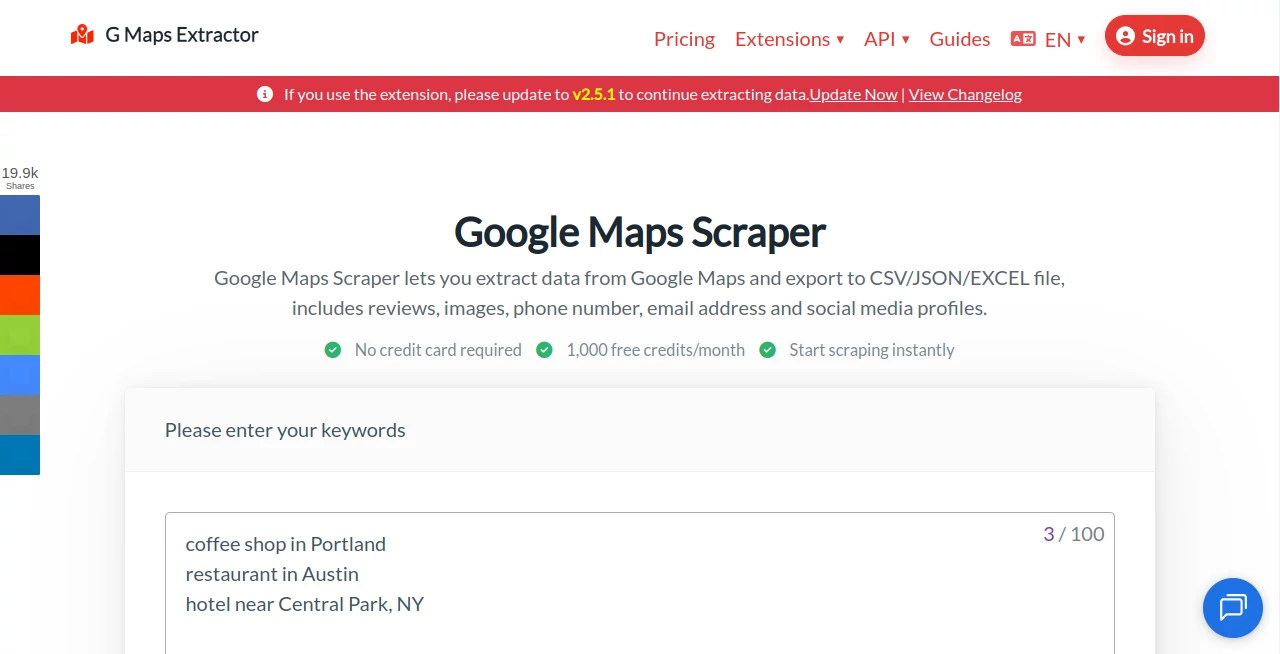
The interface is designed around a straightforward search-and-extract workflow. Users enter keywords describing the businesses or locations they want to research, start the scraping task, and review the resulting records.
For example, a marketing agency researching restaurants in Austin could search for terms such as “Italian restaurants in Austin” or “restaurant near downtown Austin.” A local SEO specialist could use similar searches to build lists of businesses within a particular niche. The preview makes it easier to understand what information is available before working with the complete dataset.
The no-code approach is particularly useful for marketers and business researchers who care more about the final dataset than the technical details behind web scraping.
Accuracy & Performance
Performance matters when a project involves thousands of businesses. The cloud-based version is designed to run scraping jobs online rather than requiring the user's computer to remain active throughout the process. The service also describes its system as using smart request patterns and rotating proxies to support more stable high-volume extraction.
The available fields go well beyond a basic business name and address. Depending on availability, records can include contact information, websites, categories, descriptions, ratings, reviews, photos, opening hours, latitude, longitude, Place IDs, and other location identifiers.
Of course, business information can change. A phone number may be updated, a company can close, or a website can disappear. For that reason, extracted information is best treated as a research dataset that should be checked before being used for important business decisions.
Capabilities
The biggest strength is the breadth of information that can be collected from a single business listing. Users can build datasets containing core business details alongside marketing-oriented information such as emails and social profiles when those details are publicly discoverable.
The bulk keyword feature is especially useful for lead generation. Instead of manually opening hundreds of searches, users can create larger scraping jobs based on multiple keywords. This makes it possible to research several industries, cities, or service types in one workflow.
Developers have another option. The available API products are designed for integrating business, review, or photo data into applications and internal systems. There is also an MCP integration aimed at using Google Maps data within supported AI development workflows.
Security & Privacy
The service states that it focuses on publicly available business information and describes its data collection approach as GDPR compliant. This makes it more suitable for business research than a workflow that depends on private or restricted information.
Users should still handle exported contact information responsibly. Data protection, marketing, and privacy requirements can vary between countries and use cases, so businesses should make sure their own outreach and storage practices comply with the laws and regulations that apply to them.
Use Cases
- Lead Generation: Build targeted lists of businesses by industry, location, or keyword.
- Sales Prospecting: Discover companies and contact details for outbound sales research.
- Local SEO: Analyze businesses, categories, ratings, reviews, and locations within a market.
- Market Research: Study competitors and business activity across different cities or industries.
- Marketing Agencies: Create prospect databases for campaigns serving specific niches.
- Real Estate Research: Identify nearby businesses and services around selected locations.
- Restaurant Research: Collect restaurant listings, ratings, addresses, websites, and other available details.
- Data Analysis: Export structured records into spreadsheets or other systems for further analysis.
- CRM Workflows: Prepare business datasets that can be cleaned and imported into sales or CRM processes.
- AI Workflows: Use the available MCP integration to bring location-based business data into supported AI development environments.
Pros and Cons
- Pros: Large monthly extraction limits on paid plans.
- Pros: CSV, Excel, and JSON export options.
- Pros: Useful business fields beyond basic listing information.
- Pros: Cloud-based scraping does not require keeping the browser open for online jobs.
- Pros: No-code interface suitable for non-technical users.
- Pros: Chrome and Edge extension options are available.
- Pros: API products provide a path for developers who need automation.
- Pros: Free monthly credits make it possible to test the service first.
- Cons: Large-scale extraction requires a paid subscription.
- Cons: Extracted information can vary depending on what is publicly available for each business.
- Cons: Users working with large datasets may need additional cleaning and validation before importing the information into a CRM.
Pricing Plans
The service offers separate pricing structures for its online scraper, browser extension, and API. This is useful because users can choose a workflow based on how they intend to collect the data.
The online scraper has a free plan with 1,000 records per month. Paid online plans increase the allowance substantially, with the Basic plan offering up to 80,000 records per month, Professional offering 300,000, Business offering 1,000,000, and Advanced offering up to 3,000,000 records per month. The site currently displays promotional pricing on several plans, so prices may change over time.
The browser extension also has a free tier with 1,000 records per month, while paid plans increase the monthly allowance to 100,000 or 500,000 records depending on the selected plan. The extension can also work with saved place lists.
For developers, the API starts with a free allowance of 20 requests per month. Paid API plans are available for higher request volumes, making the API more appropriate for applications and automated systems that need recurring access to business data.
A seven-day money-back guarantee is also advertised, giving new customers an opportunity to evaluate the service before making a longer-term commitment.
How to Use It
- Open the platform and create a free account.
- Enter a keyword describing the businesses you want to find.
- Add location-specific terms when you need results from a particular city or area.
- Start the scraping task and allow the system to collect the available listings.
- Review the preview and available business fields.
- Sign in to access the full results and export functionality.
- Choose CSV, Excel, or JSON depending on where the data will be used.
- Clean and verify important records before adding them to a CRM or contacting businesses.
For a small campaign, a search such as “dentists in Berlin” may be enough to create a focused prospecting list. For a larger agency project, multiple keywords can be processed together, making it easier to cover several services and locations without repeating the same manual research process.
Comparison with Similar Tools
There are many scraping platforms available, but they do not all approach Google Maps data in the same way. Some are designed primarily for developers, while others focus on general-purpose web scraping. This solution has a narrower focus, which can be an advantage when the main requirement is structured Google Maps business data.
Compared with a general web scraper, the dedicated workflow makes common business fields easier to work with. Users do not have to design a custom extraction process simply to obtain information such as business categories, ratings, phone numbers, coordinates, reviews, or opening hours.
The choice between the online scraper, browser extension, and API also gives it flexibility. A freelancer performing occasional research may prefer the simpler interface, while a development team can use the API for recurring automated tasks. The browser extension is another practical option for people who need to work with saved place lists directly from their browser.
Conclusion
For anyone who regularly turns Google Maps searches into business research, manually collecting listings quickly becomes a frustrating job. This platform removes much of that repetitive work by turning search results into structured, exportable datasets.
Its combination of bulk keyword scraping, multiple export formats, detailed business fields, browser extensions, APIs, and a free starting plan makes it suitable for a wide range of users. Lead generation teams can use it to build prospect lists, marketers can research local markets, SEO professionals can study businesses in specific areas, and developers can connect the data to their own systems.
The most appealing part is its practical approach. You do not need to be a programmer to get started, but there is enough flexibility available for technical users who want deeper automation. For projects where location-based business data is central to the workflow, it is a strong option worth testing.
Frequently Asked Questions (FAQ)
What information can be extracted?
Available fields can include business names, addresses, phone numbers, websites, categories, ratings, review counts, reviews, photos, emails, social media profiles, opening hours, latitude, longitude, Google Maps URLs, Place IDs, and other business identifiers.
Can I extract Google Maps data for free?
Yes. A free plan provides 1,000 records per month for the online scraper, allowing users to test keywords and evaluate the available data before choosing a paid plan.
Can the results be exported to Excel?
Yes. Results can be exported in CSV, Excel, or JSON formats, making them convenient for spreadsheets, databases, CRM workflows, and further analysis.
Do I need programming knowledge?
No. The online interface uses a point-and-click workflow, so users can create scraping jobs without writing code. Developers who need deeper automation can instead use the available API products.
Is there an API?
Yes. API options are available for developers who want to integrate Google Maps business, review, or photo data into applications, internal systems, or automated workflows.
Can I scrape multiple keywords?
Yes. The cloud-based version supports bulk keyword scraping, with the number of keywords per task depending on the selected subscription plan.
Can I extract emails and social media profiles?
Yes, when those details are publicly available. The available data fields include email addresses and social media profile URLs discovered from the internet.
Is the browser extension different from the online scraper?
Yes. The browser extension performs extraction within the browser and can work with saved place lists, while the online scraper is designed for faster cloud-based jobs and multiple keyword searches. The API is intended for developers who need programmatic access.
AI Data Mining , AI Web Scraping , AI Lead Generation , AI Developer Tools .
These classifications represent its core capabilities and areas of application. For related tools, explore the linked categories above.
G Maps Extractor details
Website unavailable — View Alternatives
Pricing
- Free
Apps
- Web App
Categories

G Maps Extractor Alternatives Product

RepoClip

TruthSpine

Scillus

JSON to Excel

JSON-Tools

Distro

TutuoAI

AILeadz.io

Jasper
