
Happy Horse AI
What is Happy Horse AI?
Creating professional-looking videos often requires multiple applications, editing skills, and countless hours of work. This platform changes that experience by bringing video generation, audio creation, and scene composition into one streamlined workflow. Instead of stitching together visuals, music, sound effects, and transitions manually, creators can generate polished multi-shot videos from a simple combination of text, images, video clips, and music.
One of its most impressive strengths is native audio generation. Rather than producing silent footage that requires separate editing, videos are created with synchronized sound, making the final result feel far more immersive. Whether you're producing marketing campaigns, storytelling videos, social media content, educational presentations, or product showcases, the creative process becomes dramatically faster while maintaining cinematic quality.
The platform also focuses on maintaining character consistency across multiple scenes, creating natural camera movement, realistic physics, and smooth transitions that help videos feel coherent from beginning to end.
Key Features
- Generate cinematic videos from text prompts.
- Combine text, images, music, and video clips in one project.
- Create multi-shot videos automatically.
- Native synchronized audio generation.
- Realistic character movement and animation.
- Consistent characters across different scenes.
- Beat-synced editing for music-driven content.
- Natural camera motion and cinematic composition.
- Support for creative storytelling and commercial content.
- Fast cloud-based rendering workflow.
User Interface
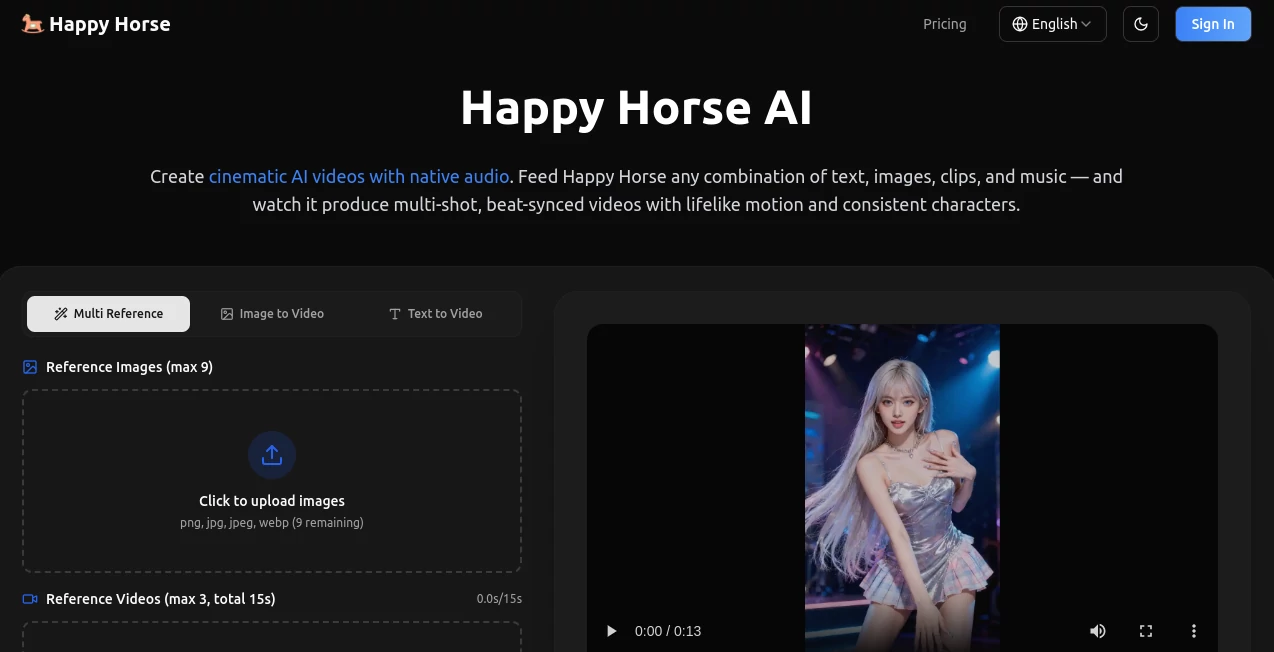
The workspace is designed to reduce complexity without limiting creativity. Uploading source materials is straightforward, and creators can freely mix prompts, reference images, music, and existing clips. The interface guides users through the production process in a logical way, making it approachable for beginners while still offering enough flexibility for experienced content creators who need greater creative control.
Accuracy & Performance
The generated videos demonstrate impressive scene continuity, smooth movement, and believable motion. Character identity remains remarkably consistent across multiple shots, which is especially valuable when producing narrative content or branded marketing videos. Native audio generation also improves synchronization between visuals and sound, reducing the amount of post-production work required.
Capabilities
The platform supports multimodal inputs, allowing creators to combine text prompts, uploaded images, existing video clips, and music into a single production workflow. This flexibility makes it suitable for promotional videos, social media campaigns, cinematic storytelling, educational explainers, concept visualization, creative experiments, and product advertisements. The ability to automatically create multiple connected scenes significantly speeds up content production while maintaining visual consistency.
Security & Privacy
User-generated projects are processed in the cloud, while paid plans include private generation options that help keep creative work inaccessible to other users. Commercial usage rights are also available with eligible plans, making the platform suitable for professional creators and businesses producing client work.
Use Cases
- Social media video production.
- Marketing campaigns.
- Product advertisements.
- YouTube content creation.
- Storytelling and cinematic shorts.
- Educational videos.
- Creative concept visualization.
- Promotional brand videos.
- Music-driven short-form content.
- Startup product launches.
Pros and Cons
Pros
- Native audio generation eliminates separate sound editing.
- Excellent multi-shot cinematic workflow.
- Supports multiple input formats.
- Strong character consistency.
- Natural camera movement.
- Suitable for both personal and commercial projects.
- Fast production process compared to traditional editing.
Cons
- Advanced projects may require paid credits.
- Rendering speed depends on selected plan and workload.
- Beginners may need experimentation to master prompt writing.
Pricing Plans
Several pricing options are available for different types of creators. Subscription plans provide monthly credits, priority processing, commercial licensing, and private generation. Users who prefer flexibility can also purchase one-time credit packs without committing to a recurring subscription, making the platform accessible for both occasional creators and professional production teams.
How to Use Happy Horse
Start by describing your idea with a text prompt or upload images, video clips, and music that match your creative vision. Customize the project by combining different media sources, then generate the video. After processing, review the result, regenerate scenes if necessary, and export the finished production for publishing on social media, websites, advertising campaigns, or client presentations.
Comparison with Similar Tools
Many AI video generators specialize in either text-to-video creation or image animation, often requiring separate applications for sound effects and music synchronization. This platform stands out by generating cinematic visuals together with native audio while supporting multiple input formats in a unified workflow. The ability to maintain character consistency across several scenes also provides an advantage for storytelling, branded content, and professional video production.
Conclusion
For creators who want cinematic AI videos without building complicated editing pipelines, this platform delivers a refreshing experience. The combination of multimodal input, native synchronized audio, realistic motion, and automatic multi-shot generation helps transform creative ideas into polished videos with minimal effort. Whether you're producing advertisements, educational content, social media campaigns, or visual storytelling projects, it offers an efficient workflow that balances speed, creativity, and production quality.
Frequently Asked Questions (FAQ)
Can I generate videos from only text?
Yes. Text prompts can be used on their own, although combining them with images or clips can provide greater creative control.
Does it generate audio automatically?
Yes. Native audio is generated alongside the video, producing synchronized sound during creation.
Can I upload my own images and videos?
Yes. Images, video clips, music, and text prompts can all be combined in a single project.
Is it suitable for commercial work?
Commercial licensing is available with eligible paid plans, making it appropriate for business and client projects.
Who is this platform best suited for?
It is ideal for marketers, content creators, filmmakers, educators, agencies, startups, and anyone looking to create high-quality AI-generated videos quickly.
AI Image to Video , AI Music Video Generator , AI Video Generator , AI Text to Video .
These classifications represent its core capabilities and areas of application. For related tools, explore the linked categories above.

Happy Horse AI Alternatives Product

VO4 AI

Gemini Omni

seedance 2.0

AI Animate I…

seedream vid…

Nano Banana …

AI Dance Vid…

Veo 3.2

Seedance 2.0