
Harmonic Security
What is Harmonic Security?
Harmonic Security is an AI governance and security platform designed for organizations that need to understand how employees and AI agents are using artificial intelligence at work. Instead of simply blocking known AI websites, it looks at the context of AI interactions, identifies potential data exposure, and allows security teams to respond in real time.
The platform is built around a straightforward idea: companies should be able to adopt AI without losing control of sensitive information. It can discover AI applications across browsers, desktop software, embedded AI features, and agentic workflows, giving security teams a broader view of what is actually happening across the organization.
Key Features
- AI usage discovery across more than 1,000 AI surfaces.
- Context-aware detection of sensitive information in AI interactions.
- Real-time policies that can warn, coach, log, or block risky actions.
- Support for browser, desktop, and MCP-based AI environments.
- AI usage classification based on business purpose and user intent.
- Visibility into shadow AI and unapproved applications.
- Audit trails and controls designed to support security and compliance programs.
User Interface
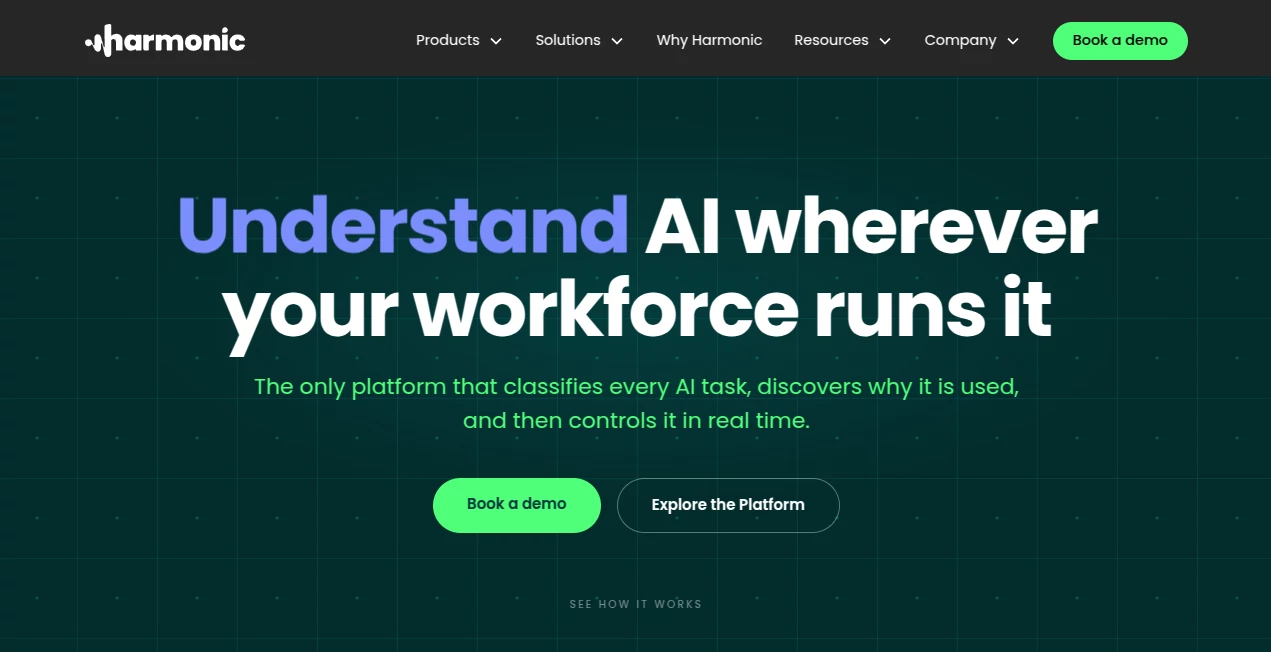
The platform is designed around an enterprise security console where teams can investigate AI usage, understand exposure, and manage policies. Its interactive platform preview provides a practical look at how sensitive information can be detected during an AI interaction and how a security policy can respond.
The experience focuses on useful security decisions rather than overwhelming administrators with raw activity. Teams can see where AI is being used, what kind of work is taking place, and where additional controls may be necessary.
Accuracy & Performance
One of the most interesting parts of the platform is its use of purpose-built small language models to understand context instead of relying entirely on keyword matching or traditional regular expressions. This matters because an AI prompt can contain perfectly normal business information alongside genuinely sensitive material.
The company reports inline classification decisions in under 200 milliseconds. It also states that its approach produces significantly fewer false positives than pattern-based detection. In practical terms, this can make security policies less disruptive for employees who need AI as part of their everyday workflow.
Capabilities
The platform covers a wide range of AI environments, including web applications, desktop AI clients, embedded AI features, and autonomous agents. It can work with environments involving applications such as ChatGPT Desktop, Claude Desktop, Cursor, Windsurf, Canva, Grammarly, and other AI-enabled services.
Its MCP gateway is particularly relevant for organizations experimenting with AI agents. Instead of focusing only on what a person types into a chatbot, the system can inspect agent actions and tool calls so policies can follow the actual workflow.
Security teams can choose different responses to risky activity. A policy may silently record an event, warn an employee, coach them toward a safer action, or block the interaction altogether. This gives organizations room to introduce controls gradually rather than immediately preventing legitimate AI usage.
Security & Privacy
Security and privacy are central to the platform's positioning. The company states that customer data is protected in dedicated tenants and that EU and US hosting options are available. It also states that customer data is not used to train its models.
The platform is designed to provide risk visibility without turning the security dashboard into a detailed employee-surveillance system. Employee names can be masked, and reporting is designed around organizational risk and AI usage patterns.
The company also lists SOC 2 Type 2, ISO 27001, HIPAA attestation, GDPR, and other security and compliance credentials through its trust center. Organizations should still review the current documentation and contractual terms against their own regulatory requirements before deployment.
Use Cases
Security teams can use the platform to discover shadow AI applications that employees are using without formal approval. This is particularly useful in companies where employees rely on dozens of AI services beyond the small group of applications officially sanctioned by IT.
Another practical use case is preventing sensitive business information from being entered into inappropriate AI accounts. For example, a sales employee could accidentally paste confidential pipeline information into a personal AI service. Context-aware controls can identify the risky interaction and respond before the information leaves the organization's intended security boundary.
It can also help organizations manage AI agents. As agents begin reading files, calling APIs, updating systems, and generating reports, traditional browser-focused security controls become less useful. Monitoring the agent and MCP layer provides another point of control for these workflows.
For compliance teams, centralized visibility, logging, data controls, and policy enforcement can also make it easier to document how AI is being governed across the organization.
Pros and Cons
- Pros: Broad AI visibility across web, desktop, embedded, and agentic environments.
- Pros: Context-aware sensitive-data detection rather than relying only on keyword rules.
- Pros: Real-time warning, coaching, logging, and blocking options.
- Pros: Designed to work alongside AI adoption rather than simply banning AI tools.
- Pros: Support for MCP and autonomous AI workflows.
- Cons: The platform is primarily aimed at organizations and security teams rather than individual users.
- Cons: Enterprise deployment requires IT and security involvement.
- Cons: Public pricing information is not prominently provided, so interested organizations need to contact the company for a tailored discussion.
Pricing Plans
No standard public pricing plans are listed on the website. The service is positioned as an enterprise security and AI governance platform, with pricing and deployment details handled through a personalized consultation and demo.
The company offers a 30-minute personalized demonstration where organizations can review their AI footprint, sensitive-data exposure, enforcement options, and deployment approach. This model makes sense for larger teams because requirements can vary considerably depending on the number of users, devices, AI applications, and security policies involved.
How to Use It
- Request a personalized demonstration and discuss the organization's AI security requirements.
- Deploy the required components using supported management platforms such as Intune, Jamf, Kandji, or Group Policy.
- Allow the system to build an inventory of AI applications and surfaces being used across the organization.
- Review AI activity, business use cases, and potential sensitive-data exposure.
- Create policies for different types of AI interactions and risk levels.
- Start with monitoring, logging, or employee coaching before introducing stricter blocking policies where appropriate.
- Continue reviewing AI usage as new applications, embedded AI features, and autonomous agents appear.
Comparison with Similar Tools
Traditional DLP platforms are generally focused on identifying sensitive strings, files, or predefined patterns. AI interactions are more complicated because the meaning of a prompt can depend heavily on its surrounding context. A normal-looking paragraph may represent confidential business information, while a message containing a recognizable pattern may be harmless.
SASE platforms can provide valuable visibility into network traffic and known AI domains, but modern AI usage is no longer limited to browser traffic. AI features can be built directly into productivity software, desktop applications, development environments, and autonomous agents.
This platform takes a more specialized approach by combining AI discovery, contextual classification, endpoint visibility, and inline governance. That makes it especially relevant for organizations that want to control AI usage across multiple vendors rather than managing a small whitelist of approved websites.
Conclusion
AI adoption is moving faster than many traditional security policies can keep up with. Employees are using AI inside browsers, development tools, productivity applications, and increasingly autonomous workflows. Simply blocking unfamiliar services is rarely a practical long-term strategy.
Harmonic Security takes a more flexible approach by focusing on what the AI interaction is actually trying to accomplish and whether the associated data presents a meaningful risk. Its combination of discovery, contextual detection, real-time controls, and agent governance makes it a strong option for organizations building a more mature AI security strategy.
For companies that want employees to benefit from AI while maintaining visibility over sensitive data and emerging agentic workflows, the platform offers a compelling enterprise-focused solution.
Frequently Asked Questions (FAQ)
What is Harmonic Security used for?
It is used to discover, understand, and govern AI usage across an organization. Security teams can identify AI applications, detect risky data exposure, and apply policies to AI interactions.
Does it only protect ChatGPT?
No. The platform is designed to cover a much broader AI ecosystem, including web AI applications, desktop AI software, embedded AI features, and agentic workflows.
Can it detect sensitive information in AI prompts?
Yes. Its contextual classification approach is designed to identify sensitive information based on meaning and intent rather than relying solely on keyword or regular-expression matching.
Can organizations block risky AI activity?
Yes. Policies can be configured to warn, coach, log, or block certain interactions depending on the organization's requirements.
Does it support AI agents and MCP?
Yes. The platform includes an MCP gateway designed to provide visibility and governance for agentic workflows and tool calls.
How quickly can it be deployed?
The company states that deployment can be completed in minutes using supported device-management systems. It also states that organizations can begin building an AI inventory from the first day of deployment.
Is pricing publicly available?
Standard pricing is not publicly listed. Organizations interested in the platform can request a personalized demonstration and discuss their specific deployment requirements.
Does the platform support privacy and compliance requirements?
It provides data controls, logging, security certifications, and hosting options intended to support enterprise privacy and compliance programs. Organizations should review the current documentation against their specific legal and regulatory obligations.
Who is this platform best suited for?
It is best suited to enterprises, security teams, IT departments, compliance teams, and organizations that need visibility and control over rapidly expanding AI usage across their workforce.
Other , AI Research Tool , AI Developer Tools , Business .
These classifications represent its core capabilities and areas of application. For related tools, explore the linked categories above.
Harmonic Security details
Website unavailable — View Alternatives
Pricing
- Freemium
Apps
- Web App
Categories

Harmonic Security Alternatives Product
VALTRAIN

MCP DXT Serv…

OnlyTraction
Aback Tools

OhNoCode
Meet in the …
DiRe-RAPIDS

ChatView-AI …

Grok 4