
















heicpdf.to
What is heicpdf.to?
Anyone who owns an iPhone knows the frustration: beautiful photos trapped in that HEIC format that half the world can’t open properly. You want to email them, upload them, or turn a bunch into a clean document, but it always turns into a headache. This tool makes that problem disappear. You drag in your HEIC files, and it turns them into proper, universally compatible PDFs in seconds. I’ve used it to quickly compile family trip photos into a shareable album and to send important documents that were stuck in Apple’s format. The relief is real when something that used to be annoying becomes almost instant.
Introduction
HEIC is great for saving space on your phone, but it’s a pain everywhere else. Most people end up converting photos one by one or using clunky desktop software. This platform offers a much smoother experience. It’s fast, works right in your browser, supports batch conversion, and delivers clean, high-quality PDFs that look professional. Whether you’re a regular iPhone user trying to share vacation memories or someone who needs to turn scanned documents into proper files, it handles the job without fuss. No software to install, no accounts forced on you—just straightforward, reliable conversion when you need it.
Key Features
User Interface
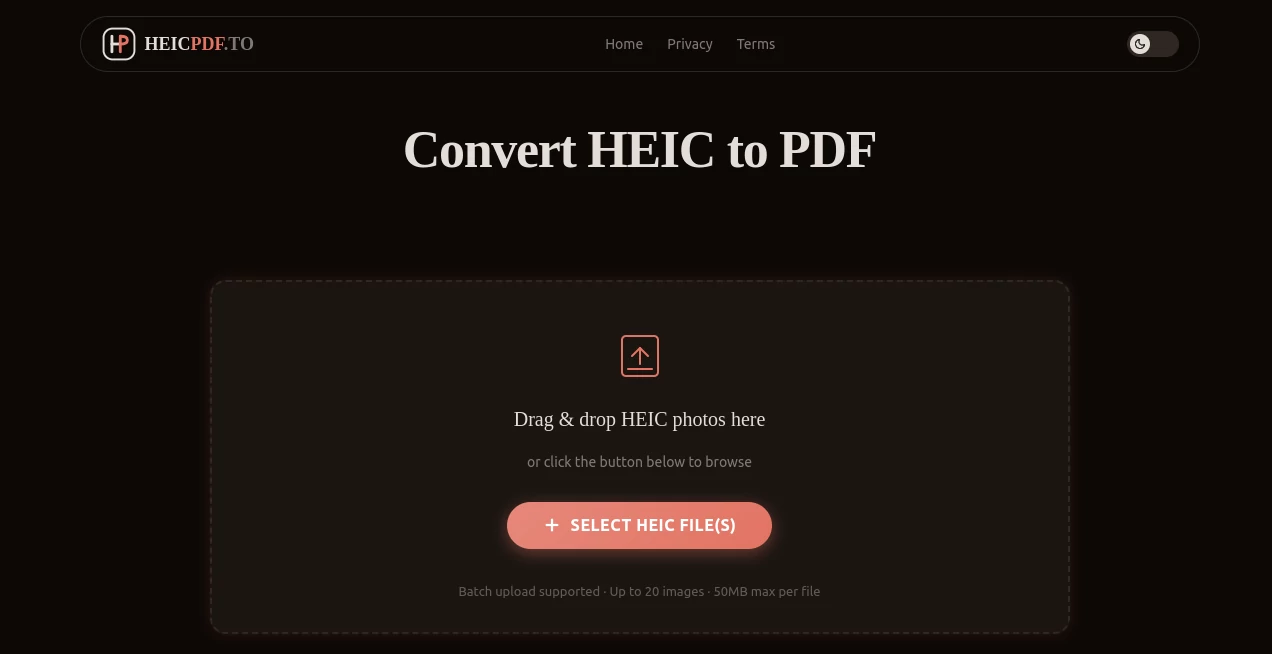
The design is wonderfully simple. A big, inviting drop zone in the center where you can drag multiple HEIC files or click to browse. Options for quality, page layout, and compression are clear and easy to understand. Conversion starts with one click, and you see progress for each file. The whole process feels thoughtful and user-friendly, especially for people who aren’t tech-savvy but just want their photos turned into usable PDFs without drama.
Accuracy & Performance
It preserves image quality remarkably well while converting. Colors stay true, details remain sharp, and the resulting PDFs open perfectly on any device. Batch processing is fast even with dozens of photos, and the tool handles both portrait and landscape orientations cleanly. In my experience, the output looks better than many other converters I’ve tried, with proper compression that keeps file sizes reasonable without making images look compressed or blurry.
Capabilities
You can convert single images or entire batches at once. It supports combining multiple HEIC files into one multi-page PDF, which is perfect for creating albums or documents. Options include choosing image quality, PDF orientation, and file size optimization. The tool also works well with photos taken in different modes (HDR, Portrait, etc.) and maintains metadata where it matters. Everything is done in your browser, so there’s no need to upload to a server if you prefer local processing in some cases.
Security & Privacy
Your photos are processed securely and deleted from servers shortly after conversion. There’s no requirement to create an account for basic use, which is refreshing. For personal family photos or sensitive documents, that respectful approach to privacy makes a big difference—you can use the tool confidently without worrying about where your images end up.
Use Cases
Parents compile school photos or vacation memories into beautiful multi-page PDFs to share with grandparents. Freelancers turn client photos or scanned receipts into professional documents. Travelers convert iPhone shots into organized trip reports. Real estate agents quickly make PDF portfolios from property photos. Anyone who receives HEIC files from Apple users and needs them in a more universal format finds an instant solution here. It turns a common annoyance into a five-second task.
Pros and Cons
Pros:
- Extremely fast and reliable batch conversion.
- Clean, high-quality PDFs that look professional.
- No software installation or account required for basic use.
- Smart handling of multiple files into single or separate PDFs.
- Excellent preservation of original image quality.
Cons:
- Free tier has reasonable daily limits for heavy users.
- Advanced customization options (like password protection) are limited in the free version.
Pricing Plans
The free version is generous enough for regular personal use and occasional batch jobs. Paid plans remove limits, add priority processing, unlimited conversions, and extra features like password-protected PDFs and advanced compression. Pricing is straightforward and affordable—most people find the paid tier pays for itself quickly if they convert files regularly.
How to Use HEIC to PDF Converter
Go to the main page and drag your HEIC photos into the upload area (or click to select files). Choose whether you want separate PDFs or one combined document. Adjust quality settings if needed, then click Convert. Wait a few seconds as it processes everything, then download your ready PDFs. For multiple batches, the interface makes it easy to start the next round right away. The whole process is intuitive enough that most people get great results on their very first try.
Comparison with Similar Tools
Many online converters are slow, require sign-ups, or reduce image quality noticeably. Desktop software often feels heavy and outdated. This tool stands out for its speed, simplicity, and balance of quality versus file size. It doesn’t force accounts or complicated steps, and the results are consistently cleaner than many free alternatives. For everyday users who just want reliable conversion without hassle, it’s one of the smoothest options available.
Conclusion
HEIC photos are beautiful on your iPhone but annoying everywhere else. This converter solves that problem elegantly, turning a common frustration into something quick and reliable. Whether you’re preserving memories, preparing documents, or just trying to share photos with friends who don’t use Apple devices, it makes life noticeably easier. Simple, fast, and effective—it’s the kind of practical tool you end up using more often than you expect, and you’ll be glad you found it.
Frequently Asked Questions (FAQ)
Is the conversion quality good?
Yes—images stay sharp and colors remain accurate while keeping file sizes reasonable.
Can I combine multiple photos into one PDF?
Absolutely—one of the most useful features for creating albums or reports.
Do I need to create an account?
No, you can start converting immediately without signing up.
What about batch conversion?
It handles dozens of files at once smoothly, saving huge amounts of time.
Are my photos stored on the server?
Files are processed securely and automatically deleted after conversion.