Hoocs AI
What is Hoocs AI?
Turning a long recording into useful information can take far more time than recording it in the first place. Hoocs.ai is built to make that process much easier by converting audio and video into editable text, summaries, key points, and visual mind maps. It supports more than 130 languages and is designed for everything from interviews and lectures to meetings, podcasts, and recorded calls.
What makes the platform particularly practical is that it does not stop at transcription. Once a recording has been converted into text, users can edit the result, translate it, extract important information, generate summaries, and organize ideas visually. For someone who regularly works with spoken content, that can remove a surprisingly large amount of repetitive work.
Key Features
- Audio and video transcription with support for more than 130 languages and dialects.
- Fast processing advertised at up to 10x the original recording speed.
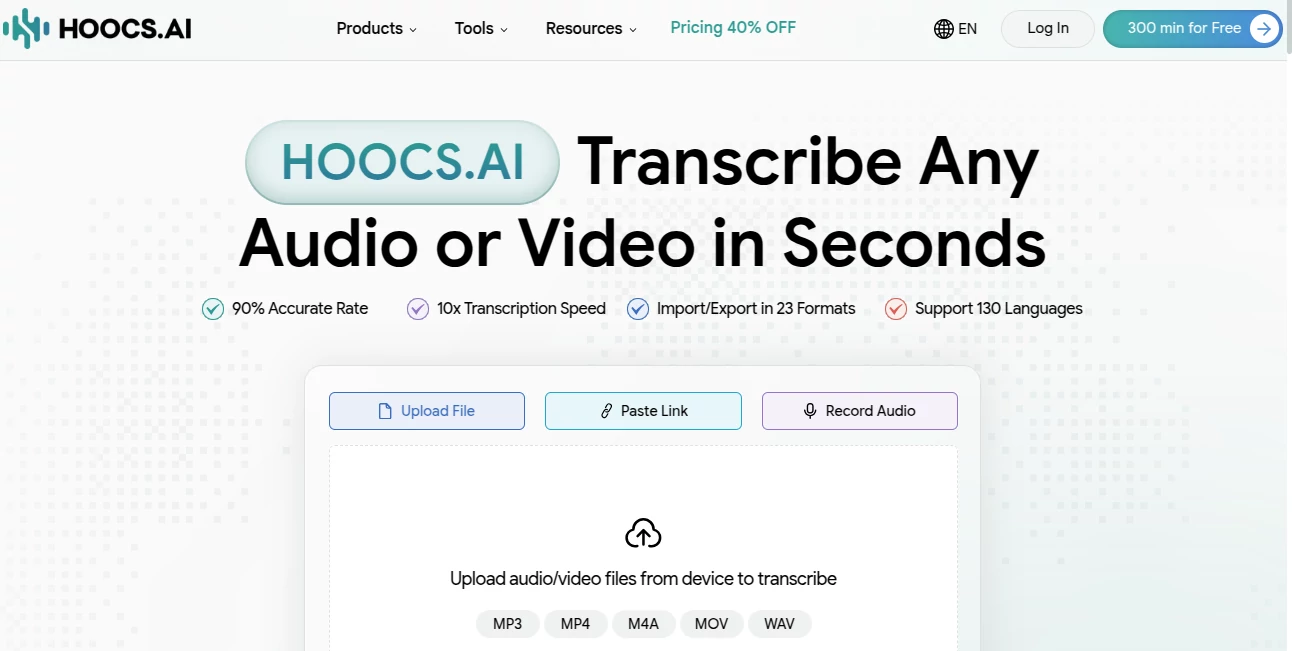
- Upload, link-based import, and direct audio recording options.
- Online transcript editing before exporting or sharing.
- AI-generated summaries, key takeaways, and highlights.
- Mind map generation for turning lengthy transcripts into visual structures.
- Automatic translation for supported transcription workflows.
- Batch processing of up to 50 files on paid plans.
- Export options including DOCX, XLSX, SRT, TXT, and other supported formats.
- Dedicated conversion tools for formats such as MP3, MP4, WAV, and video files.
User Interface
The workflow is refreshingly straightforward. A user can upload a recording, paste a supported link, or record audio directly in the browser. After transcription, the resulting text can be reviewed and edited in the online workspace before being downloaded or shared.
This approach works particularly well when the transcript is not the final destination. For example, a researcher can correct a few phrases, pull out important statements, generate a summary, and export the finished material without moving between several different applications.
Accuracy & Performance
The service advertises transcription accuracy above 90% and processing speeds of up to 10x. Actual results naturally depend on factors such as audio quality, background noise, accents, terminology, and the number of speakers. Still, the combination of fast processing and built-in editing makes it useful even when a transcript needs a little human polishing afterward.
Its support for multilingual recordings is another useful advantage. A recording containing different languages can be particularly troublesome for conventional transcription workflows, while the platform is designed to handle more than 130 languages and dialects.
Capabilities
The platform goes beyond simple speech-to-text conversion. It can turn recordings into searchable written material, generate summaries and key takeaways, create mind maps, translate transcripts, and produce subtitles. Users can also work with different audio and video formats rather than having to convert files before uploading them.
For content creators, the subtitle functionality can be especially helpful. A podcast episode, interview, or video recording can become a transcript and SRT subtitle file without requiring a separate captioning workflow. Students and researchers can use the same process to transform lectures and interviews into notes that are easier to review later.
Security & Privacy
Privacy is an important consideration whenever recordings contain meetings, interviews, lectures, or private conversations. The service states that uploaded files and data are protected with end-to-end encryption and that files are deleted after transcription. Users should still review the current privacy policy and terms before uploading sensitive or confidential material, particularly when working with regulated or proprietary information.
Use Cases
Meetings: Teams can turn recorded discussions into transcripts, summaries, key points, and action-oriented notes. This is useful when participants need to revisit decisions without watching an entire recording again.
Education: Students can convert lectures and online lessons into written notes, making it easier to search for specific subjects and review important sections before an exam.
Podcasts: Podcast creators can create transcripts and subtitles from recorded episodes, then reuse the written material for accessibility, research, or content repurposing.
Journalism and Interviews: Reporters and researchers can process interviews quickly and search through the resulting text rather than repeatedly listening to the original recording.
Content Creation: Video creators can generate captions and transcripts from their recordings and make their content more accessible to audiences who prefer reading or watching with subtitles.
Pros and Cons
Pros:
- Supports more than 130 languages and dialects.
- Fast transcription workflow with claimed speeds of up to 10x.
- Includes summaries, key points, and mind maps.
- Built-in transcript editing reduces the need for external software.
- Supports common audio, video, and subtitle formats.
- Free plan includes 300 transcription minutes for a 15-day period.
- Paid plans offer batch processing and automatic translation.
Cons:
- Transcription quality can vary depending on recording conditions.
- The free plan has limits on file length, total files, and available features.
- Users working with highly specialized terminology may still need to review transcripts manually.
- Heavy users may need a paid plan once the included transcription minutes are exhausted.
Pricing Plans
A free plan provides 300 minutes of AI transcription for 15 days, with individual files limited to 30 minutes and 10 GB. It also includes text editing and export, support for 130 languages, and unlimited mind map generation.
The monthly plan costs $12 per month and includes 1,500 transcription minutes. It allows files of up to five hours and 10 GB, along with unlimited transcription history, automatic translation, advanced file management, and batch processing of up to 50 files.
The yearly plan is listed at $7.20 per month, billed annually, and provides the same 1,500 monthly transcription minutes and paid features while offering a lower effective monthly price. Pricing and promotional offers can change, so users should check the current plan details before subscribing.
How to Use It
Getting started takes only a few steps. First, upload an audio or video file, paste a supported media link, or record audio directly. Next, start the transcription process and wait for the generated text. The transcript can then be reviewed and edited in the online workspace.
Once the text is ready, users can export it in a suitable format, share it, translate it, or use the available AI tools to create summaries, key points, and mind maps. For a simple interview, for example, the entire workflow can go from raw recording to edited transcript and summarized notes without needing several separate applications.
Comparison with Similar Tools
Many transcription services focus primarily on converting speech into text. This platform takes a broader approach by combining transcription with editing, translation, summarization, mind maps, and subtitle generation. That makes it more interesting for users who need to do something with their transcript after the initial conversion.
It is especially well suited to people who regularly process large amounts of spoken content. A casual user who only needs an occasional short transcript may find the free allowance sufficient, while professionals, researchers, educators, journalists, and content teams can benefit more from the larger monthly allowance and batch-processing capabilities available on paid plans.
Conclusion
For anyone who spends a significant amount of time turning recordings into usable information, this platform offers a practical combination of transcription and content-processing features. Support for more than 130 languages, fast processing, online editing, summaries, mind maps, translations, and subtitle generation give it a broader role than a basic speech-to-text converter.
The strongest part of the experience is the workflow: upload a recording, obtain an editable transcript, extract the important information, and export the finished result. Whether the source is a meeting, lecture, podcast, interview, or video, that simplicity can save a considerable amount of manual work.
Frequently Asked Questions (FAQ)
Is there a free plan?
Yes. The free plan includes 300 minutes of AI transcription, valid for 15 days, along with editing, export, support for 130 languages, and unlimited mind map generation.
How many languages are supported?
The service supports more than 130 languages and dialects for transcription and related language-processing features.
Can audio and video files be transcribed?
Yes. Users can process both audio and video recordings, including common formats such as MP3, MP4, M4A, MOV, and WAV.
Can transcripts be edited?
Yes. Transcripts can be reviewed and edited online before they are exported or shared.
Can it generate subtitles?
Yes. The platform includes video-to-SRT functionality for creating subtitle files from video recordings.
Can it summarize recordings?
Yes. AI-generated summaries, highlights, key takeaways, and mind maps can be created from transcribed audio and video.
Is automatic translation available?
Automatic translation is available on the paid plans, allowing users to translate supported transcripts as part of the workflow.
Who can benefit most from this tool?
It is a good fit for students, educators, journalists, researchers, meeting-heavy teams, podcasters, video creators, and professionals who frequently need to turn spoken content into searchable and reusable information.
AI Summarizer , AI Mind Mapping , AI Transcription , AI Speech to Text .
These classifications represent its core capabilities and areas of application. For related tools, explore the linked categories above.

Hoocs AI Alternatives Product

TO MD
TikoTranscri…
WhisperWebUI
AudioScribe

Inpodcast AI

NepVox

Maestra

Speech Text

Jasper