
IdeaPico
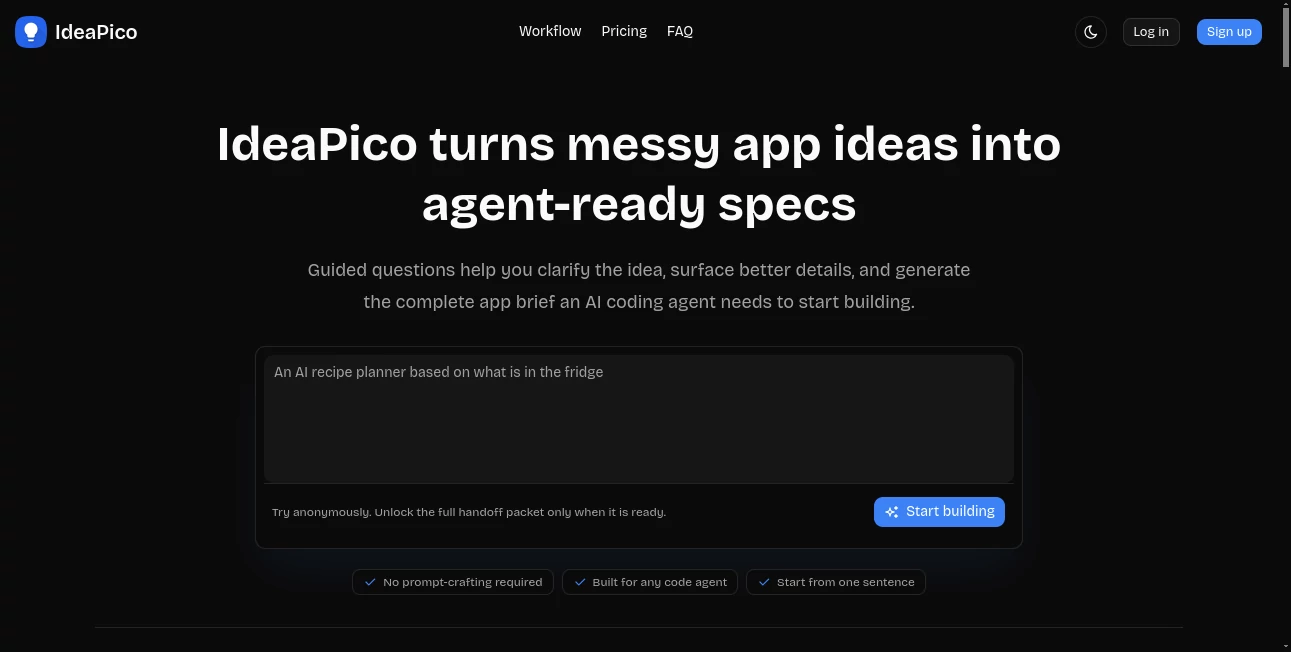
What is IdeaPico?
I’ve been there — you have this half-formed app idea bouncing around in your head, but when you try to explain it to an AI coding agent, it either gets confused or starts building the wrong thing. That’s exactly the problem this tool solves. You start with a messy sentence or two, answer some smart follow-up questions, and it hands you a complete, structured brief your AI agent can actually work with. No more vague prompts. No more mid-project rewrites because something important was missed. It feels like having a sharp product person sitting next to you, asking the right questions before the coding even begins.
Introduction
AI coding agents are incredibly powerful, but they’re only as good as the context you give them. Most of us aren’t great at writing perfect specs on the first try. IdeaPico bridges that gap. It guides you through a thoughtful interview process that surfaces user flows, edge cases, technical decisions, and acceptance criteria. Then it packages everything into clean, separate documents your agent can understand. Founders, indie hackers, and product teams are using it to go from rough idea to first working version with far fewer detours. It doesn’t replace your vision — it helps you express it clearly enough for an AI to build something useful.
Key Features
User Interface
The interface is refreshingly straightforward. You start by typing your idea — even if it’s just one vague sentence. Then it walks you through guided questions that feel natural, not robotic. No overwhelming forms or confusing options. Everything stays focused on clarifying what actually matters for building the app. When you’re done, you get a clean handoff packet ready to copy-paste. It’s the kind of tool that respects your time and keeps you in creative flow instead of fighting with prompts.
Accuracy & Performance
What impresses me most is how well it catches the important details. It doesn’t just rephrase your words — it asks smart follow-ups that reveal missing pieces you hadn’t thought about yet. The resulting documents are structured and practical, giving the AI agent clear boundaries, user journeys, technical considerations, and success criteria. In practice, this leads to fewer wrong turns and less back-and-forth during the build phase. The output feels like something a seasoned PM would produce, not generic AI filler.
Capabilities
It generates a full handoff packet with four focused documents: product scope and user journeys, technical architecture and APIs, design system and UI guidance, plus a shipping and verification checklist. You can start from text alone or combine it with reference images if needed. The system works beautifully with Cursor, Claude Code, Codex, v0, and similar agents. It’s especially strong at turning fuzzy ideas into something concrete enough for serious development.
Security & Privacy
You can try it anonymously without signing up. Your ideas stay private — the platform doesn’t store or train on your projects unless you explicitly save them. For founders working on early-stage concepts, that low-friction, privacy-first approach is genuinely appreciated.
Use Cases
A solo founder with a weekend idea uses it to create a solid spec before feeding it to Cursor, ending up with a working prototype faster than ever. A small team building an internal tool clarifies requirements with stakeholders through the guided questions, then hands a clean brief to their AI coding setup. An indie hacker testing multiple concepts generates quick specs for each one to see which feels most promising before investing real time. It shines whenever you have an idea that’s exciting but still fuzzy around the edges.
Pros and Cons
Pros:
- Turns vague ideas into structured, agent-ready specs without prompt engineering skills.
- Guided questions surface important details you might otherwise miss.
- Produces clean, organized documents that agents actually understand.
- Fast and focused workflow that respects your time.
- Anonymous try-before-you-buy option.
Cons:
- Best results still depend on your willingness to answer the questions thoughtfully.
- It’s a one-time credit model rather than unlimited monthly access.
Pricing Plans
It uses a simple credit system — buy once and use when you need it, with no subscriptions or auto-renewals. Single projects, 3-packs, and 10-packs are available, with the larger packs offering better value per project. Credits don’t expire for a full year, giving you flexibility to work at your own pace. Many users find that even one well-executed project more than justifies the cost.
How to Use IdeaPico
Start by typing your idea — even if it’s rough or incomplete. Go through the guided questions, answering as thoroughly as you can. Review the generated documents, make small tweaks if needed, then copy the handoff instruction. Paste it into your AI coding agent (Cursor, Claude, etc.) and watch it pull in the full context and start building. The whole process from idea to ready-to-build spec usually takes under 15–20 minutes.
Comparison with Similar Tools
Most prompting tools still leave you writing long, fragile prompts that agents easily misinterpret. This one replaces guesswork with structured context and clear acceptance criteria. While other spec generators produce generic documents, IdeaPico creates agent-friendly packets with separate concerns for product, tech, design, and shipping. It’s less about writing better prompts and more about giving your AI the right foundation to work from.
Conclusion
Building with AI agents is exciting, but vague ideas lead to frustrating results. IdeaPico makes the critical early stage much more reliable by turning messy thoughts into clear, comprehensive specs. It’s the missing bridge between excitement and execution — helping you move faster while reducing costly misunderstandings. For anyone serious about building with AI, it’s quickly becoming an essential part of the workflow.
Frequently Asked Questions (FAQ)
How long does it take to create a full spec?
Most people finish in 10–25 minutes, depending on how complex the idea is.
Do I need to know technical details?
No — the guided questions help surface those details naturally.
Which AI coding tools work best with it?
It works especially well with Cursor, Claude Code, Codex, v0, and similar agents.
Are the credits one-time or recurring?
One-time purchase with no auto-renewal. Unused credits last for one year.
Can I try it before buying?
Yes — you can start anonymously and only pay when you want the full handoff packet.
AI Code Assistant , AI Research Tool , AI Developer Tools .
These classifications represent its core capabilities and areas of application. For related tools, explore the linked categories above.

IdeaPico Alternatives Product

Odysseus AI

HY Motion

Patches Answ…

Ito AI

StatMate

Best of AI

obbylist

Gemini Omni

Where Is Thi…