PDF Toolkit
What is PDF Toolkit?
Managing PDF files has become a daily necessity for students, professionals, and businesses alike. From editing and compressing to converting and signing documents, having a reliable online solution can save a significant amount of time and effort. This platform offers a complete suite of PDF tools designed to make document handling smooth, fast, and accessible from anywhere.
Instead of relying on heavy software installations, users can perform all essential PDF tasks directly in the browser. The experience is lightweight, intuitive, and built for productivity without unnecessary complexity.
Key Features
User Interface
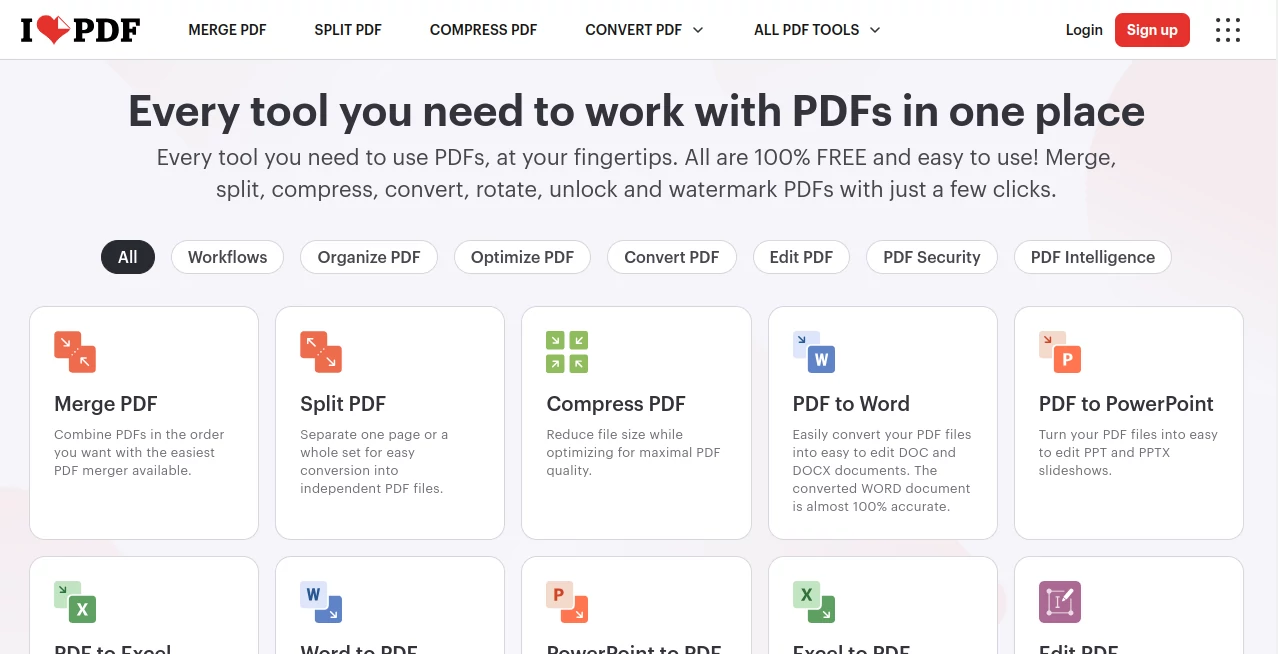
The interface is clean and beginner-friendly, allowing users to quickly find the tool they need. Each function is clearly labeled, reducing confusion and making the workflow extremely efficient even for first-time users.
Accuracy & Performance
File processing is fast and highly accurate. Whether converting documents or compressing large files, the system maintains formatting quality while ensuring quick output delivery.
Capabilities
- Merge multiple PDF files into one document
- Split large files into smaller sections
- Convert PDFs to and from various formats
- Compress files without losing quality
- Edit and annotate documents online
Security & Privacy
User privacy is a top priority. Uploaded files are processed securely and automatically deleted after a short period, ensuring sensitive information remains protected.
Use Cases
- Students managing assignments and research papers
- Businesses handling contracts and reports
- Freelancers editing and sending client documents
- Office workers streamlining daily paperwork
Pros and Cons
Pros:
- Wide range of PDF tools in one place
- No software installation required
- Fast processing and user-friendly design
- Accessible from any device
Cons:
- Some advanced features require premium access
- Internet connection is required for all operations
Pricing Plans
The platform offers both free and premium options. The free version covers most essential tasks such as conversion, compression, and basic editing. The premium plan unlocks advanced features like batch processing, enhanced file limits, and additional productivity tools for power users.
How to Use the Platform
Using this PDF solution is straightforward. Users simply select the required tool from the homepage, upload their file, and apply the desired action. Within seconds, the processed file is ready for download. No technical knowledge is required, making it accessible to everyone.
Comparison with Similar Tools
Compared to traditional desktop software, this platform offers greater flexibility and convenience. While many alternatives require installation and system resources, this solution works entirely online, making it more accessible for users who need quick and reliable document handling without setup delays.
Conclusion
For anyone working regularly with digital documents, this platform provides a complete and efficient solution. It combines simplicity with powerful functionality, making PDF management easier than ever. Whether for personal or professional use, it stands out as a dependable choice in the modern digital workspace.
Frequently Asked Questions (FAQ)
What types of files can be processed?
It supports a wide range of document operations including conversion, compression, merging, and editing of PDF files.
Is it free to use?
Yes, many core features are available for free, with optional premium upgrades for advanced needs.
Do I need to install anything?
No installation is required. Everything works directly through the browser.
Is my data safe?
Yes, uploaded files are securely processed and removed after a short period to ensure privacy.
Can it be used on mobile devices?
Yes, the platform is fully compatible with smartphones, tablets, and desktop devices.
AI Document Extraction , AI PDF , AI Productivity Tools , AI Files Assistant .
These classifications represent its core capabilities and areas of application. For related tools, explore the linked categories above.
PDF Toolkit details
Website unavailable — View Alternatives
Pricing
- Free
Apps
- Web App
- iOS App
- Android App
- Windows App
- Mac App
Categories

PDF Toolkit Alternatives Product

Docubix

TO MD

MindSnapz

Vibebot.gg

Markdown to …

WhatsMyName …

Embedful

Firefox

ForthWrite