
Image MCP Server
What is Image MCP Server?
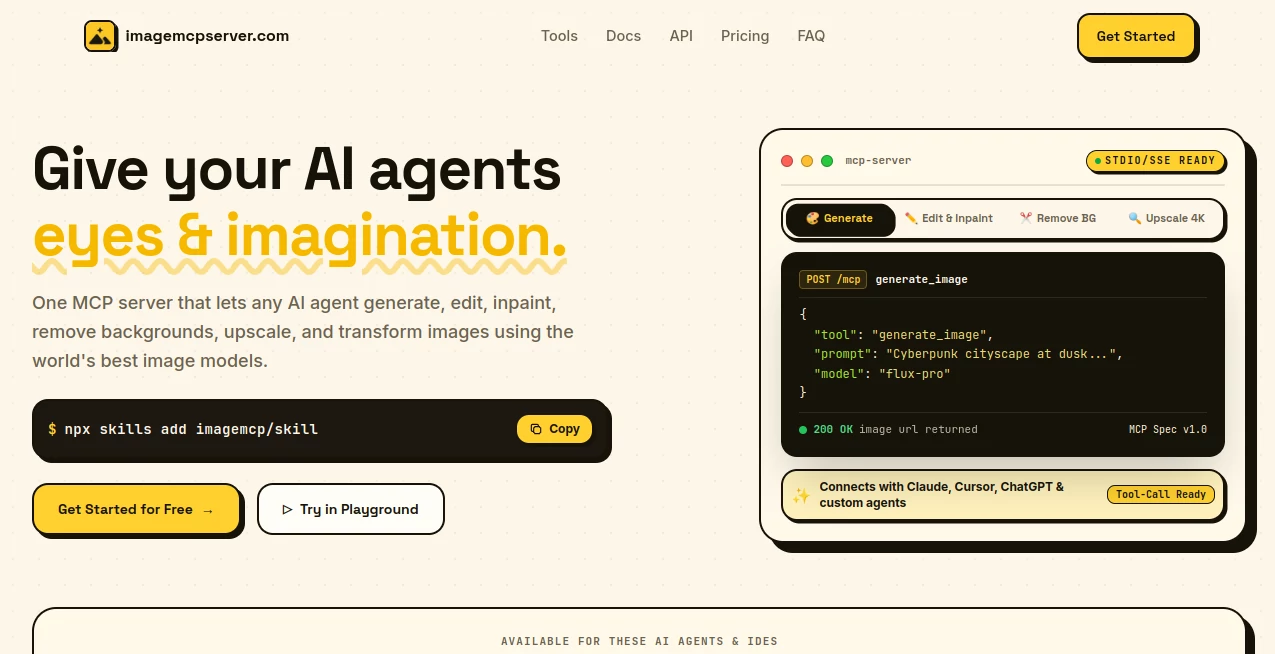
Image MCP Server brings image generation and editing directly into AI agents and development environments through the Model Context Protocol (MCP). Instead of wiring separate image APIs, authentication methods, and provider-specific SDKs into an application, developers can connect one server and give their agents access to a broad set of visual tools.
The platform supports image generation, image editing and inpainting, background removal, image upscaling, SVG creation, compression, and format conversion. It is designed for modern AI workflows where an agent may need to create or modify visuals as part of a larger task rather than sending the user to a separate image editor.
It also supports a range of popular AI clients and IDEs, including Claude, Cursor, ChatGPT, VS Code, Windsurf, Zed, Cline, Roo, and other MCP-compatible environments. For developers building autonomous agents or content automation systems, this makes visual operations considerably easier to incorporate into existing workflows.
Key Features
- AI image generation from text prompts and reference images
- Image editing, retouching, inpainting, and restyling
- Automatic background removal and transparent PNG creation
- Image upscaling with support for resolutions up to 4K
- Text-to-SVG generation for editable vector graphics
- Image compression with quality and format controls
- Conversion between PNG, JPG, WEBP, GIF, BMP, and SVG
- Automatic routing across more than 40 image models
- Unified API and MCP interfaces
- API key management and per-key request logging
- Credit-based usage with monthly spending controls
- Support for multiple AI agents and development environments
User Interface
The experience is primarily designed around developers and AI agents rather than a traditional drag-and-drop photo editor. Configuration is handled through an MCP client, while the accompanying dashboard provides practical controls for API keys, request logs, billing, and usage.
The setup is intentionally straightforward. A developer can add the server to an MCP-compatible client, make a request through a natural-language prompt or structured call, and receive the resulting visual output. The dashboard also makes it easier to understand which agent is using the service and how many credits individual requests consume.
Accuracy & Performance
Performance depends on the model selected for a particular request, but the platform is built to route requests across multiple image-generation models rather than locking developers into a single provider. Automatic routing, retries, and fallbacks are included to make integrations more resilient.
The published examples show generated images being returned within several seconds, with model information, latency, and seed values recorded for individual generation requests. This level of visibility can be particularly useful when developers need to troubleshoot an automated workflow or compare outputs between models.
Capabilities
The strongest part of the platform is the breadth of operations available through one connection. An AI agent can create a new image, modify an existing one, remove its background, upscale it, generate an SVG, compress it, or convert it into another format without requiring a separate integration for every operation.
Reference images can also be supplied for image generation, while editing workflows can handle tasks such as inpainting, retouching, and restyling. For teams working with automated websites, marketing content, game assets, or AI-powered applications, having these capabilities available as callable tools can remove a surprising amount of development overhead.
Security & Privacy
API access is managed through keys that can be created and revoked from the dashboard. The service also provides request logs containing information such as the prompt, selected model, latency, HTTP status, and credits consumed.
Generated images are returned as public URLs by default through object storage, although the service also supports a base64 JSON response format when developers prefer to receive the image data directly instead of having the output hosted. Teams should still review their own data-handling requirements before sending confidential or sensitive images through any third-party AI service.
Use Cases
- Autonomous AI agents: Give research, design, or web agents the ability to create and modify visuals while completing larger tasks.
- AI-powered editors: Add generation, editing, background removal, and upscaling to development tools without building individual provider integrations.
- Content automation: Produce blog graphics, social media visuals, product images, and other marketing assets automatically.
- Game development: Generate concept art, sprites, textures, and asset variations during an automated development workflow.
- Website creation: Create hero graphics, SVG elements, transparent images, and other visual assets while building websites.
- Internal applications: Add controlled image-generation capabilities to dashboards, operations systems, and internal AI tools.
- CI and backend workflows: Use the HTTP API to perform image operations from backend jobs or automated pipelines without requiring an attached AI agent.
Pros and Cons
Pros
- One connection provides access to multiple image operations.
- Supports MCP-compatible AI clients and IDEs.
- More than 40 image models can be accessed through the service.
- Includes generation, editing, background removal, and upscaling.
- Offers both MCP and HTTP API access.
- Usage and individual request costs can be monitored.
- Prepaid credits help prevent unexpected usage invoices.
Cons
- It is primarily aimed at developers and AI-agent workflows rather than casual image editing.
- Image-generation costs vary depending on the model used.
- Users who need highly specialized provider-specific controls may prefer working directly with individual model APIs.
- Public image URLs are the default output format, so teams handling sensitive assets should configure their workflow accordingly.
Pricing Plans
The service uses a prepaid credit model rather than charging per user seat. A free tier provides 30 credits per month with no credit card requirement, along with basic image editing, text-to-image generation, and API/MCP access.
The Starter plan costs $20 per month and includes 1,000 credits, all image editing tools, text-to-image, text-to-SVG, image-to-SVG, and API/MCP access. The Pro plan costs $50 per month and provides 3,000 credits, priority processing, and early access to new tools.
For larger workloads, the Enterprise plan costs $100 per month and includes 8,000 credits, the features of the Pro plan, maximum rate limits, and priority support. Additional credit packs are also available, while enterprise customers can use their own provider keys if preferred.
How to Use Image MCP Server
- Create an account and access the dashboard.
- Generate an API key for the agent or application you want to connect.
- Add the MCP server to your compatible AI client or development environment.
- Ask the connected agent to generate, edit, upscale, convert, or otherwise process an image.
- Review the returned visual output and continue refining it through additional tool calls when needed.
- Use the dashboard to monitor request history, model usage, latency, and credit consumption.
Comparison with Similar Tools
Traditional image APIs often require developers to integrate each provider separately, manage different authentication systems, and maintain different request formats. This approach can work well when an application depends heavily on one specific provider, but it becomes more complicated when several models or image operations are required.
An MCP-based approach takes a different route. Instead of exposing a collection of unrelated provider APIs to an agent, the visual capabilities are presented through a unified set of tools. This is particularly useful for AI agents that need to decide when an image should be generated, edited, converted, or enhanced as part of an ongoing task.
The platform is therefore best viewed as an orchestration layer for image workflows rather than simply another standalone image generator. Developers who value flexibility across models and want fewer integrations to maintain may find this approach especially attractive.
Conclusion
Image MCP Server is a compelling option for developers who want AI agents to work with images as naturally as they already work with text and code. Its combination of MCP support, multiple image models, editing capabilities, background removal, upscaling, SVG generation, and standard image utilities creates a useful toolkit behind a single integration.
The real advantage becomes apparent in automated workflows. A website-building agent can create its own graphics, a content system can generate and resize marketing images, and an autonomous application can modify visual assets without relying on a human to move files between several different services.
For developers building the next generation of AI-powered applications, that ability to treat visual operations as ordinary agent tools can make complex workflows considerably simpler.
Frequently Asked Questions (FAQ)
What is an MCP server?
Model Context Protocol is an open standard that allows AI applications to discover and call external tools. An MCP server can therefore provide an AI agent with capabilities that are not built into the model itself.
Which AI clients can connect?
The service supports MCP-compatible clients and environments including Claude, Cursor, ChatGPT, VS Code, Copilot, Windsurf, Zed, Cline, Roo, Codex, and several other agent platforms.
Do I need separate API keys for different image models?
No. A single service key provides access to the models available through the platform. Enterprise users can also bring their own provider keys if they prefer to manage provider billing directly.
Can it be used as a regular API?
Yes. The image tools have HTTP equivalents, allowing developers to call them from backend applications, automated jobs, and CI pipelines even when an MCP client is not involved.
How are image credits calculated?
Each operation consumes a specified number of credits, with the cost depending on the operation and, for image generation, the model tier. The service records the exact credit cost for individual requests, while monthly plans replenish credits on a recurring basis.
AI Photo & Image Generator , Photo & Image Editor , AI API Design , AI Developer Tools .
These classifications represent its core capabilities and areas of application. For related tools, explore the linked categories above.
Image MCP Server details
Website unavailable — View Alternatives
Pricing
- Free
Apps
- Web App
Categories

Image MCP Server Alternatives Product

AI Complianc…

ChromaPeel

ShipAhead

Photoshoot A…

Photo Locati…

UpMocker

StyleCut

bananaai.app

Nano Banana …