
ImageStyle
What is ImageStyle?
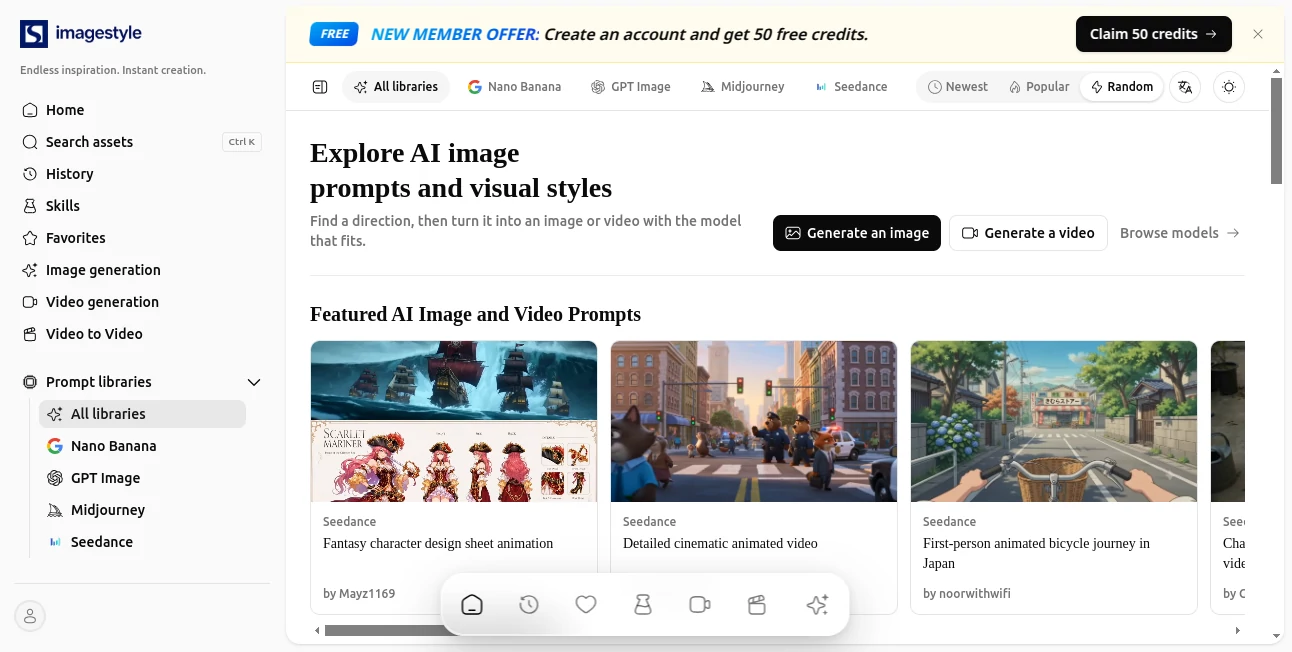
ImageStyle is a visual creation platform built around AI image prompts, creative styles, and practical image and video workflows. Instead of starting from a blank prompt every time, users can explore proven visual directions, study complete prompts, and move from inspiration to generation with a workflow that fits the project.
The platform brings together prompt collections for popular image and video models, including Nano Banana, GPT Image, Midjourney, and Seedance. It also goes beyond prompt discovery by providing tools for image generation, image-to-image work, image variations, product visuals, and video creation. This makes it particularly useful for creators who want ideas they can actually turn into finished visual content.
Key Features
- AI image prompt collections with detailed visual directions.
- Prompt libraries covering Nano Banana, GPT Image, Midjourney, and Seedance.
- AI image generation from text descriptions.
- Image-to-image generation using reference visuals.
- Image variation workflows for developing different versions of an existing concept.
- AI video generation and image-to-video creation.
- Product photo and product detail image generation.
- White-background product imagery for listings and catalogs.
- Prompt categories covering photography, illustration and 3D, poster design, product and brand visuals, and UI and graphic design.
- History and favorites features for keeping useful creative references organized.
User Interface
The interface is designed around discovery. Users can browse visual assets, filter prompt collections, explore categories, save favorites, and move directly into image or video generation. The separation between inspiration, generation, and specialized workflows makes the platform easier to navigate than a tool that simply presents a single prompt box.
The task-oriented structure is especially practical. Someone working on a product campaign, for example, can move from a product photo concept to a white-background image, then explore product detail imagery or animation without having to search through unrelated creative resources.
Accuracy & Performance
Its strongest advantage is not simply producing another AI-generated picture. The platform puts emphasis on the instructions behind the result. Complete prompts describe elements such as subject, composition, lighting, materials, and style, giving users a clearer starting point for visual generation.
Reference-based workflows add another layer of control. A reference image can carry information such as composition, subject identity, color, or an opening frame for motion, while the accompanying prompt explains what should remain unchanged and what should be modified. This approach can make experimentation considerably more predictable.
Capabilities
The platform covers both still images and motion. Users can generate images from text, work with references, create controlled variations, generate videos from prompts, animate still images, and turn product imagery into motion.
For commercial projects, the product-focused tools are particularly interesting. Product photos, clean white-background images, and coordinated product detail images can help businesses prepare visual material for online listings without having to create every variation manually.
Security & Privacy
Users should review the platform's current privacy and account policies before uploading confidential, proprietary, or sensitive material. This is especially important for commercial product photography, unreleased designs, customer-related imagery, or other assets that may have usage restrictions.
Use Cases
- Digital artists: Explore new visual directions and study prompts before creating original artwork.
- Content creators: Develop image concepts and transform still visuals into motion.
- E-commerce brands: Create product photos, white-background images, and supporting product detail visuals.
- Marketing teams: Produce concepts for promotional imagery, posters, and branded campaigns.
- Designers: Experiment with photography, illustration, UI, graphic design, and product-oriented styles.
- Video creators: Start with a prompt or still image and develop it into an animated sequence.
- AI enthusiasts: Compare prompt approaches across different image and video generation models.
Pros and Cons
Pros
- Combines prompt discovery with actual image and video creation workflows.
- Supports several popular AI image and video model ecosystems.
- Useful prompt collections make experimentation easier.
- Includes practical product-image workflows in addition to creative generation.
- Reference-image and variation workflows provide more control than starting from text alone.
- Organized categories make visual inspiration easier to browse.
Cons
- The number of available creative options may feel overwhelming for first-time users.
- Results can still vary depending on the selected generation model and prompt quality.
- Users looking only for a basic text-to-image generator may find the wider workflow more extensive than necessary.
Pricing Plans
The platform's website does not present a sufficiently clear pricing breakdown in the publicly accessible pages reviewed for this article. Because AI generation costs and available models can change, users should check the current account and generation options before committing to a paid workflow.
How to Use ImageStyle
- Browse the available prompt collections or search for a visual direction that matches your project.
- Choose a relevant model or workflow, such as image generation, image-to-image, image variation, or video generation.
- Study the prompt and visual reference to understand the intended composition, subject, lighting, and style.
- Adapt the creative direction to your own project instead of relying on the original example unchanged.
- Generate an image or video and experiment with variations when the first result is close but not quite right.
- Save useful prompts or creative references in your favorites or history for future projects.
Comparison with Similar Tools
Many AI image platforms concentrate primarily on generation, while others focus almost entirely on prompt sharing. This platform sits between those two approaches. Its prompt libraries provide inspiration and practical examples, while its generation workflows allow users to move directly from an idea into production.
Another notable difference is the attention given to product imagery and motion. A creator can explore artistic prompts, but a business can also work with product photography, white-background visuals, product detail images, and video workflows. That broader range makes it useful for both creative experimentation and commercial content production.
Conclusion
For anyone who regularly works with AI-generated visuals, starting with a strong creative direction can save more time than endlessly rewriting prompts from scratch. This platform makes that process more approachable by combining visual inspiration, detailed prompts, model-specific collections, and generation workflows in one place.
Its combination of image creation, image-to-image experimentation, product photography, and video workflows gives it appeal beyond the typical prompt library. Whether the goal is to find a fresh art direction, prepare e-commerce imagery, or turn a still concept into motion, it provides a useful starting point and a practical path toward the final result.
Frequently Asked Questions (FAQ)
What is this platform used for?
It is used to discover AI image prompts and visual styles, generate images and videos, experiment with reference images and variations, and create specialized product visuals.
Can I generate images from text?
Yes. The platform provides an AI image generation workflow that allows users to create visuals from text-based prompts.
Does it support image-to-image generation?
Yes. Users can work from a reference image and use text instructions to guide what should stay the same or change.
Can it create videos?
Yes. The available workflows include AI video generation, image-to-video generation, and video-to-video creation.
Is it useful for e-commerce?
Yes. Product photo generation, white-background imagery, and product detail images are specifically included for commercial product-visual workflows.
Which AI models are supported?
The platform currently features prompt libraries associated with Nano Banana, GPT Image, Midjourney, and Seedance, alongside broader image and video generation workflows.
Can I save useful prompts?
Yes. Favorites and history features help users keep track of creative references and previously explored content.
Who can benefit from using it?
Digital artists, designers, marketers, e-commerce businesses, content creators, and anyone experimenting with AI-generated images or videos can benefit from its combination of inspiration and creation tools.
AI Photo & Image Generator , AI Image to Video , AI Image to Image , AI Text to Image .
These classifications represent its core capabilities and areas of application. For related tools, explore the linked categories above.

ImageStyle Alternatives Product

SeeDream 4.5

outfitswap

AI Image Edi…

Berrioo

seedream 6
GPT Image 2 …

Flux2 Klein
Quant AI

Just Christm…