
Image To Video AI
What is Image To Video AI?
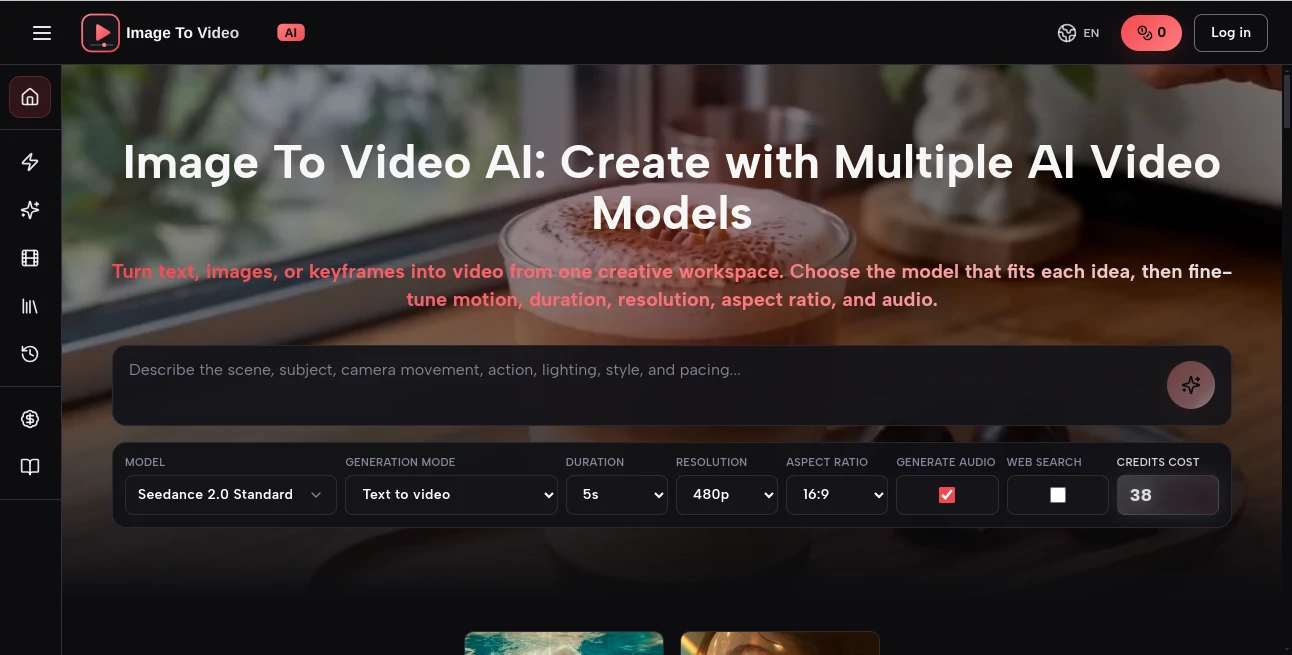
Image To Video AI transforms static images into engaging, high-quality videos with the help of advanced artificial intelligence. Built for creators, marketers, educators, designers, and businesses, the platform makes professional video production accessible without requiring editing experience. Instead of spending hours animating visuals manually, users can upload an image or write a prompt, choose from multiple AI models, and receive polished video content within minutes.
The platform stands out by bringing several leading AI video models into one workspace, allowing users to compare outputs and select the result that best matches their creative vision. Whether the goal is creating product advertisements, social media content, educational explainers, promotional campaigns, or artistic animations, the workflow remains simple and efficient.
One of the most appealing aspects is the balance between creative freedom and ease of use. Motion, aspect ratio, duration, resolution, and even audio options can be adjusted depending on the selected generation model, giving both beginners and professionals greater control over the final result. Instead of replacing creativity, the platform accelerates it by removing technical barriers and letting ideas become videos much faster.
Key Features
User Interface
The workspace is clean, modern, and designed around productivity. Uploading an image or entering a text prompt takes only a few clicks, while model selection and generation settings remain easy to understand. Generated projects are automatically organized in a personal library, making it convenient to review, compare, and download completed videos.
Accuracy & Performance
The platform supports multiple AI generation models, allowing users to choose the engine that best fits their project. Videos are generated with smooth motion, impressive visual consistency, and customizable quality settings including different resolutions, durations, and aspect ratios. The ability to compare outputs from different models helps improve creative results without switching between multiple services.
Capabilities
Users can generate videos from text descriptions, transform still images into animated scenes, or create motion from keyframes. The platform is suitable for marketing campaigns, product showcases, educational materials, travel memories, portrait animations, social media shorts, and creative storytelling. Support for commercial usage makes it valuable for businesses and agencies producing client content.
Security & Privacy
User accounts, project history, and generated content are managed within a dedicated workspace. The service focuses on maintaining project organization while providing account management, billing support, and secure access to generation history. Personal projects remain available inside the user's library for future editing and downloading.
Use Cases
Digital marketers can quickly convert product photos into promotional videos for advertising campaigns. E-commerce stores can create engaging product showcases without hiring video editors. Social media creators can animate portraits, travel photos, and illustrations into eye-catching short-form videos. Educators may transform diagrams and educational graphics into animated lessons that are easier for students to understand. Designers and agencies can rapidly prototype creative concepts before producing final marketing materials.
Pros and Cons
Pros
Supports multiple leading AI video generation models in one platform.
Simple workflow suitable for beginners and professionals.
Offers text-to-video, image-to-video, and keyframe-to-video generation.
Flexible controls for resolution, duration, aspect ratio, motion, and audio.
Commercial usage is available for generated content under supported plans.
Built-in project library simplifies asset management.
Cons
Higher-quality generations consume more credits.
Generation time varies depending on selected AI models and server demand.
Some advanced features are available only through paid subscriptions.
Pricing Plans
A free plan allows new users to explore the platform with limited daily credits. Paid subscriptions offer significantly larger monthly credit allocations, access to premium AI models, commercial usage rights, watermark-free downloads, and faster generation capacity. Multiple subscription tiers are available for individual creators, professionals, and businesses depending on production needs.
How to Use Image To Video AI
Start by uploading an image or entering a descriptive text prompt. Select the preferred AI generation model and customize settings such as video duration, aspect ratio, resolution, motion style, and audio if supported. Launch the generation process and wait for the AI to produce the video. Once complete, review the output inside the project library, compare different versions if needed, and download the final video for publishing or commercial use.
Comparison with Similar Tools
Unlike many AI video generators that rely on a single proprietary model, this platform combines several leading AI engines inside one interface. This eliminates the need to create accounts across multiple services simply to compare results. The unified workspace, flexible creative controls, project management library, and support for several generation methods provide a more streamlined experience for creators who regularly produce AI-powered videos.
Conclusion
For anyone looking to turn static visuals into compelling motion content, this platform delivers an impressive combination of simplicity, flexibility, and creative power. Its support for multiple AI models, customizable generation settings, and organized project workflow makes it suitable for individual creators, marketing teams, educators, and businesses alike. Whether producing promotional videos, educational animations, or engaging social media content, it offers a practical solution that significantly reduces production time while maintaining excellent visual quality.
Frequently Asked Questions (FAQ)
Can I create videos without uploading an image?
Yes. Text prompts can be used to generate videos directly.
Can I use generated videos commercially?
Commercial usage is supported on eligible subscription plans.
Can I customize the video output?
Yes. Resolution, duration, aspect ratio, motion settings, and audio options can be adjusted depending on the selected AI model.
Where are my generated videos stored?
Completed projects are saved inside the personal library for review and downloading.
Who is this platform best suited for?
Content creators, marketers, educators, agencies, e-commerce businesses, designers, and anyone who wants to create AI-generated videos efficiently.
AI Image to Video , AI Video Generator , AI Video Editor , AI Text to Video .
These classifications represent its core capabilities and areas of application. For related tools, explore the linked categories above.
Image To Video AI details
Website unavailable — View Alternatives
Pricing
- Free
Apps
- Web App
Categories

Image To Video AI Alternatives Product

AI Motion Co…
seedance2-pro
v04 ai

Nano Banana …
Aura AI

Omnigen Stud…

GoViralTrend
Artaivo

LatentSync