
















Image to Image AI Generator
What is Image to Image AI Generator?
Turning an existing image into something completely different can take a surprising amount of time when done manually. Changing a background, testing a new visual style, adjusting lighting, or creating several versions of a product photo often means opening a complicated design application and working through multiple steps.
Image to Image AI takes a much simpler approach. Instead of starting with a blank canvas, you upload an existing photo, sketch, or design and describe the changes you want to make. The AI then uses the original image as a visual reference while following your instructions.
This makes it useful for photographers, content creators, online sellers, marketers, and anyone who needs fresh visual variations without creating every image from scratch. A single product photograph, for example, can be adapted into studio, lifestyle, seasonal, or outdoor scenes with a suitable prompt.
The platform also brings multiple AI models together, allowing users to experiment with the same source image and prompt and compare different results. That flexibility is particularly useful when the first generation is close to what you want but not quite there.
Key Features
- Image-to-image generation using an existing visual reference
- Support for multiple AI models on one platform
- Prompt-based image transformation
- Background, style, lighting, color, outfit, and scene changes
- High-quality image generation
- High-resolution downloads
- Multiple reference image support
- Adjustable resolution and aspect ratio options
- Fast generation for testing different creative directions
- Commercial usage for subscribed users
- JPG, PNG, and WebP image uploads
- Support for files up to 30 MB
User Interface
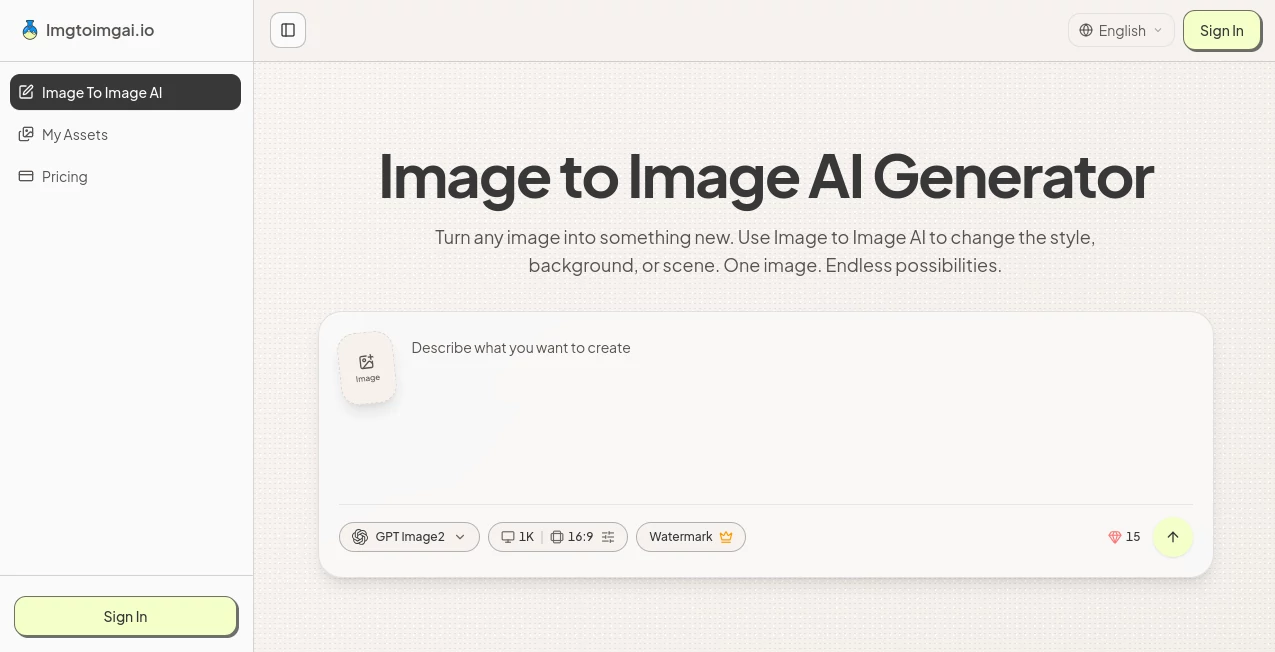
The interface is designed around a straightforward workflow rather than a collection of complicated editing controls. Upload the source image, describe the desired transformation, select the available model and settings, then generate the result.
This approach is especially convenient for people who do not regularly use professional image-editing software. Someone working on an online store can start with a basic product photograph and ask for a cleaner studio environment. A creator might use a portrait and request a cinematic setting. The process remains essentially the same.
The platform also works on mobile devices, including iPhone and Android phones, without requiring a separate application. That makes it practical for quick edits when a desktop computer is not available.
Accuracy & Performance
The quality of an image-to-image result depends on several factors, including the source image, the prompt, and the selected model. A clear source image with a well-defined subject generally gives the AI more useful visual information to work with.
One of the stronger aspects of the service is the ability to test different models with the same creative direction. Instead of settling for the first result, users can explore variations and select the output that best matches their needs.
Generation is also designed to be quick enough for experimentation. This matters when creating several versions of an advertisement, thumbnail, social media image, or product scene, where comparing alternatives is often more valuable than producing one image immediately.
Capabilities
The tool can transform an existing image in many different directions. Users can change backgrounds, lighting, colors, visual styles, outfits, and entire scenes while using the original image as a starting point.
For example, a product photograph can be placed into a lifestyle environment, while a portrait can be adapted to a different visual atmosphere. Sketches and designs can also be used as references, giving creative professionals another way to explore ideas before committing to a final design.
Multiple reference images can be uploaded for a single generation as well. Combined with a focused prompt, this can provide additional context when a single image does not contain everything needed for the desired result.
Security & Privacy
When working with AI image services, users should always consider the nature of the images they upload and the provider's applicable privacy and terms policies. This is particularly important for private photographs, unreleased product designs, client material, or other commercially sensitive assets.
For commercial projects, the service distinguishes between free and subscribed usage. Subscribed users receive a commercial-use license, while free users are limited to non-commercial use according to the published terms.
Use Cases
Product Photography: Online sellers can turn one product photo into several different environments. A single image can be adapted for studio presentations, lifestyle pages, seasonal campaigns, or advertising creatives without arranging another photo shoot.
Social Media Content: Content creators can reuse an existing photograph to produce different scenes, styles, thumbnails, and cover images. This can make it easier to build several pieces of visual content from the same original material.
Marketing Campaigns: Marketing teams can experiment with different backgrounds, colors, formats, and visual concepts before deciding which direction deserves further investment.
Photography: Photographers can explore alternative lighting, backgrounds, and styles while preparing different versions of an image for clients.
Creative Exploration: Designers and artists can use photographs, sketches, or existing designs as starting points for exploring new visual directions without rebuilding the composition manually.
Pros and Cons
Pros
- Simple image-to-image workflow
- Multiple AI models available in one service
- Useful for both creative and commercial visual work
- Supports multiple reference images
- High-resolution downloads are available
- Works on mobile devices
- Supports JPG, PNG, and WebP files
- No advanced Photoshop knowledge is required
Cons
- Final results can vary depending on the source image and prompt
- More advanced usage requires a paid subscription
- Free usage has non-commercial limitations
- AI transformations may require several attempts to achieve a precise visual result
Pricing Plans
A free version is available for users who want to try the image transformation workflow before subscribing. Paid plans add more credits, higher usage limits, faster generation, watermark-free downloads, commercial-use rights, and customer support.
The Basic Annual plan is listed at $100 per year and provides 1,500 credits per month, with up to 100 images monthly. The Pro Annual plan costs $240 per year and includes 6,000 monthly credits with up to 400 images. For heavier usage, the Max Annual plan is listed at $480 per year and provides 15,000 monthly credits with up to 1,000 images.
All three annual plans include watermark-free downloads, faster generation, and a commercial-use license. Pro and Max plans also include priority customer support, while the Basic plan includes basic customer support.
How to Use Imgtoimgai.io
Start by uploading the image you want to transform. A product photograph, portrait, room, pet photo, drawing, or sketch can serve as the starting point. Clear images with a well-defined subject generally provide better visual information for the generation process.
Next, write a prompt explaining what you want to change. You can request a different background, style, season, outfit, color, lighting setup, or scene. It can also help to mention which important elements should remain unchanged.
Choose the available AI model and adjust settings such as resolution and aspect ratio when needed. After generating the image, review the result and create another version if the first attempt does not match your expectations.
A useful workflow is to make one change at a time. For example, instead of asking for a new background, outfit, lighting style, camera angle, and artistic style in one prompt, begin with the most important change. This makes it easier to understand what is working and refine the next generation.
Comparison with Similar Tools
Traditional photo editors provide much finer manual control, but they can require considerably more time and editing experience. Image-to-image generation takes a different route by allowing users to describe many changes with natural language.
Text-to-image generators also work differently. They normally begin with a written description and create a new visual from scratch. Image-to-image generation starts with an existing image, which means the original composition, subject, or visual reference can guide the new result.
For users who already have useful source material and want to explore variations quickly, this workflow can be more practical than starting with an empty prompt every time.
Conclusion
Image-to-image generation is most useful when you already have something worth building on. Instead of discarding an existing photograph or design and starting again, you can use it as the foundation for new creative directions.
This platform makes that process approachable by combining image references, natural-language prompts, multiple AI models, and straightforward generation controls in one place. Its applications range from product photography and marketing campaigns to social media content and creative experimentation.
For anyone who regularly needs multiple visual variations from a limited set of source images, it offers a practical way to speed up the creative process while keeping the original visual reference at the center of the workflow.
Frequently Asked Questions (FAQ)
What is Image to Image AI?
Image to Image AI creates a new image from an existing photo, sketch, or design. You upload the visual reference and describe the changes you want, such as a different background, style, lighting, color, outfit, or scene.
Can I use the service for free?
Yes. A free version is available for trying the image-generation workflow. Paid subscriptions provide additional credits, higher usage limits, and extra features.
Can I upload multiple images?
Yes. Multiple reference images can be uploaded for a single generation. Using clear reference images together with a specific prompt can provide the AI with additional context.
Can generated images be used commercially?
Subscribed users can use generated images commercially under the available commercial-use license. Free users are limited to non-commercial use.
What image formats are supported?
JPG, PNG, and WebP images are supported, with individual files up to 30 MB. Generated images can be downloaded in high resolution.
Do I need advanced prompting skills?
No. The platform is designed to understand plain-language instructions. You can simply explain what you want to change and what you would like to keep.
Does it work on mobile devices?
Yes. The image-to-image generator works on iPhone, Android, and other mobile devices without requiring an app download.
What is the difference between text-to-image and image-to-image generation?
Text-to-image generation starts with a written description and creates a new image from it. Image-to-image generation starts with an uploaded visual reference and transforms it according to your instructions.