


















ImgToStl
What is ImgToStl?
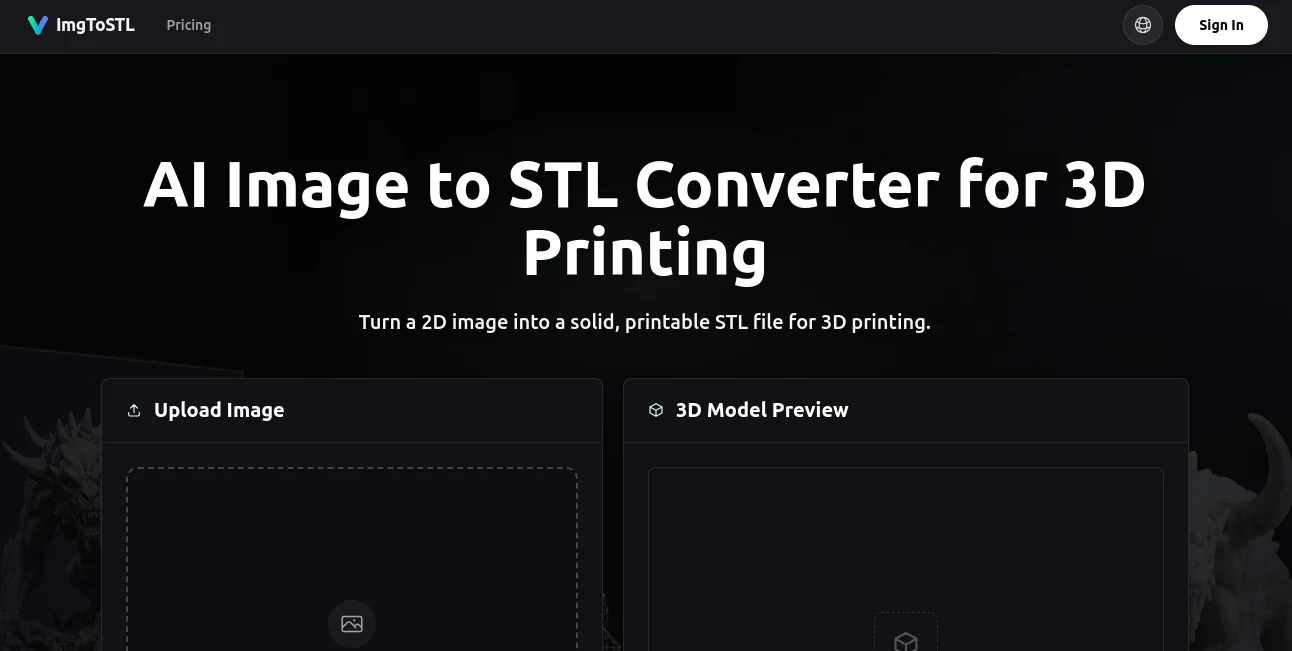
There's something exciting about taking a simple photo or sketch and watching it transform into a real 3D object you can hold in your hands. This tool makes that leap feel almost effortless. Upload a clear image — whether it's a product photo, character concept, or even a quick hand sketch — and it generates a solid, printable STL file ready for your slicer. No complex 3D modeling software, no steep learning curve, just results that actually work for printing. I've seen hobbyists turn favorite game characters into minis and makers recreate broken parts from reference photos. The speed and usability turn what used to be a headache into one of the most fun parts of the creative process.
Introduction
Converting 2D images into usable 3D models has always been tricky — either too basic (simple heightmaps) or too technical (requiring manual modeling skills). This platform bridges that gap with AI that understands shape, depth, and form. It’s built specifically for people who want printable results, not just pretty renders. Whether you’re prototyping ideas, creating custom parts, making miniatures, or bringing personal concepts to life, it delivers STLs that are ready to slice and print with minimal cleanup. The focus on practical 3D printing outcomes makes it stand out from tools that prioritize visuals over functionality.
Key Features
User Interface
The process is wonderfully straightforward. Drag and drop your image or click to upload, choose your settings if needed, and hit generate. A clean 3D preview appears so you can rotate and inspect the model before downloading. No confusing panels or hidden options — everything important is right where you expect it. Even first-time users can go from upload to downloadable STL in under a minute, which keeps the creative energy flowing instead of getting lost in technical details.
Accuracy & Performance
It does a remarkably good job reading depth from 2D sources. Clear, well-lit images with distinct subjects produce the best results — solid bases, proper proportions, and enough detail for printing. Generation is fast, and the output mesh is generally watertight and printable with little to no repair needed. For product shots, character art, or simple mechanical references, the conversion accuracy feels reliable enough to trust for real projects.
Capabilities
Supports common image formats like JPG, PNG, and WebP. It creates full 3D models rather than just flat reliefs, making it suitable for miniatures, props, replacement parts, and decorative objects. You get a rotatable preview, STL export (plus other formats when available), and options to iterate quickly with different settings. It shines on single-object images with good contrast — perfect for turning concept art, photos of objects, or sketches into starting points you can refine or print directly.
Security & Privacy
Your images are processed securely and not stored long-term after generation. No unnecessary accounts or data collection for basic use. For personal projects or client work, that clean, private approach gives peace of mind while you experiment and create.
Use Cases
A tabletop gamer uploads character art and gets printable miniatures ready for painting. A maker photographs a broken plastic part and generates a replacement that fits perfectly after minor tweaks. A jewelry designer turns hand sketches into 3D-printable prototypes. A cosplay enthusiast converts reference images into armor pieces. Even educators use it to turn 2D diagrams into physical models for classrooms. It opens up 3D printing to anyone with a good photo or drawing, removing the usual modeling barrier.
Pros and Cons
Pros:
- Turns everyday images into actual printable 3D models quickly.
- Simple workflow that doesn’t require 3D modeling experience.
- Useful preview tools help you check quality before downloading.
- Great starting point for prototypes, miniatures, and custom parts.
- Free tier available to test the quality on your own images.
Cons:
- Best results come from clear, single-subject images with good lighting.
- Complex or busy scenes may need cleanup in a 3D editor after conversion.
- Heavy use requires credit packs for more generations.
Pricing Plans
Free credits let you test the service and see real results on your images. Paid credit packs offer better value for regular users, with options scaled for hobbyists and more serious makers. No forced subscriptions — you buy what you need when you need it, which keeps things flexible and budget-friendly.
How to Use Image Enhancer
Upload a clear JPG, PNG, or WebP image (ideally with a distinct subject and decent lighting). Let the AI process it into a 3D model. Rotate and inspect the preview to check details and overall form. If satisfied, download the STL file. For best results, start with simple, well-defined images. Minor post-processing in free tools like Meshmixer or your slicer can refine the model further if needed. The entire flow is fast enough that you can test several variations in one session.
Comparison with Similar Tools
Many image-to-3D tools focus on artistic renders or game assets that aren’t optimized for printing. This one stands out by prioritizing solid, printable STLs suitable for real-world use. While some solutions require complex settings or produce fragile meshes, the results here tend to be more robust and ready for slicing with less repair work. It strikes a practical balance between ease of use and output quality that makers appreciate.
Conclusion
3D printing should be accessible to anyone with a good idea and a photo, not just those who can model from scratch. This tool lowers that barrier beautifully, turning visual references into physical objects with surprising ease. Whether you’re prototyping inventions, creating custom gifts, printing miniatures, or replacing broken parts, it delivers reliable results that move your projects forward. For hobbyists and makers who love turning ideas into reality, it’s one of those tools that quickly becomes indispensable.
Frequently Asked Questions (FAQ)
What kinds of images work best?
Clear, single-object photos or sketches with good contrast and simple backgrounds produce the strongest printable results.
Are the STL files ready to print?
Most are solid and printable with minimal or no cleanup, though checking in your slicer is always recommended.
Can I use it for commercial projects?
Yes, paid credit packs include commercial licensing for the generated models.
How long does generation take?
Usually just a few seconds to under a minute depending on image complexity.
Do I need 3D modeling skills?
Not at all — the tool is designed for people who want results without modeling expertise.
AI 3D Model Generator , Photo & Image Editor , AI Image to 3D Model , AI Design Generator .
These classifications represent its core capabilities and areas of application. For related tools, explore the linked categories above.

ImgToStl Alternatives Product

PNG to 3D

Edit Stamp

RoomDecorFin…

FLUX 2
Nano Banana 2

AI Anime

Make Image C…

square face …

GPT Imagine
