
Imgveo AI
What is Imgveo AI?
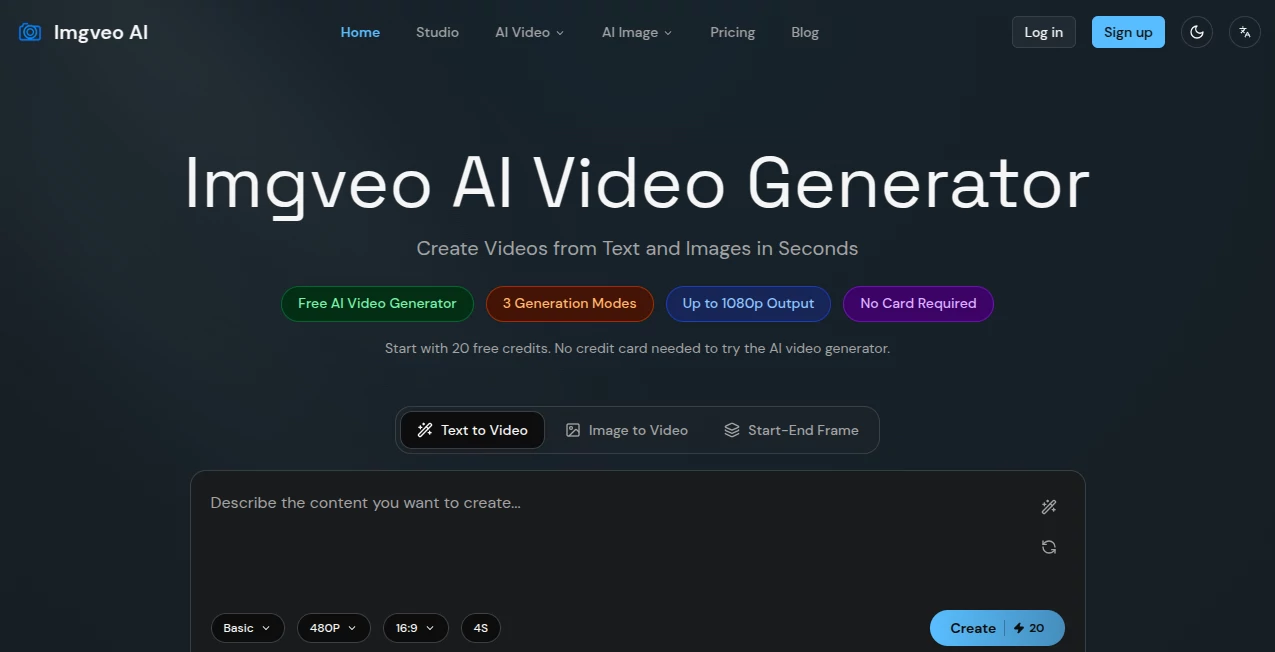
Imgveo AI is an AI video creation platform designed for people who want to turn ideas, prompts, and still images into short videos without dealing with cameras, editing software, or a complicated production workflow. The service brings several video-generation methods into one workspace, making it particularly useful for creators, marketers, designers, agencies, and businesses that need visual content regularly.
One of its most practical advantages is the choice between text-to-video, image-to-video, and start-end frame generation. Instead of forcing every project into the same workflow, users can choose the method that makes sense for the scene they are trying to create. The platform also provides access to multiple AI video models through a shared credit system, giving users more flexibility when a particular model works better for a specific visual style.
The free entry point is another welcome touch. New users receive 20 credits without needing a credit card, which makes it possible to test the workflow before deciding whether a paid plan is worthwhile.
Key Features
- Text-to-video generation from written prompts
- Image-to-video animation for turning still images into moving clips
- Start-end frame generation for controlled transitions between two images
- Multiple AI video models available from one workspace
- Output quality reaching up to 1080p on supported plans and workflows
- Credit-based pricing with visible generation costs
- Watermark-free video exports
- Commercial-use-ready generated videos under the platform's license
- Free monthly credits for testing the service
- Generation history and dashboard tools for managing projects
User Interface
The interface follows a relatively straightforward generation process. Users select a generation mode, provide a prompt or upload an image, choose an appropriate model, adjust settings such as duration and aspect ratio, and then generate the clip.
This approach is useful for beginners because there is no need to understand traditional video-editing terminology before getting started. More experienced creators also get useful controls without having to build a production pipeline around several separate services.
The ability to experiment with different models from the same workspace is especially convenient. If one model produces an interpretation that is not quite right, the same creative idea can be tested with another model instead of starting from scratch on another platform.
Accuracy & Performance
Video generation is naturally dependent on the selected model, prompt quality, image input, and requested movement. The platform addresses this by offering several generation engines rather than relying on a single model for every type of scene.
For short-form content, this setup can be surprisingly efficient. A marketer can describe a product scene, generate a few variations, and compare the results without arranging a filming session. Likewise, a designer can animate an existing illustration instead of rebuilding the artwork as a video.
Users should still expect occasional imperfect generations, particularly with complex physical interactions, detailed movements, or scenes requiring precise consistency. The ability to change models and regenerate makes that limitation easier to work around.
Capabilities
The text-to-video workflow turns a written description into a short video clip. Prompts can describe the subject, action, environment, camera movement, and overall mood. Supported models can also provide audio in appropriate workflows.
Image-to-video takes a different approach. Instead of creating the scene entirely from text, users provide a still image and describe the movement they want. This works well for portraits, product photography, landscapes, illustrations, and social media visuals.
The start-end frame workflow is useful when the destination matters as much as the starting point. By supplying two frames, users can guide the system toward a particular transition, making it suitable for before-and-after reveals, product transformations, scene changes, and visual transitions.
The wider studio environment also brings multiple video and image models together under one credit balance. This is a meaningful advantage for creators who prefer to compare different models rather than committing to one generation engine.
Security & Privacy
The service states that it collects account information such as email addresses, optional profile information, payment details handled by third-party providers, and videos or images uploaded or generated through the platform.
Its privacy policy says that data is protected using encryption in transit and at rest, limited access controls, authentication systems, and regular security measures. Users can also request access to, correction of, or deletion of their personal information and generated content.
There is one important detail worth understanding before uploading sensitive material: the terms allow the platform to use anonymized content to improve its AI models and services. Businesses working with confidential client material should therefore review the current privacy policy and terms before using the service for sensitive projects.
Use Cases
Social Media Content: Short videos can be created for TikTok, Instagram Reels, YouTube Shorts, and other social platforms without filming new footage for every post.
Marketing and Advertising: Marketers can quickly test different creative concepts, product scenes, and advertising variations before investing in traditional production.
E-commerce: A single product photograph can be transformed into a moving promotional clip, giving online stores another way to present products.
Design and Illustration: Artists can add motion to static illustrations, concept art, and portfolio pieces.
Agencies and Freelancers: Multiple visual concepts can be produced quickly for client presentations, campaigns, storyboards, and early-stage creative work.
Previsualization: Filmmakers and creative teams can experiment with scenes and camera ideas before committing resources to a full production.
Pros and Cons
Pros
- Free plan with 20 monthly credits
- No credit card required to test the service
- Text-to-video, image-to-video, and start-end frame workflows
- Multiple AI video models in one workspace
- Up to 1080p output on supported plans
- Watermark-free exports
- Commercial use supported under the platform's license
- Clear credit-based pricing
Cons
- Free generation is limited to basic 480p, 4-second videos
- Higher-quality generation requires a paid plan or additional credits
- Video duration is generally short compared with traditional video production
- Results can vary considerably depending on the selected model and prompt
- Some advanced workflows have specific duration or resolution limitations
Pricing Plans
The pricing structure is based on monthly credits rather than a separate subscription for every generation model. This makes the system easier to understand when users want to experiment with different models.
- Free: $0 per month with 20 credits, 480p output, 4-second videos, and access to all three generation modes in basic quality.
- Starter: $19.90 per month with 1,500 credits and Pro-quality generation up to 720p and 10 seconds.
- Creator: $49.90 per month with 4,500 credits and Pro-quality output up to 1080p and 10 seconds.
- Pro: $69.90 per month with 7,500 credits and higher monthly generation capacity.
- Business: $99 per month with 12,000 credits for heavier production and client-oriented workflows.
Users can also purchase additional credit packs without subscribing. Available packs range from 500 credits for $10 to 7,000 credits for $100, with purchased credits valid for 90 days.
How to Use It
- Choose a generation mode. Select text-to-video when starting with an idea, image-to-video when animating an existing picture, or start-end frame when you need a controlled transition.
- Write a specific prompt or upload an image. Include useful details such as the subject, action, setting, camera movement, and mood rather than relying on a vague description.
- Select a model. Different models can produce different interpretations of the same concept, so experimentation is often worthwhile.
- Set the format and duration. Choose an appropriate aspect ratio and clip length for the platform where the video will be used.
- Generate and review. Preview the result and decide whether it meets the creative goal.
- Regenerate when necessary. If the movement or composition is not quite right, refine the prompt or try another model.
- Download the finished clip. Generated videos can be exported as MP4 files for use in social media, advertising, presentations, and other supported commercial projects.
Comparison with Similar Tools
Many AI video services focus heavily on a single generation model or one particular workflow. This platform takes a broader approach by putting several video-generation methods and models behind the same credit balance.
That difference matters when creative requirements change from project to project. Someone creating a cinematic scene may prefer one model, while a product animation or stylized social clip may benefit from another. Having these options in one place reduces the need to maintain several separate subscriptions.
It is not necessarily the best choice for every professional video project. Traditional editing software remains more appropriate when users need frame-level editing, extensive timelines, detailed sound design, or complete control over every production element. For fast AI-generated short clips, however, the multi-model approach is a strong selling point.
Conclusion
For creators who want to move from an idea to a usable video without setting up a traditional production workflow, this platform offers a practical combination of simplicity and flexibility. The three generation modes cover several common creative situations, while access to multiple AI models gives users room to experiment when the first result is not quite right.
The free tier is particularly useful for evaluating the experience, and the paid plans provide a clear path for users who need more credits, higher resolution, or greater production volume. The main limitation is the nature of AI video itself: short clips can be impressive, but complex scenes may still require several attempts.
Overall, it is a compelling option for social media creators, marketers, designers, e-commerce businesses, agencies, and anyone who needs short AI-generated videos without the time and expense of conventional filming.
Frequently Asked Questions (FAQ)
Is there a free plan?
Yes. The free plan provides 20 credits each month and allows users to try all three generation modes in basic 480p quality with 4-second videos.
Can I generate videos from text?
Yes. The text-to-video workflow converts written prompts into short video clips and allows users to select a suitable generation model.
Can I animate an existing image?
Yes. The image-to-video workflow allows users to upload a still image, describe the desired movement, select a model, and generate an animated clip.
Can I control the beginning and ending of a video?
Yes. The start-end frame mode allows users to provide an initial frame and a final frame and guide the AI toward a transition between them.
Does the service add a watermark?
The platform states that generated videos are exported without a watermark, including videos created through the free workflow.
Can generated videos be used commercially?
The platform states that generated videos are available for commercial use under its license. Users should still review the current terms before using generated material in important commercial campaigns.
What resolution is available?
Free users are limited to 480p basic output, while paid plans provide higher-quality generation, with supported workflows reaching 1080p.
How does the credit system work?
Credits are consumed when generating content, with the amount depending on factors such as the selected model, resolution, and video length. Paid plans provide a monthly credit allowance, while additional credit packs can also be purchased.
Is it suitable for professional creators?
It can be useful for professional content creation, advertising concepts, e-commerce videos, social media production, client presentations, and rapid visual prototyping. The strongest results depend on choosing the right model and writing clear prompts.
Do I need video-editing experience?
No. The basic workflow is designed around selecting a generation mode, providing a prompt or image, choosing settings, and generating the clip. More advanced editing can still be performed afterward if required.
AI Image to Video , AI Video Generator , AI Text to Video .
These classifications represent its core capabilities and areas of application. For related tools, explore the linked categories above.

Imgveo AI Alternatives Product

Seedance 2.5

RenderFlow AI

ai seedance …

Fiddl.art

Faceless Ree…

Sora 2 AI

seedance 2.0

Seedance 2.0

seedance 2