

















Inkwell
Verified Blue CheckMark
Verified Blue CheckMark products are featured above free or unverified listings.
This badge indicates authenticity and builds trust, giving your product higher visibility across the platform.
Upgrade to get verified
Verified Blue CheckMark products are featured above free or unverified listings. This badge indicates authenticity and builds trust, giving your product higher visibility across the platform.
Upgrade to get verified
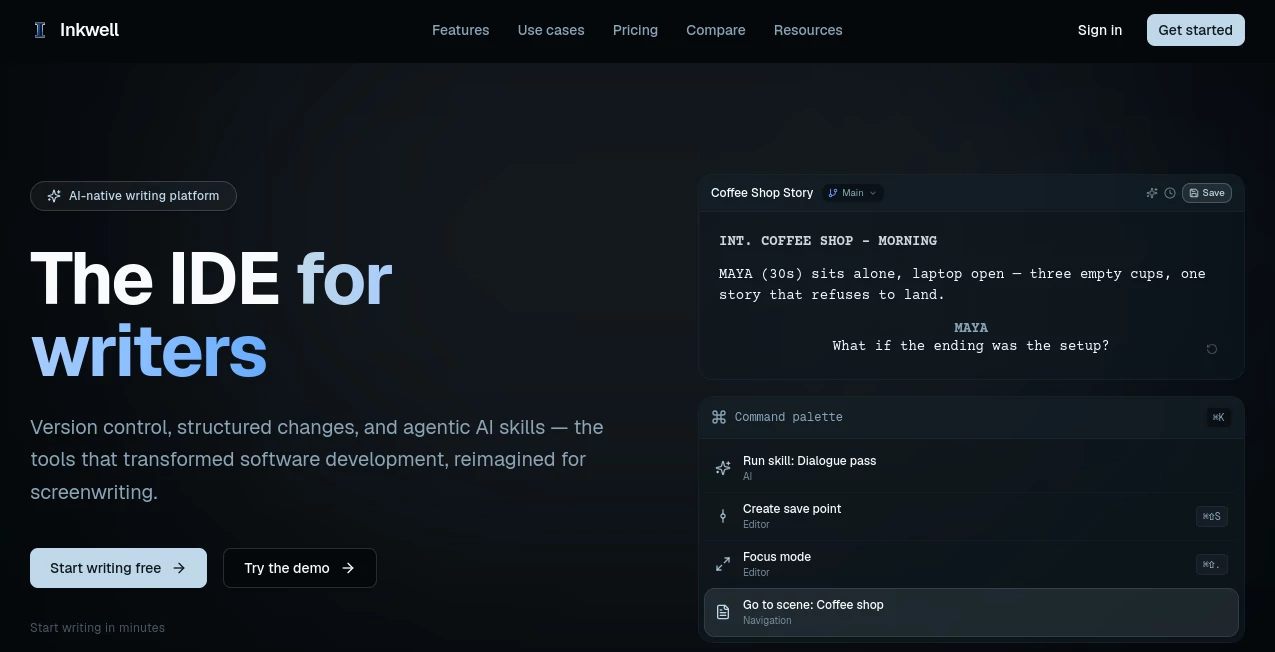
What is Inkwell?
Inkwell is an AI-native writing platform designed around the way professional writers actually work. Rather than treating a screenplay as a simple document, it understands scenes, characters, dialogue, revisions, and alternate versions as structured parts of the writing process. The result is a workspace where drafting, editing, AI assistance, version control, collaboration, and production can happen together.
Its strongest focus is screenwriting. Writers can work on feature scripts, TV pilots, episodic projects, short films, stage plays, audio dramas, treatments, and other long-form creative projects while keeping their work organized and portable. For someone who has ever ended up with files named “final,” “final-v2,” and “final-really-final,” the version-control approach is particularly appealing.
Key Features
- Structured screenplay editing with 16 screenplay element types.
- AI skill passes for dialogue, continuity, character development, and other focused revisions.
- Named save points for preserving important stages of a draft.
- Draft lines for exploring alternate versions without duplicating entire files.
- Scene-aware change tracking that makes revisions easier to understand.
- Ghost-text writing suggestions while drafting.
- Real-time collaboration for writers and production teams.
- Production workflows including locked scripts, revision colors, and production reports on supported plans.
- Import and export support for Final Draft FDX and Fountain, along with industry-formatted PDF output.
- Bring-your-own-key support for writers who want to connect their own AI provider account.
User Interface
The interface takes a focused approach to writing. Instead of forcing writers to move between a document editor, revision tracker, AI chat window, and separate collaboration space, the major parts of the workflow are brought into the same environment.
The screenplay editor is particularly thoughtful. Writers can move through screenplay elements using the keyboard, while the editor recognizes scene headings, characters, dialogue, action, transitions, shots, and other elements. A command palette also provides quick access to actions without interrupting the writing flow.
For a screenwriter working late on an Act Two scene, this matters more than having dozens of decorative controls. The workspace stays centered on the page and the story.
Accuracy & Performance
The platform takes a more controlled approach to AI editing than a conventional chat-based writing assistant. AI skills work against the existing draft and present proposed changes as readable suggestions. Writers can accept or reject individual suggestions rather than allowing an AI system to silently rewrite the manuscript.
This approach is useful when continuity and character consistency matter. Dedicated skills can examine areas such as dialogue, continuity, character arcs, and setup-and-payoff relationships. Because suggestions are connected to the structure of the screenplay, the writer can review changes where they actually belong.
For creative work, that distinction is important. A useful suggestion is not necessarily one that sounds good in isolation; it needs to fit the scene, character, and surrounding story.
Capabilities
The standout capability is the combination of AI assistance and version control. Named save points allow writers to preserve meaningful milestones, while draft lines make it possible to experiment with parallel versions of a story. An alternative ending, a different opening, or a rewritten scene can therefore be explored without creating another confusing copy of the entire screenplay.
The production side is equally practical for professional workflows. Supported plans include production reports, cast lists, revision colors, and production-draft locking. The platform also supports FDX and Fountain workflows, making it easier to exchange scripts with people who use established screenwriting software.
There is also a broader long-form writing product in development for novels, research, technical writing, and team documents. That product is designed around block-based editing, Markdown, version control, AI skills, and collaborative writing.
Security & Privacy
One of the reassuring aspects for writers is control over their work. The platform states that writers retain ownership of the screenplays, save points, and version history they create or bring into the service. Files can also be exported, reducing the risk of being permanently tied to one writing environment.
AI boundaries are similarly explicit. AI skills propose changes rather than automatically applying them, and writers decide which suggestions become part of the manuscript. For users who want additional control over their AI setup, bring-your-own-key configuration is also available.
Use Cases
- Screenwriters: Draft, revise, structure, and manage feature-length or short-form screenplays.
- TV writers: Keep episodic scripts and revisions organized throughout a production cycle.
- Writers' rooms: Collaborate on scenes, discuss changes, and maintain shared versions of a project.
- Showrunners and producers: Track revisions and understand what changed between important script versions.
- Creative writers: Explore alternate scenes, dialogue choices, character directions, and story outcomes.
- Production teams: Move from writing into structured production workflows without rebuilding the script elsewhere.
- Independent filmmakers: Manage scripts from the first draft through revisions and production-ready documents.
Pros and Cons
Pros
- Designed specifically around structured screenwriting rather than generic word processing.
- AI suggestions remain under the writer's control.
- Strong version-control concept for creative projects.
- Useful support for alternate takes and experimental drafts.
- Real-time collaboration is available on higher plans.
- FDX, Fountain, and PDF workflows make files easier to move between tools.
- A free plan makes it possible to test the core writing experience before paying.
Cons
- The platform is still relatively new compared with established screenwriting applications.
- Some advanced production and collaboration features require paid plans.
- Writers who only need a simple text editor may find the structured workflow more extensive than necessary.
- The broader long-form document product is still being developed.
Pricing Plans
The platform offers a free plan alongside paid options for individual writers, professionals, teams, and larger organizations.
- Free: $0 forever, with the screenplay editor, save points, two draft lines per screenplay, 20 AI skill passes per month, and PDF and Fountain export.
- Writer: $19 per month, adding more projects and draft lines, 200 AI skill passes per month, semantic version comparison, FDX export, custom skills, worktrees, collaboration, and production reports.
- Pro: $39 per month, with more capable AI models, higher AI quotas, custom AI skills, worktrees, production reports, revision colors, production-draft locking, and collaboration for up to five people.
- Team: $39 per seat per month, adding real-time collaboration, team workspaces, shared draft lines, shared skills, audit logs, role-based permissions, pooled AI credits, and higher limits.
- Enterprise: Custom pricing for studios, networks, and agencies, with options such as SSO, custom deployment, API access, SLA, dedicated support, and custom model configuration.
The free tier is a particularly useful starting point because writers can test the core editor and AI workflow without immediately committing to a subscription.
How to Use Inkwell
Start by creating a screenplay and begin drafting directly in the structured editor. As you write, the editor recognizes the different screenplay elements and helps maintain the expected format.
When you reach a meaningful milestone, create a save point. This gives you a clear snapshot of the project before making substantial changes. If you want to experiment with another direction, create a draft line rather than duplicating the entire screenplay.
When the draft needs another pair of eyes, run an appropriate AI skill. For example, a dialogue pass can focus on character voice, while a continuity check can help identify inconsistencies across the screenplay. Review the proposed changes and accept only the ones that genuinely improve the work.
As the project develops, use the version history and scene-aware comparisons to understand what changed. Once the script is ready for collaboration or production, export it in the format your team needs, including PDF, Fountain, or FDX on eligible plans.
Comparison with Similar Tools
Traditional screenwriting applications are often excellent at formatting pages, but creative projects can become difficult to manage once several versions of the same script begin circulating. The approach here is different: version control is treated as a central part of the writing environment rather than something handled through file names and folders.
Compared with conventional AI writing assistants, the biggest difference is context. Instead of asking a chatbot to rewrite a paragraph in isolation, writers can use focused AI skills against the structured screenplay and review suggestions in place.
Compared with established screenwriting platforms such as Final Draft, WriterDuet, Arc Studio Pro, Fade In, Celtx, and Highland, the distinctive proposition is the combination of screenplay structure, AI skills, semantic change tracking, and developer-inspired version control. Writers who already have a comfortable workflow may not need to switch immediately, but those frustrated by scattered drafts and disconnected AI tools have a compelling reason to take a closer look.
Conclusion
This platform is an interesting step toward a more organized way of writing screenplays. Its strongest idea is simple: a screenplay should be treated as structured creative work, not just another document sitting inside a folder.
The combination of scene-aware editing, named save points, alternate takes, controlled AI suggestions, collaboration, and production workflows gives writers a much clearer path from rough idea to finished script. The free plan also lowers the barrier to trying it for yourself.
For screenwriters who want AI assistance without handing control of the manuscript to a chatbot, this is one of the more thoughtfully designed approaches worth exploring.
Frequently Asked Questions (FAQ)
Is there a free plan?
Yes. The Free plan costs $0 forever and includes the screenplay editor, save points, two draft lines per screenplay, 20 AI skill passes per month, and PDF and Fountain export.
Can writers export their screenplays?
Yes. PDF and Fountain export are available on the Free plan, while FDX export is available from the Writer plan upward.
Does the AI automatically rewrite a screenplay?
No. AI skills propose changes as suggestions. Writers can accept or reject individual changes, allowing them to retain control over the final screenplay.
Can existing screenplays be imported?
Yes. Existing work can be brought in through supported Final Draft FDX and Fountain formats, allowing writers to continue projects without starting from scratch.
Can multiple writers collaborate?
Yes. Collaboration features are available on paid plans, with real-time collaboration, team workspaces, shared draft lines, and role-based permissions available for team-oriented workflows.
Can writers use their own AI API key?
Yes. Bring-your-own-key configuration is supported, allowing users to connect their own provider account and manage the model and key through the platform's settings.
Who is this platform best for?
It is particularly well suited to screenwriters, television writers, independent filmmakers, writers' rooms, showrunners, and production teams that want writing, AI assistance, version control, and collaboration in one environment.